
Disclosure: VPNFin is reader-supported. If you buy a VPN through links on this page, we may earn a commission at no extra cost to you. This never affects our ratings — here’s our full disclosure.
A DNS leak means the lookups that turn a domain name into an address are going somewhere other than through your VPN. Usually to your internet provider — the one party a VPN was supposed to move out of the picture — which then holds a list of every site you visited.
In most cases the VPN is working correctly. The operating system is asking several resolvers at once and using whichever replies first, and one of them is not inside the tunnel.
What Is Actually Leaking
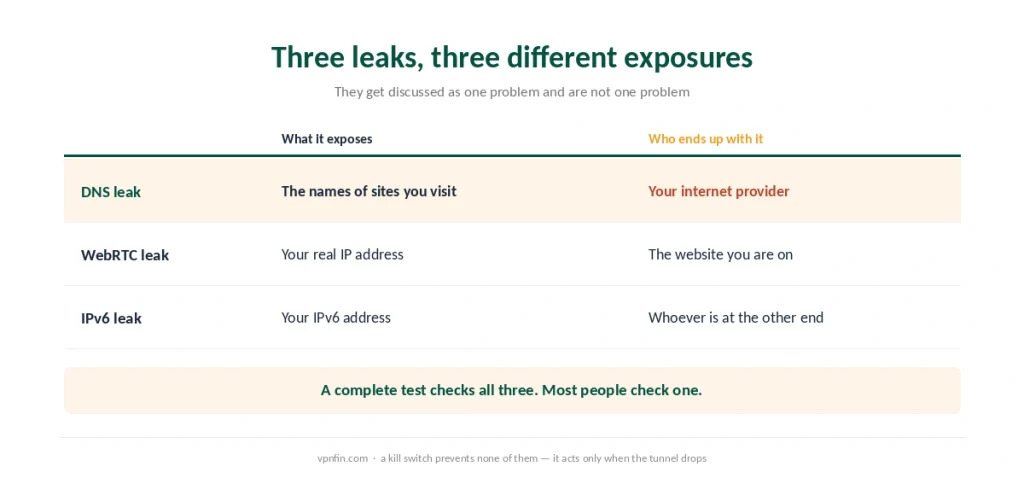
Three different leaks get discussed as one, and they expose three different things.
A DNS leak reveals the names of the sites you visit to your internet provider, while the traffic itself stays encrypted.
A WebRTC leak reveals your real address through a browser feature designed for video calls.
An IPv6 leak reveals your IPv6 address around a tunnel that only covers IPv4.
⚠️ A complete check tests all three, and our leak-testing guide walks through each. This page is about the first one and why it keeps coming back.
The Cause Most People Have
Windows, and a feature switched on by default since Windows 8.
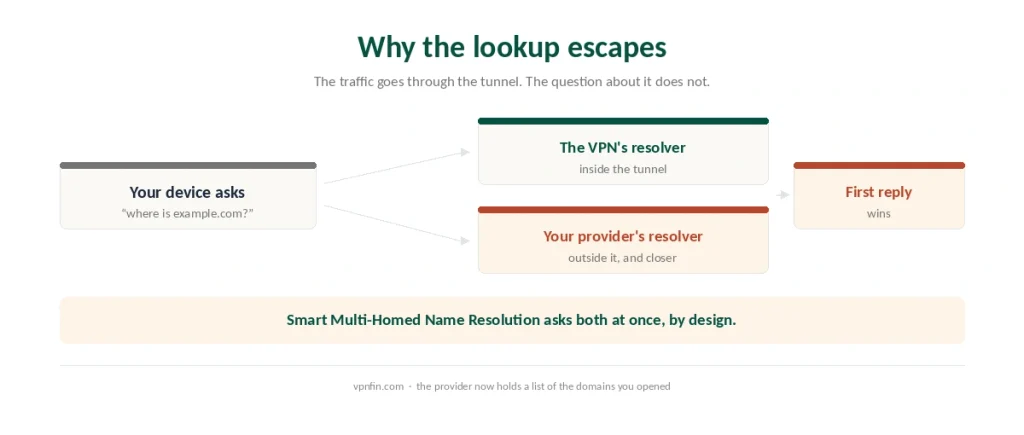
Smart Multi-Homed Name Resolution sends every DNS query out of every network interface simultaneously and accepts whichever answer arrives first. It exists to make browsing feel faster.
With a VPN connected, that means asking the VPN’s resolver and your provider’s resolver at the same time. Your provider is physically closer, so it often wins.
The traffic still goes through the tunnel. Only the lookup escaped — which is enough to build a complete list of the sites you opened.
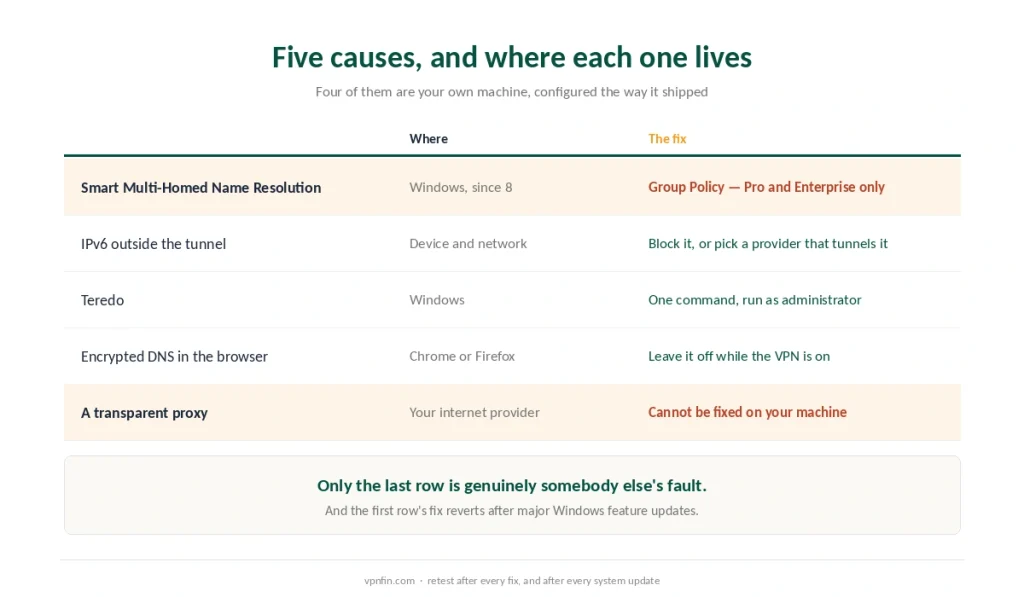
⚠️ There are two fixes, and the better-known one is the weaker. Group Policy carries the setting, but the editor ships only with Windows Pro and Enterprise, and reports describe Windows falling back to the old behaviour anyway. PowerShell works on every edition and is the more thorough route — our Windows guide has the command and the order to apply it in.
And it does not stay fixed. Published accounts describe the setting reverting after major Windows feature updates, so it needs rechecking a few times a year.
The Other Four Causes
IPv6, when the tunnel only covers IPv4. Your device asks over IPv6, the VPN never sees it, the query goes direct. Block IPv6 in the VPN’s settings, or use a provider that tunnels it — NordVPN has done so since 2024.
Teredo, a Windows feature for bridging IPv4 and IPv6. It builds its own tunnel that can take precedence over the VPN’s. Disabling it is one command: netsh interface teredo set state disabled, run as administrator.
Encrypted DNS in your browser. Setting DNS-over-HTTPS in Chrome or Firefox sends lookups straight to Cloudflare or Google, around your VPN’s resolver. It is a privacy feature that creates a leak when combined with a VPN.
A transparent proxy at your provider. Some networks intercept DNS regardless of your settings and answer with their own resolvers. This one you cannot fix locally — it needs a VPN that encrypts DNS inside the tunnel.
⚠️ Only the last one is genuinely your provider’s fault. The first three are your own machine, configured the way it shipped. A kill switch is not on this list because it prevents none of them — it acts only when the tunnel fails, and these all happen while it is up.
Testing Properly
Run the test more than once. Leaks are frequently intermittent, and a single clean result proves less than people assume.
Test in a clean browser profile. Extensions can override proxy and DNS settings, and a leak that disappears without them is a browser problem rather than a system one.
Compare with the VPN off. If the resolvers listed are identical either way, nothing is being routed through the tunnel at all.
Then retest after every fix, and after every major system update.
⚠️ A kill switch does not prevent this. It acts when the tunnel drops; a DNS leak happens while the tunnel is up and working perfectly.
What It Actually Costs You
Worth being proportionate, because this is not a breach.
Your provider ends up with a list of domains, which is metadata rather than content — the distinction that decides what a VPN is worth.
That list can be requested. In several countries providers must retain such records, and Germany’s long argument over a three-month logfile is about exactly this category of data.
Nobody sees the contents of your traffic. HTTPS still covers that, leak or no leak.
⚠️ So treat it as a slow leak rather than an emergency. Fix it, retest, and move on.
Where Else It Happens
On a router, the router’s own DNS settings override everything. Firmware configuration is where those leaks originate, and the fix is at that level rather than on the device.
Split tunneling creates them by design. Any application you exclude resolves through your provider, which is not a fault but is worth knowing before you read a test result.
On Windows more than anywhere else, which is why the exact commands, the PowerShell route and the reason the fix reverts live on their own page rather than here. This one covers the causes that are not Windows. Our VPN tracing page goes into what a VPN hides and what it leaves visible.
Which Providers Handle It
NordVPN runs its own resolvers and has tunnelled IPv6 since 2024, which removes the second-largest cause outright.
Proton VPN applies firewall rules so that traffic, including DNS, can only leave through the VPN interface — the approach that also defeats transparent proxies.
Surfshark includes private DNS on every server and covers the widest set of platforms among the providers we rank.
⚠️ If leaks persist after every fix above, the provider is the problem. That is the point at which a refund window matters more than a feature list.
Other leaks to test for: WebRTC leaks in the browser and IPv6 leaks on dual-stack connections.
How We Research
This guide draws on Fortinet and BrowserScan for the mechanism behind Smart Multi-Homed Name Resolution, transparent DNS proxies and Teredo, on published technical write-ups for the Group Policy path, the Teredo command and the observation that the setting reverts after major Windows updates, on NetworkCheckr for the distinction between DNS, WebRTC and IPv6 leaks, and on TheBestVPN for the list of five common causes. Several of those sources sell VPN subscriptions, so we have used them for mechanisms and commands rather than for rankings. We do not run our own tests. Our method lives on the About Us page.
DNS Leak FAQ
It means the lookups that translate domain names into addresses are travelling outside your VPN tunnel, usually to your internet provider. The traffic itself stays encrypted, but the provider ends up holding a list of every site you opened.
Because of Smart Multi-Homed Name Resolution, switched on by default since Windows 8. It sends each query out of every network interface at once and uses the first reply. With a VPN connected, your provider’s resolver is usually closer and often answers first.
The Group Policy fix is unavailable there, so the practical options are to block IPv6 in your VPN’s settings, disable Teredo with netsh interface teredo set state disabled, avoid setting encrypted DNS in your browser, and use a provider whose client forces DNS through the tunnel.
No. A DNS leak exposes the names of sites you visit to your internet provider. A WebRTC leak exposes your real IP address through a browser feature. An IPv6 leak exposes your IPv6 address around an IPv4-only tunnel. A complete test checks all three.
No. A kill switch acts when the tunnel fails, blocking traffic until it returns. A DNS leak happens while the tunnel is connected and working, because the lookup was never sent into it in the first place.
The Verdict
A DNS leak is usually your operating system, not your VPN. Windows asks every resolver at once by default, and the nearest one tends to answer first.
The standard fix excludes most home users. Group Policy is a Pro and Enterprise tool, and the setting reverts after major updates even where it is available.
Which leaves the practical answer: test, block IPv6, leave browser DNS alone, and retest after updates. If it still leaks, the provider is failing at something it charges you for.