
Disclosure: VPNFin is reader-supported. If you buy a VPN through links on this page, we may earn a commission at no extra cost to you. This never affects our ratings — here’s our full disclosure.
A WebRTC leak happens when your browser’s real-time communication feature, the one behind in-browser video calls, reveals an IP address the VPN was meant to hide. To connect calls directly, WebRTC asks outside servers, called STUN servers, how your connection looks, and that answer can include your real address. Modern browsers now hide your local network address by default, but your public IP can still leak in some setups, TrustMyIP explains.
This page explains what a WebRTC leak exposes, when it happens, how to test for it, and the fix for each browser.
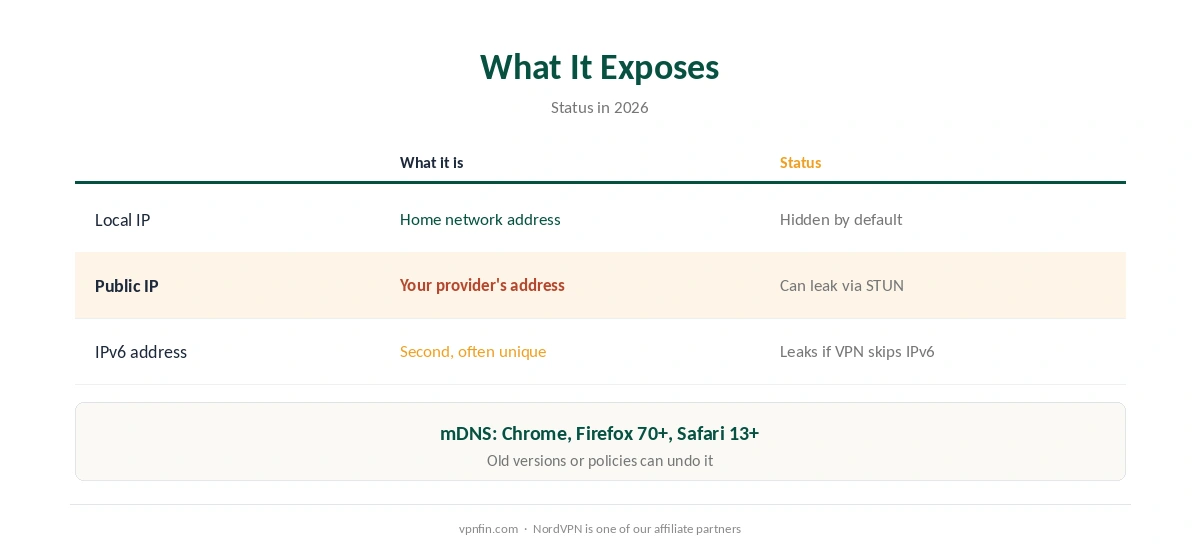
WebRTC Leak: What It Exposes
| Address | What it is | Status in 2026 |
|---|---|---|
| Local IP | Your device’s address on your home network | Hidden by default (mDNS) in major browsers |
| Public IP | Your internet provider’s address for you | Can still leak via STUN in some setups |
| IPv6 address | A second, often unique address | Can leak if the VPN doesn’t cover IPv6 |
Local addresses are mostly solved. Chrome, Firefox since version 70 and Safari since version 13 replace local IPs with random .local names, a technique called mDNS, privacyscore.dev notes. Old versions, changed settings or corporate policies can undo that.
The public IP is the one that matters. It identifies your internet connection and rough location, which is exactly what a VPN hides, and a WebRTC leak can undo the location change covered in our VPN location guide. Our guide to what a VPN hides explains the rest.
When Does a WebRTC Leak Happen?
Browser extensions and proxies are the usual risk. A full-device VPN app routes the browser’s STUN requests through the tunnel, so sites see the VPN’s address. A browser-only proxy or extension may not cover them, which is why FunWithText recommends a full-tunnel VPN over an extension on Chrome, Edge and Safari.
Split tunnelling and IPv6 add risk. A browser excluded from the tunnel shows your real IP by design, and an IPv6 address the VPN doesn’t handle can slip out. Our split tunnelling guide covers the first; our DNS leak guide covers a related leak.
How to Test for a WebRTC Leak
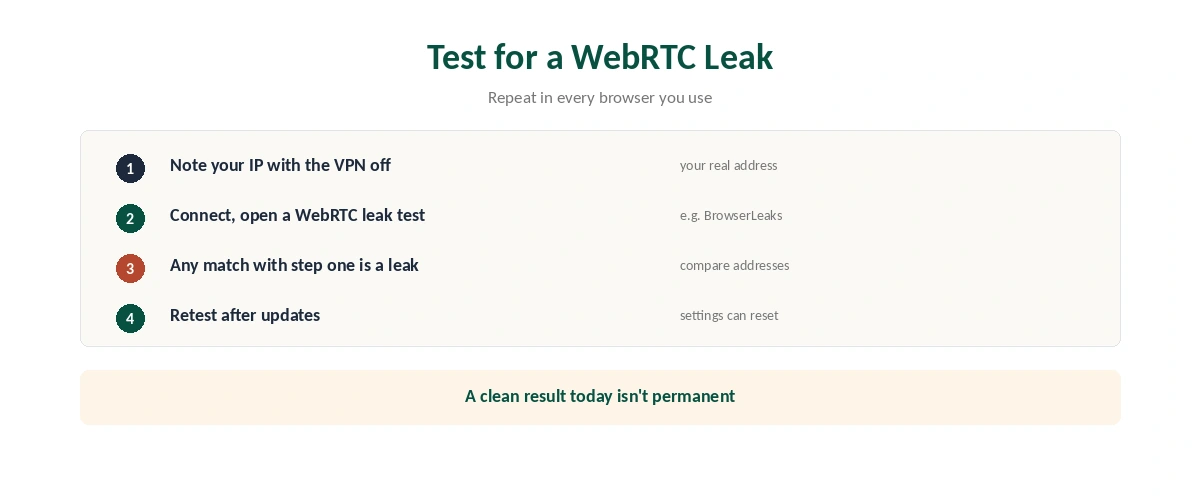
| Step | What to do |
|---|---|
| 1 | Disconnect the VPN and note your public IP |
| 2 | Connect the VPN and open a WebRTC leak test |
| 3 | Compare: any address matching step 1 is a leak |
| 4 | Repeat in each browser you use |
| 5 | Test again after browser or VPN updates |
Browsers differ, so test each one separately for a WebRTC leak. Our Chrome VPN guide explains why extensions behave differently from apps. Settings can reset after updates, FunWithText notes, so a clean result today isn’t permanent.
How to Stop a WebRTC Leak, Browser by Browser
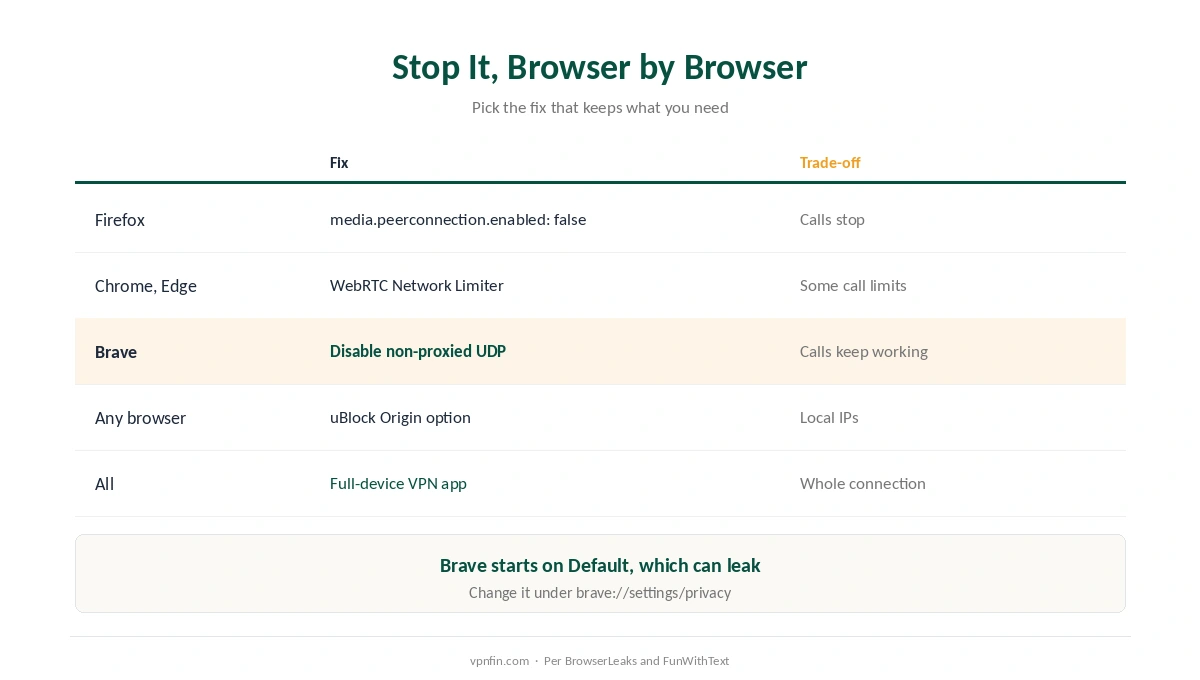
| Browser | Fix | Trade-off |
|---|---|---|
| Firefox | about:config, set media.peerconnection.enabled to false | Browser video calls stop |
| Chrome, Edge | Google’s WebRTC Network Limiter extension | Some call features limited |
| Brave | WebRTC IP handling policy: Disable non-proxied UDP | Calls keep working |
| Any browser | uBlock Origin’s WebRTC protection option | Covers local IPs |
| All of them | A full-device VPN app, not an extension | Protects the whole connection |
BrowserLeaks recommends Google’s own extension for Chrome, WebRTC Network Limiter, which offers several protection levels. In Brave, the setting sits under brave://settings/privacy, and new installs start on Default, which can leak, FunWithText notes.
Need video calls? Turning WebRTC off breaks them. Keep a full-device VPN on instead, or use a separate browser for calls. A kill switch stops traffic if the VPN drops mid-call, which matters most on public Wi-Fi. For stronger browser privacy overall, see our privacy VPN guide.
How We Research
The mDNS defaults come from privacyscore.dev; the public IP risk and uBlock Origin option from TrustMyIP; the Brave setting, extension advice and re-testing from FunWithText; the Firefox setting and Chrome extension from BrowserLeaks, whose free test is at browserleaks.com/webrtc. We read all sources on 28 September 2026. NordVPN is one of our affiliate partners. Our full approach lives on the About Us page.
WebRTC Leak FAQ
It’s when your browser’s WebRTC feature reveals an IP address, such as your real public IP, that your VPN should be hiding.
A full-device VPN app should route WebRTC requests through the tunnel. Browser extensions and proxies may not, so test to be sure.
Open about:config and set media.peerconnection.enabled to false. Browser video calls will stop working until you turn it back on.
Chrome has no built-in switch. BrowserLeaks recommends Google’s WebRTC Network Limiter extension.
Not in current Chrome, Firefox or Safari on default settings, which hide it with mDNS. Old versions or changed settings can still expose it.
The Verdict
A WebRTC leak exposes the address your VPN should hide, most often when you rely on a browser extension rather than a full-device app.
Test each browser, use the browser’s own fix where one exists, and keep the VPN app itself on.