
Disclosure: VPNFin is reader-supported. If you buy a VPN through links on this page, we may earn a commission at no extra cost to you. This never affects our ratings — here’s our full disclosure.
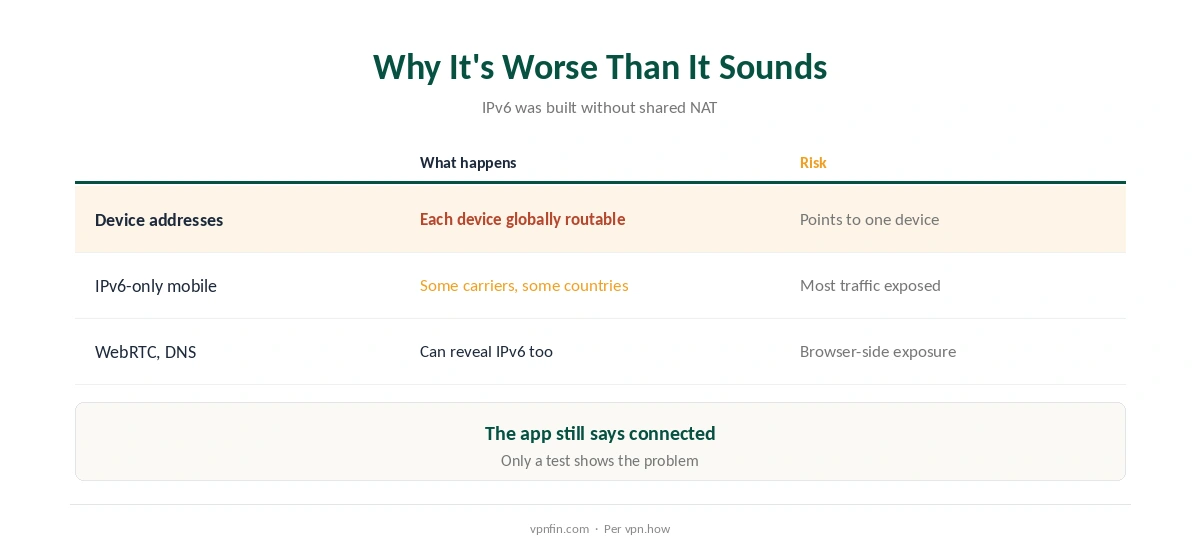
An IPv6 leak happens when your device has an IPv6 connection but your VPN only handles IPv4, so IPv6 traffic travels outside the tunnel with your real address. It happens silently, while the app still says connected. It matters more each year: IPv6 now carries 44 to 48 percent of global traffic, and unlike IPv4 it has no shared NAT, so each device can have its own globally routable address, vpn.how explains.
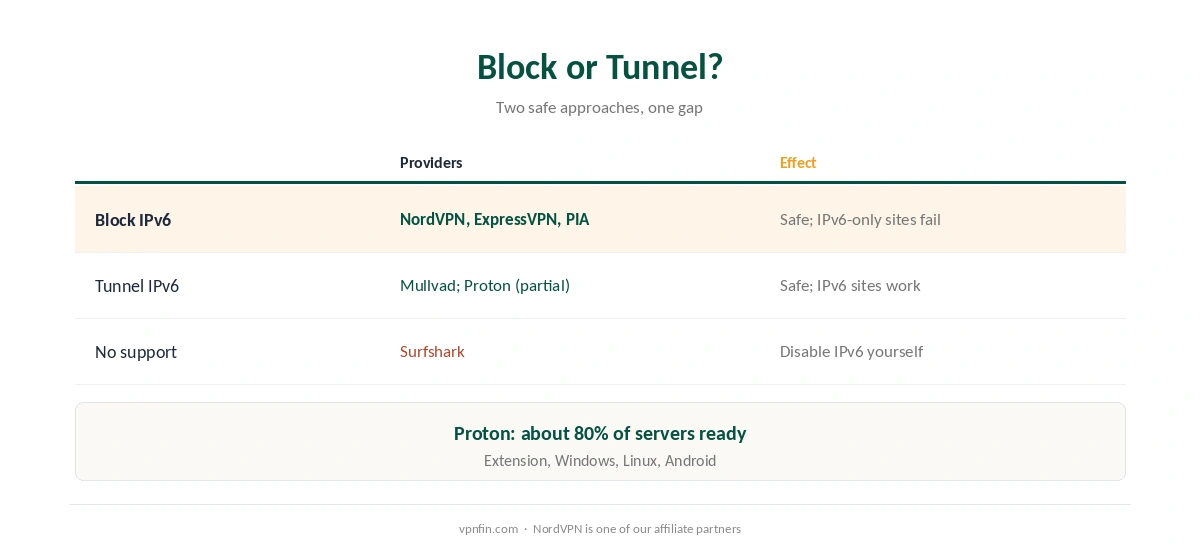
VPNs deal with it in one of two ways: they block IPv6 while connected, or they carry it through the tunnel. This page explains both, which providers do which, and how to test.
IPv6 Leak: Block or Tunnel?
| Approach | Providers | Effect |
|---|---|---|
| Block IPv6 while connected | NordVPN, ExpressVPN, PIA, Windscribe | Protected; IPv6-only sites may fail |
| Tunnel IPv6 | Mullvad; Proton VPN on some apps | Protected; IPv6 sites work |
| No IPv6 support | Surfshark (Nord Security, like NordVPN) | Disable IPv6 on the device |
Blocking is the common choice. NordVPN, ExpressVPN, PIA and Windscribe block all IPv6 traffic, Cloudwards found in July 2026. NordVPN first described its approach in 2017: the IPv6 interface is blocked and only IPv4 traffic goes through the VPN.
Tunnelling is rarer. Mullvad gives each connection both an IPv4 and an IPv6 address inside the VPN, PerfectionGeeks notes, as our Mullvad review also covers. Proton VPN supports IPv6 on its browser extension, Windows, Linux and Android, with about 80 percent of servers ready, Cloudwards reports.
Why It’s Worse Than It Sounds
IPv6 addresses can identify a device. Home networks receive large IPv6 ranges and each device gets its own address, so a leaked address can point to a specific device on your connection, vpn.how notes.
Some mobile networks are IPv6-only. In some countries mobile carriers run IPv6 with translation for older sites, so a VPN that ignores IPv6 can leave most traffic exposed there. Our Android fix guide covers phone-specific settings.
WebRTC can expose IPv6 too, as our WebRTC leak guide explains, and DNS requests can slip out alongside, as our DNS leak guide shows.
How to Test for an IPv6 Leak
| Step | What to do | What you want |
|---|---|---|
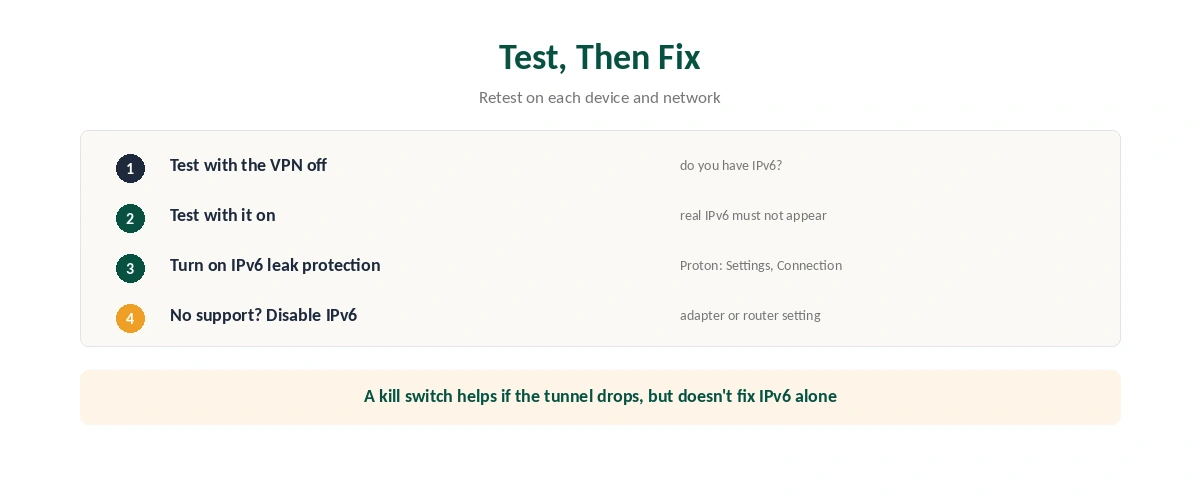
| 1 | Disconnect the VPN and run an IPv6 test | Note whether you have IPv6 |
| 2 | Connect the VPN and test again | No IPv6, or the VPN’s IPv6 |
| 3 | Compare the results | Your real IPv6 must not appear |
| 4 | Repeat on each device and network | Mobile and Wi-Fi can differ |
No IPv6 before connecting? Then there’s nothing to leak on that network, though the next network might have it. Retest after VPN updates, which can change IPv6 behaviour, Cloudwards advises. Our VPN check guide covers IP, DNS and WebRTC tests together.
How to Stop an IPv6 Leak
Turn on the VPN’s IPv6 leak protection. In Proton VPN it sits under Settings, Connection, IPv6, and Proton recommends leaving leak protection on. In NordVPN, protection is built in on every platform.
On Surfshark, disable IPv6 on the device, since Surfshark doesn’t support it yet, as our Surfshark fix guide notes. On Windows that means unticking IPv6 in the network adapter’s properties; routers often have an IPv6 switch too, as our router guide covers.
A kill switch helps if the tunnel drops, but it doesn’t fix IPv6 by itself, as our kill switch guide explains.
How We Research
Provider approaches come from Cloudwards’ July 2026 IPv6 review and NordVPN’s 2017 announcement; Mullvad’s tunnelling from PerfectionGeeks; adoption and addressing from vpn.how; Surfshark from its support pages. Proton’s own guidance is at protonvpn.com/support/prevent-ipv6-vpn-leaks. We read all sources on 28 September 2026. NordVPN is one of our affiliate partners. Our full approach lives on the About Us page.
IPv6 Leak FAQ
It’s when IPv6 traffic bypasses a VPN that only handles IPv4, exposing your real IPv6 address while the VPN shows connected.
It blocks IPv6 while connected on all its platforms, so IPv6 traffic doesn’t leave outside the tunnel.
Mullvad tunnels IPv6, and Proton VPN does on some apps. Most others, including NordVPN and ExpressVPN, block it instead.
If your VPN doesn’t handle it, such as Surfshark, yes. Otherwise turn on the VPN’s IPv6 leak protection.
Run an IPv6 test with the VPN off, then on. If your real IPv6 address appears while connected, the VPN isn’t covering it.
The Verdict
An IPv6 leak is silent, which is why testing matters. Most big VPNs block IPv6 while connected; Mullvad and, partly, Proton tunnel it.
Turn on IPv6 leak protection where it exists, disable IPv6 where it doesn’t, and retest on each new network.