
Disclosure: VPNFin is reader-supported. If you buy a VPN through links on this page, we may earn a commission at no extra cost to you. This never affects our ratings — here’s our full disclosure.
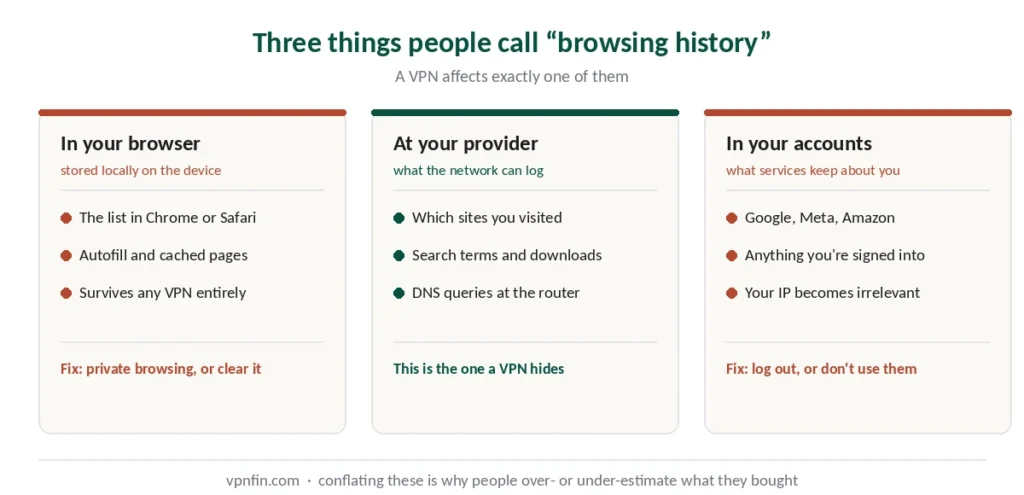
Ask whether a VPN hides your browsing history and the honest answer starts with a question back: which history?
The list in your browser — stored locally on your device.
The record at your provider — what your ISP and router can log about where you go.
The record in your accounts — what Google, Meta and every service you’re signed into keeps.
A VPN affects the middle one. It does nothing to the other two, and conflating them is why people either overestimate their privacy or dismiss VPNs as pointless.
The Short Answer
Hidden from your ISP and router: which sites you visit, your search terms, what you download, page content.
Still visible to them: that you’re using a VPN, when you connected, and how much data moved.
Not hidden at all: your local browser history, your device’s GPS, your local network IP, and anything tied to an account you’re logged into.
Who Sees What
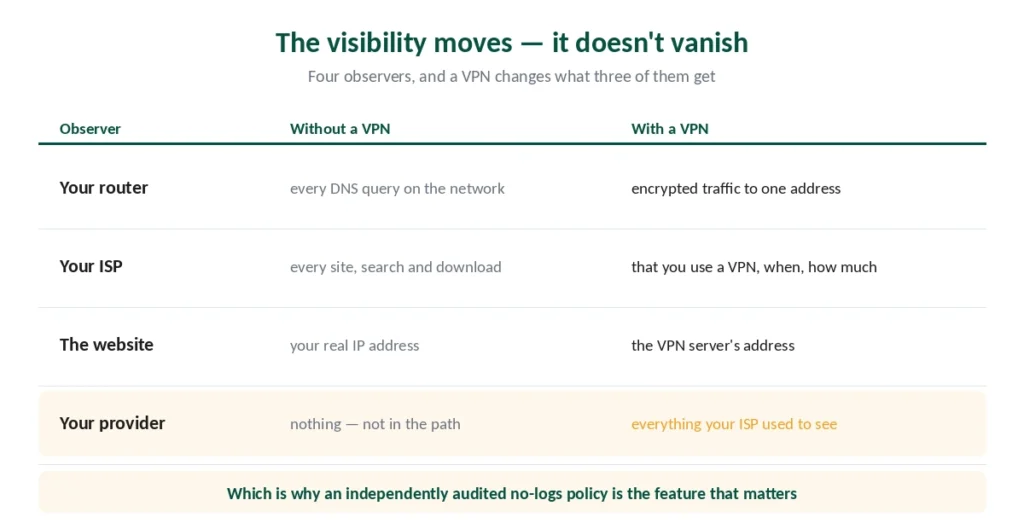
Four parties can observe your traffic, and a VPN changes what three of them get.
Without a VPN, your traffic passes your router, then your ISP, then reaches the site. All three see where you’re going. Your router logs DNS queries — every domain any device on your network looked up. That first hop is yours at home; on a network you do not control it belongs to the café, the hotel, or whoever is impersonating them.
With a VPN, your device encrypts everything before it leaves. Your router and ISP see encrypted data heading to one address and cannot read it. The VPN server decrypts and forwards, so the site sees the server’s address rather than yours. That is also why a location check can refuse you: ChatGPT’s country message usually describes the server, not your account.
The visibility doesn’t vanish — it moves. Your VPN provider now occupies the position your ISP held. That’s the entire reason audited no-logs policies matter, and why we rank providers on privacy evidence separately from everything else.
What Your ISP Still Sees
This is where most explanations stop short, and it matters.
That you’re using a VPN. The encryption pattern and routing are distinguishable from ordinary traffic. Your ISP can identify a VPN connection even without reading it.
Which VPN server. They see the destination IP address — the server, not the sites behind it.
Connection timestamps. When you connected and disconnected.
Data volume. How much moved in each direction, though not what it was.
⚠️ Why this matters practically: in countries with mandatory data retention, that’s what gets stored. It also runs the other way — your bank can see that you connected through a VPN, and treats that as a risk signal.
The period varies widely. Australia requires two years of metadata, and a VPN narrows what is in that record without emptying it.
Brazil requires a year by statute, with six months from platforms on top.
Germany is arguing about a much shorter version. Its cabinet approved three months of IP addresses in April 2026, after the courts struck down two broader attempts.
The wider version of this question has its own page. It covers what a VPN does, what it does not, and the four marketing phrases that make the difference hard to see.
What Isn’t Hidden by Anything
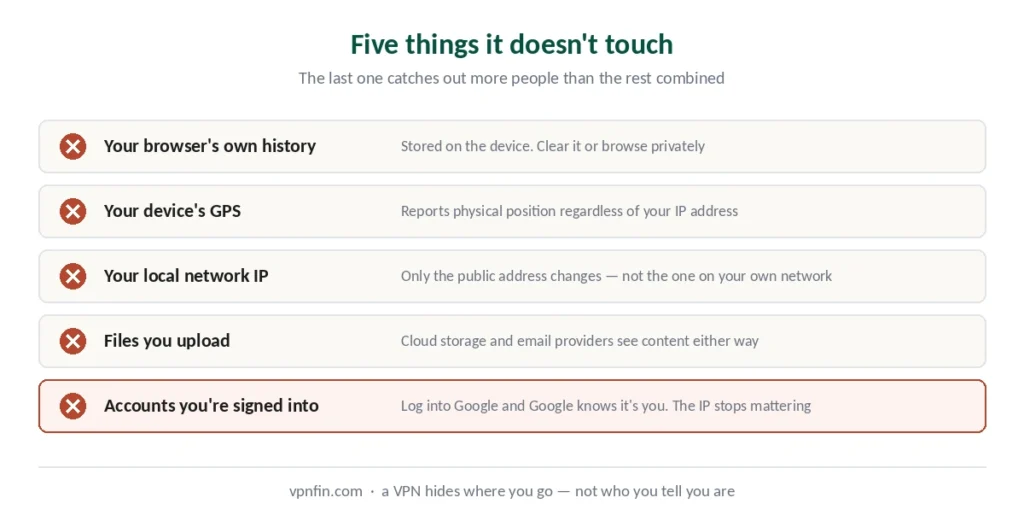
Five categories a VPN does not touch, and the fourth one catches people out.
Your browser’s own history. The list in Chrome or Safari is stored on your device. A VPN changes nothing about it — use private browsing or clear it if that’s the concern.
Your device’s GPS. Location services report physical position regardless of your IP address. Apps that read GPS know where you are, which is why Hulu and YouTube TV still detect location on mobile.
Your local network IP. Only your public address changes. The address your device holds on your own network stays the same.
Accounts you’re signed into. This is the big one. Log into Google with a VPN active and Google knows exactly who you are. Same with Facebook, Amazon, or anything else. The IP address becomes irrelevant the moment you identify yourself. Google devices are the clearest case — the Chromecast logs what you cast regardless of any tunnel.
And what you upload. Files sent to cloud storage, emails through unencrypted providers, documents on third-party platforms — all visible to those services regardless of how the traffic travelled.
And what you download. Encryption does nothing about a malicious file once it is on your machine — that is antivirus territory, and the version bundled with a VPN often does not scan files at all.
The Leaks That Undo It
A VPN can be connected and still expose exactly what it was meant to hide.
DNS leaks happen when your device sends domain lookups outside the tunnel to your ISP’s resolver. Your traffic is encrypted; the list of domains you asked for isn’t. Providers counter this by running their own DNS servers and forcing queries through the tunnel. Encrypted DNS solves the same exposure on its own, and costs nothing.
WebRTC leaks expose your real IP through browser features designed for video calls.
IPv6 leaks occur when a provider handles IPv4 but not IPv6, letting some traffic bypass the tunnel entirely.
A dropped connection exposes everything until you notice — which is what a kill switch prevents by blocking traffic when the VPN fails.
⚠️ These are the four things worth verifying after setup rather than assuming. Our setup guide covers the tests, and they take about five minutes.
Why the Router Matters More Than People Think
Worth its own section, because it’s the observer most people forget.
Home routers log DNS queries — every domain every device on the network looked up. Anyone with router access can read that list.
This is relevant if you share a network with family or housemates, or if you’re on a company network where IT has router-level visibility.
A VPN routes DNS through the provider’s servers instead, so those queries never reach the router. The log stops recording where you went.
⚠️ On a work network, note that a VPN on your device doesn’t change the fact that the network and often the device belong to your employer.
So What Are You Actually Buying?
A narrower thing than the marketing suggests, and a real one.
You’re moving visibility from your ISP to your VPN provider. Whether that’s an improvement depends entirely on which you trust more — and on whether the provider’s no-logs claim has been independently verified. Our VPN tracing page goes into what a VPN hides and what it leaves visible.
You’re not becoming anonymous. Cookies, browser fingerprints and logged-in accounts identify you regardless of IP address. Tor is the tool for anonymity, and it solves a different problem with different trade-offs.
You are gaining meaningful protection on public networks, against ISP profiling, and against the commercial data trade that runs on browsing records. Those are real benefits — our guide on whether you need a VPN works through which of them apply to you.
Some VPNs rotate your address while you stay connected; our rotating IP guide explains what that does and doesn’t hide.
How We Research
This guide draws on published technical analysis from named sources including Security.org, CircleID, CyberFence and Gizmodo, alongside our own full reviews of the providers we rank — cross-checked and verified at publication. Several sources are VPN companies with a commercial interest in this topic; we used them only for claims confirmed by independent outlets. Our full approach lives on the About Us page.
VPN Privacy FAQ
From your ISP and router, yes — the sites you visit, searches you run and files you download are encrypted and unreadable at the network layer. From your own browser, no: that history is stored locally on your device. And from accounts you’re signed into, no: logging into Google identifies you regardless of your IP address.
Yes. The encryption pattern and routing are distinguishable from ordinary traffic, so your provider can identify a VPN connection even without reading it. They also see which VPN server you connected to, when you connected and disconnected, and how much data moved — but not what any of it was.
It changes your public IP address, which is what websites use to determine location. It does not change your device’s GPS, which reports physical position directly — that’s why some apps still detect where you are on mobile. Your local network IP address also stays the same.
It’s when your device sends domain lookups outside the VPN tunnel to your ISP’s resolver. Your traffic stays encrypted, but the list of domains you asked for doesn’t — which defeats much of the point. Providers counter this by running their own DNS servers and forcing all queries through the tunnel.
Not on a work device or network in any meaningful sense. A VPN encrypts traffic from the network’s view, but the device typically belongs to the employer, and administrators generally retain visibility through device management regardless of what’s installed.
A choice about who sees your traffic. Your ISP has a commercial interest in your browsing data and, in some countries, a legal obligation to retain it. A VPN provider with an independently audited no-logs policy has documented evidence that it keeps nothing. Whether that’s an improvement depends on the provider — which is why audits matter more than any other feature.
The Short Version
A VPN hides where you go from your ISP and router. Sites, searches, downloads, page content — all encrypted and unreadable at the network layer.
It doesn’t hide that you’re using one, when, or how much data moved. In countries with retention laws, that’s what gets stored.
And it does nothing about your browser’s own history, your GPS, or any account you’re signed into. Google knows it’s you the moment you log in, whatever your IP says.
What you’re really doing is choosing who sees your traffic — your ISP, or a provider whose no-logs claim someone has audited.