
Disclosure: VPNFin is reader-supported. If you buy a VPN through links on this page, we may earn a commission at no extra cost to you. This never affects our ratings — here’s our full disclosure.
A traveller in Thailand logged into Charles Schwab through a shared VPN server. The fraud system saw fifteen other people using that address within a day, read it as an account takeover, and froze roughly $47,000. He waited eighteen days and an in-person identity check to get it back.
That is the extreme version, and the ordinary version happens constantly: an extra verification step, a blocked login, a card declined at the worst moment.
Meanwhile, the thing a VPN is supposed to protect here is already protected. Your bank encrypts the entire session with HTTPS before it leaves your device. So this guide covers what a VPN genuinely adds to online banking, what it costs you, and how to get both.
The Short Answer
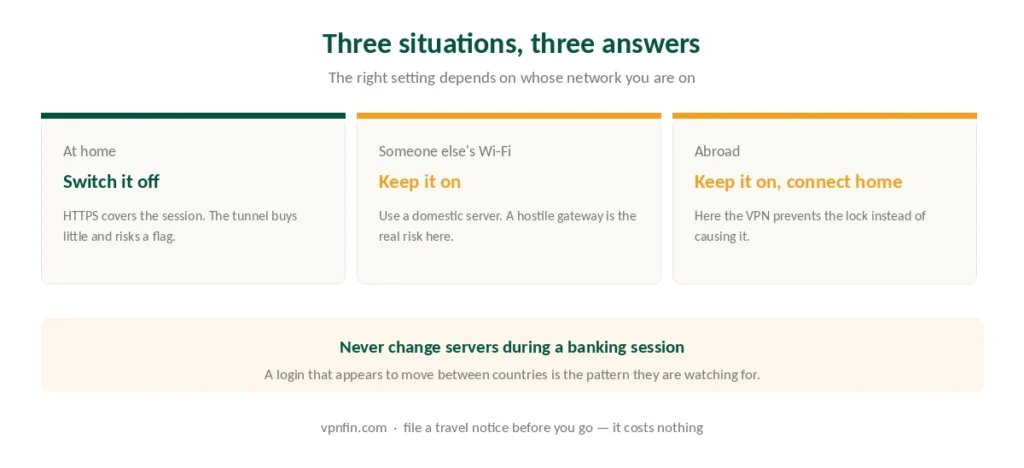
At home, on your own network, switch it off for banking. HTTPS covers the session, and the VPN adds a fraud-detection risk with little to show for it.
On a network you do not control, keep it on — connect to a server in your own country first, and expect a verification step.
If you travel, this is the reverse problem. Your bank distrusts foreign addresses more than it distrusts VPNs, so a home-country server helps rather than hurts. Colombian banks are a documented case, covered in our Colombia guide.
And never switch servers mid-session. A login that appears to move between countries is the pattern fraud systems are built to catch.
Why Your Bank Distrusts a VPN
The mechanism is not arbitrary, and understanding it tells you how to avoid the problem.
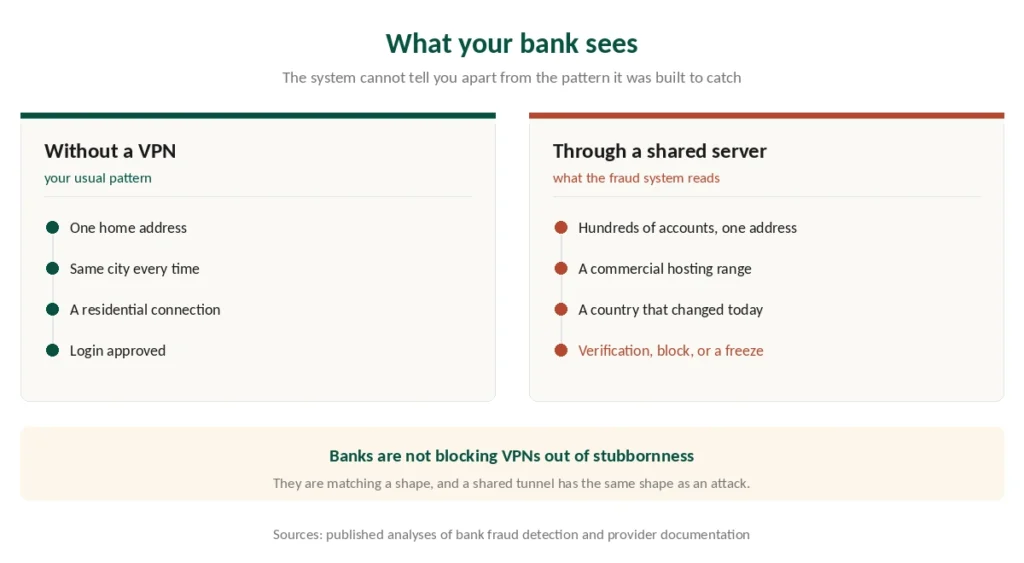
A shared VPN address carries hundreds of customers. When a bank sees many accounts authenticating from one address, that is the shape of credential stuffing — an attacker testing stolen passwords at scale. The system cannot distinguish you from that pattern, so it treats the address as high risk.
Data-centre ranges make it worse. VPN servers live in commercial hosting, and a residential customer whose bank login suddenly arrives from a hosting provider looks wrong on its face. Some institutions reject those ranges outright.
Sudden location changes are the third signal. A session that starts in one country and continues from another is exactly what an account takeover looks like from the outside.
⚠️ Named institutions that flag or block VPN traffic include Chase, Bank of America, Wells Fargo, HSBC, Barclays, Lloyds and PayPal, according to published reporting, and Ally states openly that it may block connections associated with certain VPN providers or relays. The specifics change; the direction of travel does not.
None of this is aimed at you. Banks are under regulatory pressure to prevent fraud, and their systems work on association rather than intent.
What a VPN Actually Adds Here
Being precise about this is the whole point, because the honest answer is narrow.
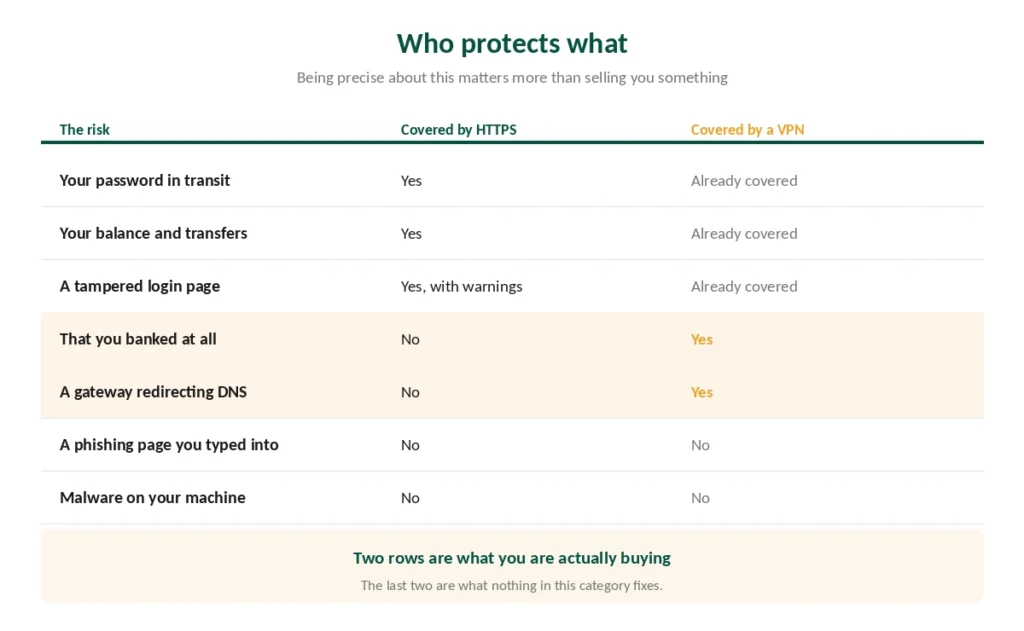
It does not encrypt your banking session. Your bank already does that, with HTTPS, before anything leaves your device. Published guidance is blunt about it: most customers do not need a VPN to protect the session itself.
It does not protect your credentials from a phishing page. A fake login form works identically inside an encrypted tunnel.
What it does hide is the fact that you are banking. Your internet provider, or whoever runs the network you are on, otherwise sees that you connected to a bank, how often, and when. That is metadata rather than content, and what a VPN actually hides covers why the distinction matters.
On a network you do not control, it also blocks manipulation. A hostile gateway can interfere with DNS and redirect you elsewhere — the risks on public Wi-Fi are real, though smaller than the warnings suggest.
⚠️ So the trade is metadata privacy against fraud-detection risk. At home the first is worth little and the second is worth avoiding. On hotel Wi-Fi the balance flips.
Four Rules If You Keep It On
Use a server in your own country. Your bank compares the login against where you normally are. A domestic server keeps that consistent.
Pick the same server every time. Consistency reads as a stable location; rotating addresses reads as evasion.
Never change servers during a session. Log in, finish, then move if you must.
Expect the extra verification step and complete it. A one-time code is the system working, not the system failing.
⚠️ If your bank blocks you outright, switch the VPN off, use your own network or mobile data, and retry. Do not attempt repeated logins through different servers — a burst of failed attempts from changing addresses is the exact pattern that escalates a flag into a lock.
The Proper Fix, and Where It Fails
Split tunneling solves this cleanly. You exclude the banking app or website from the tunnel, so it sees your real domestic address while everything else stays encrypted. No fraud flag, no loss of protection elsewhere. A dedicated IP address is the paid alternative: the bank stops objecting because the address is yours and its reputation is clean.
On Windows and Android it works well. Most clients let you exclude specific applications or domains.
⚠️ On iPhone it does not work at all. App-level exclusion is unavailable to every consumer VPN on current iOS — it exists only through enterprise device management. On Mac it does work, with conditions: one major provider requires installing outside the App Store, because store policy prohibits the system extensions involved. Our iPhone guide explains what iOS allows, and our Mac guide covers the rest.
On Apple hardware the practical answer is to disconnect for the banking session, and only on a network you trust.
A dedicated IP is the other route. Several providers sell a static address used by nobody else, which removes the shared-address problem entirely. It costs extra, and it is the reliable fix if you bank abroad regularly.
Travelling Changes the Calculation
Here a VPN goes from liability to solution.
Banks distrust foreign addresses more than they distrust VPNs. A login from Bali on a local connection can trigger the same lock as a VPN login — sometimes faster, because the country change is unambiguous.
Connecting to a server in your home country makes the login look normal, which is the case where a VPN prevents the problem rather than causing it.
⚠️ Tell your bank before you travel. Most offer a travel notice in the app, and it costs nothing. A notice on file plus a home-country server is the combination that works — and the rest of the travel setup is worth doing before you leave rather than in a hotel lobby.
⚠️ Investment and crypto accounts are stricter than current accounts. Reported cases describe asset freezes rather than temporary blocks, so treat those logins with more care.
Free VPNs Are the Wrong Tool Here
Free tiers concentrate users onto few addresses, which makes them the most likely of all to trip a bank’s fraud system.
And the trust problem is worse. Reporting has described free browser extensions capturing active sessions, which is the opposite of what you wanted. Our free VPN guide covers the small number that are safe, and none of them is a banking tool.
If you use one for anything financial, use a provider with an independently audited no-logs policy. That is the whole reason we keep counting published audits.
Which VPNs Handle This Best
NordVPN — offers a dedicated IP add-on, which is the reliable fix, plus split tunnelling on Windows and Android. Six published no-logs audits and ten devices. Renewal reaches $139.08 a year, the highest we track — our renewal price table sets it against the rest. Our NordVPN review has the detail.
Proton VPN — five annual audits published in full and open-source apps, which matters more than usual when money is involved. Our Proton VPN review covers it.
Surfshark — unlimited devices and a dedicated IP option, around $79 a year on renewal. Our Surfshark review sets it against the others.
CyberGhost — 45 days to change your mind, long enough to find out whether your bank tolerates it before you commit. Our CyberGhost review has the rest.
How We Research
This guide draws on published analyses of bank fraud-detection behaviour from named outlets, provider documentation describing dedicated IP and split tunnelling limitations, reported customer cases including a documented account freeze during travel, and Apple’s constraints on split tunnelling as described in technical coverage — cross-checked and verified at publication. We don’t run our own tests against banks, and we do not publish a list of which institutions block VPNs this month, because those policies change without announcement. Where a case comes from a single report rather than several, as the Schwab freeze does, we say so. Our full approach lives on the About Us page.
Online Banking VPN FAQ
On your own network, generally not. Your bank encrypts the session with HTTPS before it leaves your device, so the VPN adds metadata privacy rather than protection, while creating a real risk that fraud systems flag the login. On a network you do not control, or while travelling, the balance changes.
Because a shared VPN address carries hundreds of customers, and many accounts authenticating from one address is the signature of credential stuffing. Data-centre ranges and sudden location changes add to the picture. The system cannot tell you apart from that pattern, so it treats the connection as high risk.
It can trigger extra verification, a blocked login, or in reported cases a temporary freeze. One traveller using a shared server had assets frozen for eighteen days pending an in-person identity check. Investment and crypto accounts apply stricter rules than everyday current accounts.
Connect to a server in your own country, use the same one each time, and never change servers during a session. Split tunnelling lets you exclude the banking app entirely, though Apple’s framework limits this on iPhone and Mac. A dedicated IP removes the problem outright.
Reasonably, since HTTPS protects the session regardless of the network. The residual risks are a hostile gateway manipulating DNS and the network operator seeing that you banked. A VPN addresses both, which is why this is the case where keeping it on makes sense.
The Verdict
On your own network, switch it off to bank. HTTPS already encrypts the session, and the VPN buys you metadata privacy at the cost of a fraud flag. That trade is not worth making at your kitchen table.
On someone else’s network, keep it on and use a domestic server. The hostile-gateway risk is real, even if smaller than the warnings suggest.
Abroad, keep it on and connect home. Here the VPN prevents the lock rather than causing it, and a travel notice filed with your bank costs nothing.
And if you bank abroad often, buy a dedicated IP. A static address nobody else uses removes the entire problem, which is a rare thing to be able to say about anything in this category.