
Disclosure: VPNFin is reader-supported. If you buy a VPN through links on this page, we may earn a commission at no extra cost to you. This never affects our ratings — here’s our full disclosure.
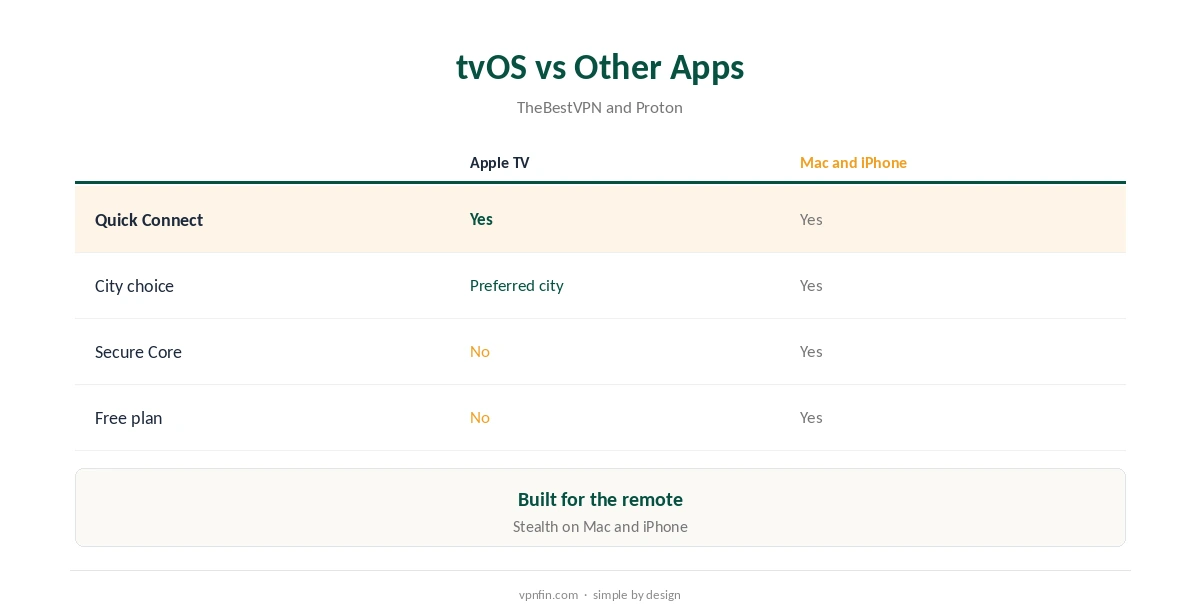
A Proton VPN Apple TV app has existed since 30 October 2024, TechRadar reported, for Apple TVs on tvOS 17 or later. It needs a paid plan: Proton’s support page lists VPN Plus, Proton Unlimited and Visionary, and Security.org notes the free tier does not include the Apple TV app. Sign-in uses a code entered on Proton’s website. TheBestVPN describes the tvOS app as minimal, with Quick Connect and a preferred city but no Secure Core.
This guide covers setup, what the app offers, older Apple TVs and the limits.
Proton VPN Apple TV Setup
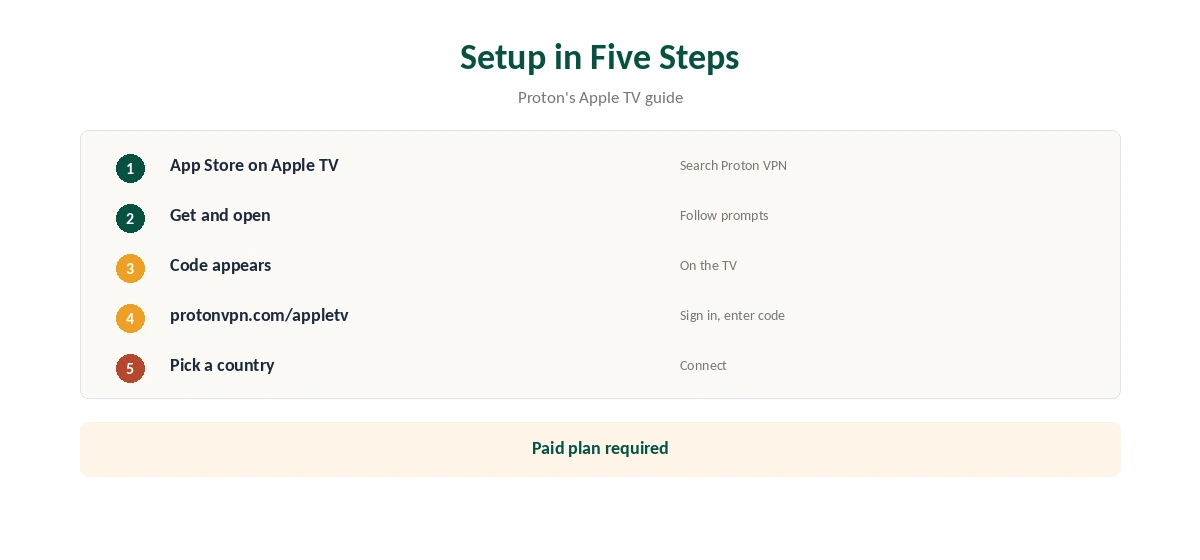
Open the App Store on the Apple TV, search for Proton VPN and choose Get. Launch the app and follow the on-screen steps. A code appears; on a phone or computer, go to protonvpn.com/appletv, sign in with your Proton account and enter the code, Proton’s guide explains. Then pick a country and connect.
What the App Offers
TheBestVPN found the tvOS build deliberately simple: Quick Connect and a preferred city, designed for the remote. Secure Core stays on desktop and mobile apps. Our Proton VPN Mac guide and iPhone guide cover the fuller apps.
Older Apple TVs
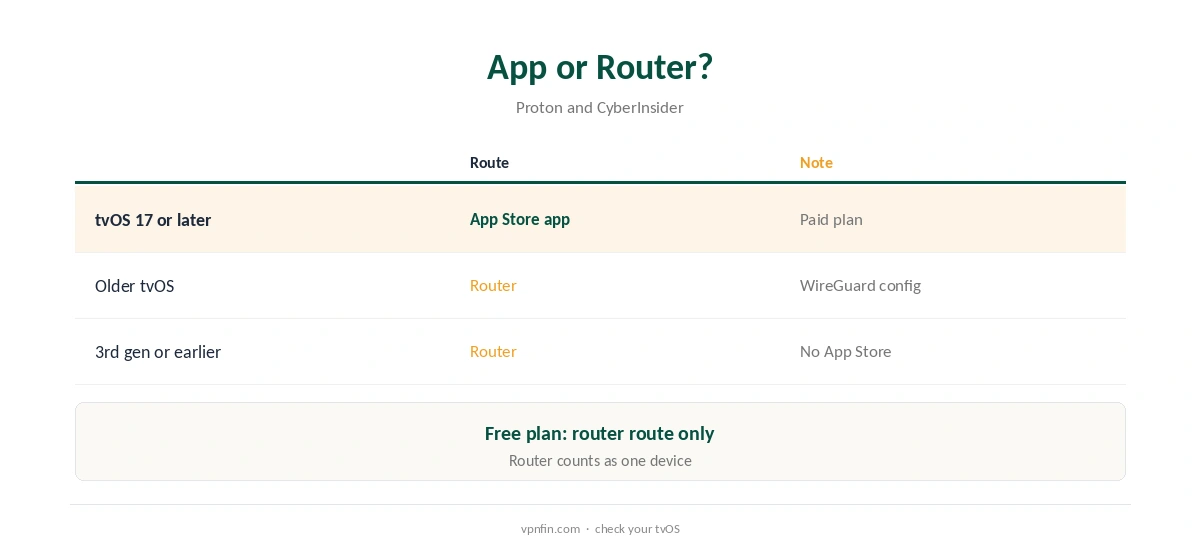
Apple TVs on older tvOS versions, or third-generation models without an App Store, cannot run the app. A router with a Proton WireGuard or OpenVPN config covers them, CyberInsider notes. Our Proton VPN router guide explains the setup.
Proton VPN Apple TV Requirements
Apple added third-party VPN support with tvOS 17 in September 2023, TechRadar notes, and Proton’s App Store listing requires tvOS 17.0 or later on Apple TV. Update the Apple TV in Settings, System, Software Updates before installing.
Several Devices
The Apple TV counts as one of VPN Plus’s 10 devices. A household with an iPhone, a Mac and an Apple TV fits easily.
Switching Locations
Choose a country with the remote, or set a preferred city. Restart the streaming app after switching, so it reads the new location rather than a cached one.
Is the Proton VPN Apple TV App Worth Paying For?
If you stream on Apple TV, yes: the paid plan adds the TV app, streaming support and 10 devices. If you only need privacy on a phone, the free plan may be enough.
Privacy
Proton has five Securitum audits in our table, and the Apple TV app follows the same no-logs policy. Our VPN audit tracker explains what those audits check.
Proton VPN Apple TV and Streaming Apps
Connect before opening a streaming app. If the app shows your home library, close it fully from the app switcher and reopen it, or try another server in the same country.
Free Alternatives
If you want to test Proton before paying, use the free plan on a phone or computer first. Our Proton VPN free guide explains its limits.
Proton VPN Apple TV vs Other Apps
NordVPN, Surfshark and ExpressVPN also ship tvOS apps, TheBestVPN notes; the first two share an owner, Nord Security. Proton’s stands out on privacy rather than on features, since Secure Core and Stealth stay off the TV.
Keeping It Updated
Turn on automatic app updates in tvOS settings. After an update, sign in again if the app asks for a new code.
Who It Suits
Paid Proton users who stream on Apple TV gain most. Free users should try the router route or a phone first.
Kids and Shared Use
A VPN does not filter content. For a family Apple TV, use Apple’s own restrictions in Settings, and keep the VPN for location and privacy. Sign the TV out of Proton if you sell or give it away.
Quick Rule
Apple TV on tvOS 17 with a paid plan: use the app. Older Apple TV or a free plan: use a router. Either way, restart streaming apps after connecting.
Refunds
Proton allows a full refund within 30 days of the original purchase, once per user, our tables record.
Troubleshooting
If the app will not connect, check tvOS is current, sign out and back in with a new code, and try another server. A router route remains the fallback.
Streaming
Proton reached Netflix in the US, UK, Australia, Canada and Japan in TechRadar’s 2026 testing on paid plans. Security.org named it a strong Apple TV pick for streaming. Results change, so test the services you use.
Free Plan
The free plan does not include the Apple TV app, Security.org notes. Free users can still cover an Apple TV through a router or by sharing a computer’s connection. Our Apple TV VPN guide compares other providers.
Turning It Off
Disconnect in the app, or remove the VPN configuration in tvOS settings. Our guide to turning off a VPN on Apple TV covers each route.
How We Research
This page draws on Proton’s Apple TV support page, the App Store listing, TechRadar’s launch report, Security.org’s, TheBestVPN’s and CyberInsider’s Apple TV guides, and our Proton tables. We cross-checked these sources against each other, and where they conflict or something can’t be verified, we say so in the text rather than guessing. We checked time-sensitive figures, including prices in US dollars, on 8 October 2026. The main source we relied on is Proton VPN’s Apple TV guide. Our full approach lives on the About Us page.
Proton VPN Apple TV FAQ
Yes, since October 2024, for tvOS 17 or later.
No; the Apple TV app needs a paid plan.
Enter the on-screen code at protonvpn.com/appletv.
No; it stays on desktop and mobile apps.
Use a router with a Proton config.
The Verdict
The Proton VPN Apple TV app is simple and works well on tvOS 17 or later with a paid plan. Older models need a router.