
Disclosure: VPNFin is reader-supported. If you buy a VPN through links on this page, we may earn a commission at no extra cost to you. This never affects our ratings — here’s our full disclosure.
Proton VPN Mac users get a full app with Secure Core, a kill switch, VPN Accelerator and an always-on option, Proton’s download page lists, and the free plan works on Mac too. The app runs WireGuard and Stealth: Proton removed IKEv2 and OpenVPN from its macOS and iOS apps and recommends Smart Protocol. Split tunnelling arrived as an experimental feature in January 2026, and the same update dropped support for macOS 13 Ventura, Proton’s release notes say.
This guide covers setup, settings, recent changes and the limits worth knowing.
Proton VPN Mac Setup
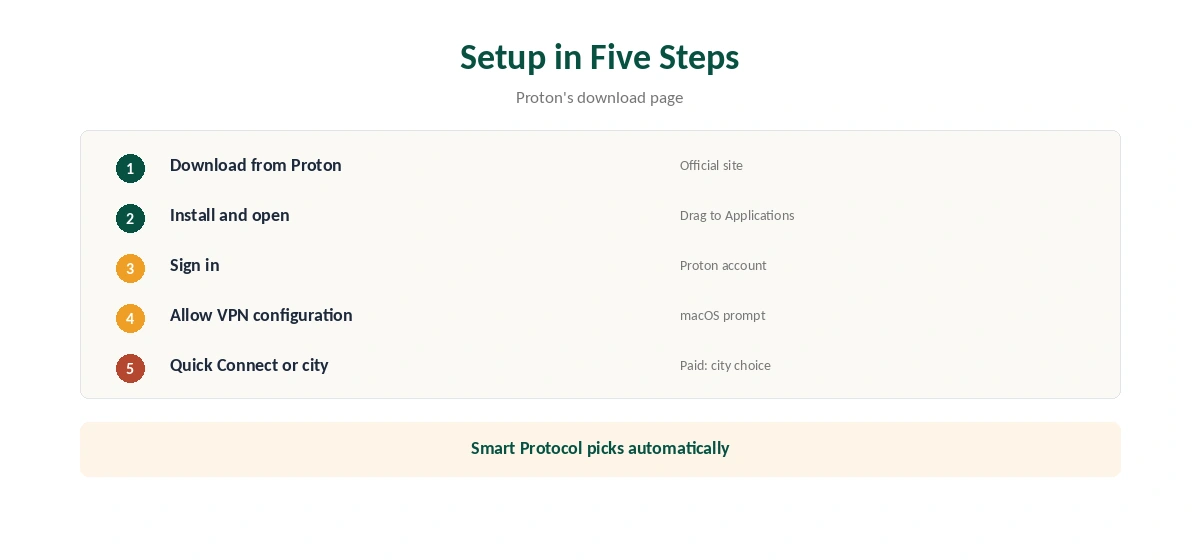
Download the app from Proton’s site, install it and sign in with your Proton account; Proton Mail users already have one. Allow the VPN configuration when macOS asks. Choose Quick Connect or a country, and on paid plans a specific city, which version 6.5.0 added in April 2026.
Protocols
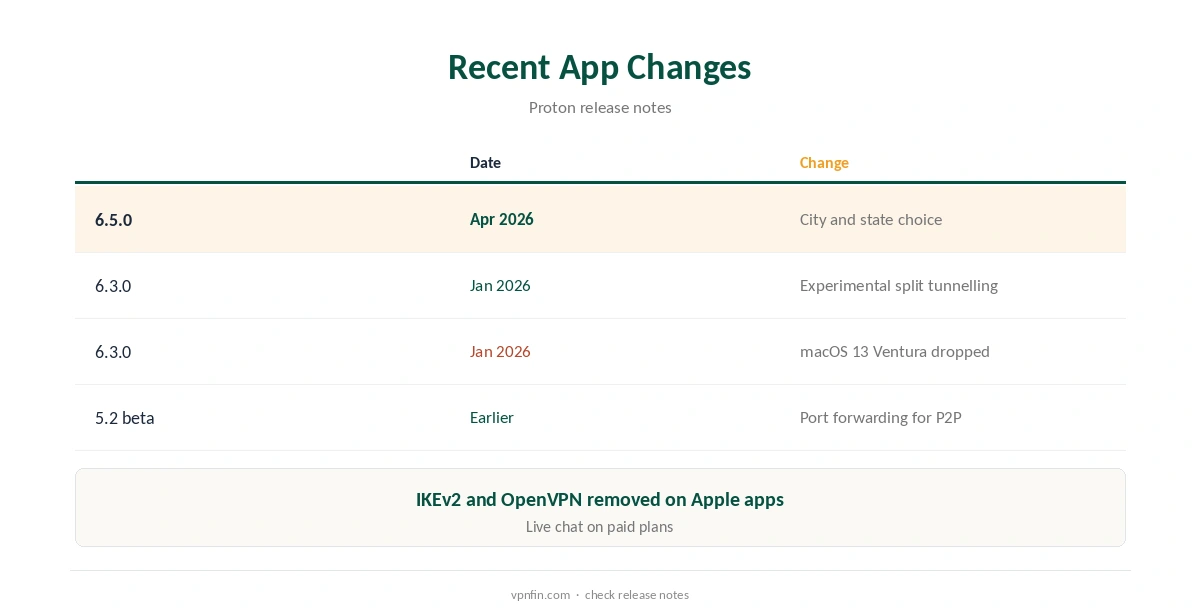
Proton removed IKEv2 and OpenVPN from its macOS and iOS apps, citing concerns about Apple’s IKEv2 implementation, and kept WireGuard and Stealth. Smart Protocol picks automatically; Stealth helps on networks that block VPNs. Our Proton VPN connection guide covers protocol fixes.
Kill Switch and Split Tunnelling
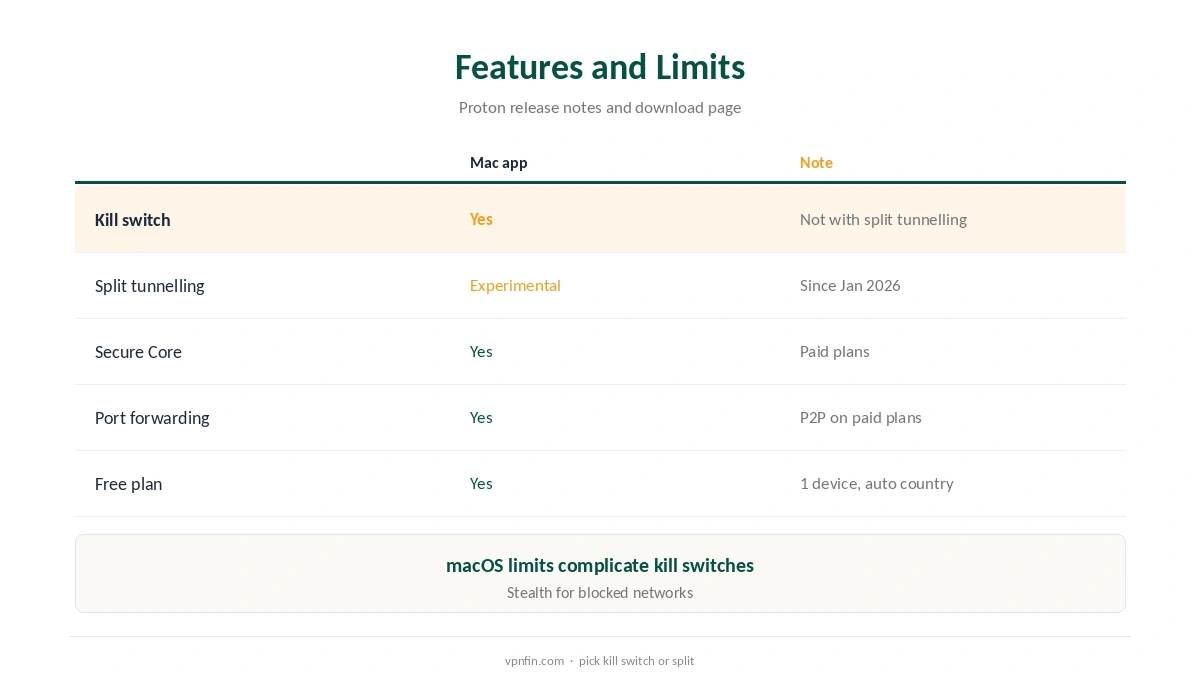
The kill switch blocks traffic if the tunnel drops. Split tunnelling, experimental since January 2026, routes chosen apps through the VPN. Release notes say the two cannot run at the same time, so pick one. Privacy Guides’ forum notes macOS limits make kill switches harder to build than on other systems. Our split tunnelling guide explains the feature.
macOS Versions
Proton dropped macOS 12 and then macOS 13 Ventura, so current updates need a newer macOS, and it fixed issues on macOS 26 Tahoe in early 2026. Older Macs keep working on the last supported version but stop receiving fixes.
Secure Core and Stealth
Secure Core routes traffic through a privacy-friendly country before the exit server, and Stealth disguises VPN traffic on networks that block VPNs. Both appear in the Mac app; Secure Core needs a paid plan.
VPN Accelerator
Proton lists VPN Accelerator among the Mac app’s features, aimed at faster connections on long routes. Test speed with it on and off at your usual time.
Always-On Protection
The download page lists an always-on option with the kill switch, so the Mac reconnects automatically. Turn it on if you use public Wi-Fi often. Our public Wi-Fi guide explains the risks.
Early Access
Proton lets Mac users test new versions by turning on Early Access in the app’s settings, its release notes say. Leave it off if you want only stable releases.
Proton VPN Mac Troubleshooting
If the Mac app will not connect, switch to Stealth or let Smart Protocol choose, then reinstall if needed. Our Mac VPN troubleshooting guide covers wider fixes, from network settings to security software.
Several Devices
VPN Plus covers 10 devices, so a Mac, an iPhone and a household’s laptops share one plan. Our Proton VPN iPhone guide covers the phone app.
Quick Check
After connecting, open our VPN test page in Safari to confirm the address changed, then run our DNS leak guide.
Proton VPN Mac vs the iPhone App
Both Apple apps share the WireGuard and Stealth protocols after Proton removed IKEv2 and OpenVPN. The Mac app adds experimental split tunnelling, which the release notes describe for macOS. Our guide to Proton VPN on Apple TV covers tvOS app, sign-in code and older models.
Keeping It Updated
Proton notifies you of updates, and you can check manually. After updating, confirm the kill switch and protocol stayed the same.
Who It Suits
Mac users who want audited privacy, a free plan to start and Stealth for strict networks suit Proton well. Anyone who needs a kill switch and split tunnelling together should test that limit first.
Refunds
Proton’s terms allow a full refund within 30 days of the original purchase, once per user, our tables record.
Proton VPN Mac and Privacy
Proton has five Securitum audits in our table, and its Mac app follows the same no-logs policy. Our VPN audit tracker explains what those audits cover.
Quick Rule
Want a kill switch on every network? Keep split tunnelling off. Need some apps outside the tunnel? Use split tunnelling and accept the kill switch limit. Our guide to Proton VPN on Windows covers split tunnelling with the kill switch, ports and protocols.
Free Plan on Mac
The free plan installs on Mac with no data cap, one device and servers in 10 countries assigned automatically, Toolradar notes. Streaming support is for paid plans. Our Proton VPN free guide covers the limits.
Port Forwarding
Proton added port forwarding for P2P to the Mac app in a 5.2 beta, release notes show. It suits seeders on paid plans.
Support
Proton’s release notes say paid users can reach support by live chat, and everyone through its support team.
Turning It Off
Disconnect in the app, quit it from the menu bar, or remove it to uninstall. Our guide to turning off a VPN on Mac covers each route.
How We Research
This page draws on Proton’s macOS release notes and download page, its support note on IKEv2 and OpenVPN, Toolradar, Privacy Guides’ forum and our Proton tables. We cross-checked these sources against each other, and where they conflict or something can’t be verified, we say so in the text rather than guessing. We checked time-sensitive figures, including prices in US dollars, on 8 October 2026. The main source we relied on is Proton VPN’s macOS release notes. Our full approach lives on the About Us page.
Proton VPN Mac FAQ
Yes, with a full app and the free plan.
WireGuard and Stealth; Proton removed IKEv2 and OpenVPN.
Yes, experimentally since January 2026.
Proton dropped macOS 13 Ventura in January 2026; newer versions get updates.
No; release notes say they cannot run at the same time.
The Verdict
Proton VPN Mac support is strong: a full app, a free plan, WireGuard and Stealth. Keep macOS current, and choose between the kill switch and split tunnelling.