
Disclosure: VPNFin is reader-supported. If you buy a VPN through links on this page, we may earn a commission at no extra cost to you. This never affects our ratings — here’s our full disclosure.
Windscribe Chrome is a browser extension, also available for Firefox and Edge, that connects Chrome to Windscribe’s servers in a click, TechRadar notes. It protects only what happens in Chrome tabs, Windscribe’s own guide says, with no split tunnelling or system-wide leak blocking. Reviews describe extra browser tools, such as WebRTC blocking and user-agent rotation, and a double-hop mode when used with the desktop app. The free plan’s 10 GB a month applies.
This guide covers setup, what the extension does and does not protect, its privacy tools, the free plan and when to use the full app.
Windscribe Chrome Setup
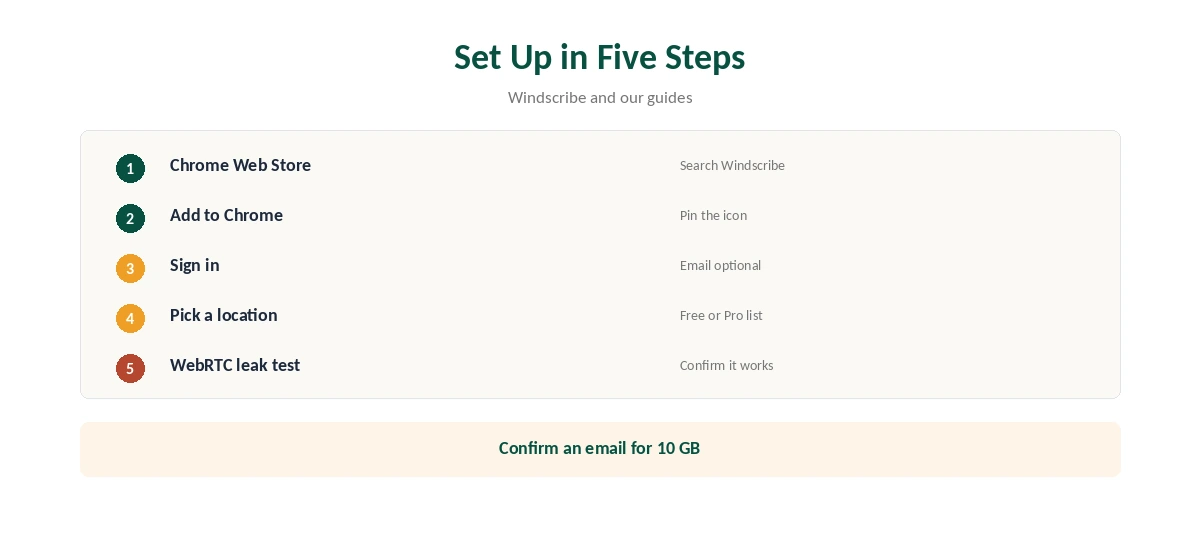
Open the Chrome Web Store, search for Windscribe and add the extension. Click its icon in the toolbar, sign in or create an account; an email is optional, but confirming one raises free data from 2 GB to 10 GB a month.
Choose a location from the country list and connect. The extension shows your new IP address in its window, so you can confirm the change at a glance. Pin the icon so the connection state stays visible.
What the Extension Protects
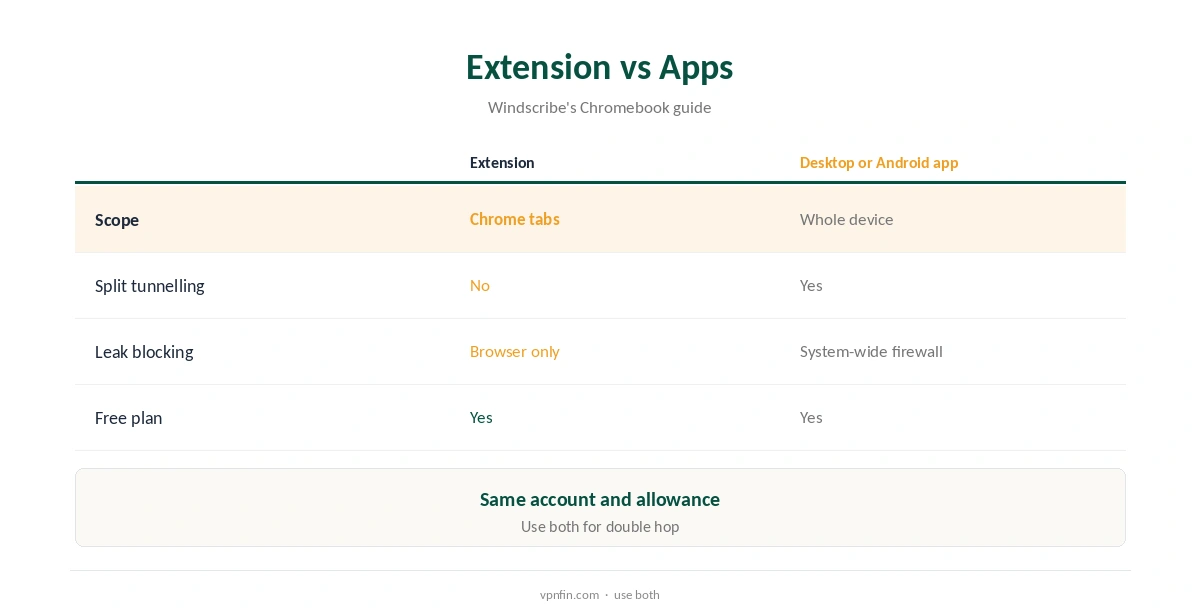
Windscribe’s Chromebook guide is plain about the scope: the extension routes Chrome browser traffic only. Email apps, games, torrent clients and anything outside Chrome keep using your normal connection.
It also lacks the app’s split tunnelling and system-level leak blocking. That makes it a browser proxy in practice, as our VPN vs proxy guide explains. For whole-device protection, install the desktop or Android app.
Privacy Tools in the Browser
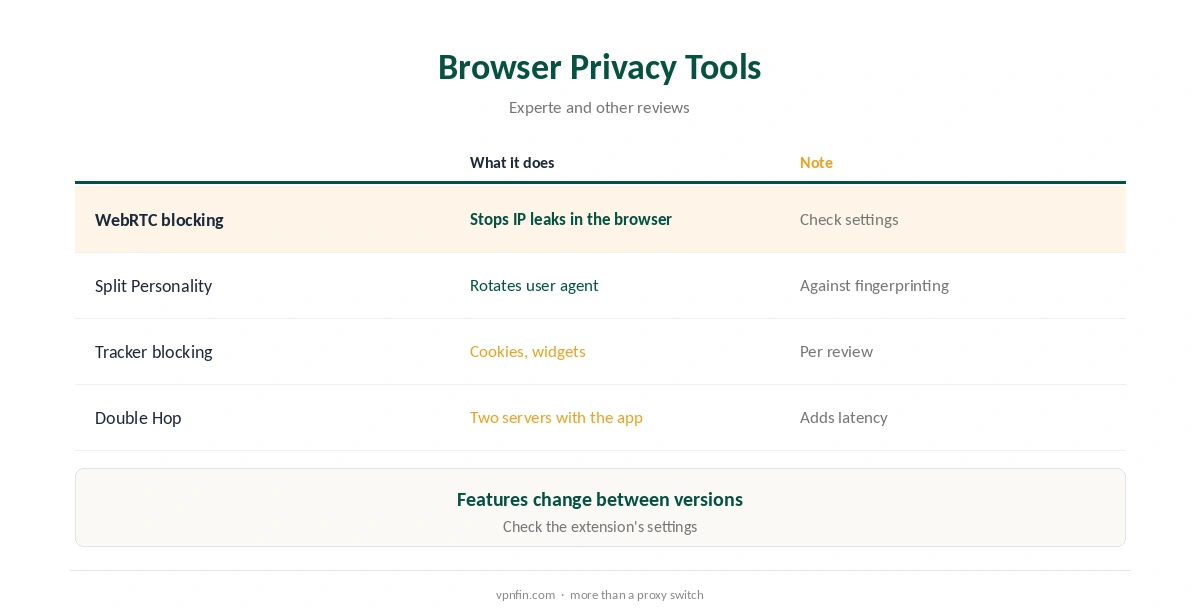
Reviews describe a set of browser tools: blocking adverts and malware, tracking cookies, social media widgets, notifications and WebRTC queries, Experte found, plus Split Personality, which rotates the user agent and reported operating system to resist fingerprinting.
Some reviews also mention Cookie Monster, which clears third-party cookies when you close a tab. Features change between versions, so check the extension’s settings for the current list. Our WebRTC leak guide explains why WebRTC blocking matters.
Double Hop With the Desktop App
Running the extension and the desktop app at the same time routes browser traffic through two servers, one from each, Experte describes. The app covers the whole device; the extension adds a second hop for Chrome.
Two hops add latency, so use it for sensitive browsing rather than streaming. Disconnect the extension when you only need the desktop app’s single hop. Our Double VPN guide explains how multi-hop routing works.
Free Plan in the Browser
The extension uses the same account and allowance as Windscribe’s apps: 10 GB a month after confirming an email, servers in 10 countries. Browsing uses far less data than video, so the allowance lasts longer in a browser than on a TV. Confirming an email matters more here than anywhere, since it raises the allowance fivefold.
Pro, at $9 a month or $69 a year, unlocks every location and unlimited data, our tables record. Our Windscribe Free guide covers the free plan’s limits.
On a Chromebook
On a Chromebook, Windscribe recommends its Android app for broader coverage: it protects Chrome windows, Chrome apps and Android apps, and adds R.O.B.E.R.T., split tunnelling, GPS spoofing and protocol choice. The extension covers Chrome tabs only.
Use the extension on Chromebooks without Android support, or on school-managed devices where you cannot install apps. Remember that it then protects only Chrome tabs, so Android apps on the same machine stay on your normal connection. Our Chromebook VPN guide compares options.
Windscribe’s Privacy Record
Windscribe’s no-logs claim held when an Athens court dismissed charges against its CEO in April 2025, because the company had no user data to give, TechRadar and Tom’s Guide reported. In 2021, two seized Ukrainian servers held no user data but exposed an encryption key, which Windscribe disclosed and fixed.
The audit picture is mixed: Windscribe cites a 2024 PacketLabs infrastructure audit, while Security.org found no audit of the no-logs policy. Our Windscribe safety guide covers the full record.
Firefox, Edge and Turning It Off
Windscribe’s extensions also run in Firefox and Edge, TechRadar notes, with the same account and allowance. Each browser needs its own extension, and each covers only its own tabs. Signing in to all three uses one account and one allowance.
To stop it, disconnect in the extension window, or disable it on Chrome’s extensions page. Our guide to turning off a VPN in Chrome covers both routes.
When to Use the Full App
Use the desktop app for public Wi-Fi, torrents, games and anything outside the browser. Its firewall blocks leaks system-wide, which an extension cannot do, and it offers Stealth and WStunnel for networks that block VPNs.
Keep the extension for quick location changes in Chrome, or for a shared computer where installing software is not allowed. Our Windscribe for PC guide covers the desktop app.
How We Research
This page draws on TechRadar’s 2026 Windscribe review, Windscribe’s Chromebook guide, Experte’s Windscribe review and our Windscribe price and free-plan tables. We cross-checked these sources against each other, and where they conflict or something can’t be verified, we say so in the text rather than guessing. We checked time-sensitive figures, including prices in US dollars, on 8 October 2026. The main source we relied on is Windscribe’s Chromebook guide. Our full approach lives on the About Us page.
Windscribe Chrome FAQ
Yes, with 10 GB a month after confirming an email.
No; Windscribe says it covers Chrome tabs only.
Reviews describe WebRTC blocking among its tools.
Running the extension and desktop app together for two servers.
Windscribe recommends its Android app where supported.
The Verdict
Windscribe Chrome is a capable free browser extension with extra privacy tools. For anything beyond Chrome tabs, install the full app.