
Disclosure: VPNFin is reader-supported. If you buy a VPN through links on this page, we may earn a commission at no extra cost to you. This never affects our ratings — here’s our full disclosure.
Cancelling IPVanish bought on its website happens in My Account, under Subscription, where you turn off auto-renewal or choose to cancel, guides from ProPrivacy, Top10VPN and Comparitech describe. Yearly and two-year plans carry a 30-day refund for new users; monthly plans do not. Top10VPN says refunds then arrive automatically within 10 business days, while SafetyDetectives had to ask support. App Store and Google Play subscriptions are cancelled in the store. Our guide to IPVanish Refund covers 30 days on yearly plans, and how to make sure it arrives.
This guide covers each route, who qualifies for a refund, what happens after cancelling and the mistakes that cost money.
Cancelling IPVanish on the Website
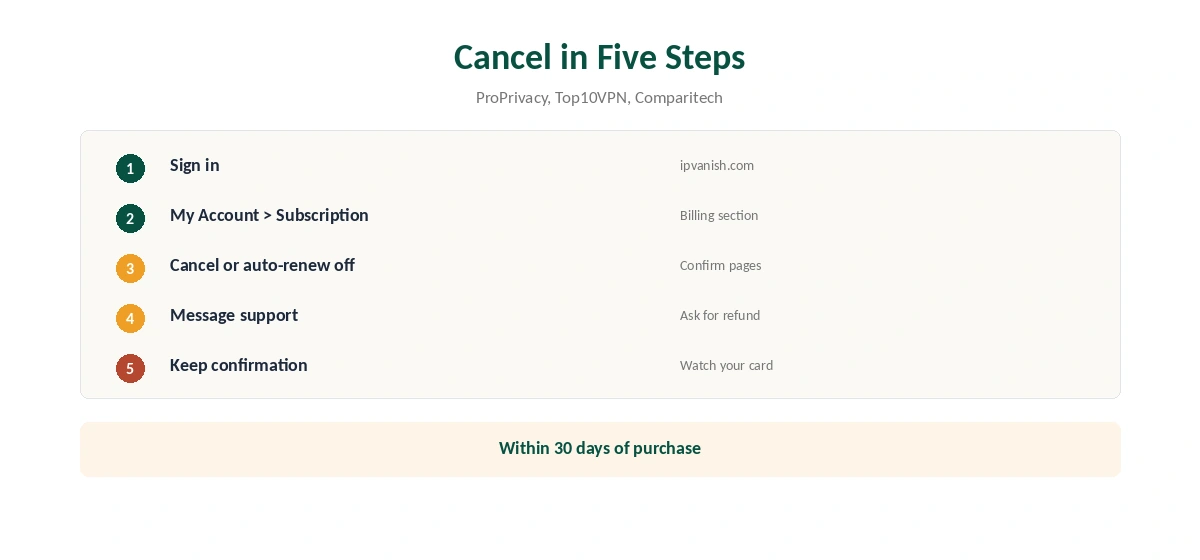
Sign in at ipvanish.com and open My Account, then Subscription. Depending on the version of the page, you will see an auto-renew switch, a Change Plan button leading to Cancel Subscription, or a link that says you wish to cancel, followed by confirmation pages, the guides describe.
Turning off auto-renew stops the next charge; you keep access until the paid period ends, subger notes. Cancelling outright within 30 days of a yearly or two-year purchase is the route to a refund.
Who Gets a Refund
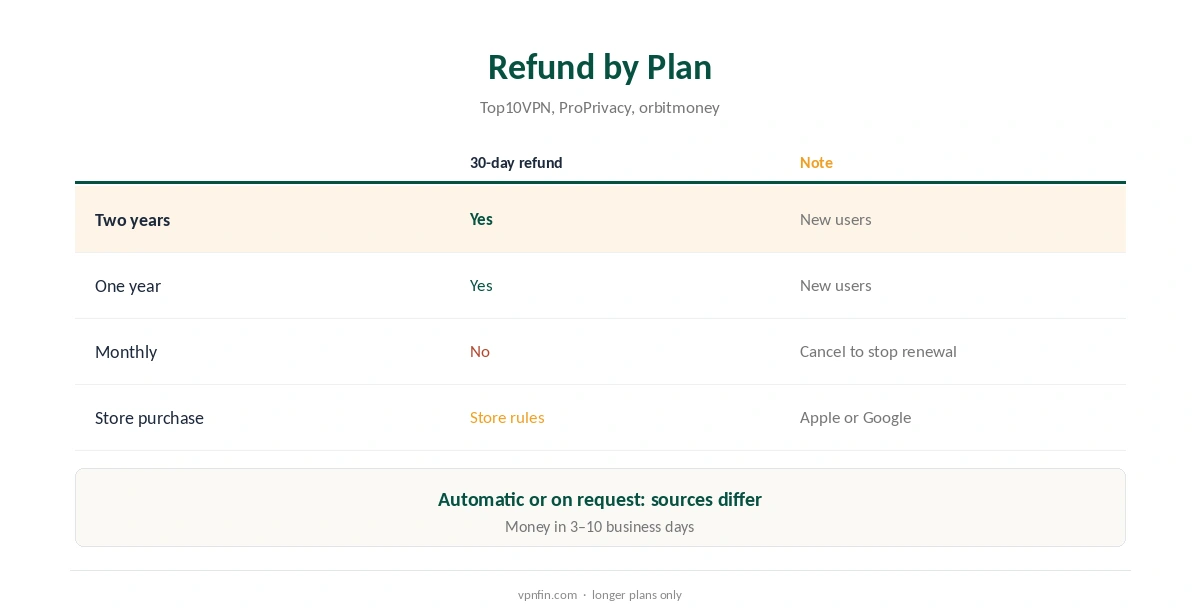
IPVanish’s 30-day money-back guarantee applies to yearly and two-year plans, not monthly ones, Top10VPN and other guides note, and only to new users, ProPrivacy says. Our refund table records the 30-day window. The guarantee covers purchases made directly from IPVanish; store purchases follow Apple’s or Google’s rules, as the store section below explains.
Timing is counted from purchase, so cancel before day 30, not after. Note the purchase date from your receipt email when you sign up, so the deadline is easy to check later.
Automatic or On Request
Top10VPN says IPVanish processes refunds automatically within 10 business days of a qualifying cancellation. SafetyDetectives found cancelling alone did not trigger a refund and had to ask support, after which the money arrived within three business days.
To be safe, cancel and then send a short refund request to support, by live chat or support@ipvanish.com, quoting your account email and purchase date. Keep the confirmation email until the money arrives.
App Store and Google Play
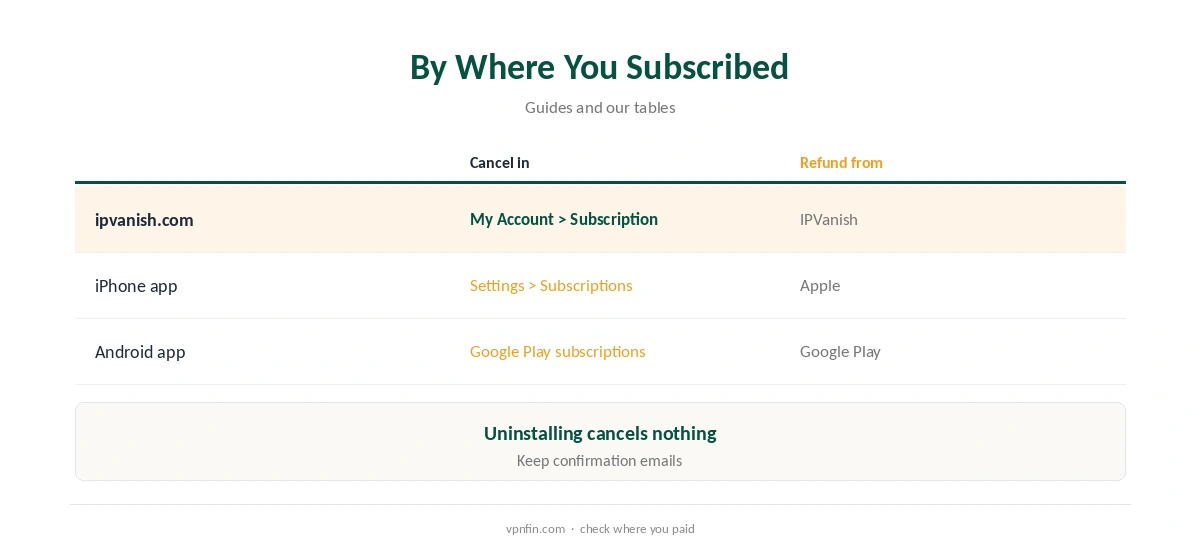
If you subscribed in the iPhone or Android app, IPVanish cannot cancel it for you. On iPhone, open Settings, your name, Subscriptions, choose IPVanish and cancel; on Android, open Google Play, Payments and subscriptions, then Subscriptions.
Refunds for store purchases follow the store’s rules, not IPVanish’s, so request them from Apple or Google directly. Our VPN refund guide explains how store refunds work.
Turn Off Renewal or Cancel Now?
Two options appear in most guides. Turning off renewal stops future charges while you keep using the VPN until the paid period ends. Cancelling outright ends the account, and within 30 days of a yearly purchase it starts the refund, DoNotPay’s guide summarises.
If you might still want the VPN for the rest of a paid year, turn off renewal. If you want your money back, cancel within 30 days and ask support to confirm the refund.
Leaving for Another Provider
Unlimited devices may be what kept you on IPVanish. PIA, Surfshark and TunnelBear also set no device cap, our device table records; Surfshark shares an owner, Nord Security, with NordVPN. Check each provider’s refund window before switching, and keep IPVanish until the new service works on all your devices.
Our PIA vs IPVanish and IPVanish vs TunnelBear pages compare the closest alternatives.
What Uninstalling Does Not Do
Deleting the app from your devices does not cancel the subscription, ProPrivacy and orbitmoney warn. Neither does logging out of the app or letting a device sit unused. Billing continues until you cancel in your account or the store.
If you no longer want the VPN at all, cancel first, then uninstall. Our guide to turning off a VPN on Mac and similar guides cover removing apps cleanly.
Retention Offers and Renewal
IPVanish may offer a discounted renewal when you try to cancel, subger notes. Read the offer’s renewal terms before accepting it. Compare it with the $89.99 a year that plans normally renew at, as VPNOverview lists, before deciding.
If you mainly dislike the renewal price, turning off auto-renew and buying a new promotional term later is an option, though new deals for returning customers are not guaranteed. Our IPVanish price guide covers every plan.
Before You Cancel
If a specific problem is the reason, such as streaming or speed, IPVanish’s live chat may fix it within the refund window. Live chat is available in its apps and on its site, its store listing notes. Note the date you bought, since the 30 days run from purchase. Our guide to IPVanish Free covers the seven-day trial, the 30-day refund and free alternatives.
If you are leaving for another provider, check its refund window too, so you are never without a tested VPN. Our free VPN trial guide explains how refund windows work as trials.
How We Research
This page draws on ProPrivacy’s, Top10VPN’s, Comparitech’s and SafetyDetectives’ IPVanish cancellation guides, orbitmoney, subger, VPNOverview and our refund tables. We cross-checked these sources against each other, and where they conflict or something can’t be verified, we say so in the text rather than guessing. We checked time-sensitive figures, including prices in US dollars, on 8 October 2026. The main source we relied on is Top10VPN’s IPVanish refund guide. Our full approach lives on the About Us page.
Cancelling IPVanish FAQ
In My Account, under Subscription, or in the app store if you subscribed there.
Within 30 days on yearly and two-year plans, for new users.
Top10VPN says so; SafetyDetectives had to ask support.
No; billing continues until you cancel.
No, guides agree the guarantee covers longer plans only.
The Verdict
Cancelling IPVanish takes a few clicks in My Account. For a refund, act within 30 days on a yearly or two-year plan and message support to confirm.