
Disclosure: VPNFin is reader-supported. If you buy a VPN through links on this page, we may earn a commission at no extra cost to you. This never affects our ratings — here’s our full disclosure.
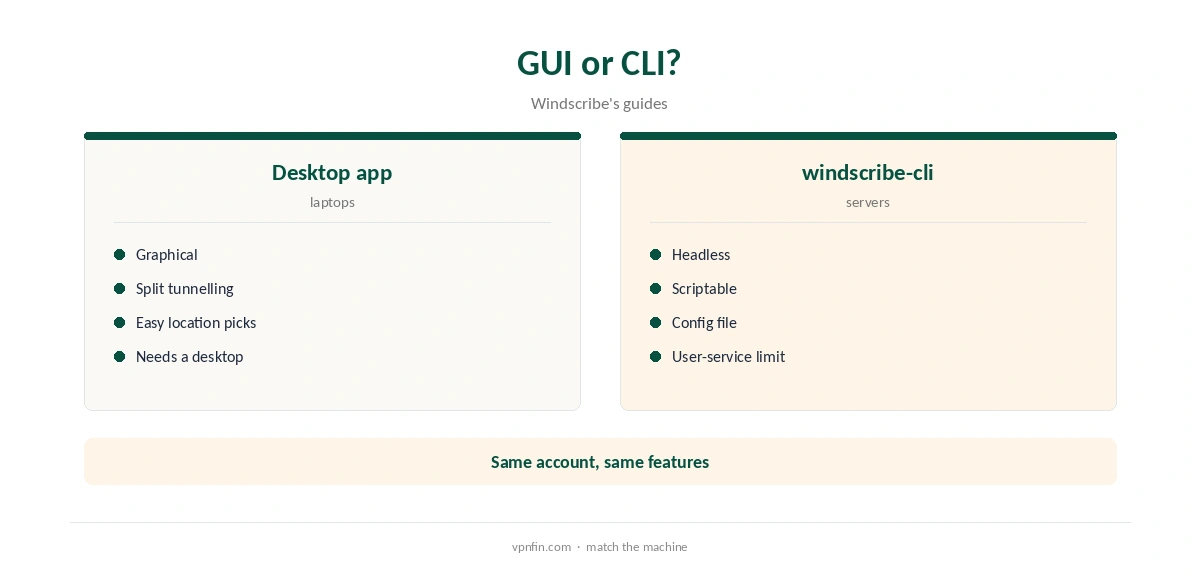
Windscribe for Linux comes in two forms: a desktop app for machines with a graphical environment, and a command-line app, windscribe-cli, for servers and headless machines, Windscribe’s guides explain. The desktop app supports Ubuntu 22.04 or later, Fedora 36 or later, openSUSE Leap 15.6 and Arch with glibc 2.35 or later, and since version 2.23.5 every Linux package is signed with Windscribe’s GPG key. Both support WireGuard, OpenVPN, Stealth and WStunnel.
This guide covers which distributions work, installing each app, the CLI commands that matter, the firewall, split tunnelling and known Linux issues.
Windscribe for Linux: Supported Distributions
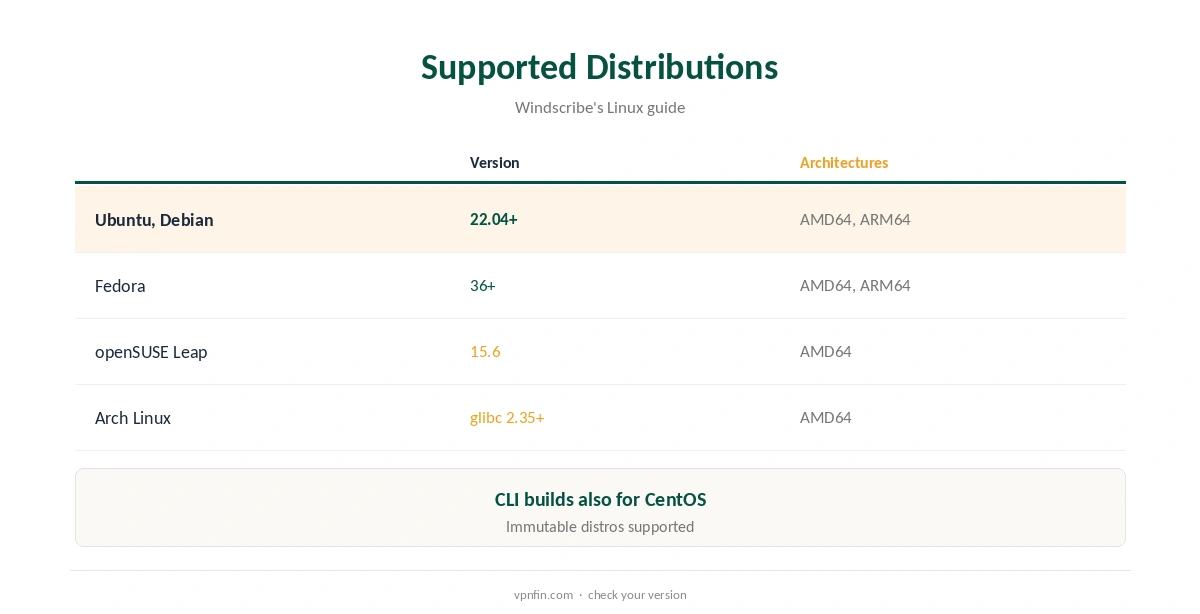
Windscribe’s August 2026 guide lists Ubuntu 22.04 or later, Fedora 36 or later, openSUSE Leap 15.6, Arch Linux with glibc 2.35 or later, and supported immutable distributions for the desktop app. Debian and Ubuntu packages come for 64-bit Intel and ARM, Fedora for both, and Arch for 64-bit Intel.
CLI builds cover Debian, Ubuntu, Fedora, CentOS, Arch and openSUSE, available from the download page. Our Linux VPN guide compares other providers’ Linux support.
Installing the Desktop App
Download the package for your distribution and install it with your package manager: apt for a .deb on Debian or Ubuntu, dnf for the Fedora .rpm, pacman for the Arch package, or zypper on openSUSE, as Windscribe’s guide lists.
Open Windscribe from your applications menu, log in and press the power button. The app turns blue and shows ON when connected, the guide notes. Windscribe signs its packages, so openSUSE users import its key first, or the installer warns.
The Command-Line App
For servers and terminals without a desktop, use windscribe-cli, Windscribe’s July 2026 guide explains; the desktop app cannot run headless. Install it with the Debian or Ubuntu package fetched by curl, or the build for your distribution.
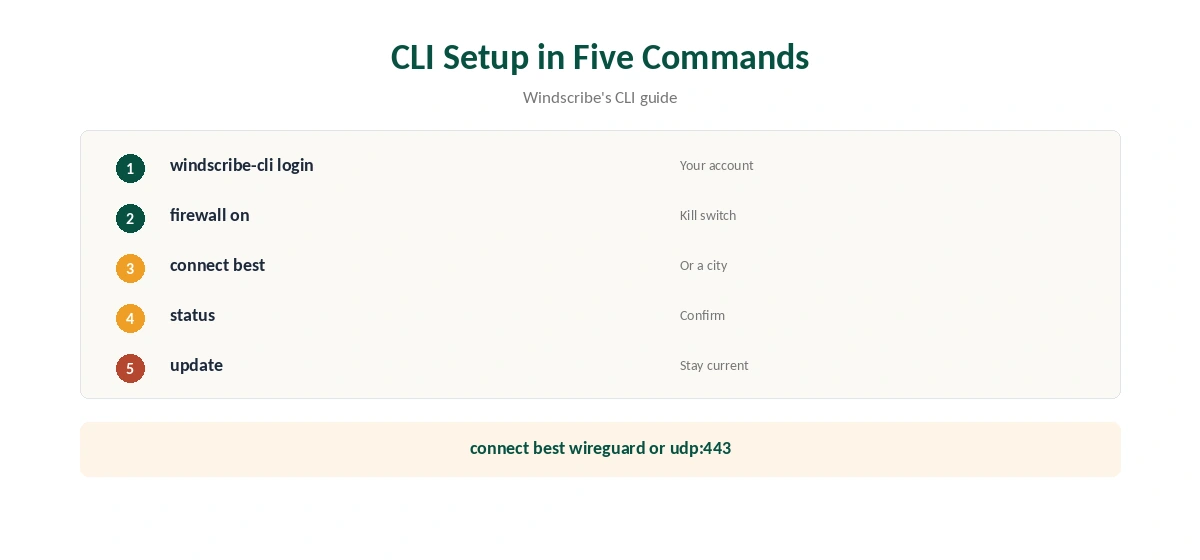
Log in with windscribe-cli login, connect with windscribe-cli connect, and check with windscribe-cli status. windscribe-cli locations lists every server you can reach. You can name a location, such as windscribe-cli connect Toronto, or use connect best for the fastest.
Protocols, Ports and the Firewall
The CLI supports WireGuard, OpenVPN over UDP and TCP, Stealth and WStunnel, and you can add the protocol and port to the connect command, such as connect best udp:443. Stealth helps on networks that block VPNs, and windscribe-cli ports wireguard lists the ports available for a protocol.
Turn the firewall on with windscribe-cli firewall on; it uses Linux’s nftables to block traffic outside the tunnel, Windscribe’s code wiki notes. windscribe-cli logout on logs out while keeping the firewall active. Our kill switch guide explains the protection.
Configuration and Updates
The CLI reads its settings from a configuration file, ~/.config/Windscribe/windscribe_cli.conf, and windscribe-cli preferences reload applies changes. windscribe-cli update keeps it current, and windscribe-cli ip rotate requests a new address.
If something fails, windscribe-cli logs send uploads logs for support. To remove the CLI, use your package manager on the windscribe-cli package and delete the configuration folder, the guide notes.
Split Tunnelling on Linux
The desktop app offers split tunnelling, but picking an app from its list sometimes fails, because the list points to a launcher script rather than the real program, Windscribe’s known-issues page says. It happens most with Firefox on some distributions.
Find the real binary with ps aux, for example /usr/lib/firefox/firefox-bin, and add that path with the plus button in Split Tunneling. Our split tunnelling guide explains the modes.
Free Plan and Privacy on Linux
The free plan works in both Linux apps, with 10 GB a month after confirming an email and servers in 10 countries. Windscribe’s no-logs claim held up when an Athens court dismissed charges against its CEO in April 2025, TechRadar reported.
The audit picture is mixed: Windscribe cites a 2024 PacketLabs infrastructure audit, while Security.org found no no-logs audit. Our Windscribe safety guide covers the record.
Removing Windscribe
Remove the desktop app with your package manager: sudo apt remove windscribe on Debian or Ubuntu, sudo dnf remove windscribe on Fedora, or sudo pacman -R windscribe on Arch, Windscribe’s guide lists.
For the CLI, remove the windscribe-cli package and delete ~/.config/Windscribe. Turn the firewall off before removing, or traffic may stay blocked. Our guide to turning off a VPN on Linux covers leftovers.
Auto-Connect on Servers
For security, the CLI runs as a user service. If no user is logged in, it does not start and will not auto-connect, the known-issues page warns. That matters on servers that reboot unattended. Our guide to Windscribe on Raspberry Pi covers the ARM64 command-line app, step by step.
Plan for it: keep a user session, or check the connection after reboots. The free plan’s 10 GB a month also limits server use, so servers usually need Pro, at $9 a month or $69 a year, our tables record. Our Windscribe Free guide covers the limits.
How We Research
This page draws on Windscribe’s Linux GUI and CLI guides from July and August 2026, its desktop code wiki and known-issues page, and our Windscribe tables. We cross-checked these sources against each other, and where they conflict or something can’t be verified, we say so in the text rather than guessing. We checked time-sensitive figures, including prices in US dollars, on 8 October 2026. The main source we relied on is Windscribe’s Linux CLI guide. Our full approach lives on the About Us page.
Windscribe for Linux FAQ
It offers a desktop app and a command-line app, windscribe-cli.
Ubuntu 22.04+, Fedora 36+, openSUSE Leap 15.6 and Arch with glibc 2.35+.
Use windscribe-cli; the desktop app needs a graphical environment.
windscribe-cli firewall on blocks traffic outside the tunnel.
The CLI runs as a user service and needs a logged-in user.
The Verdict
Windscribe for Linux is well supported, with signed packages, a capable CLI and Stealth. Use windscribe-cli on servers, plan for the user-service limit on auto-connect, and keep packages current.