
Disclosure: VPNFin is reader-supported. If you buy a VPN through links on this page, we may earn a commission at no extra cost to you. This never affects our ratings — here’s our full disclosure.
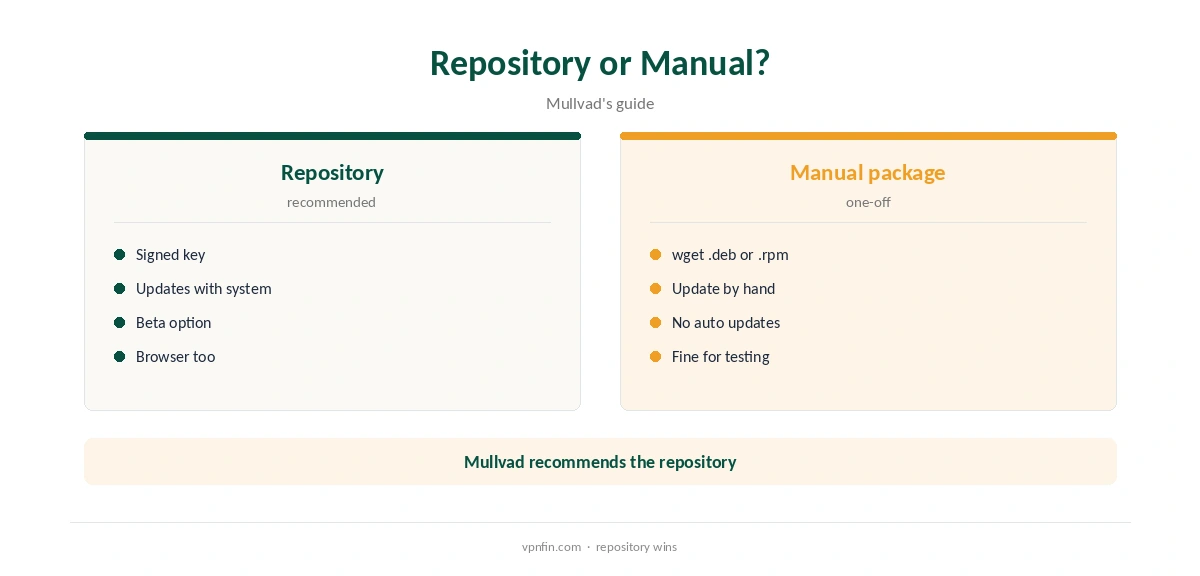
Mullvad Linux support comes through Mullvad’s own package repository for deb and rpm distributions, which Mullvad recommends over manual downloads so updates arrive with your system’s. Its download page lists Ubuntu 24.04 or later, Debian 12 or later and Fedora 43 or later. The app includes a graphical interface, a background service and a command-line tool, mullvad. The same repository offers Mullvad Browser.
This guide covers supported distributions, installing from the repository, the CLI, split tunnelling, Fedora Atomic and the desktop quirks worth knowing.
Supported Distributions
Mullvad’s Linux download page lists Ubuntu 24.04 or later, Debian 12 or later and Fedora 43 or later. Older help pages named earlier releases, so go by the current download page, and update your distribution if it falls below the list.
Mullvad’s code repository notes it tests on the GNOME desktop. On Debian with GNOME, the tray icon needs an extra extension, covered below. Our Linux VPN guide compares other providers’ Linux support.
Installing From the Repository
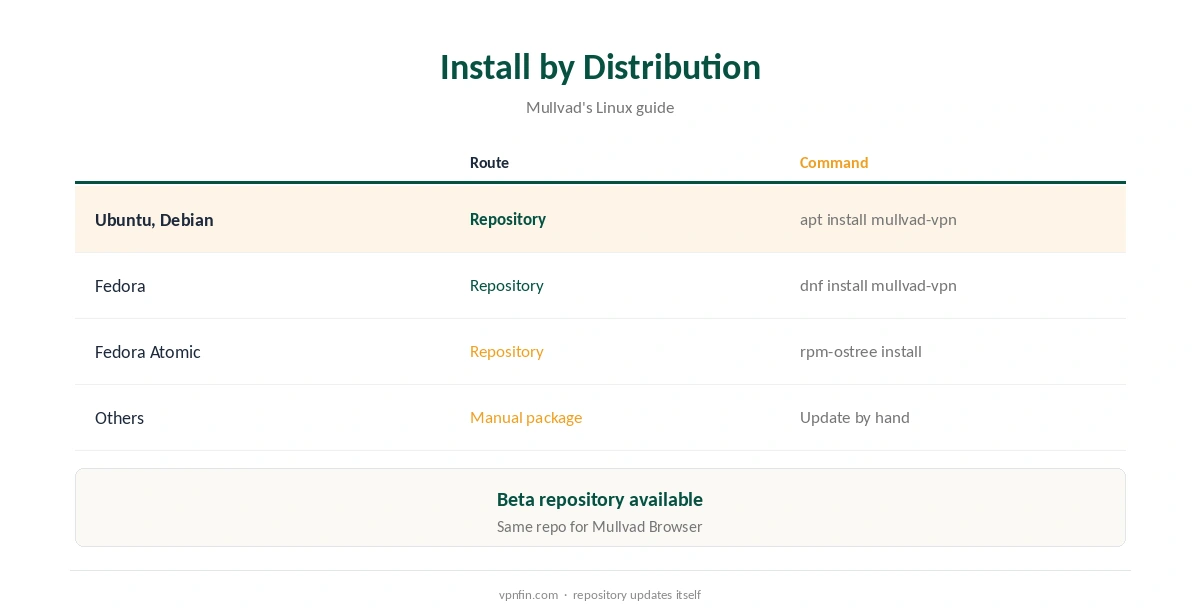
On Ubuntu or Debian, download Mullvad’s signing key into /usr/share/keyrings, add the repository to apt’s sources, then run sudo apt install mullvad-vpn, Mullvad’s guide shows. A beta repository is available if you want new versions early. Install curl first if it is missing, and avoid the Snap version of curl, Mullvad’s browser guide advises.
On Fedora, add the repository with dnf config-manager and run sudo dnf install mullvad-vpn. Updates then arrive with your normal system updates, so you never run an outdated client by accident.
Manual Packages and Fedora Atomic
You can also download the latest .deb or .rpm with wget and install it with apt or dnf, but you will need to update by hand. The files follow a name pattern such as MullvadVPN-YYYY.N_amd64.deb, so check the version before installing. Mullvad recommends the repository instead.
On Fedora Atomic editions, add the repository file to /etc/yum.repos.d and refresh metadata with rpm-ostree refresh-md. Then install with rpm-ostree install mullvad-vpn, Mullvad’s guide lists.
Using the CLI
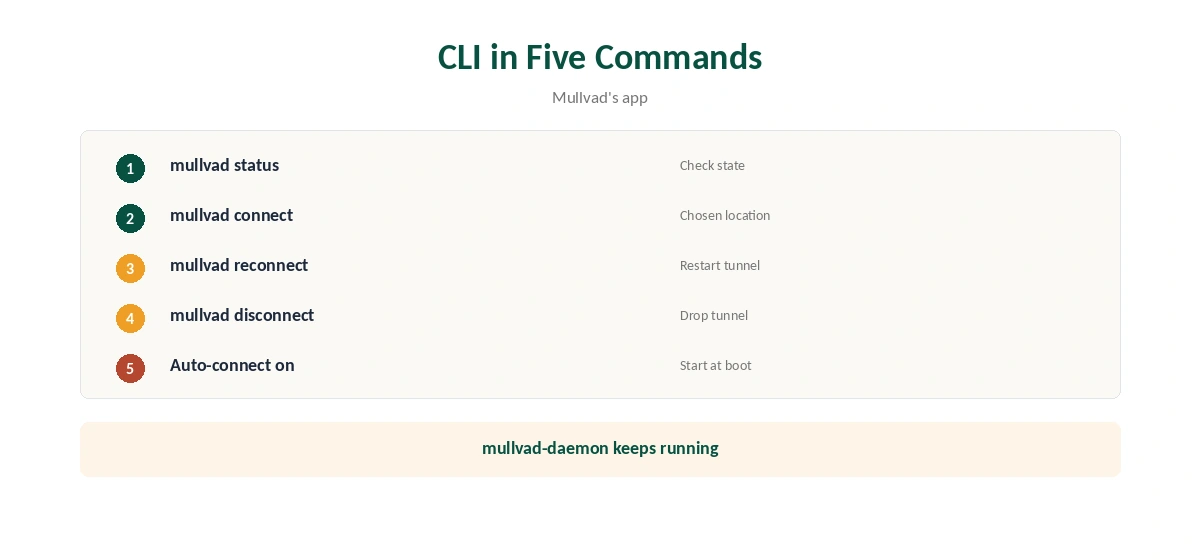
The app ships a command-line tool alongside the GUI. mullvad connect connects to your chosen location, mullvad disconnect drops the tunnel, mullvad reconnect restarts it and mullvad status shows the state.
Auto-connect can be turned on so the tunnel starts at boot, which users report working from the CLI. The background service, mullvad-daemon, keeps running when the GUI is closed, so the tunnel survives closing the window. Run mullvad –help to see every command your version supports, including account and relay settings.
Split Tunnelling on Linux
Mullvad considers split tunnelling stable on all desktop platforms since version 2025.2, its blog said. Excluded apps bypass the tunnel, which helps with local services that block VPN addresses. Set it in the app’s settings, or run mullvad split-tunnel in a terminal for the command-line options.
Our split tunnelling guide explains when excluding an app makes sense and when it weakens privacy.
Privacy Features on Linux
Mullvad’s repository lists quantum-resistant tunnels, DAITA and WireGuard multihop on Linux as on every other platform, so a Linux machine gets the full toolkit. Mullvad’s app documentation also describes an always-on kill switch built into the app.
Mullvad has more than 10 audits in our table, and police who visited its office with a warrant left with nothing. Our Mullvad cost guide covers what €5 a month buys.
Desktop Quirks
On Debian with GNOME, the Mullvad padlock tray icon needs the AppIndicator and KStatusNotifierItem Support extension, Mullvad’s guide notes. Install it from GNOME’s extensions site. Without it, the app runs but its icon does not appear. For unusual setups, Mullvad’s code repository documents options such as forcing the userspace WireGuard implementation.
Mullvad has dropped OpenVPN and runs WireGuard only since January 2026, our tables record, so older OpenVPN configs from Mullvad no longer apply; generate WireGuard configs from your account instead if you need them for a router.
Mullvad Browser on Linux
If you added the Mullvad repository for the app, installing Mullvad Browser is one more command: sudo apt install mullvad-browser or sudo dnf install mullvad-browser, Mullvad’s browser guide says, on Ubuntu, Debian or Fedora. An alpha build is available as mullvad-browser-alpha. For a WireGuard profile that survives updates, see our page on Mullvad on Steam Deck.
The browser ships with Mullvad’s extension, which checks for leaks and adds a browser proxy. Our Mullvad Firefox guide explains the extension.
Price and Removal
Mullvad costs a flat €5 a month for five devices, with a 14-day refund on card-style payments; cash and cryptocurrency are not refunded, its terms say. A Linux desktop and a server count as two devices. A router running Mullvad’s WireGuard configuration counts as one and can cover other machines on the same network. Our Mullvad on Raspberry Pi page goes into the ARM64 app or a WireGuard file.
To remove it, use apt or dnf to remove mullvad-vpn. Our guide to turning off a VPN on Linux covers leftover settings.
How We Research
This page draws on Mullvad’s Linux installation guide and download page, its Mullvad Browser guide, its code repository and blog, a GitHub issue on CLI behaviour and our Mullvad tables. We cross-checked these sources against each other, and where they conflict or something can’t be verified, we say so in the text rather than guessing. We checked time-sensitive figures, including prices in US dollars, on 8 October 2026. The main source we relied on is Mullvad’s Linux guide. Our full approach lives on the About Us page.
Mullvad Linux FAQ
Ubuntu 24.04+, Debian 12+ and Fedora 43+, per its download page.
From Mullvad’s repository with apt or dnf, as Mullvad recommends.
Yes: mullvad connect, disconnect, reconnect and status.
Mullvad calls it stable on all desktops since 2025.2.
Install the GNOME AppIndicator extension.
The Verdict
Mullvad Linux support is solid: a signed repository, GUI and CLI, and Mullvad Browser alongside. Install from the repository so updates keep coming.