
Disclosure: VPNFin is reader-supported. If you buy a VPN through links on this page, we may earn a commission at no extra cost to you. This never affects our ratings — here’s our full disclosure.
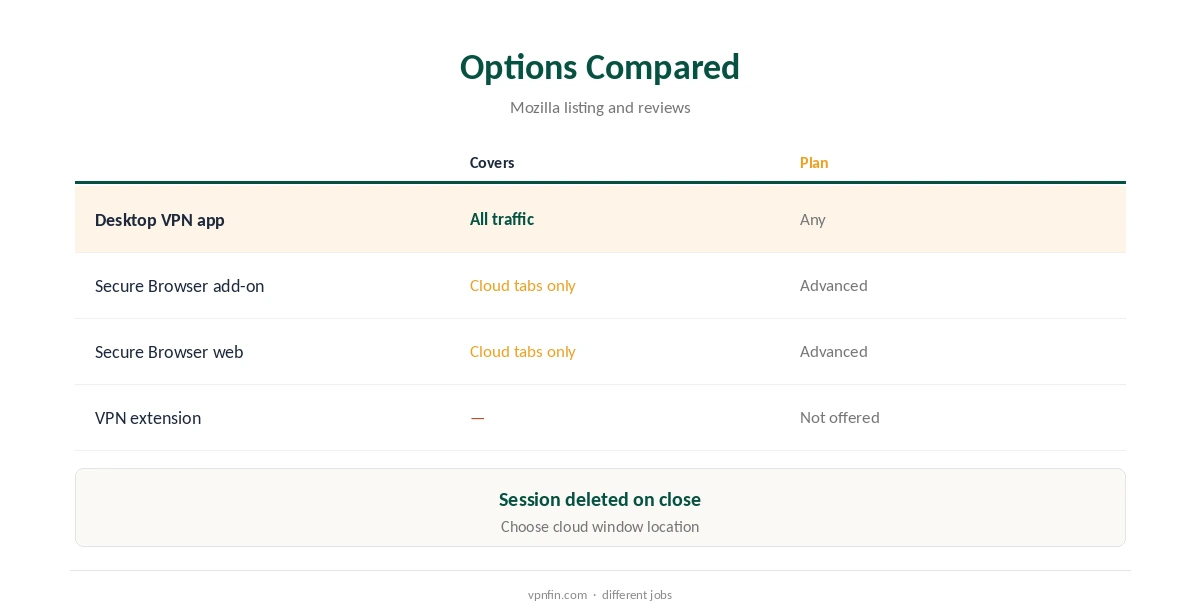
IPVanish Firefox support comes in two forms that do different jobs. The IPVanish Secure Browser add-on, listed on Mozilla’s add-ons site, opens a virtual browser in IPVanish’s cloud and shows it to you as an interactive video feed; it is not a VPN. To route Firefox itself through IPVanish, use the desktop app on Windows, macOS or Linux, which covers every browser on the computer.
This guide covers what Secure Browser does, who gets it, setup, its limits, and using the VPN app with Firefox.
What the Firefox Add-On Is
When you use the IPVanish Secure Browser add-on, IPVanish opens a browser window for you on its servers, and you interact with it through a video feed, Mozilla’s listing explains. You can choose where that cloud window opens, the listing adds.
Your device keeps no browsing history, cookies or site data, and IPVanish deletes the session from its server when you close the window, the listing says. It also clears DNS data after each session.
What It Is Not
Secure Browser does not route Firefox’s normal traffic through a VPN. Tabs outside the Secure Browser window still use your real address, and other apps on the computer carry on as before.
Cybernews’ Chrome testing confirmed IPVanish offers no VPN browser extension, only Secure Browser. Our VPN vs proxy guide explains why browser tools cover less than a full VPN.
Who Gets Secure Browser
IPVanish’s Advanced plan includes Secure Browser, TechRadar notes, alongside ad, tracker and malware protection. You activate it in your IPVanish account portal before first use, which links it to your subscription.
Besides the Firefox add-on, it is available as extensions for Chrome and Edge, inside the Windows and Mac apps, and through a web address for browsers without an add-on.
IPVanish Firefox Secure Browser Setup
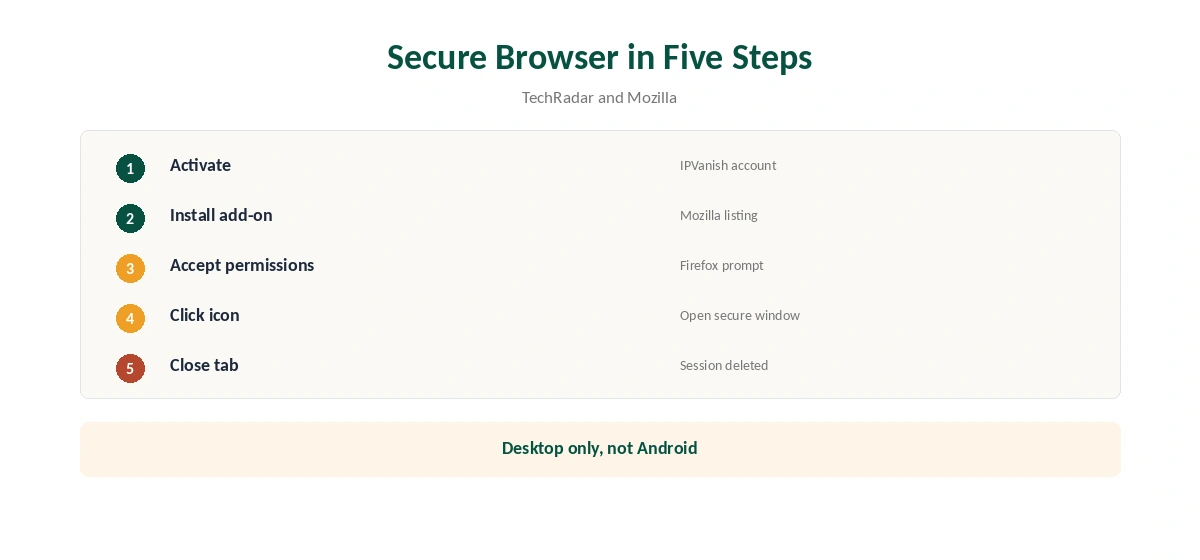
Activate Secure Browser in your IPVanish account, then install the add-on from Mozilla’s add-ons site and accept its permissions. Click the IPVanish icon in the toolbar to open a secure window.
A 2026 review found pages load a little slower and text input needs more care, with a limit of three secure tabs. To end a session, close the tab or log out from the add-on, and the cloud session is deleted.
Permissions and Firefox on Android
The add-on asks for sensitive permissions, as add-on statistics sites flag, which is normal for a tool that manages browser windows. Install it only from Mozilla’s official listing, never from a third-party site.
It is not available for Firefox on Android, the same statistics show. On Android, use the IPVanish app instead, which protects Firefox and every other app on the phone. Our IPVanish for Android guide covers it.
Using the VPN App With Firefox
For full protection, install IPVanish’s desktop app and connect; Firefox then uses the tunnel along with everything else. On Linux, IPVanish has no official app, so use its OpenVPN files with NetworkManager.
If Firefox shows your real location with the VPN on, turn off WebRTC leaks in Firefox’s settings and check DNS. Our IPVanish Windows guide covers the app.
Price, Plans and Privacy
IPVanish sells Essential and Advanced plans; Secure Browser comes with Advanced, TechRadar notes. Plans start at $57.22 for the first 24 months and renew at $89.99 a year, VPNOverview lists, with no device limit.
Yearly website plans carry a 30-day refund. Our IPVanish price guide compares the tiers.
IPVanish has two audits in our table, by Leviathan and Schellman, owns its servers and is based in the US; Ziff Davis owns it. Secure Browser adds isolation on top of that, not a separate privacy guarantee.
Our NordVPN vs IPVanish page weighs its record against a rival.
Which to Use
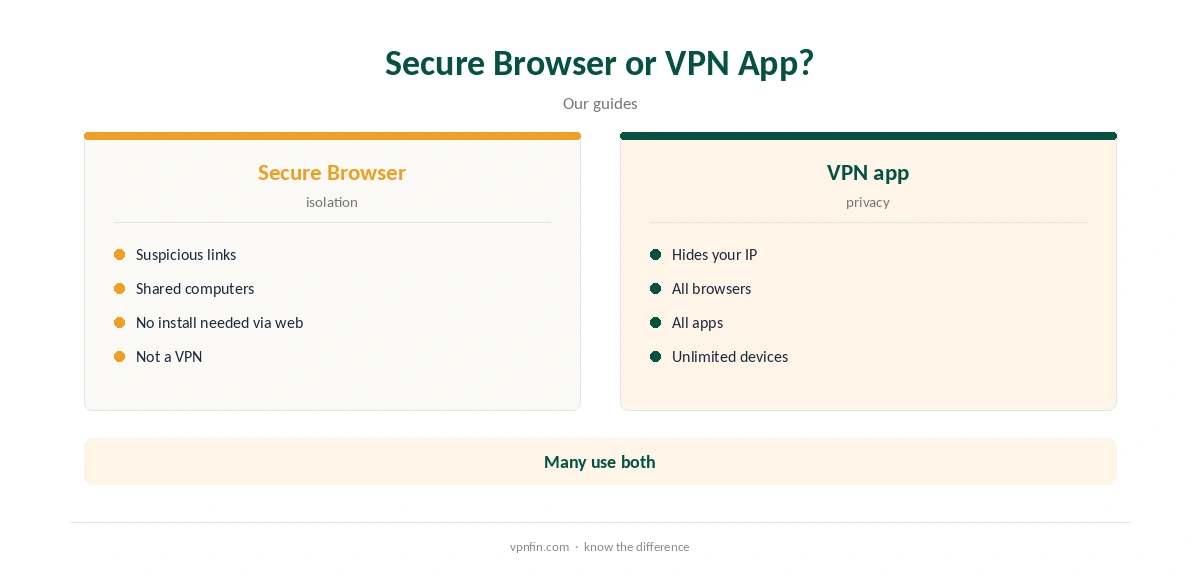
Use the VPN app for privacy across Firefox and the whole computer, every day. Use Secure Browser to open a suspicious link or browse on a shared computer without leaving traces, especially where you cannot install apps or change system settings.
Mullvad and NordVPN offer Firefox add-ons with different designs and purposes. Our Mullvad Firefox guide compares a different approach.
Without Installing Anything
If you cannot install add-ons, for example on a work computer, TechRadar notes Secure Browser also runs from a web address, securebrowser.ipvanish.com, in any browser. You sign in and browse inside the cloud window.
That suits shared or borrowed computers where you want no traces left behind, though it still is not a VPN and hides only the cloud session.
Checking Firefox Is Protected
With the IPVanish app connected, visit an IP check site in Firefox and confirm the location matches the server. Then test for WebRTC and DNS leaks, which can reveal your real address even with a VPN on.
Our WebRTC leak guide explains how to block that leak in Firefox.
How We Research
This page draws on IPVanish Secure Browser’s Mozilla listing, firefox-stats, TechRadar’s Secure Browser guide, a 2026 Secure Browser review, Cybernews’ Chrome VPN tests and our IPVanish tables. We cross-checked these sources against each other, and where they conflict or something can’t be verified, we say so in the text rather than guessing. We checked time-sensitive figures, including prices in US dollars, on 8 October 2026. The main source we relied on is the Mozilla add-on listing. Our full approach lives on the About Us page.
IPVanish Firefox FAQ
No; its Firefox add-on is Secure Browser, a cloud browser.
Runs your browsing in a cloud window and streams it to you.
The Advanced plan, TechRadar notes.
No; use the IPVanish Android app.
Use the desktop app, which covers every browser.
The Verdict
IPVanish Firefox users get Secure Browser for isolated browsing and the desktop app for real VPN protection. Do not mistake one for the other.