
Disclosure: VPNFin is reader-supported. If you buy a VPN through links on this page, we may earn a commission at no extra cost to you. This never affects our ratings — here’s our full disclosure.
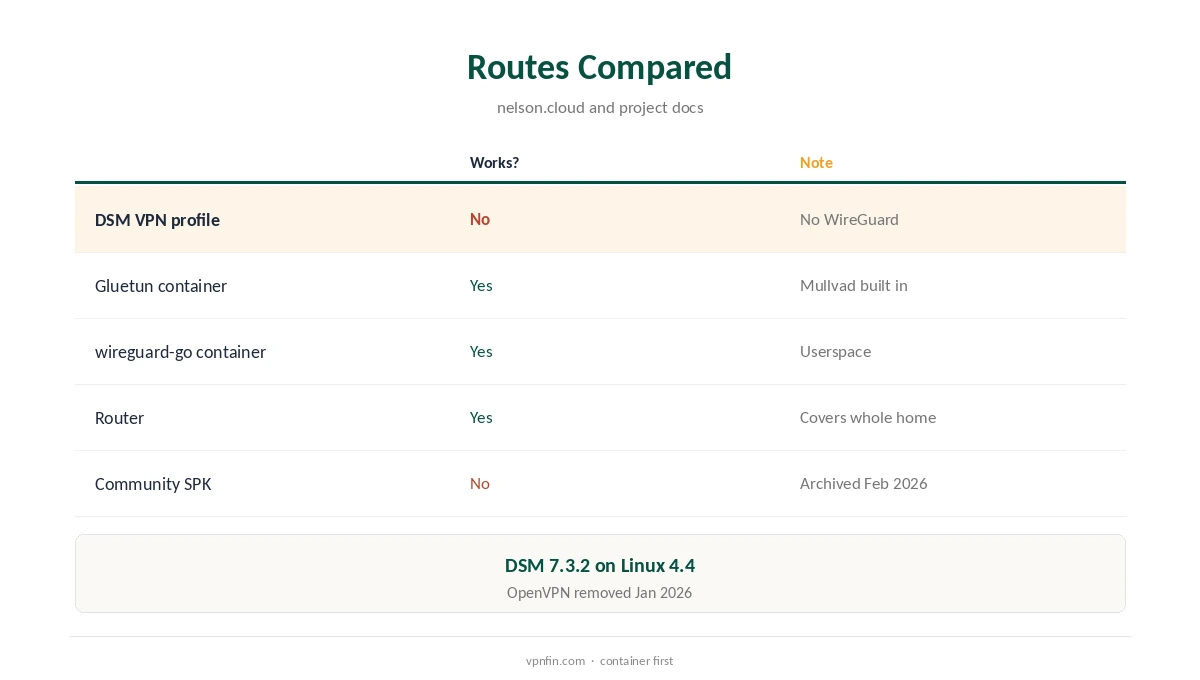
A Mullvad Synology setup cannot use DSM’s built-in VPN profiles. Mullvad has run on WireGuard only since January 2026, and DSM’s VPN client does not support WireGuard. DSM 7.3.2 still runs on a Linux 4.4 kernel without it, a 2026 guide explains. The working route is Container Manager with Gluetun, a VPN container that supports Mullvad in software, with other containers sent through it.
This guide covers why DSM falls short, the Gluetun setup, routing apps through it, alternatives and limits.
Why DSM’s VPN Client Will Not Work
DSM’s VPN profiles handle OpenVPN, which Mullvad removed on 15 January 2026. The nelson.cloud guide sees no sign that Synology will add WireGuard the way it supports OpenVPN. The linuxserver WireGuard image fails because DSM’s kernel lacks the module.
Its maintainer archived an older community WireGuard package for Synology in February 2026, with releases only for DSM 6. It is not a current option. Our Mullvad OpenVPN guide covers the protocol change.
The Gluetun Route
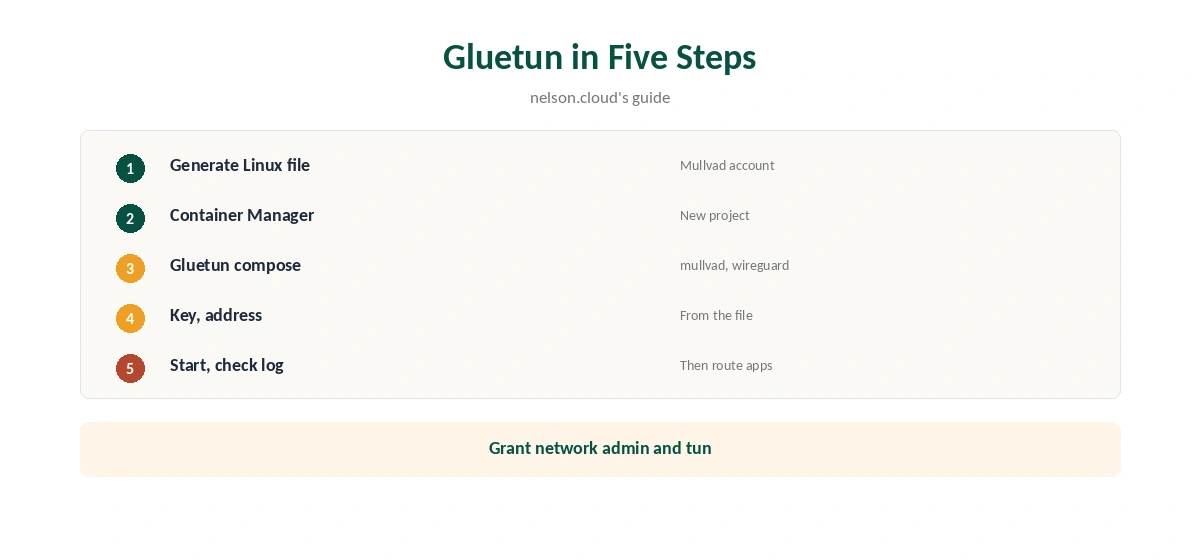
Gluetun runs WireGuard in software, so it works without kernel support, and it has Mullvad built in as a provider. Generate a Linux WireGuard file in your Mullvad account and take the private key and address from it, the nelson.cloud guide shows.
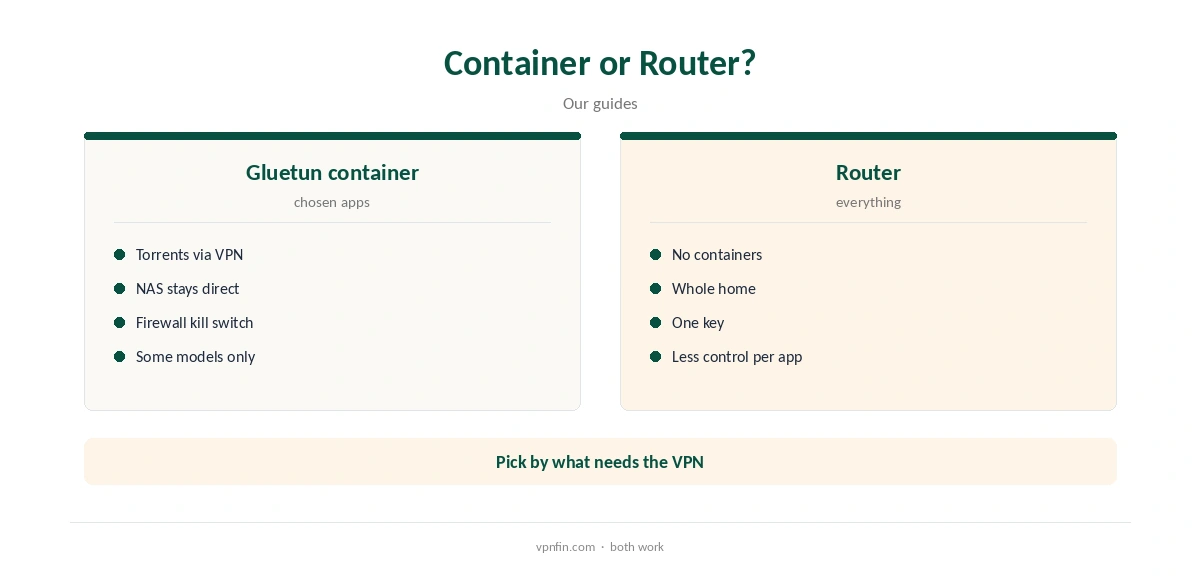
Container Manager is available only on some Synology models, Cloudzat notes, so check yours first in Package Center.
Mullvad Synology Setup With Gluetun
In Container Manager, create a project from a compose file for qmcgaw/gluetun, and set the provider to mullvad and the type to wireguard. Add your WireGuard private key and address, and grant the container network admin rights and the tun device.
Start the project and check the container log for a successful connection message within a minute or so. Choose a server city with Gluetun’s server settings if you want a particular Mullvad location.
Routing Apps Through Gluetun
Set another container, such as qBittorrent, to use Gluetun’s network. Its traffic then goes through Mullvad while the rest of the NAS stays direct. You publish the app’s web interface ports on the Gluetun container instead of the app’s own.
Gluetun’s firewall blocks traffic outside the tunnel, acting as a kill switch for the routed apps. Our Mullvad torrenting guide explains the lack of port forwarding.
Checking and Updating It
Gluetun’s log shows when the tunnel comes up and reports the public address it sees. Compare that with your normal address, and open a routed app to confirm it connects only while Gluetun runs.
Stop the Gluetun container briefly as a test: routed apps should lose their connection rather than fall back to your home line.
Pull a new Gluetun image now and then and recreate the project, since provider server lists and fixes arrive in updates. Keep your compose file and WireGuard key in a backed-up folder.
If you remove that key in your Mullvad account, generate a new file and update the private key and address in the compose file.
Known Problems
Some users report WireGuard in Gluetun being fussier on DSM than OpenVPN once was, a 2026 discussion shows. Routing or firewall rules can fail to apply. Check the logs, and make sure the container has network admin rights.
Another report traced DNS leaks to a DNS service on the same host overriding Gluetun’s resolver. Set Gluetun’s DNS explicitly and test.
Other Routes
A userspace WireGuard container, such as docker-wireguard-go, can also run a Mullvad file on DSM 7. A router running Mullvad’s WireGuard file covers the NAS and everything else without containers.
Our Mullvad router guide covers that route, and our Synology VPN guide compares providers that still work in DSM’s own client.
Keys, Price and Privacy
The Gluetun container uses one of Mullvad’s five WireGuard keys, leaving four for phones, laptops and a router. Mullvad costs a flat €5 a month, with an account number instead of an email, and has more than 10 audits in our table.
Our Mullvad cost guide covers payment methods.
Which Apps to Route
Gluetun suits apps that need privacy on their own, such as a torrent client or an indexer, Cloudzat notes. Backups and cloud sync stay on your normal connection. Each routed app joins Gluetun’s network rather than having its own network connection.
Mullvad offers no port forwarding, so seeding from the NAS will be slower than with providers that do, such as Proton or PIA.
Models Without Container Manager
On Synology models that cannot run containers, Mullvad cannot run on the NAS at all. A router running Mullvad’s WireGuard file is then the way to cover it, along with every other device on the network.
Alternatively, choose a provider that still supports OpenVPN for DSM’s own client, such as NordVPN or ExpressVPN, and keep Mullvad for your other devices.
How We Research
This page draws on nelson.cloud’s 2026 guide to WireGuard on DSM, Gluetun project discussions, the archived synology-wireguard project, docker-wireguard-go, Cloudzat’s Synology comparison and our Mullvad tables. We cross-checked these sources against each other, and where they conflict or something can’t be verified, we say so in the text rather than guessing. We checked time-sensitive figures, including prices in US dollars, on 8 October 2026. The main source we relied on is nelson.cloud’s DSM WireGuard guide. Our full approach lives on the About Us page.
Mullvad Synology FAQ
No; DSM lacks WireGuard and Mullvad dropped OpenVPN.
Run it in a Gluetun container through Container Manager.
No; Container Manager is available only on some models.
Its firewall blocks traffic outside the tunnel.
A router running Mullvad’s WireGuard file.
The Verdict
A Mullvad Synology setup needs a container, because DSM’s VPN client cannot run WireGuard. Gluetun is the established route; a router is the simpler alternative.