
Disclosure: VPNFin is reader-supported. If you buy a VPN through links on this page, we may earn a commission at no extra cost to you. This never affects our ratings — here’s our full disclosure.
A Synology NAS can take part in a VPN in two opposite ways, and most guides blur them together. As a server, it lets you reach your files from outside the house. As a client, it sends its own traffic, such as downloads, out through a commercial VPN. Each uses a different part of DSM and solves a different problem.
Both have limits that Synology documents but rarely puts on the front page. Neither side supports WireGuard natively, the client connects to one server at a time, and there is no kill switch. This guide takes each role in turn, using Synology’s own help pages, and then explains when neither is the right tool.
Synology VPN: The Short Answer
To reach your NAS from outside, use the VPN Server package. It supports OpenVPN, L2TP/IPSec and PPTP, and needs a port forwarded on your router. You do not need a commercial VPN for this.
To hide the NAS’s own traffic, use DSM’s built-in VPN client with a provider’s OpenVPN profile. It routes everything the NAS sends, not just one app, and it has no kill switch.
WireGuard is not built in either way. DSM’s kernel lacks the module, so faster protocols such as NordLynx need a container instead. Our WireGuard and OpenVPN comparison explains the difference, and our speed guide what it costs you.
Server or Client: Which Job Do You Need?
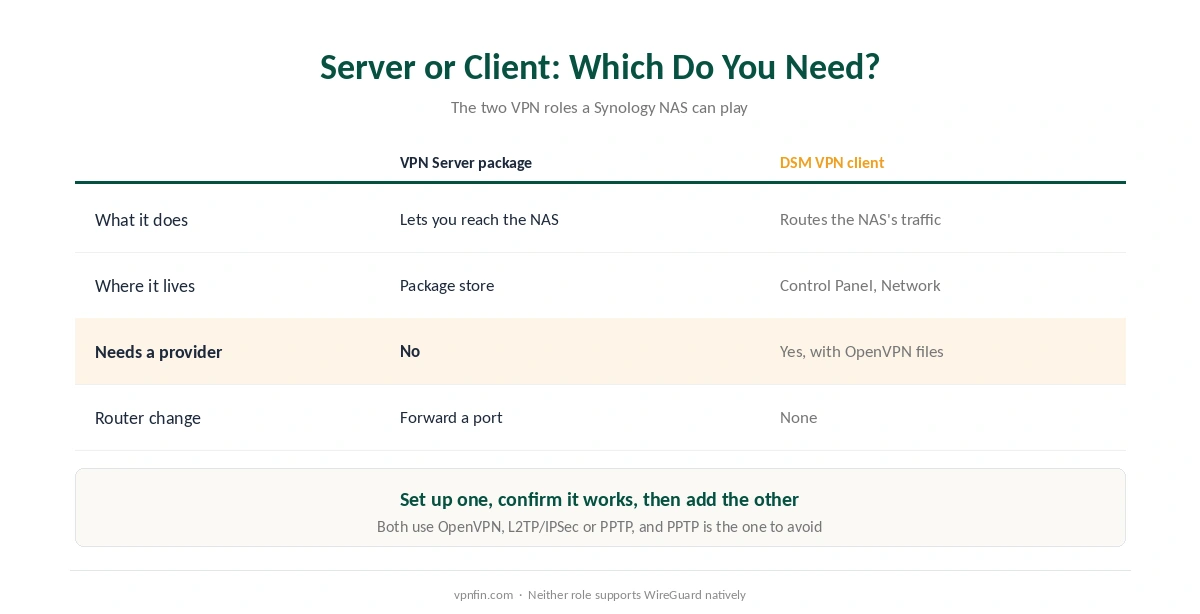
The server role brings you in. You install VPN Server, forward a port, and connect from your phone or laptop as if you were at home. Your files never leave the NAS; you simply reach them securely.
The client role sends the NAS out. You create a VPN profile in Control Panel, and from then on the NAS’s traffic to the internet appears to come from the provider’s server. This is what people want for Download Station, torrent clients and cloud backups.
They can run together, but each changes how the NAS talks to the network, so set up one, confirm it works, and only then add the other.
Using Your NAS as a VPN Server
Install VPN Server from Synology’s package store. Synology’s guide lists three protocols: PPTP, OpenVPN and L2TP/IPSec. Only administrators can set it up, and Synology notes that running it affects the NAS’s network performance.
Choose OpenVPN or L2TP/IPSec, not PPTP. PPTP is kept for compatibility with old clients, and it is widely regarded as insecure. For OpenVPN, VPN Server exports a zip file containing the client configuration and a short instruction file, which you then import into the OpenVPN app on each device.
Three things outside DSM must be in place. The NAS needs a fixed address on your home network. Your router must forward the VPN port to it, by default UDP 1194 for OpenVPN. And if your home’s public address changes, you need a dynamic DNS name so your devices can find it. Our router guide covers port forwarding in general.
⚠️ Forwarding a port exposes the NAS to the internet on that port. Keep DSM updated, use strong passwords with two-factor sign-in, and close the port again if you stop using the server.
Using Your NAS as a VPN Client
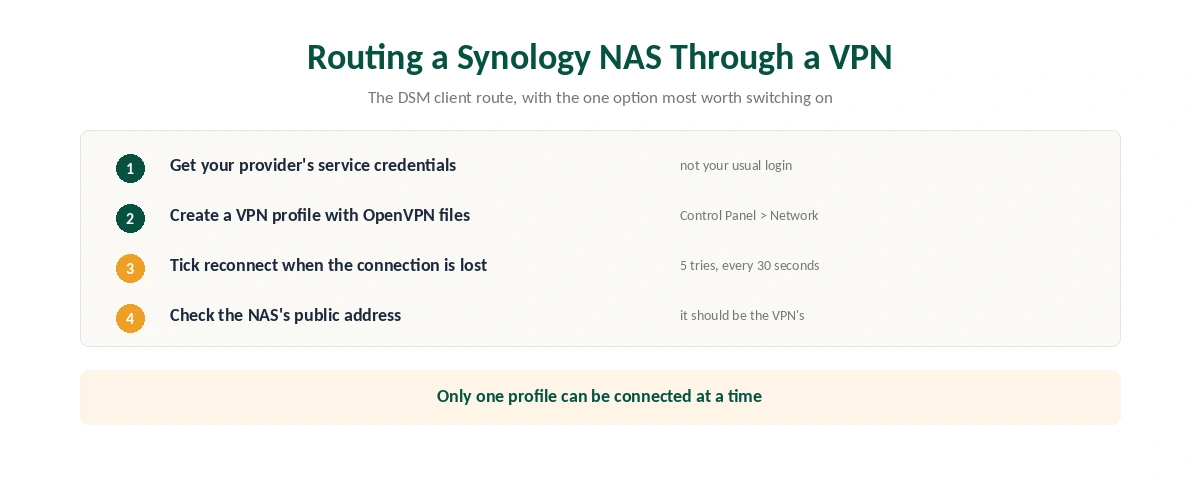
Go to Control Panel, then Network, then Network Interface, and choose Create, then Create VPN profile. Synology’s guide lists three connection types: PPTP, OpenVPN and L2TP/IPSec.
Use your provider’s OpenVPN files. Synology notes that DSM connects only to OpenVPN servers using tun-style, layer-3 tunnels, which is what the major providers publish. NordVPN and Surfshark both document OpenVPN setups for Synology. Both also need the separate service credentials from your account dashboard rather than your usual login.
Only one profile connects at a time. You can save several, one per country, and switch between them, but DSM will not run two at once.
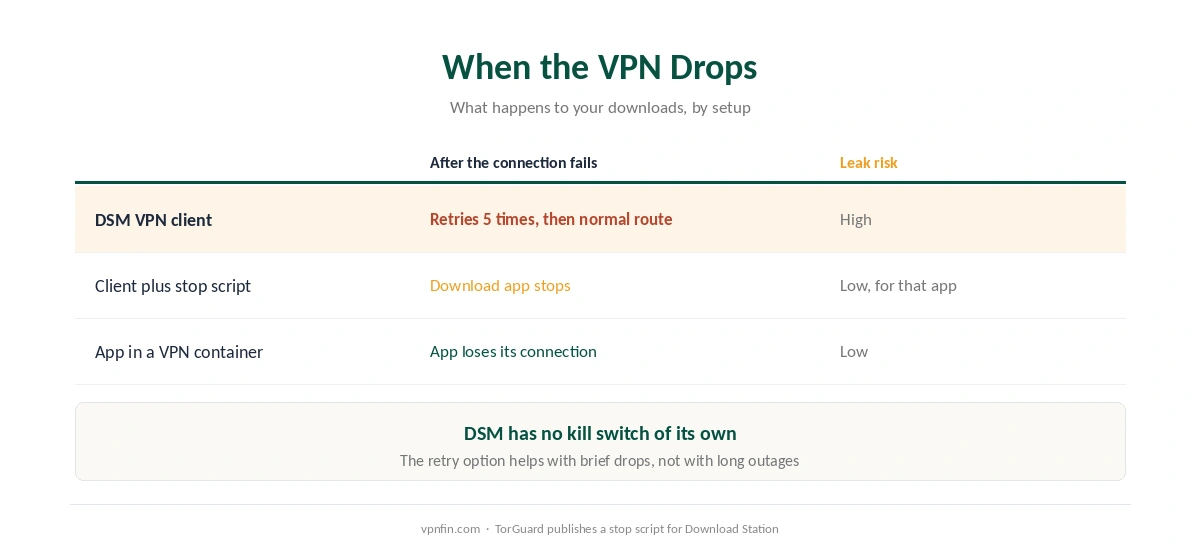
Turn on the reconnect option. If the connection drops, Synology’s guide says DSM tries to reconnect five times, once every 30 seconds. After that it stops trying.
Then confirm it worked. Check that traffic leaving the NAS now shows the VPN server’s address rather than your own, for example with an IP-check torrent in your download client. Our guide to checking a VPN covers the tests worth running.
The Missing Kill Switch
DSM has no setting that blocks the NAS’s traffic when the VPN drops. Once the five reconnect attempts fail, traffic goes out through your normal connection instead. Our kill switch guide explains why that matters for downloads in particular.
Some providers publish their own workaround. TorGuard’s Synology guide, for example, includes a script that stops Download Station whenever the VPN interface disappears and restarts it when the tunnel returns. That is a reasonable approach, though it protects only the one app it watches.
The container route solves it more cleanly. Running your download client inside a VPN container, such as the widely used Gluetun, ties the app to the tunnel: if the VPN fails, the app loses its connection rather than falling back. It also leaves the rest of the NAS on your normal connection, which is a form of split tunnelling.
Why There Is No WireGuard
Users have asked Synology for WireGuard since at least 2020, according to threads on its own community forum. It has not arrived, because DSM runs an older Linux kernel that does not include the WireGuard module.
The workarounds carry their own risk. The best-known third-party package, runfalk’s synology-wireguard, was archived in February 2026 and its author now calls it unmaintained. A newer approach runs wireguard-go, which needs no kernel module, inside Docker; its author reports it working on a DS218+ with DSM 7.3.
⚠️ Installing kernel packages from unknown sources on a device that holds your backups is a serious trade. A container that stays inside Docker is the safer experiment, and OpenVPN remains the supported option.
Port Forwarding for Downloads
If your NAS seeds torrents through a VPN, incoming connections need the provider to forward a port to you. Many providers do not. Cloudzat notes that Surfshark offers no VPN-side port forwarding, and NordVPN does not offer it either.
Among providers we cover, Private Internet Access includes it, as our PIA review records, and our torrenting guide lists the others. Without it, downloads still work, though with fewer peers.
Which VPN for a Synology NAS
For the client role, any provider with standard OpenVPN files works. NordVPN is a sensible default if you already use it elsewhere, and a NAS counts as one of its ten devices. Our NordVPN review covers it in full.
Surfshark suits a household of many devices, since it has no device limit, but it lacks port forwarding for seeding. It belongs to the same parent as NordVPN, Nord Security, and our Surfshark review has the rest.
For the server role, no subscription is needed at all. A fixed external address can help, and our dedicated IP guide explains when paying for one makes sense. Our multi-device guide compares limits if the NAS joins a crowded account.
How We Research
The DSM steps, protocol lists and reconnect behaviour come from Synology’s official help pages for the VPN client and VPN Server, read on 25 September 2026. The WireGuard history comes from Synology’s community forum and from the two GitHub projects named above. TorGuard’s support article supplied the kill-switch script, and Cloudzat the note on Surfshark and port forwarding. Device limits and port-forwarding support come from our own tables and reviews. We did not configure a Synology NAS ourselves. Our full approach lives on the About Us page.
Synology VPN FAQ
Yes. DSM has a built-in VPN client under Control Panel, Network, Network Interface. It supports PPTP, OpenVPN and L2TP/IPSec, connects one profile at a time, and routes all of the NAS’s outgoing traffic through the VPN.
Not natively. DSM’s kernel lacks the WireGuard module, so neither the VPN client nor VPN Server offers it. Third-party packages and Docker containers exist, but OpenVPN is the supported option.
No. It can retry the connection five times, once every 30 seconds, and then traffic falls back to your normal connection. A VPN container or a script that stops the download app is the usual workaround.
No. The VPN Server package turns the NAS into its own VPN server. You forward a port on your router and connect from your devices using the exported configuration.
OpenVPN for both roles where possible, or L2TP/IPSec if a device cannot run OpenVPN. Avoid PPTP, which Synology keeps for compatibility and which is widely regarded as insecure.
The Verdict
Decide which job you need before touching DSM. VPN Server lets you in from outside and needs no subscription. The VPN client sends the NAS out through a provider, one profile at a time, with no kill switch and no WireGuard.
In practice that means OpenVPN on both sides, the reconnect option switched on, and a container if downloads must never leak. It is less elegant than a VPN app on a phone, yet it is the setup Synology actually supports.