
Disclosure: VPNFin is reader-supported. If you buy a VPN through links on this page, we may earn a commission at no extra cost to you. This never affects our ratings — here’s our full disclosure.
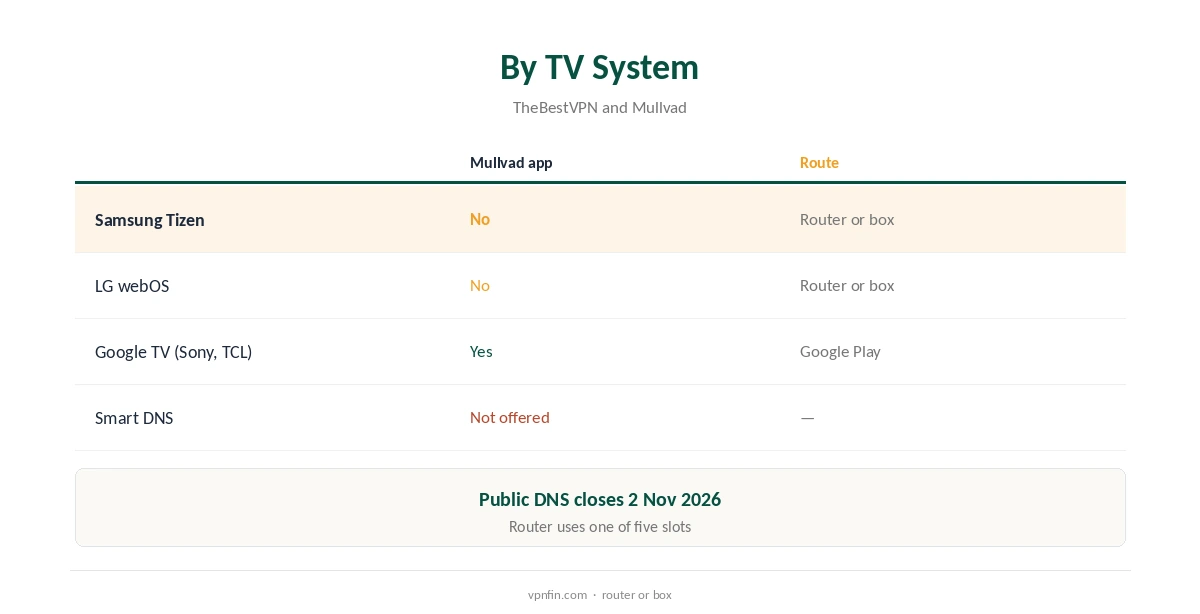
Mullvad Samsung TV use has one real route: a router. Samsung’s Tizen, like LG’s webOS, runs no VPN apps, TheBestVPN notes, and Mullvad offers no Smart DNS for unblocking. Its public encrypted DNS was never a Smart DNS and closes on 2 November 2026, Mullvad’s help page says. A router running a Mullvad WireGuard file covers the TV, or a Google TV box plugged into it can run Mullvad’s app.
This guide covers the router route, the box alternative, Google TV sets, device slots and streaming.
Why a Mullvad Samsung TV App Does Not Exist
Tizen and webOS have no VPN support, so no provider’s app installs on them, Mullvad’s included. Mullvad’s Android app needs Android 9 or newer, and Samsung TVs do not run Android at all.
Our Samsung TV VPN guide explains the options with every provider.
No Smart DNS, and the DNS Service Closing
Some providers offer Smart DNS to change a TV’s region without a VPN; Mullvad does not, and has never marketed one. Its public DNS over HTTPS and TLS service was for private lookups and ad blocking, not unblocking. Mullvad is ending it on 2 November 2026 and recommends Quad9 instead.
Our Smart DNS vs VPN guide explains the difference.
Mullvad Samsung TV via a Router
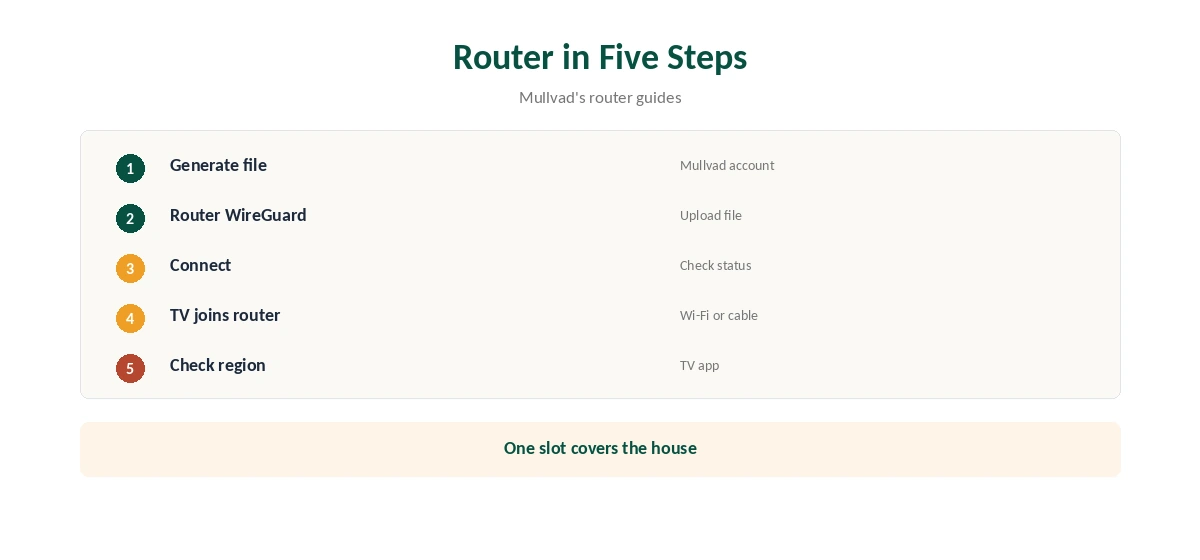
Generate a WireGuard file in your Mullvad account and load it into a router with a WireGuard client, such as a GL.iNet model, OpenWrt or Asuswrt-Merlin. Connect the Samsung TV to that router by Wi-Fi or an Ethernet cable.
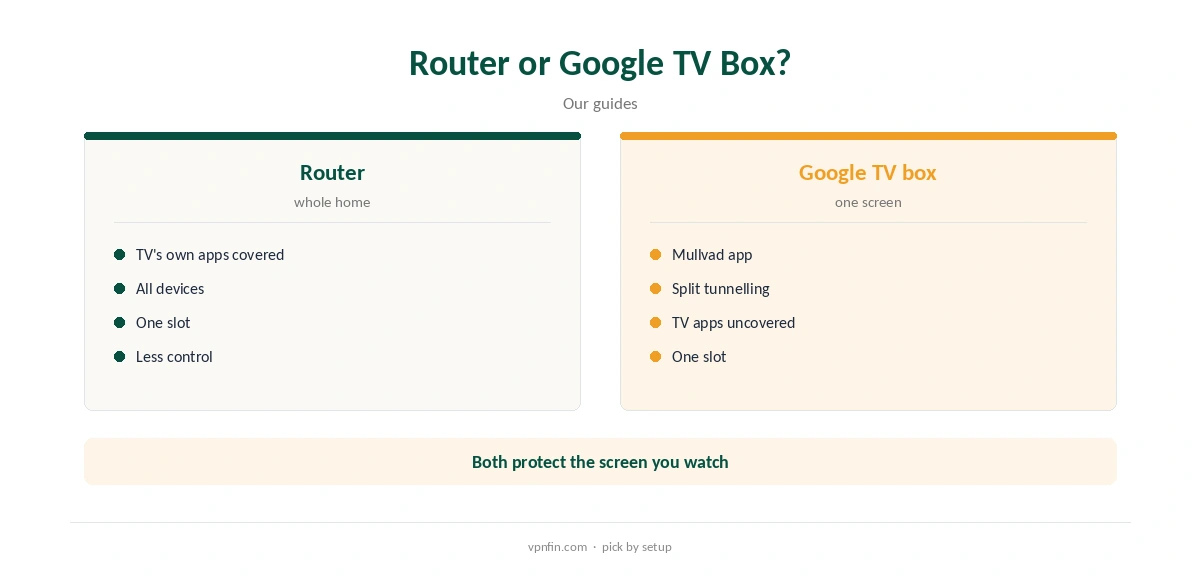
The router uses one of your five device slots and covers everything behind it, including phones and laptops at home. Our Mullvad router guide walks through each firmware.
A Google TV Box Instead
Plugging a Chromecast with Google TV, Google TV Streamer or Nvidia Shield into the Samsung TV gives you an Android TV system. That system runs Mullvad’s app, with split tunnelling and lockdown. The TV’s own apps stay unprotected, so watch through the box rather than the TV’s built-in apps.
Our Mullvad Google TV guide covers the app.
Google TV Sets and Streaming
Some brands, including Sony and TCL on many models, ship Google TV, which installs Mullvad’s app directly with no box or router. Check your TV’s system in its settings before buying a box; the About or System menu usually names it.
LG’s webOS follows the same rules as Samsung’s Tizen, so the same two routes apply. Our LG TV VPN guide covers it.
Choosing a Router
Any router with a WireGuard client can run Mullvad’s file. GL.iNet models handle it in their admin panel, OpenWrt through its WireGuard packages, and Asuswrt-Merlin from version 388.1, a 2026 router guide notes.
Disable IPv6 on the router unless the tunnel carries it, and check for DNS leaks from a phone on the same network.
Covering Only the TV, and Price
To keep the rest of the home off the VPN, put a small travel router running Mullvad between the Samsung TV and your main router. Only devices on it use the tunnel.
Router firmware with device rules, such as VPN Director on Asuswrt-Merlin, can also send only the TV through Mullvad.
Testers found Netflix blocked Mullvad, and it markets privacy rather than streaming. On a Google TV box, split tunnelling can keep Netflix outside the tunnel.
Our Mullvad Netflix guide explains.
Mullvad costs a flat €5 a month for five devices, with an account number instead of an email, and has more than 10 audits in our table. You cannot buy Mullvad time through Google Play, its help page notes.
Our Mullvad cost guide covers payment methods.
If You Want Other Catalogues
Mullvad is a privacy service, and testers found Netflix blocked it. If changing the Samsung TV’s streaming region matters most, a provider with Smart DNS or streaming servers fits better. ExpressVPN’s MediaStreamer is one example.
You can also keep Mullvad for phones and laptops and let the TV stream without a VPN.
Checking It Works
The Samsung TV has no leak test, so check from a phone or laptop on the same router that the address shows a Mullvad location. Mullvad’s connection check page shows whether you are connected through one of its servers.
Restart the TV’s streaming apps after the router connects so they check your region again, and repeat after changing location.
Privacy
Mullvad asks for no email and accepts cash, and it has more than 10 audits in our table. A router running Mullvad hides the Samsung TV’s traffic, including its own apps and any viewing data it sends, from your internet provider.
It does not stop the TV maker’s own data collection, which you control in the TV’s privacy settings, such as viewing information options.
How We Research
This page draws on TheBestVPN’s smart TV guide, Mullvad’s DNS and router help pages, reports on the DNS closure and our Mullvad tables. We cross-checked these sources against each other, and where they conflict or something can’t be verified, we say so in the text rather than guessing. We checked time-sensitive figures, including prices in US dollars, on 8 October 2026. The main source we relied on is Mullvad’s DNS help page. Our full approach lives on the About Us page.
Mullvad Samsung TV FAQ
No; Tizen runs no VPN apps.
No; its public DNS was not for unblocking and closes on 2 November 2026.
Through a router running a Mullvad WireGuard file.
A Google TV box plugged into the TV can run Mullvad’s app.
Testers found Mullvad blocked by Netflix.
The Verdict
Mullvad Samsung TV use means a WireGuard router or a Google TV box. Do not count on Mullvad DNS, which was never Smart DNS and is closing.