
Disclosure: VPNFin is reader-supported. If you buy a VPN through links on this page, we may earn a commission at no extra cost to you. This never affects our ratings — here’s our full disclosure.
Windscribe Chromebook support comes two ways, its own Chromebook guide explains. One is the Android app from Google Play, which protects the whole Chromebook with R.O.B.E.R.T. blocking and split tunnelling, the other the Chrome extension, which covers only Chrome tabs and lacks split tunnelling and system-wide leak protection. Both work on the free plan, with 10 GB a month.
This guide covers both, how they differ, settings, school devices and turning it off.
Windscribe Chromebook With the Android App
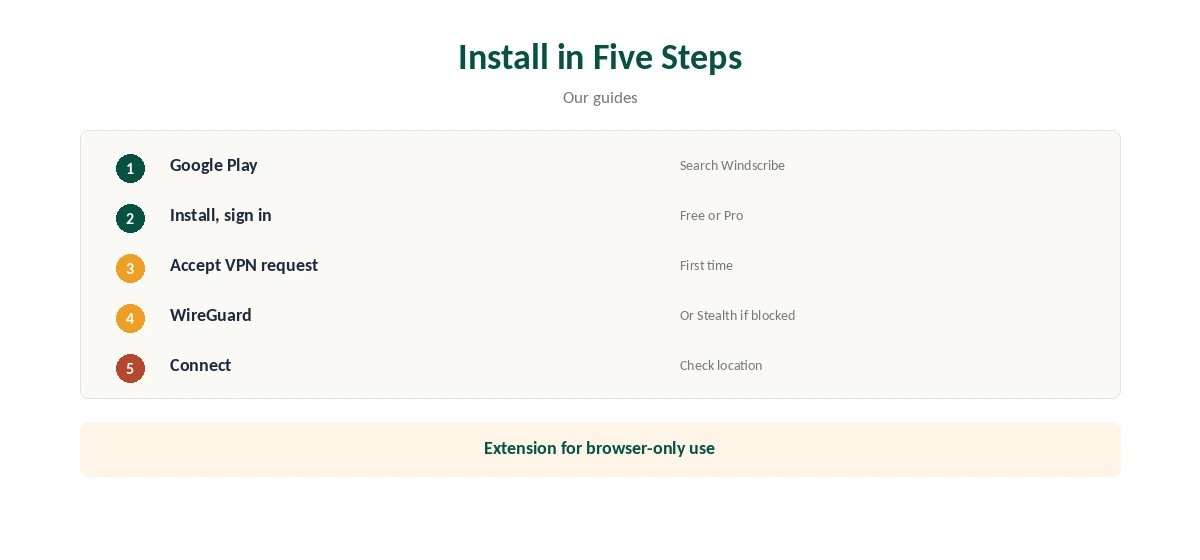
On a Chromebook with Google Play, install Windscribe, sign in and connect, accepting ChromeOS’s VPN request the first time. The Android app runs as a system VPN on ChromeOS, so every app and the browser go through it.
Windscribe’s guide lists R.O.B.E.R.T. blocking, split tunnelling and GPS spoofing among the app’s features. Our Windscribe Android guide covers the settings.
The Chrome Extension, and Which to Use
The extension installs from the Chrome Web Store in seconds and covers only Chrome tabs, Windscribe’s Chromebook guide notes. It lacks split tunnelling and system-wide leak protection.
It suits quick, browser-only use, such as on a managed Chromebook where you cannot install apps, if the administrator allows extensions.
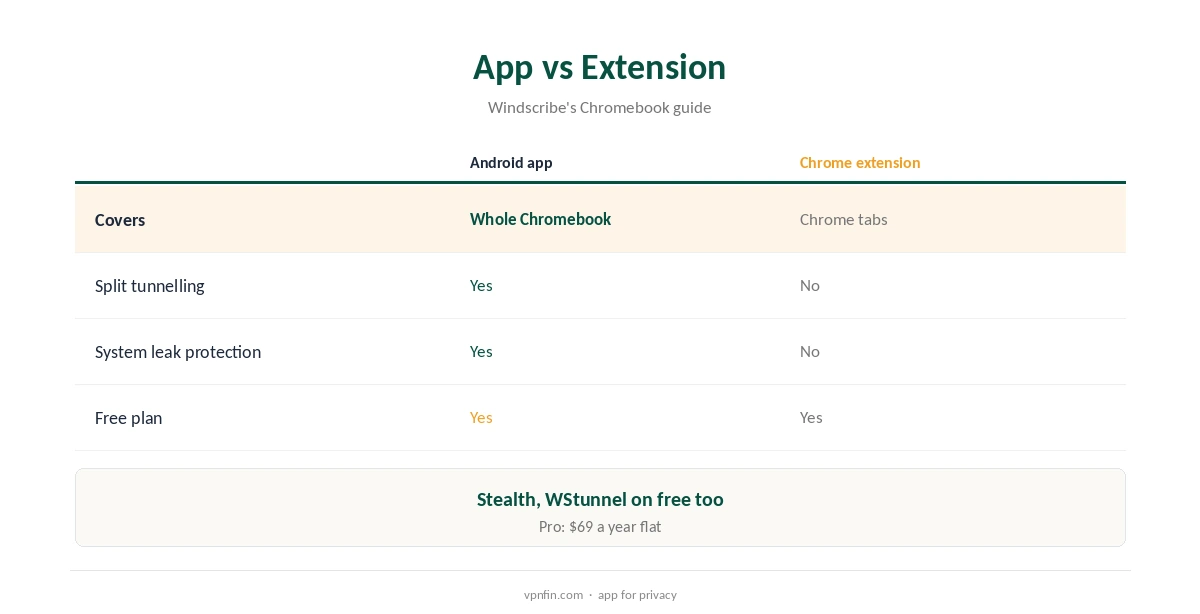
Use the app for full protection of the Chromebook, including its Android apps and the browser. Use the extension when you only need the browser covered, or alongside the app for its browser-specific features.
Our Chromebook VPN guide compares the routes across providers.
Settings on ChromeOS
In the app, pick WireGuard for speed, or Stealth and WStunnel on networks that block VPNs; both obfuscation modes work on the free plan. R.O.B.E.R.T. blocks ads, trackers and malware at the DNS level, before pages load.
Split tunnelling lets a school or work site skip the VPN if it rejects VPN addresses, while the rest stays protected.
Free Plan or Pro
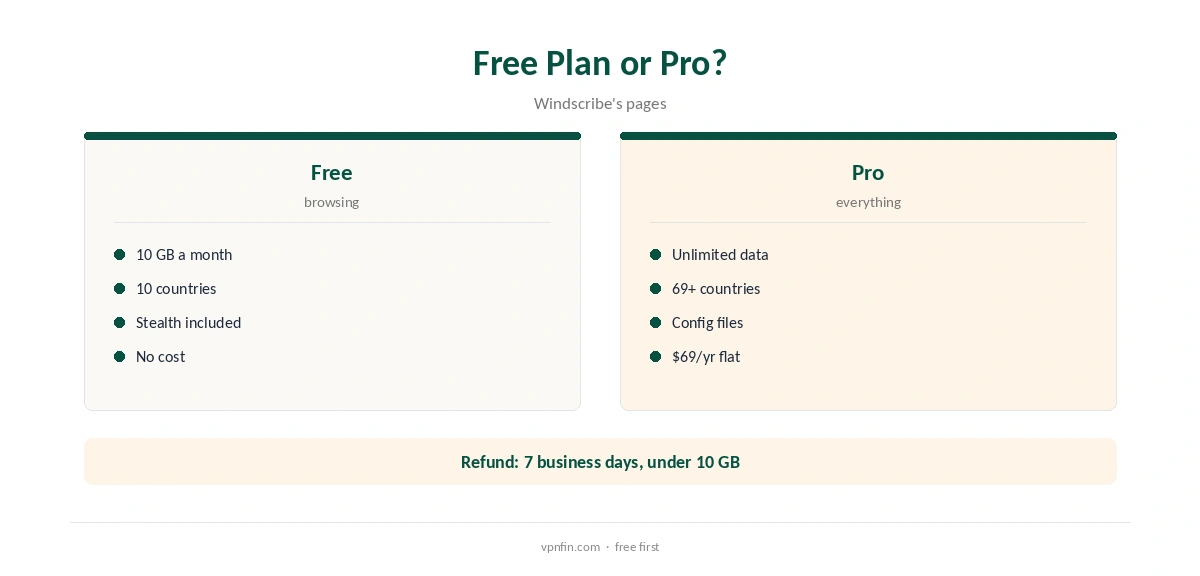
The free plan covers servers in 10 countries with 10 GB a month after confirming an email. That is enough for everyday browsing on a Chromebook. Pro unlocks unlimited data and more locations.
The free plan gives 10 GB a month with a confirmed email; Pro costs $9 a month or $69 a year with no renewal jump. Windscribe’s terms allow a refund of the first payment within seven business days if you have used less than 10 GB.
Speed and Privacy
WireGuard is light enough for modest Chromebook processors, and Windscribe offers it with post-quantum encryption. Pick a nearby location for the best speed; free accounts choose from servers in 10 countries.
Stealth and WStunnel cost some speed, so use them only where a network blocks WireGuard, then switch back.
Windscribe’s no-logs claim held when an Athens court dismissed charges against its CEO in April 2025, because no user data existed. Sign-up needs no email, though confirming one raises free data to 10 GB.
Our Windscribe safety guide covers its record.
School Chromebooks and Turning It Off
Managed school and work Chromebooks often block Google Play, VPN apps or extensions, and administrators can see that a VPN is in use. Ask before installing one on a device you do not own, since school or work rules may forbid it.
Our Windscribe Free guide covers the free plan’s limits.
Disconnect in the app, or click the extension’s icon in the toolbar and stop it, Windscribe’s guide on turning off VPNs explains. Removing the VPN from ChromeOS’s network settings also works for the app, where it appears next to Wi-Fi.
Our guide to turning off a VPN on a Chromebook covers each case.
Restrictive Networks
Some school, work or public networks block VPN traffic. Windscribe’s Stealth and WStunnel modes disguise it, and both work on the free plan, our tables record. Switch to them in the app’s connection settings when WireGuard fails.
Respect the rules of networks you do not own or manage; bypassing a school’s filter may break its acceptable use policy.
Checking It Works
After connecting, visit an IP check site in Chrome and confirm the location matches the Windscribe server. With the Android app, other Android apps should show the same address.
If only Chrome shows the VPN address, you are using the extension rather than the app, and other apps remain exposed to your network.
Refund
Windscribe’s terms allow a refund of the first payment within seven business days if you have used less than 10 GB. Renewals are not refundable. Purchases through Google Play follow Google’s own refund rules instead.
Our Windscribe refund guide explains the conditions.
What Pro Adds on a Chromebook
Pro removes the 10 GB cap, opens more than 69 countries and allows P2P on its paid servers, which Windscribe switches off on free ones. It also unlocks the configuration generator for routers.
Build-a-Plan, from $3, lets you pay only for the locations you use, with the same apps and unlimited data in those locations.
How We Research
This page draws on Windscribe’s Chromebook guide and blog, its plans page and terms, and our Windscribe tables. We cross-checked these sources against each other, and where they conflict or something can’t be verified, we say so in the text rather than guessing. We checked time-sensitive figures, including prices in US dollars, on 8 October 2026. The main source we relied on is Windscribe’s plans page. Our full approach lives on the About Us page.
Windscribe Chromebook FAQ
Yes, through its Android app or Chrome extension.
The app covers the whole Chromebook; the extension only Chrome tabs.
Yes, with 10 GB a month.
No; the Android app does.
Often not; administrators may block it.
The Verdict
Windscribe Chromebook use is best through the Android app, which covers the whole device. The extension suits browser-only needs.