
Disclosure: VPNFin is reader-supported. If you buy a VPN through links on this page, we may earn a commission at no extra cost to you. This never affects our ratings — here’s our full disclosure.
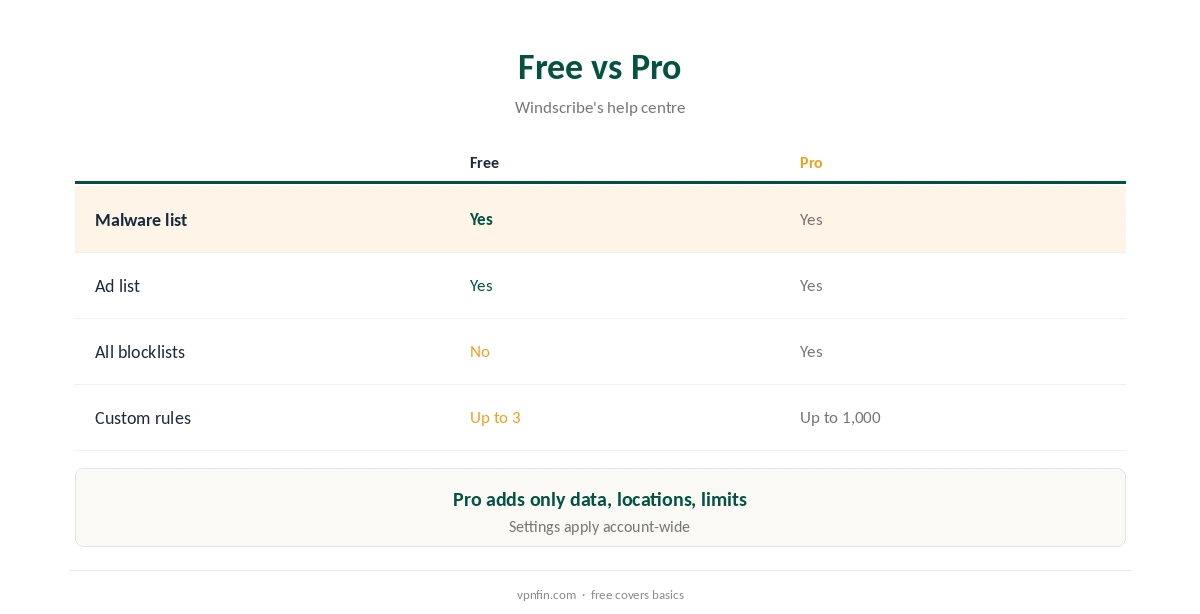
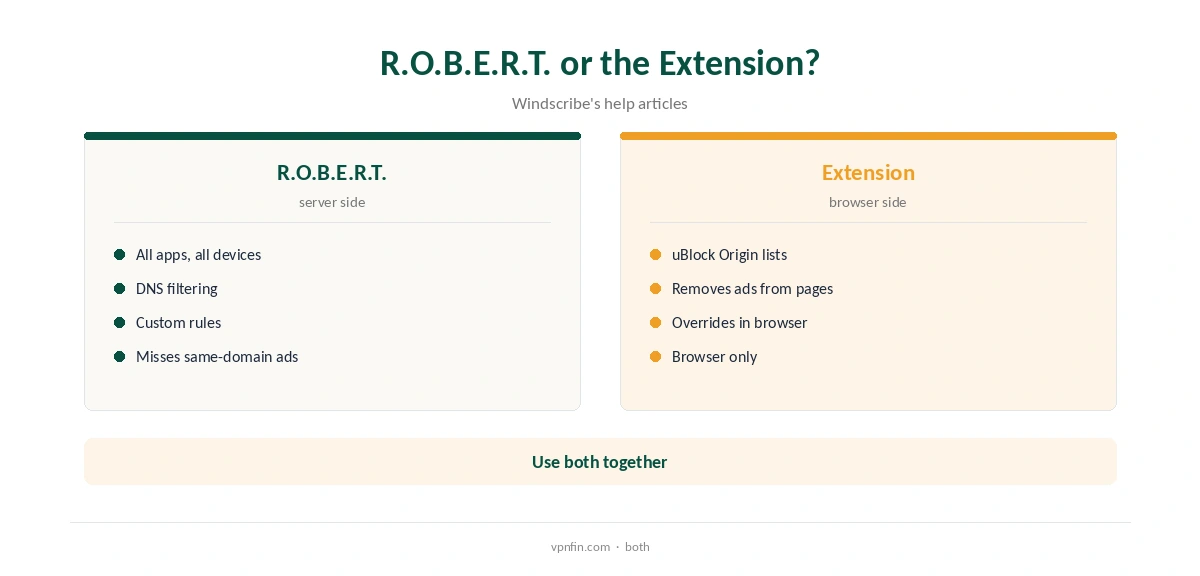
The Windscribe ad blocker comes in two forms. R.O.B.E.R.T. filters ads, trackers and malware at the DNS level on Windscribe’s servers, so it works in every app and on every device connected to the VPN. The browser extension blocks ads inside the browser using uBlock Origin’s lists. Free accounts get R.O.B.E.R.T.’s malware and ad lists with up to 3 custom rules. Pro gets every list and up to 1,000 rules, Windscribe’s help centre says.
This guide covers how each works, free versus Pro, setup, custom rules and the limits of DNS blocking.
How R.O.B.E.R.T. Works
When an app on your device looks up an ad or tracking domain, Windscribe’s servers refuse to resolve it. The request then goes nowhere. Because it works at the DNS level on the server, it covers phones, TVs and desktop apps alike, Windscribe explains.
It only works while you are connected to Windscribe, since your lookups go through its servers then. Disconnect, and ads return.
Windscribe Ad Blocker: Free or Pro, and Turning It On
Free accounts get the malware and advertising blocklists and up to 3 custom rules, Windscribe’s 2026 help article says. Pro unlocks every blocklist and up to 1,000 custom rules.
Upgrading changes only data, locations and R.O.B.E.R.T.’s limits, the same article notes. The free plan gives 10 GB a month after confirming an email. Pro costs $9 a month or $69 a year with no renewal jump, or Build-a-Plan from $3. Windscribe’s terms allow a refund of the first payment within seven business days if you have used less than 10 GB.
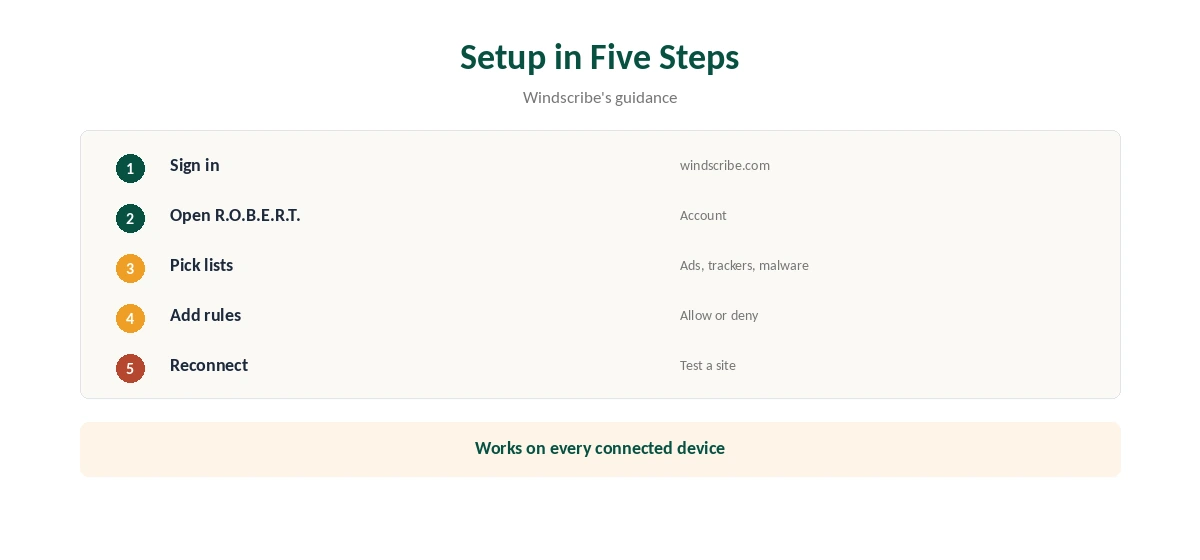
Sign in at windscribe.com, open R.O.B.E.R.T. in your account, and switch on the blocklists you want, such as ads, trackers or malware. Changes take effect on your next connection. Settings apply to your account, so every device you connect picks them up.
Reconnect the VPN after changing them if a site still shows ads, since cached lookups can linger for a while.
Windscribe Ad Blocker Custom Rules
Custom allow and deny rules let you block a domain the lists miss, or unblock one they catch by mistake, Windscribe’s information page describes. Free accounts get 3 rules and Pro accounts 1,000.
Allow rules are the fix when a shopping or banking site breaks because a tracking domain it depends on is blocked. Deny rules suit a domain you want gone everywhere.
The Browser Extension
Windscribe’s extension blocks ads client-side, using uBlock Origin’s lists, so pages load without the ads at all, a 2025 help article explains. When both are active, the extension’s blocking takes priority inside the browser.
Windscribe’s own articles differ on how the Chrome and Edge extensions relate to R.O.B.E.R.T.: one says the extension does not use it, another that those two extensions combine both.
What DNS Blocking Cannot Do
DNS blocking stops requests to known ad domains, but ads served from the same domain as the content, as on YouTube, usually get through. Cosmetic gaps where an ad would have been may also remain.
For those, a browser-based blocker such as the extension does better, since it can hide page elements. Our NordVPN ad blocker guide compares another provider’s approach.
On TVs and Phones, and Privacy
Because filtering happens on the server, R.O.B.E.R.T. covers apps on TVs and phones that have no ad-blocking of their own. Windscribe’s TV and mobile apps use the same account settings.
Ads inside streaming apps often come from the same servers as the video, so expect fewer to disappear there than in a browser.
Windscribe’s no-logs claim held when an Athens court dismissed charges against its CEO in April 2025, because no user data existed. R.O.B.E.R.T. filters lookups without needing to keep them.
Our Windscribe safety guide covers its record.
When a Site Breaks
If a site stops loading properly with R.O.B.E.R.T. on, add an allow rule for the domain it needs, or turn off the tracker list briefly to find the cause. Reconnect after each change.
Free accounts have only 3 custom rules, so use them for the sites that matter most, such as your bank or a work tool.
How It Compares
Other VPN providers build similar blockers into their apps: NordVPN’s Threat Protection and Surfshark’s CleanWeb both filter ads and malware, with their own rules about which plans and apps include them. Windscribe’s stands out for being on the free plan. Nord Security owns both NordVPN and Surfshark.
Our Surfshark ad blocker guide covers one alternative.
Does It Slow Things Down?
DNS blocking can make pages feel quicker, since blocked ad and tracker requests never download. Lookups that pass are resolved on Windscribe’s own servers inside the tunnel.
If a page seems slower with blocking on, try a nearer location before blaming R.O.B.E.R.T.
How We Research
This page draws on Windscribe’s help articles on R.O.B.E.R.T., the extension ad blocker and its Apple TV app, its information page, its original R.O.B.E.R.T. We cross-checked these sources against each other, and where they conflict or something can’t be verified, we say so in the text rather than guessing. announcement and our Windscribe tables. We checked time-sensitive figures, including prices in US dollars, on 8 October 2026. The main source we relied on is Windscribe’s R.O.B.E.R.T. help article. Our full approach lives on the About Us page.
Windscribe Ad Blocker FAQ
Yes: R.O.B.E.R.T. on its servers and a blocker in its browser extension.
Its malware and ad lists are, with up to 3 custom rules.
Every blocklist and up to 1,000 custom rules.
Usually not; those come from YouTube’s own domains.
Yes, on any device connected to Windscribe.
The Verdict
The Windscribe ad blocker is a strong extra, even on the free plan. Use R.O.B.E.R.T. for every device and the extension for cleaner pages in the browser.