
Disclosure: VPNFin is reader-supported. If you buy a VPN through links on this page, we may earn a commission at no extra cost to you. This never affects our ratings — here’s our full disclosure.
NordVPN adblock features come in two levels. Threat Protection, once called Threat Protection Lite, filters ads and trackers by DNS on every plan, but only while the VPN is connected. Threat Protection Pro, launched in June 2024, adds JavaScript and URL filtering and antivirus-style checks, works without the VPN, and runs only on Windows and macOS with an upper-tier plan.
Threat Protection or Threat Protection Pro?
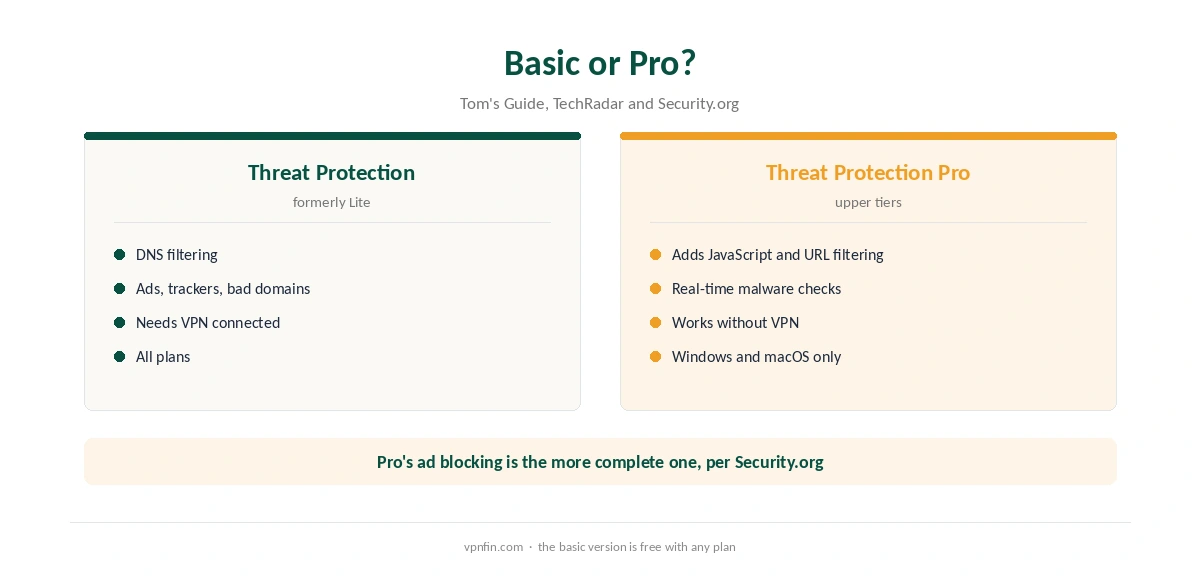
Tom’s Guide sets out the difference. Threat Protection uses DNS filtering to block ads, trackers and known malicious domains. Threat Protection Pro also filters JavaScript and URLs, scans for malware in real time, flags phishing sites and checks for leaked credentials. Our page on the CyberGhost ad blocker covers what the apps and the free Chrome extension actually block.
Security.org found Pro’s ad blocker comprehensive and the basic version’s more limited. In TechRadar’s own test, Pro blocked 87% of sample threats.
Where the NordVPN Adblock Works
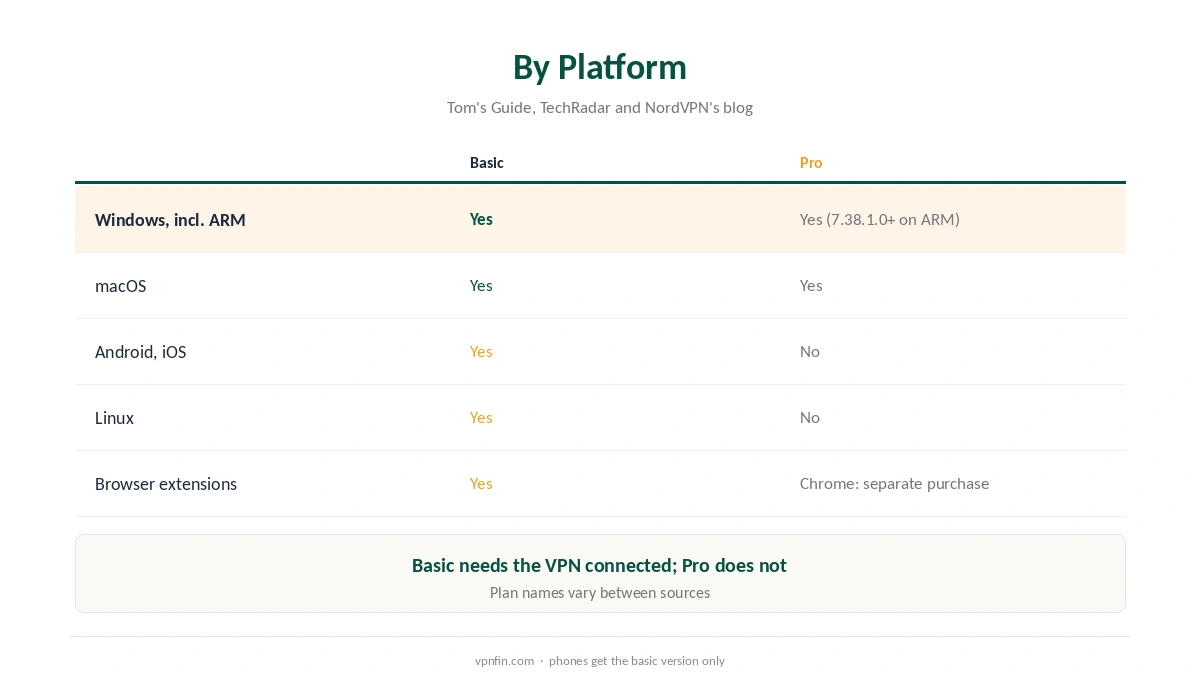
Threat Protection runs on Android, iOS, Linux, Windows, macOS and NordVPN’s browser extensions, according to Tom’s Guide and TechRadar. Threat Protection Pro runs only on Windows and macOS, including Windows on ARM since app version 7.38.1.0.
In the Chrome extension, NordVPN’s blog says Threat Protection Pro is a separate purchase. Our NordVPN Chrome guide and Firefox guide cover the extensions.
Which Plan Includes the NordVPN Adblock Pro Version?
Security.org lists Pro on the Plus, Complete and Prime plans. On 25 September 2026, NordVPN’s pricing page showed Basic, Complete and Prime, without Plus, so the tier names change. Check the plan page at checkout; our NordVPN deals guide shows current prices.
How to Turn On the NordVPN Adblock
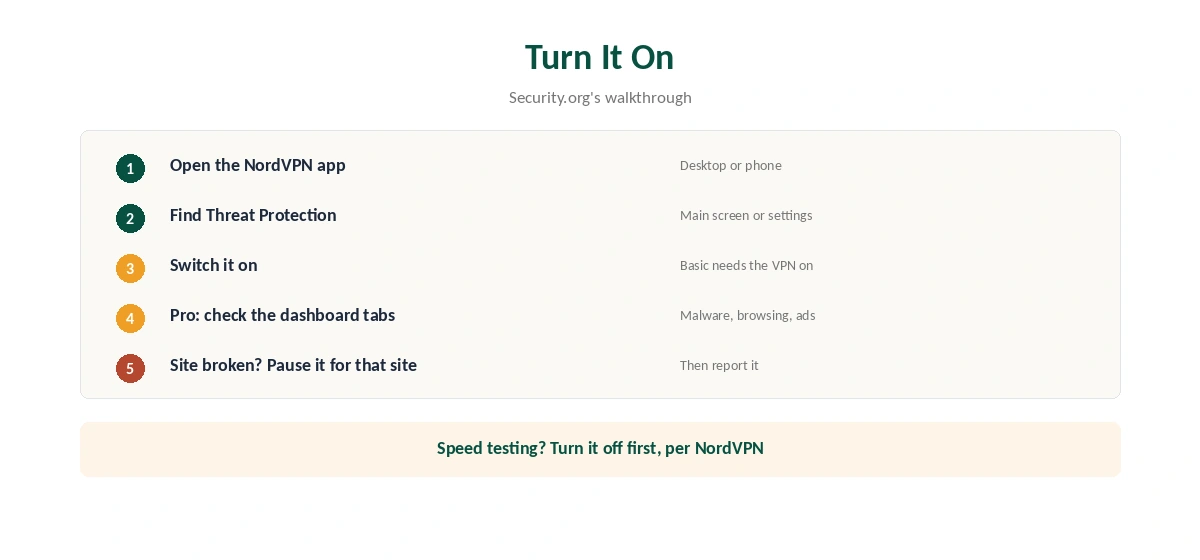
To use the NordVPN adblock, open the app and find Threat Protection on the main screen or in settings. Switch it on; on Windows and macOS with Pro, its dashboard shows separate tabs for malware, browsing protection and ad blocking, Security.org notes. Remember that the basic version needs the VPN connected.
Side Effects and Limits
Filtering can slow pages or break a site. NordVPN’s Android speed article suggests turning Threat Protection off while you test, as our NordVPN speed guide explains. Pro is not a full antivirus replacement for everyone, in our view; dedicated antivirus does more. Our Android TV guide covers the TV app, and our iPhone guide covers the phone version.
NordVPN’s own data claims 5 billion ads blocked in May 2024, according to TechRadar, but treat company figures with care. NordVPN belongs to Nord Security, which also owns Surfshark. Our NordVPN review covers the wider service. Our page on the Surfshark ad blocker covers CleanWeb in the apps and CleanWeb 2.0 in the browser.
The NordVPN adblock pairs well with other settings. Our kill switch guide explains the leak side, and our DNS leak guide shows why DNS filtering needs the tunnel. On Windows, our NordVPN Windows guide shows the settings.
Mac users can follow our NordVPN Mac guide. For a broader privacy view, our guide to what VPNs do explains the limits of any VPN feature.
Ad Blocking and Streaming Services
VPNPro notes that Paramount Plus blocks some ad-blocker servers as well as VPNs. DNS filtering can look like a blocked ad server to a streaming service, which then refuses to play. If a stream fails after the page loads, pause Threat Protection for that site and try again.
Add an exception for the service rather than turning filtering off everywhere. Our NordVPN Paramount Plus guide covers that case in detail.
Testing Whether It Works
Open a news site you know carries many ads, with Threat Protection off and then on. The difference shows quickly. For malware protection, test only with safe test pages that security vendors publish for that purpose, never with real malicious files.
Threat Protection and Speed
NordVPN’s Android speed article suggests turning Threat Protection off while you test speed. Filtering adds a small amount of work to each request. On a fast line the cost is usually invisible, but it can matter on slow devices. Our NordVPN speed guide covers the full checklist.
Threat Protection on Phones
Phones get the basic Threat Protection, not the Pro version, according to Tom’s Guide and TechRadar. It filters ads, trackers and known malicious domains while the VPN is connected. Turn it on in the app’s settings on Android or iOS.
Because it depends on the VPN connection, it stops filtering when NordVPN disconnects. Keep auto-connect on if you want the filtering to run all day. Our NordVPN iPhone guide shows where the settings sit on iOS. Our guide to PureVPN Ad Blocker covers tracker and ad blocker, platforms and the plan question.
Pro on Windows Without the VPN
Threat Protection Pro works even when the VPN is off, on Windows and macOS. That suits people who want malware and phishing protection at home without routing everything through a VPN. It runs as part of the NordVPN app, so keep the app open in the background. Our guide to VPN for Twitch covers blocked countries, regional ads and the rules.
How We Research
This page draws on Threat Protection coverage from Tom’s Guide, TechRadar and Security.org, NordVPN’s announcement and blog, and its speed article. We cross-checked these sources against each other, and where they conflict or something can’t be verified, we say so in the text rather than guessing. We read every source on 5 October 2026. The main source we relied on is Tom’s Guide on Threat Protection Pro. Our full approach lives on the About Us page.
NordVPN Ad Blocker FAQ
Yes. Threat Protection blocks ads and trackers by DNS on every plan; Threat Protection Pro goes further on upper tiers.
Threat Protection Pro does, on Windows and macOS. The basic Threat Protection needs the VPN connected.
No. Pro runs on Windows and macOS only; phones get the basic version.
Upper tiers only. Security.org lists Plus, Complete and Prime; NordVPN’s page showed Basic, Complete and Prime in September 2026.
NordVPN’s Android speed article suggests turning it off while testing speed.
The Verdict
The NordVPN adblock tools are useful extras: the basic version for every device while connected, and Pro for stronger protection on Windows and Mac. Check your plan includes Pro before counting on it.