
Disclosure: VPNFin is reader-supported. If you buy a VPN through links on this page, we may earn a commission at no extra cost to you. This never affects our ratings — here’s our full disclosure.
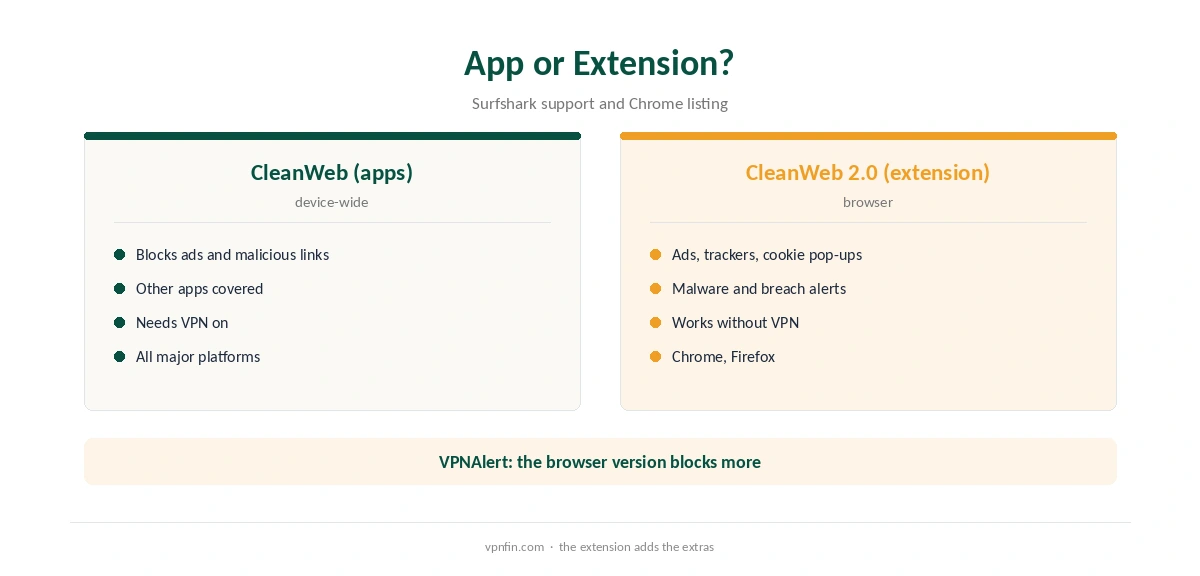
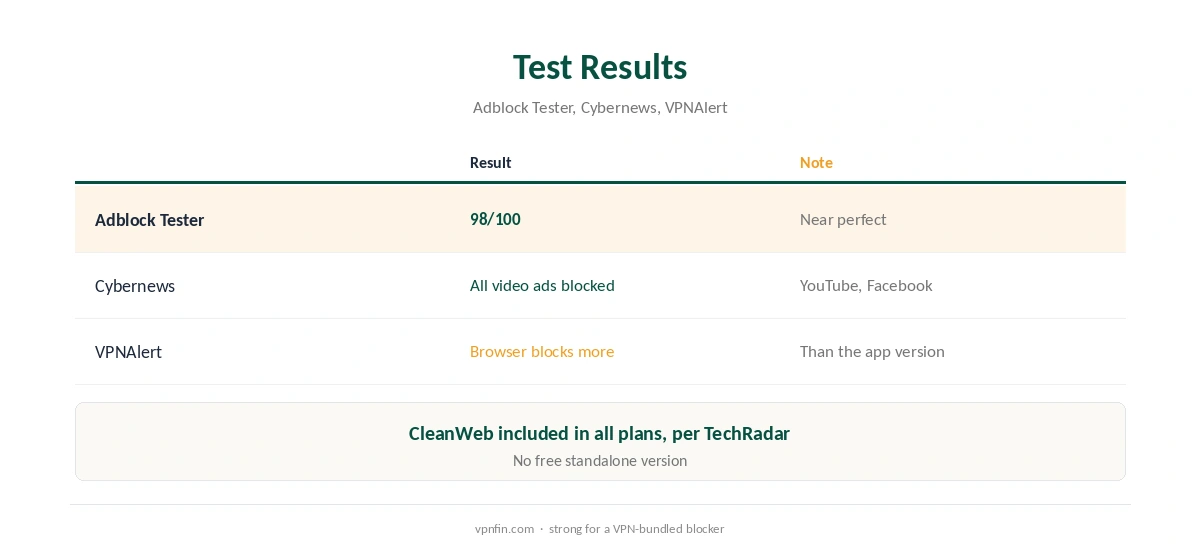
Surfshark calls its ad blocker CleanWeb, and it comes in two forms. In the apps, Surfshark’s support says it blocks ads and malicious links on Windows, macOS, Android and iOS. In the browser extension, CleanWeb 2.0 adds a cookie pop-up blocker, malware alerts and data breach warnings. Adblock Tester scored the extension 98 out of 100, and Cybernews found it blocked all the video ads it saw on YouTube and Facebook.
Every Surfshark plan includes CleanWeb, TechRadar notes. This guide covers both versions, the setup, the test results and when to use something else.
CleanWeb in the Apps
Surfshark’s features article describes app CleanWeb as an ad blocker that stops ads and malicious links before they load, available on Android, iOS, macOS and Windows. Turn it on in the app’s settings. It works while the VPN is connected and covers other apps as well as the browser.
CleanWeb 2.0 in the Browser
The Chrome extension’s official listing describes an ad and tracker blocker, a cookie pop-up blocker, malware alerts, checks on search results for malware and phishing, and warnings about data breaches on sites you visit. Surfshark’s Firefox page adds that it blocks banners and video ads. Cybernews lists the settings as Blockers, for ads and cookie pop-ups, and Site Safety, for breach and malware alerts.
Adblock Tester notes the extension’s CleanWeb works even when the VPN is not connected. Our Surfshark Chrome guide covers the extension.
Surfshark Ad Blocker Setup
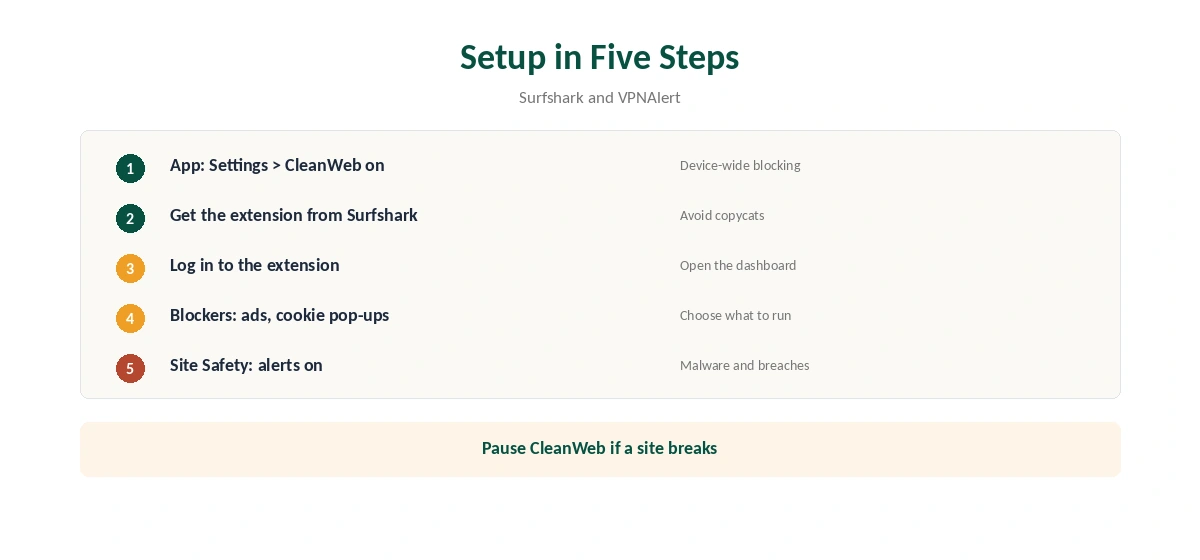
In the app, open Settings and switch CleanWeb on. For the browser, install the extension from Surfshark’s own download page, which VPNAlert recommends to avoid copycat extensions, log in, and enable CleanWeb in the extension dashboard.
Choose which blockers to run: ads, cookie pop-ups, or both. Keep Site Safety on for malware and breach alerts.
What the Tests Found
Adblock Tester gave CleanWeb 98 out of 100. Cybernews found the Chrome extension’s CleanWeb 2.0 blocked all the video ads it saw on YouTube and Facebook. VPNAlert’s tests found the browser version blocks more than the app version, which matches the extra features it carries.
Surfshark Ad Blocker or a Free Extension?
There is no free version of CleanWeb, Adblock Tester notes; it comes with the VPN subscription. If you only want ad blocking, a free browser blocker may be enough. If you already pay for Surfshark, CleanWeb adds app-level blocking, cookie pop-up control and malware alerts at no extra cost.
When Sites or Streams Break
Adblock Tester notes switching CleanWeb off takes more steps than a dedicated blocker. If a page or stream fails right after you enable it, pause CleanWeb for that site and reload. Some streaming players rely on ad scripts. Our Surfshark Netflix guide covers other streaming errors.
Surfshark Ad Blocker on Phones
On Android and iOS, app CleanWeb covers in-app ads as well as the browser, which is where an app-level blocker helps most. On iPhone, Surfshark’s iOS support notes its separate unsafe site blocking works only over WireGuard, so keep that protocol if you rely on it. Our Surfshark iPhone guide covers the settings.
Testing the Surfshark Ad Blocker
Open a news site you know carries many ads, with the Surfshark ad blocker off and then on, and compare. Then confirm the VPN side separately with our VPN test page and a DNS check with our DNS leak guide. Our Surfshark safety guide covers the provider’s wider record.
Who Needs the Surfshark Ad Blocker
If you already pay for Surfshark, turning on the Surfshark ad blocker costs nothing extra and covers every device. It matters most on Android, where ads appear inside apps, and in browsers full of cookie pop-ups. Desktop users who only want ad blocking may prefer a free extension, but then lose the malware alerts. Our guide to Windscribe Ad Blocker covers R.O.B.E.R.T., the extension and free vs Pro.
How It Compares
NordVPN’s Threat Protection and PureVPN’s Tracker and Ad Blocker do similar jobs, as our NordVPN ad blocker guide and PureVPN ad blocker guide explain. CyberGhost’s free extension promises less, as our CyberGhost ad blocker guide shows. NordVPN and Surfshark share an owner, Nord Security.
Ad Blocking Is Not Antivirus
Blocking malicious links reduces exposure but does not scan files. Surfshark One adds antivirus for a higher price, Surfshark’s support notes. Our VPN vs antivirus guide explains why both matter.
What Surfshark Costs
On 25 September 2026, the Starter 2-year plan cost $67.23 for the first 27 months. Renewal sits at about $79 a year, according to Security.org and VPNOverview. Surfshark sets no device limit. Our Surfshark price breakdown covers the plans, and our Surfshark refund guide explains the 30 days.
| Provider | Renewal price | Per month | Tier |
|---|---|---|---|
| NordVPN | $139.08/yr | ~$11.59 | Basic |
| Surfshark | ~$79/yr | ~$6.58 | Starter |
| ExpressVPN | $99.95/yr | ~$8.33 | Basic |
| CyberGhost | $56.94/yr | ~$4.75 | 2-year |
| PureVPN | $47.95/yr | ~$4.00 | Standard, 2-year (1-year renews $57.95) |
| IPVanish | $89.99/yr | ~$7.50 | Essential |
| Windscribe | ~$69/yr | ~$5.75 | Pro |
| Proton VPN | ~$83.88/yr | ~$6.99 | VPN Plus |
| Mullvad | ~$65/yr | ~$5.40 | flat, no tiers |
| Norton VPN | $79.99/yr | ~$6.67 | Standard |
| Hotspot Shield | ~$95.99/yr | ~$8.00 | Premium annual |
| Astrill | $300 every 2 yrs | ~$12.50 | 2-year, same at renewal |
How We Research
This page draws on Surfshark’s features support article, its Chrome Web Store listing and Firefox page, TechRadar’s CleanWeb review, Cybernews, Adblock Tester, VPNAlert and pricing from Surfshark, Security.org and VPNOverview. We cross-checked these sources against each other, and where they conflict or something can’t be verified, we say so in the text rather than guessing. We checked time-sensitive figures, including prices in US dollars, on 6 October 2026. Surfshark’s renewal table did not load, so renewal figures come from Security.org and VPNOverview. The main source we relied on is TechRadar’s CleanWeb review. Our full approach lives on the About Us page.
Surfshark Ad Blocker FAQ
Yes. CleanWeb blocks ads and malicious links in the apps, and CleanWeb 2.0 adds more in the browser extension.
Every Surfshark plan includes it; there is no free standalone version.
In the browser extension, yes, per Surfshark’s support.
Adblock Tester scored it 98 out of 100; Cybernews saw it block all video ads it tested.
In the browser extension, yes, per Adblock Tester.
The Verdict
The Surfshark ad blocker is one of the stronger VPN-bundled blockers, with a 98/100 test score and extra browser features. Use the app version for device-wide blocking and the extension for cookie pop-ups and breach alerts. Surfshark belongs to Nord Security, which also owns NordVPN.