
Disclosure: VPNFin is reader-supported. If you buy a VPN through links on this page, we may earn a commission at no extra cost to you. This never affects our ratings — here’s our full disclosure.
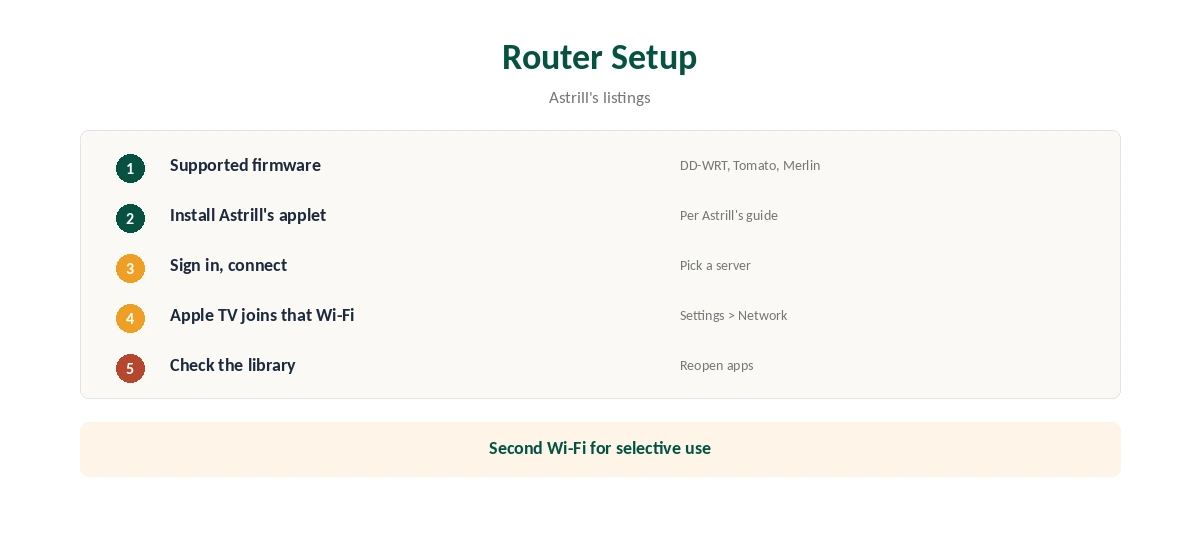
Astrill Apple TV support comes through your network, not an app. Astrill’s App Store listing names iPhone, iPad and Mac, not Apple TV, and we found no tvOS app. The listing itself suggests the route: run Astrill on a DD-WRT, Tomato or AsusWRT-Merlin router, and every device on the network, Apple TV included, uses the VPN. TechRadar also describes VPN Sharing, which turns a Windows PC into a VPN hub.
This guide covers both routes, the setup and providers with native Apple TV apps.
Route One: A Router
Astrill’s listings describe plug-and-play router support for DD-WRT, Tomato and AsusWRT-Merlin, naming Apple TV and smart TVs among the devices a router covers. Our Astrill router guide covers the supported firmware and the OpenWrt gap.
Astrill Apple TV Setup Through a Router
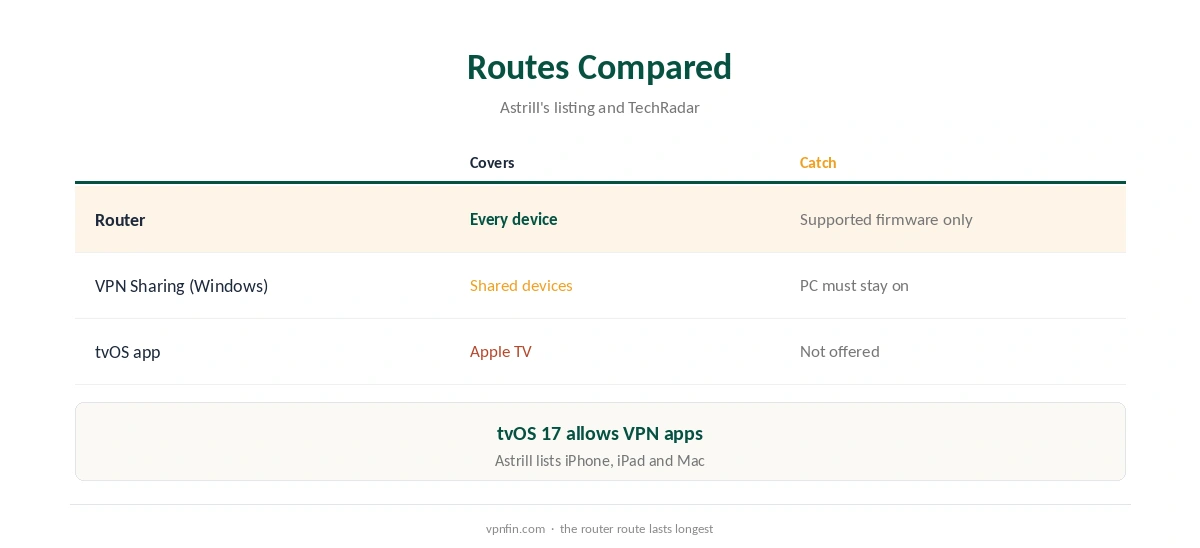
Install Astrill’s router applet on supported firmware, sign in and connect. Then join the Apple TV to that router’s Wi-Fi under Settings, Network. If you want only some devices on the VPN, set up a second Wi-Fi network for them.
Route Two: VPN Sharing From a Windows PC
TechRadar describes VPN Sharing in Astrill’s Windows client, which lets a PC act as a VPN hub for other devices. Connect the Apple TV to the network the PC shares. It works for occasional viewing but keeps the PC running. Our Astrill Windows guide covers the client.
Choosing a Router
If you are buying hardware for an Astrill Apple TV setup, check that the model runs AsusWRT-Merlin, DD-WRT or Tomato first. A stronger processor helps, since the router does the encryption for every device. Many ASUS models accept Merlin, which keeps the stock interface. Our router setup guide covers what to look for.
Apple TV Settings to Check
Some Apple TV apps use the account region or the Apple ID country, which a VPN does not change. Check the Apple TV’s time zone and region in Settings if an app keeps showing the wrong library. Restart the Apple TV after joining a new network.
Turning It Off
To watch without the VPN, move the Apple TV back to your normal Wi-Fi, or switch off the router’s VPN. Our guide to turning off a VPN on Apple TV covers the steps.
When the Router Is Too Slow
Routers have modest processors, and VPN encryption can cap speeds for 4K streams. If the picture softens, pick a closer server or move to a router with a stronger CPU. Wired Ethernet to the Apple TV helps too, since Wi-Fi adds its own losses.
A Quick Rule
Already run a supported router? Add Astrill there and the Apple TV is covered. Only watch now and then? Use VPN Sharing on a Windows PC. Buying a VPN mainly for Apple TV? Pick one with a native tvOS app.
Testing the Setup
Open the Apple TV’s streaming apps after connecting and confirm the library matches the server country. On another device on the same network, run our DNS leak guide, since routers sometimes keep handing out your provider’s DNS. Fix that in the router’s settings before relying on the setup.
Several Apple TVs
A router covers every Apple TV in the house at once, which saves configuring each box. Put them all on the VPN Wi-Fi, or keep one on the normal network for local services such as AirPlay from phones that stay off the VPN. Label each network clearly so everyone knows which is which.
Streaming on Apple TV
After connecting, open the streaming app and check the library. If it shows your home catalogue, close the app fully and reopen it. Apple TV apps may also read the account’s region, which a VPN does not change.
Providers With tvOS Apps
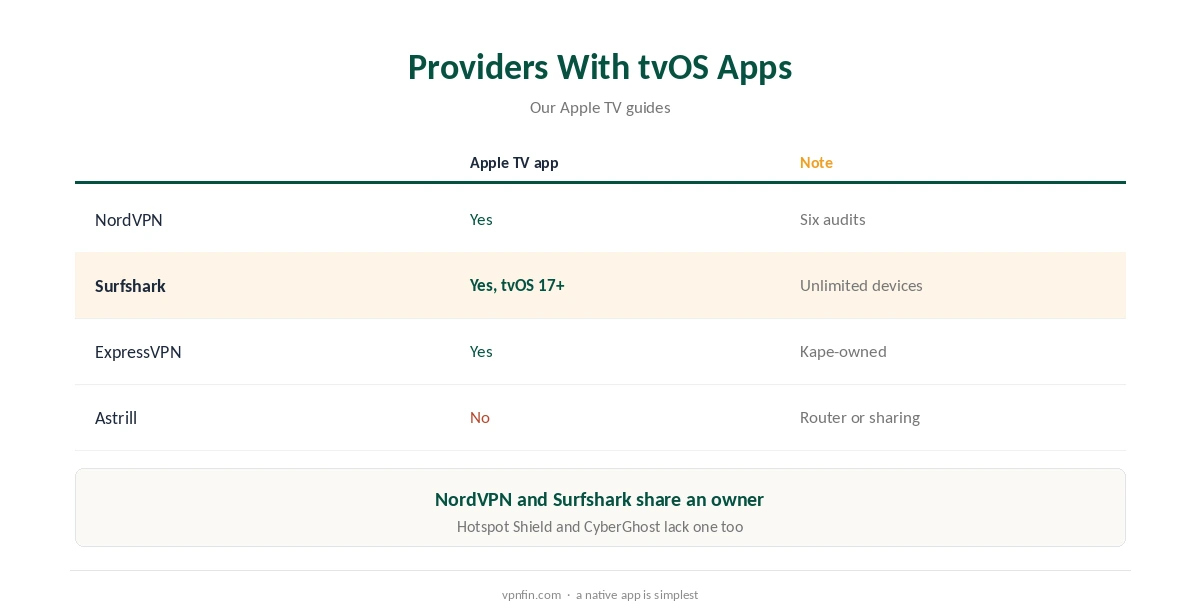
Apple TV has supported VPN apps since tvOS 17. Several providers publish them; our NordVPN Apple TV guide and Surfshark Apple TV guide cover two, and the pair share an owner, Nord Security.
Our ExpressVPN Apple TV guide covers a third.
Astrill and China
Many Astrill users are in China, where its ratings stand out; GreatFirewallGuide rated it 98% on China Telecom’s CN2 GIA network. A router setup covers an Apple TV there too. Our China VPN guide covers the wider picture.
Other Devices on the Same Router
A router setup covers smart TVs, consoles and Apple TV boxes at once, which helps households where several devices lack VPN apps. Our Apple TV VPN guide compares other providers’ routes.
Astrill’s Record
No source we read found an independent audit of Astrill. VPN.com reports it stores session data such as IP and connection time and deletes it afterwards. Our VPN audit tracker explains why audits matter.
What Astrill Costs
Astrill’s pricing page lists $30 a month or $180 a year. Our Astrill cost guide covers the plans.
How We Research
This page draws on Astrill’s App Store listing, TechRadar’s Astrill reviews, GreatFirewallGuide and our Astrill guides and tables. We cross-checked these sources against each other, and where they conflict or something can’t be verified, we say so in the text rather than guessing. We checked time-sensitive figures, including prices in US dollars, on 7 October 2026. The main source we relied on is Astrill’s App Store listing. Our full approach lives on the About Us page.
Astrill Apple TV FAQ
Not that we found; its listing names iPhone, iPad and Mac.
Run Astrill on a supported router, or share a Windows PC’s connection.
DD-WRT, Tomato and AsusWRT-Merlin, per Astrill’s listings.
Yes, since tvOS 17, though Astrill does not offer one.
NordVPN, Surfshark and ExpressVPN, among others.
The Verdict
Astrill Apple TV use runs through a supported router or VPN Sharing on Windows. For a simpler setup, a provider with a native tvOS app saves effort.