
Disclosure: VPNFin is reader-supported. If you buy a VPN through links on this page, we may earn a commission at no extra cost to you. This never affects our ratings — here’s our full disclosure.
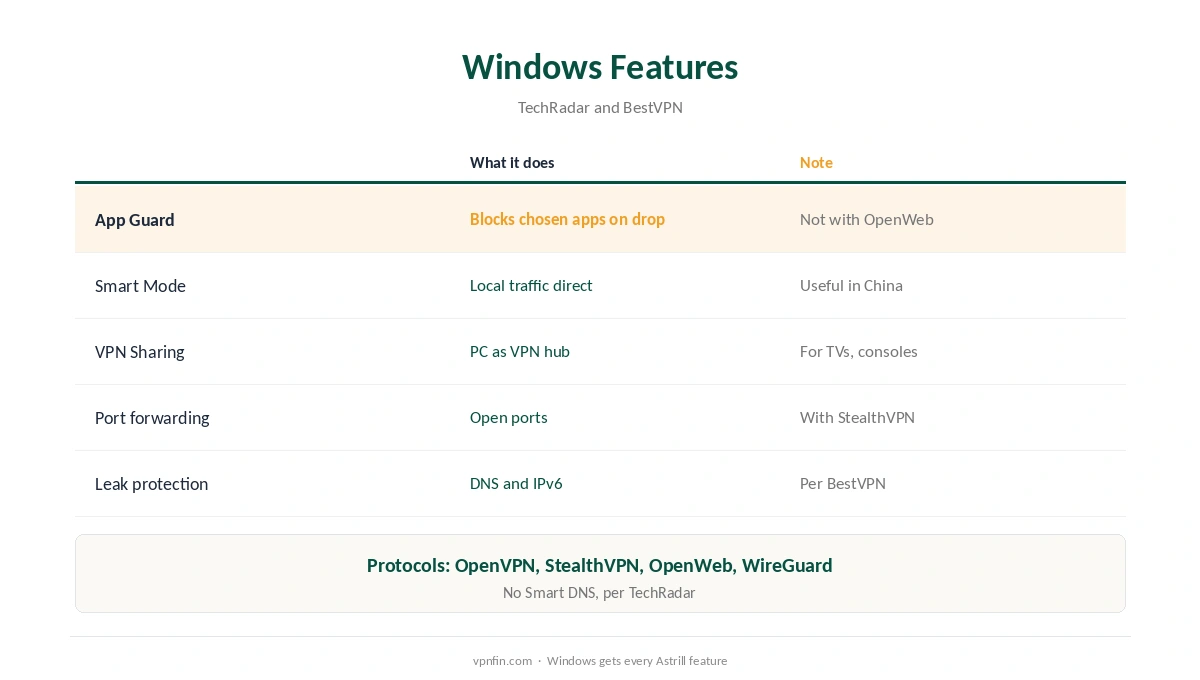
Astrill Windows support is its strongest platform: TechRadar calls the Windows client the most comprehensive Astrill offers. Its App Guard kill switch blocks chosen apps when the VPN drops, switches on automatically at install according to BestVPN, and works with every protocol except OpenWeb, TechRadar’s business review notes. Smart Mode, VPN Sharing, split tunnelling and port forwarding with StealthVPN round it out. Our page on Astrill on Linux covers the Linux client, the manual OpenVPN route and what each gives up.
This guide covers the setup, the features, the protocol catch and Astrill’s record.
Astrill Windows Setup
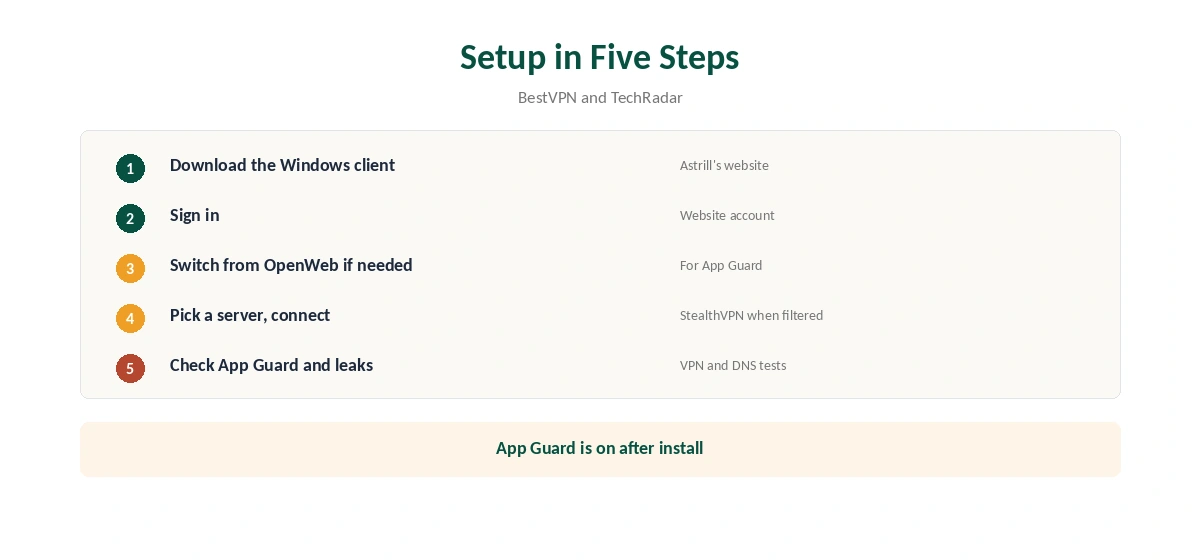
Download the Windows client from Astrill’s website and run the installer. Sign in with your Astrill account, pick a protocol and server, and connect. BestVPN found OpenWeb selected by default in its tests; switch protocol if you need App Guard, as explained below.
Confirm the new address with our VPN test page.
App Guard
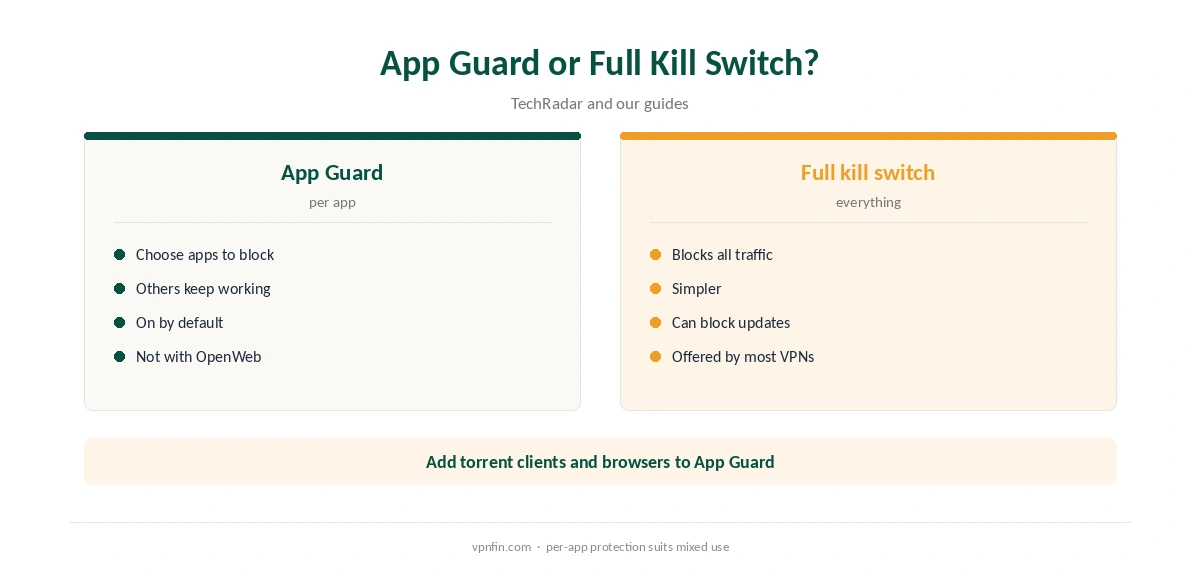
App Guard lets you choose which applications lose internet access when the VPN disconnects, TechRadar explains, rather than cutting everything. BestVPN notes it is enabled automatically after installation. TechRadar’s business review adds that it works with all Astrill protocols except OpenWeb.
If OpenWeb is your default, switch to StealthVPN, OpenVPN or WireGuard to keep App Guard working. Our kill switch guide explains why per-app protection matters for torrent clients and browsers. Our page on Astrill WireGuard covers speeds, setup and when StealthVPN is the better pick.
Protocols
BestVPN lists OpenVPN, StealthVPN and OpenWeb on Windows, with many OpenVPN cipher options, and Astrill’s page adds WireGuard. StealthVPN is Astrill’s tool for filtered networks; OpenWeb also offers an ad blocker in some versions. Our obfuscation guide explains how disguised traffic works.
Smart Mode and Split Tunnelling
Smart Mode sends international traffic through the VPN and local traffic directly, TechRadar’s business review explains, which helps users in China reach local sites at full speed. TechRadar also describes split tunnelling for chosen apps or websites. Our split tunnelling guide explains the idea.
VPN Sharing and Port Forwarding
VPN Sharing turns your PC into a VPN hub for devices that cannot run Astrill, TechRadar notes, such as consoles or TVs connected through it. Port forwarding is available with StealthVPN, which helps torrent seeding, as our port forwarding guide explains.
Astrill Windows for China
Inside China, combine StealthVPN with Smart Mode so local sites load directly while international traffic goes through the VPN. GreatFirewallGuide found China Mobile throttling UDP at peak hours, when TCP helped. Our China VPN guide covers the wider picture.
Sharing the Connection
VPN Sharing suits households with devices that cannot run Astrill, such as games consoles and smart TVs. Connect them to the PC’s shared connection, then check their address. Routers are another route: TechRadar’s business review lists ASUS, Tomato and DD-WRT support.
Torrenting on Windows
For downloads, add your torrent client to App Guard so it stops when the VPN drops, choose StealthVPN for port forwarding, and run a torrent IP check before you start. Our torrenting VPN guide compares providers built for seeding.
Gaming and Streaming
A VPN adds a step between you and game servers, so expect slightly higher ping. Use split tunnelling to keep a game launcher outside Astrill. TechRadar describes Astrill’s streaming results as mixed, so test the services you use within your first month. Our public Wi-Fi guide covers the other everyday use.
Quick Check
After setup, confirm App Guard is on and your protocol is not OpenWeb.
Leak Protection
BestVPN notes DNS and IPv6 leak protection in the Windows client. Run our DNS leak guide and IPv6 leak guide once after setup to confirm.
Turning It Off
Disconnect in the Astrill app. If App Guard keeps blocking apps after you exit, adjust it in settings. Our guide to turning off a VPN on Windows covers stubborn cases.
Astrill’s Record
No source we read found an independent audit of Astrill. VPN.com reports it stores the IP, connection time, device type and app version during a session and says it deletes them afterwards, while Security.org says it logs IP addresses. Astrill Systems Corp. has run the service since 2009; sources disagree on whether it is based in the Seychelles or Liechtenstein. Our VPN audit tracker explains why audits matter.
What Astrill Costs
Astrill’s pricing page lists $30 for one month, $15 a month on one year and $12.50 a month on two years, with a VIP add-on from $10 a month. Refund terms are disputed between reviewers, so read them before buying. Our Astrill cost guide covers the plans and add-ons.
Is Astrill Windows Worth It?
For a Windows PC used in a filtered country, Astrill Windows support is about as complete as VPN clients get. For everyday privacy elsewhere, the price and missing audit weigh more, as the cost section below shows. Our guide to Astrill on a Router covers DD-WRT, Tomato, Merlin and the OpenWrt gap.
Related Guides
Our Windows VPN guide compares providers, and our NordVPN vs Astrill page goes head to head.
How We Research
This page draws on TechRadar’s Astrill and Astrill Business reviews, BestVPN’s review, Astrill’s pricing page, VPN.com and Security.org. We cross-checked these sources against each other, and where they conflict or something can’t be verified, we say so in the text rather than guessing. We checked time-sensitive figures, including prices in US dollars, on 6 October 2026. Prices from Astrill’s pricing page, read 25 September 2026; no affiliate link. The main source we relied on is TechRadar’s Astrill review. Our full approach lives on the About Us page.
Astrill Windows FAQ
TechRadar calls it the most comprehensive.
A kill switch that blocks chosen apps when the VPN drops.
No, per TechRadar’s business review; use another protocol.
Routes international traffic through the VPN and local traffic directly.
Yes, with StealthVPN.
The Verdict
Astrill Windows support is its best: App Guard, Smart Mode, VPN Sharing and port forwarding. Switch away from OpenWeb to keep App Guard, and weigh the high price and missing audit.