
Disclosure: VPNFin is reader-supported. If you buy a VPN through links on this page, we may earn a commission at no extra cost to you. This never affects our ratings — here’s our full disclosure.
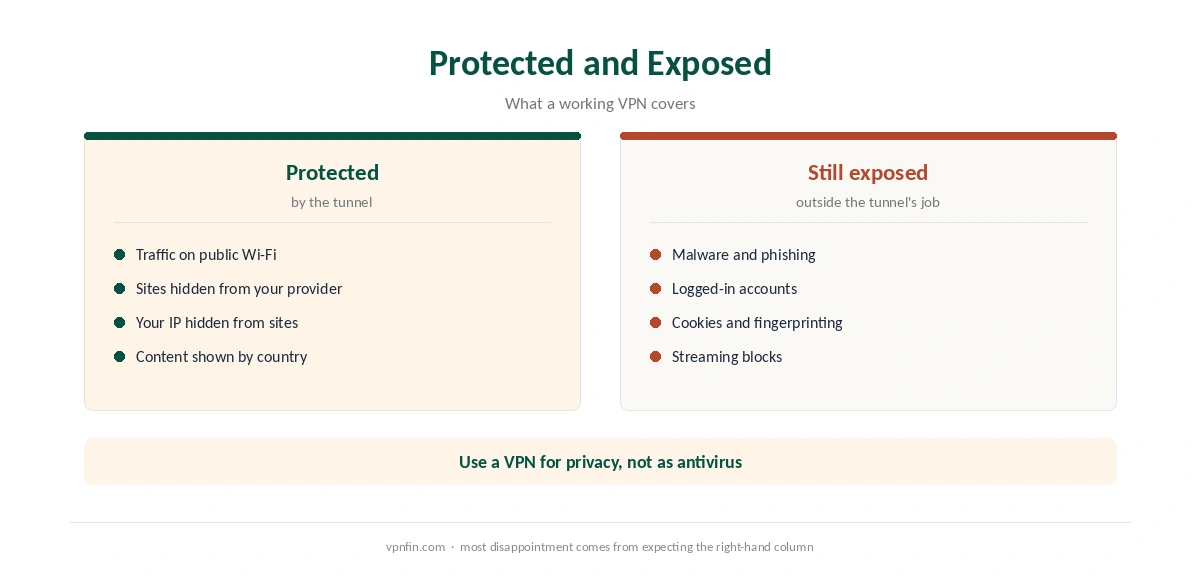
Do VPNs work? Yes, for one specific job: they encrypt your traffic between your device and the VPN server and hide your IP address from the sites you visit. The US Federal Trade Commission describes that job plainly, and it also warns about what VPNs do not do. Both halves matter, because most disappointment with VPNs comes from expecting the second half.
This guide sets out what a VPN does, what it cannot do, and four checks that show whether yours works.
What a VPN Actually Does
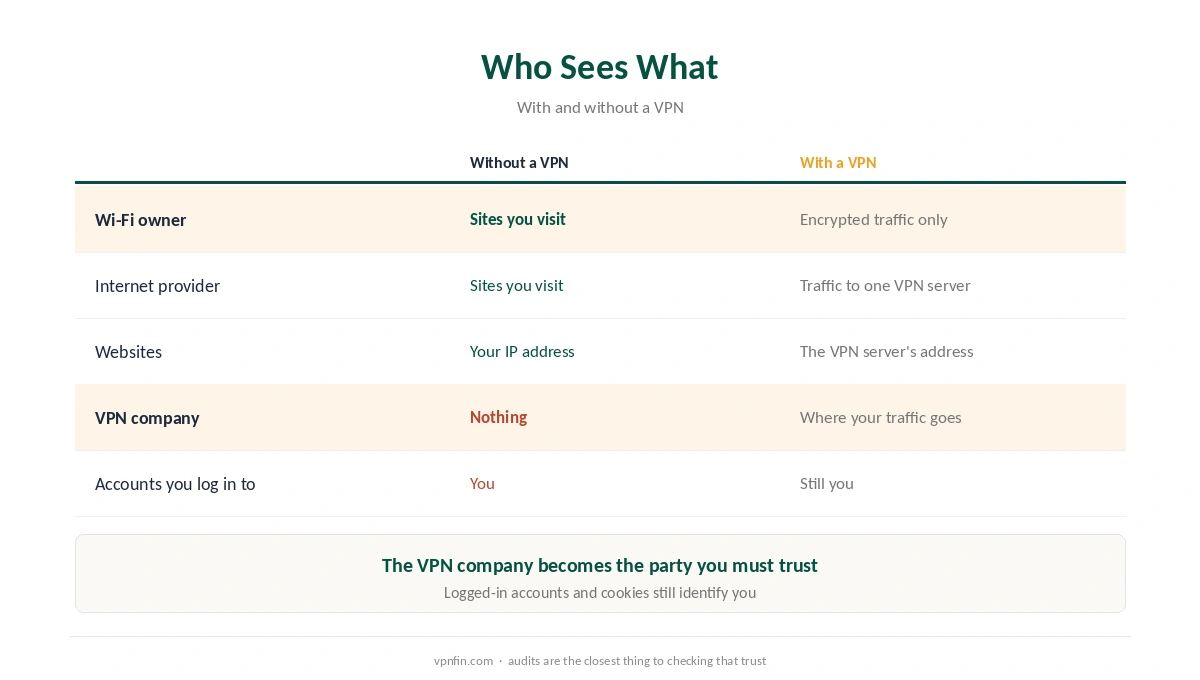
A VPN app builds an encrypted tunnel from your device to a server run by the VPN company. Everything you send passes through that tunnel. As a result, the Wi-Fi owner and your internet provider see encrypted traffic going to one server, not the sites you visit. The sites, in turn, see the VPN server’s address rather than yours.
The FTC’s advice centres on public Wi-Fi for that reason. In its 2018 guidance, it said VPN apps can help shield information sent over open networks in cafés and airports. Our public Wi-Fi guide covers that use, and our VPN explainer goes deeper into the tunnel.
Do VPNs Work for Anonymity?
Not fully, and the FTC says so. Its guidance reminds users that not every VPN app encrypts traffic, and none makes you completely anonymous. A VPN moves trust from your internet provider to the VPN company, which can see where your traffic goes.
Accounts also identify you. If you sign in to Google or Facebook, those services know who you are, VPN or not. Cookies and browser fingerprinting work the same way. A VPN changes your address, not your identity.
What VPNs Do Not Do
Do VPNs work against malware? No. A VPN is not antivirus software. It will not stop malware you download or a phishing page you open, as our VPN vs antivirus page explains. It also cannot guarantee access to streaming catalogues, since services such as Netflix block VPN addresses on their own schedule.
Speed is a trade-off as well. The extra hop and the encryption cost some speed, as our guide to VPN speed loss shows. For streaming alone, our Smart DNS vs VPN page explains a lighter option.
How to Check That Your VPN Works
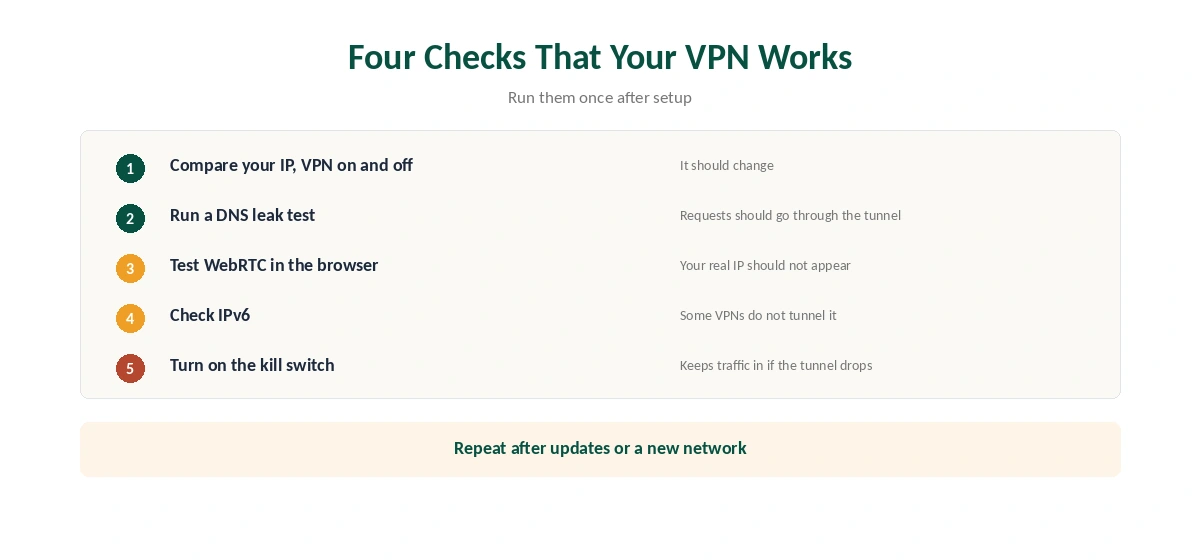
Four checks cover most failures. First, compare your IP address with the VPN on and off. Second, run a DNS leak test; our DNS leak guide explains why requests can bypass the tunnel. Third, test for WebRTC leaks in the browser, as our WebRTC guide shows.
Fourth, check IPv6. Some VPNs do not tunnel it, and our IPv6 leak guide covers the fix. Our VPN test page runs through all four, and a kill switch keeps traffic in when the tunnel drops.
Do VPNs Work if You Cannot Check the Company?
This is the hard part. The FTC advises researching an app before installing it: read the privacy policy, check the permissions it asks for and look for sharing with third parties. It cited research into 300 VPN apps, many of which lacked encryption or asked for unexpected permissions, according to SC Magazine.
In 2022, US lawmakers asked the FTC to act, citing Consumer Reports research that found some major VPNs misrepresented their products. They also noted there are few practical tools to check security claims. Independent no-logs audits are the closest substitute, and our VPN audit tracker lists them. Ownership matters too, as our VPN ownership map shows.
When a VPN Is Worth It
So when do VPNs work best? A VPN is worth it on public Wi-Fi, when you do not want your internet provider to see the sites you visit, and when a site shows different content by country. It is not worth it as a substitute for antivirus, for anonymity against services you log in to, or as a guarantee for streaming. Apple users can compare a lighter option in our VPN vs iCloud Private Relay guide.
The FTC’s Checklist
The FTC’s 2018 advice includes a short checklist. Use it before installing any VPN app. Research the app, check the permissions it requests, confirm it encrypts traffic, and read whether it shares data with third parties. That checklist still applies.
How We Research
This page draws on the FTC’s 2018 guidance on VPN apps and coverage of its 2024 update, plus reports from Hunton, SC Magazine and RPP on VPN claims. We cross-checked these sources against each other, and where they conflict or something can’t be verified, we say so in the text rather than guessing. We read every source on 5 October 2026. The main source we relied on is the FTC’s guidance on VPN apps. Our full approach lives on the About Us page.
Do VPNs Work? FAQ
Yes, for encrypting traffic between your device and the VPN server and hiding your IP address from sites. They do not make you anonymous or protect against malware.
No. The FTC notes that VPN apps do not make users completely anonymous, and logged-in accounts and cookies still identify you.
It sees encrypted traffic going to the VPN server, not the sites you visit. The VPN company can see where your traffic goes instead.
Some do, but the FTC’s warnings apply most to apps you cannot check. Look for encryption, a clear privacy policy and independent audits.
Compare your IP address with the VPN on and off, then test for DNS, WebRTC and IPv6 leaks.
The Verdict
Do VPNs work? They do what they are built for: encrypting traffic and hiding your IP address. Expect privacy from your network and internet provider, not anonymity or malware protection, and test your VPN for leaks once it is running.