
Disclosure: VPNFin is reader-supported. If you buy a VPN through links on this page, we may earn a commission at no extra cost to you. This never affects our ratings — here’s our full disclosure.
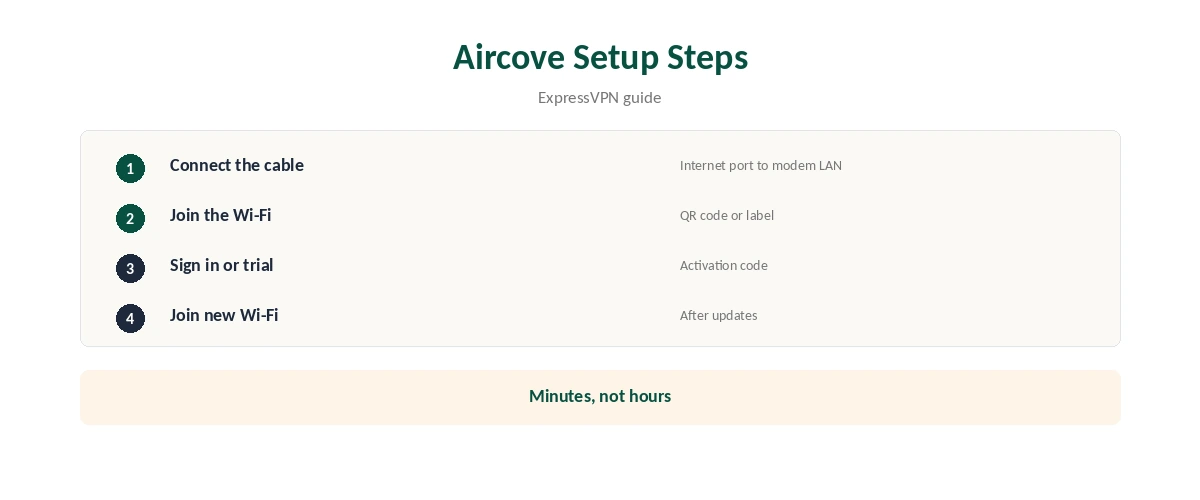
ExpressVPN Aircove setup takes a few minutes and needs no technical knowledge. You connect a cable, join the router’s Wi-Fi, sign in with your ExpressVPN details and then reconnect your devices.
This guide follows ExpressVPN’s Aircove setup guide step by step, then covers common problems and device groups. The steps are almost identical for Aircove Go.
Before You Start
You need the Aircove, the Ethernet cable from the box and either an ExpressVPN activation code or the router’s 30-day free trial. Our Aircove review covers what the router costs and does.
Keep the label on the bottom of the router handy. It shows the default Wi-Fi name, which starts with Aircove, its password and a QR code.
Choose a spot near your modem with room for the cable and good airflow. Routers placed in cupboards or behind TVs lose Wi-Fi range and can run hot.
Note your current Wi-Fi name and password too. You will reconnect each device to the new Aircove network at the end.
ExpressVPN Aircove Setup: Connect the Router
First, connect the power adapter and plug it into a wall socket. Then use the Ethernet cable to link the Aircove’s Internet port to a LAN port on your modem or existing router, ExpressVPN’s guide says.
If your provider gave you a combined modem and router, you can still connect Aircove behind it. ExpressVPN lists other connection methods on its support pages.
Join the Aircove Wi-Fi
On your phone, scan the QR code on the bottom of the Aircove to join its Wi-Fi automatically. The QR code works only on first setup or after a factory reset.
Alternatively, look for the network whose name starts with Aircove and enter the password from the label. A laptop on a cable works too.
If several Wi-Fi networks appear, choose the one whose name matches the label exactly. Neighbouring routers can have similar names.
Sign In and Finish
The setup page opens. Select Get Started, then Connect. If you already have ExpressVPN, choose Sign in and enter your activation code.
If you are new, choose Start Free Trial to use the 30-day trial that comes with Aircove. Then set an admin password, let the router check for updates and join the new Wi-Fi network you created.
Your activation code lives in your ExpressVPN account dashboard. Sign in on the ExpressVPN website from another device to copy it if you do not have it to hand.
Pick a new Wi-Fi name and a strong password when prompted. Using your old network name can make some devices reconnect automatically, which saves time.
ExpressVPN Aircove Setup Problems
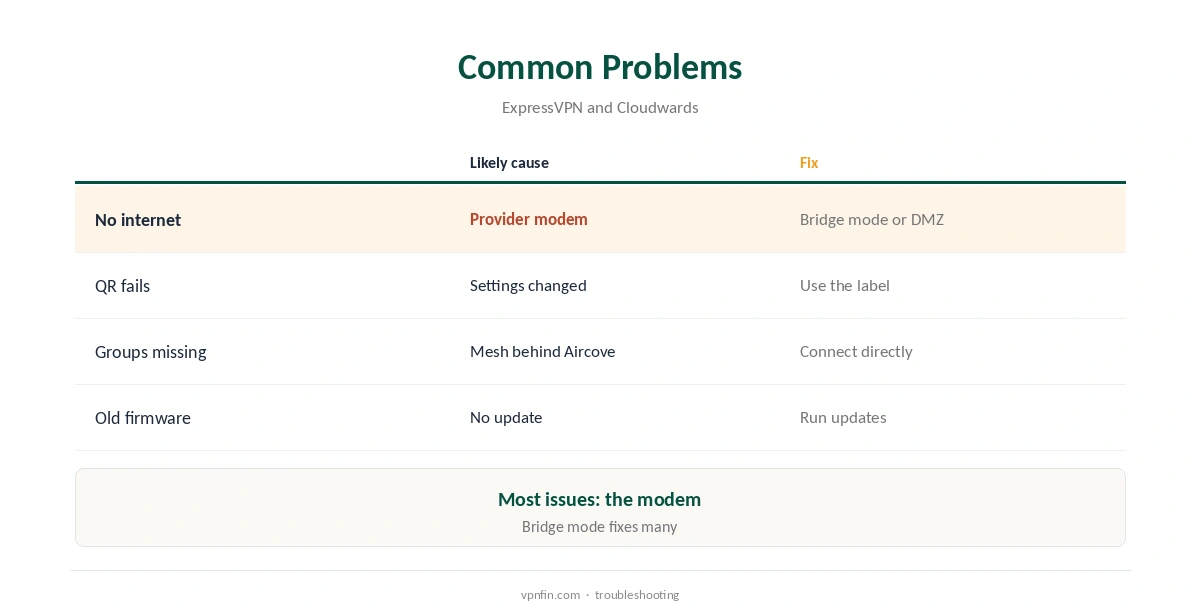
If Aircove cannot reach the internet, your provider’s modem may be blocking a second router. ExpressVPN suggests switching the modem to bridge mode, or using its DMZ function.
If you place a mesh system behind Aircove, devices on the mesh lose access to device groups, Cloudwards notes. Connect devices directly to Aircove where you need groups.
⚠️ Use a strong admin password. It protects the router settings from anyone on your network, including guests.
If Wi-Fi feels slow after setup, check whether your devices joined the 2.4 GHz band instead of 5 GHz. The 5 GHz band is faster at short range.
A factory reset brings back the default settings on the label, including the QR code. Use it as a last resort, since it clears your groups and passwords.
Set Up Device Groups
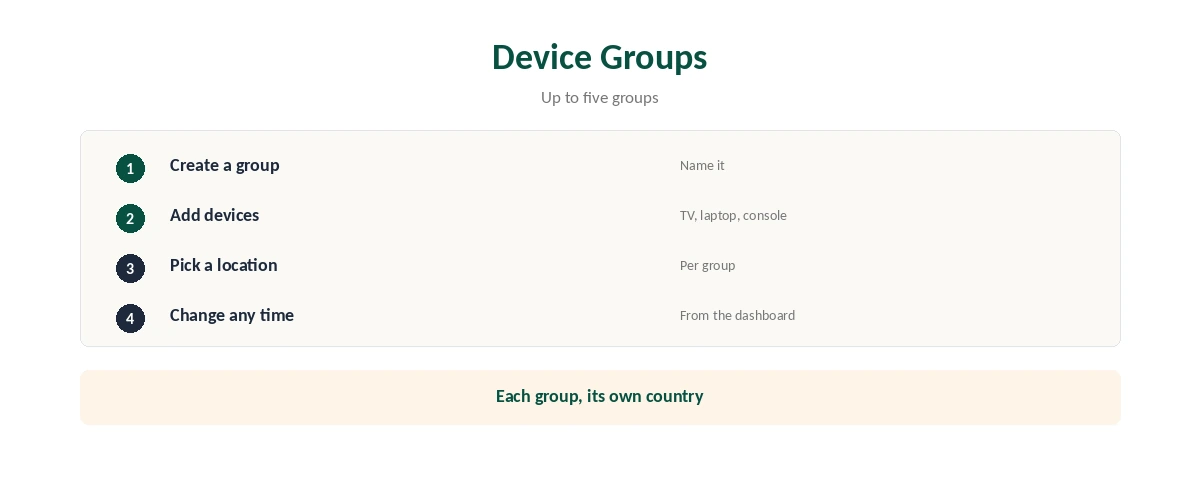
Device groups let you give each group of devices its own VPN location. You can create up to five groups, Cloudwards reports, for example one for the TV and one for work laptops.
ExpressVPN’s support pages explain how to manage groups and change server locations. Our VPN for smart TV guide covers TV-specific tips.
Give each group a clear name, such as Living Room TV or Work, so you can change locations quickly later.
New devices join the default group automatically. Move them into the right group when they first connect, so they use the location you want.
Check That It Works
Once connected, open a leak test on any device. Our guide to checking if a VPN is working walks through it.
Consoles benefit too: our VPN for Xbox guide explains what changes when the router handles the VPN.
Check the VPN location shown on the Aircove dashboard against what a leak test reports. If they differ, the device may sit outside the VPN group you expected.
Repeat the check after firmware updates. Updates can occasionally reset settings, so a quick test confirms everything still routes through the VPN.
For a fuller picture of Aircove, our guides cover Aircove against a DIY VPN router.
How We Research
We took every setup step from ExpressVPN’s Aircove setup guide and ExpressVPN’s Aircove support pages, read on 21 October 2026. Mesh and device-group details come from Cloudwards. We do not run our own tests. Our full approach lives on the About Us page.
ExpressVPN Aircove Setup FAQ
The Aircove’s Internet port connects to a LAN port on your modem or existing router.
On the label on the bottom of the router, with a QR code for first setup.
No. You can start the 30-day free trial during setup.
Try bridge mode or the DMZ function on your provider’s modem.
Yes, the steps are almost identical, ExpressVPN says.
The Verdict
ExpressVPN Aircove setup is quick: cable, Wi-Fi, sign in, reconnect. Most problems come from the provider’s modem and are solved with bridge mode.