
Disclosure: VPNFin is reader-supported. If you buy a VPN through links on this page, we may earn a commission at no extra cost to you. This never affects our ratings — here’s our full disclosure.
Aircove vs VPN router setups on your own hardware is a choice between convenience and flexibility. ExpressVPN Aircove arrives with the VPN built in, while a do-it-yourself setup means installing or configuring a VPN on a router you choose.
Both protect every device on your network. They differ in cost, setup effort, features and which VPN you can use. Here is how they compare.
Aircove vs VPN Router: The Short Answer
Choose Aircove if you use ExpressVPN and want setup in minutes, with device groups and no firmware work. Choose your own router if you use another VPN, want more control or already own suitable hardware.
Our Aircove review covers the router in depth, and our VPN router setup guide covers the DIY route.
A third option exists for some households: install a VPN app only on the devices that need it, and skip the router entirely. That works well when only a few devices need protection.
Router-level protection shines when you have consoles, smart TVs or many guests’ devices. Those are the cases where apps cannot help.
Cost
Aircove costs $189.90 in the ExpressVPN store, and Aircove Go $169.90, plus an ExpressVPN subscription for the VPN itself. A 30-day free trial comes with the router.
A DIY setup can cost less if your current router supports a VPN client. Otherwise, you buy a compatible router, and you still pay for your chosen VPN.
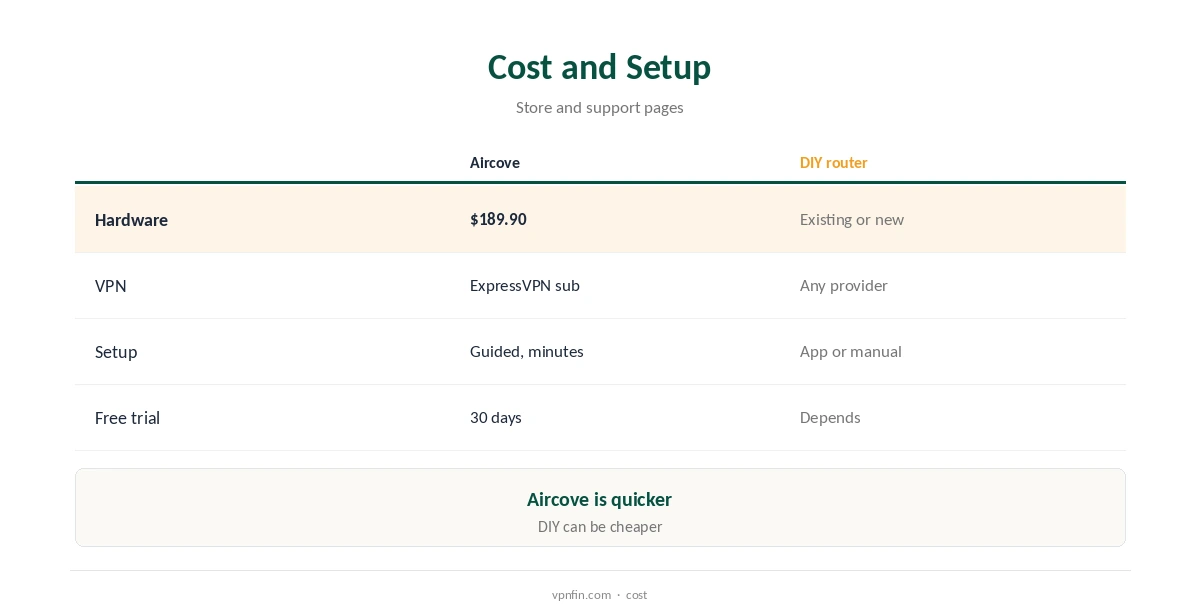
Think about the full lifetime cost rather than the box price. A router lasts several years, while the VPN subscription renews every year or two, so the subscription usually costs more over time.
Aircove also bundles extras that a basic router lacks, such as Threat Manager, an ad blocker and parental controls. If you would otherwise pay for those separately, the gap narrows.
Setup Effort
Aircove setup is guided: connect the cable, join the Wi-Fi, sign in. ExpressVPN calls it the easiest and fastest option on ExpressVPN’s router page.
The DIY route ranges from installing ExpressVPN’s router app on a compatible model to configuring a VPN manually. Our ExpressVPN on a router guide shows both.
Manual configuration usually means entering server details, keys or certificates by hand, and repeating that whenever you change location. Aircove changes location from its dashboard instead.
Firmware matters too. Flashing a router with third-party firmware can void its warranty and, if it goes wrong, leave the device unusable, so follow the maker’s guide closely.
Features
Aircove adds device groups, so up to five groups can each use a different VPN location, Cloudwards reports. It also includes Threat Manager, an ad blocker and parental controls.
A DIY router depends on its firmware. ExpressVPN’s router app includes Network Lock, its kill switch, ExpressVPN says, while manual setups may lack per-device locations.
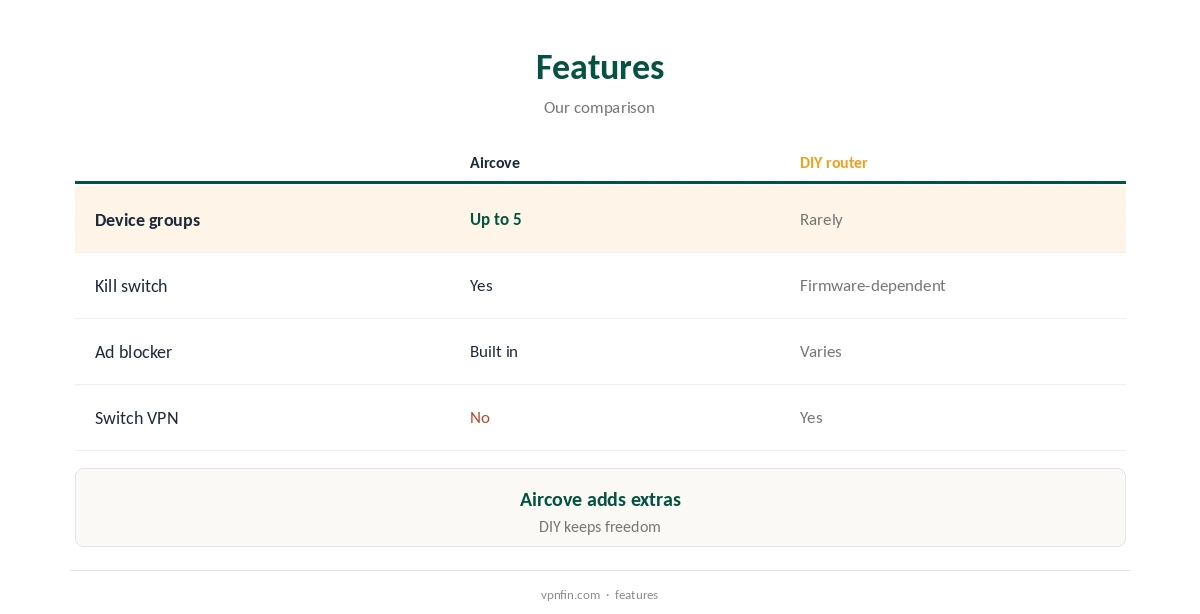
Per-device locations are the biggest practical difference. On a typical DIY setup, every device behind the router shares one VPN location, so a TV and a laptop cannot use different countries.
A DIY router can still offer things Aircove lacks, depending on the firmware. Some models support several VPN profiles or policy-based routing, though setting them up takes more skill.
Which VPN You Can Use
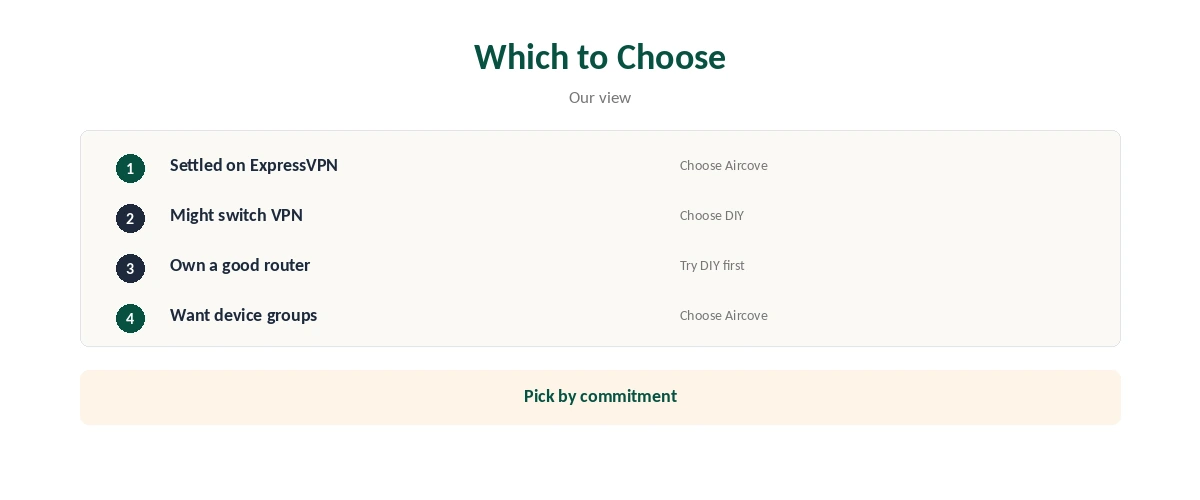
Aircove works only with ExpressVPN, Tom’s Guide notes. If you later switch provider, the VPN features stop, although it still works as a normal router.
A DIY router keeps you free to use any VPN that supports your hardware. That matters if you might change provider.
⚠️ One device slot either way. With ExpressVPN, a router counts as one of eight devices on a subscription, however many devices sit behind it, the company says.
This lock-in cuts both ways. Staying with one provider keeps setup simple, but you lose the option to move if prices rise or features change.
Before choosing, list the devices you want to protect and check which ones can run a VPN app. That list usually decides between the two approaches.
Speed
Aircove’s Wi-Fi 6 tested ahead of two mid-range routers in Tom’s Guide’s review, though it lacks 6 GHz. DIY speed depends entirely on the router’s processor, which handles the encryption.
Our Lightway vs WireGuard guide explains how protocol choice affects router speed.
Encryption on a router runs on its own processor, not on your computer. Budget routers often cap VPN throughput well below your internet plan, which is why router choice matters for a DIY setup.
If you have a fast fibre line, check the VPN throughput figure a router maker quotes, not just its Wi-Fi speed. The two can differ widely.
More on Aircove: our guides cover the Aircove setup guide.
How We Research
We took Aircove prices and features from the ExpressVPN store and ExpressVPN’s router page, speed findings from Tom’s Guide and device groups from Cloudwards, read on 21 October 2026. We do not run our own tests. Our full approach lives on the About Us page.
Aircove vs VPN Router FAQ
It is easier, with device groups built in; a DIY router is more flexible.
No. Aircove works only with ExpressVPN.
A DIY setup on a router you already own; Aircove costs $189.90 plus the subscription.
Yes. Any device on the router’s network goes through the VPN.
With ExpressVPN, yes: one of eight, however many devices connect behind it.
The Verdict
Aircove vs a DIY VPN router comes down to commitment. If you are settled on ExpressVPN, Aircove is the simplest whole-home option. If you want freedom to switch, set up your own router.