
Disclosure: VPNFin is reader-supported. If you buy a VPN through links on this page, we may earn a commission at no extra cost to you. This never affects our ratings — here’s our full disclosure.
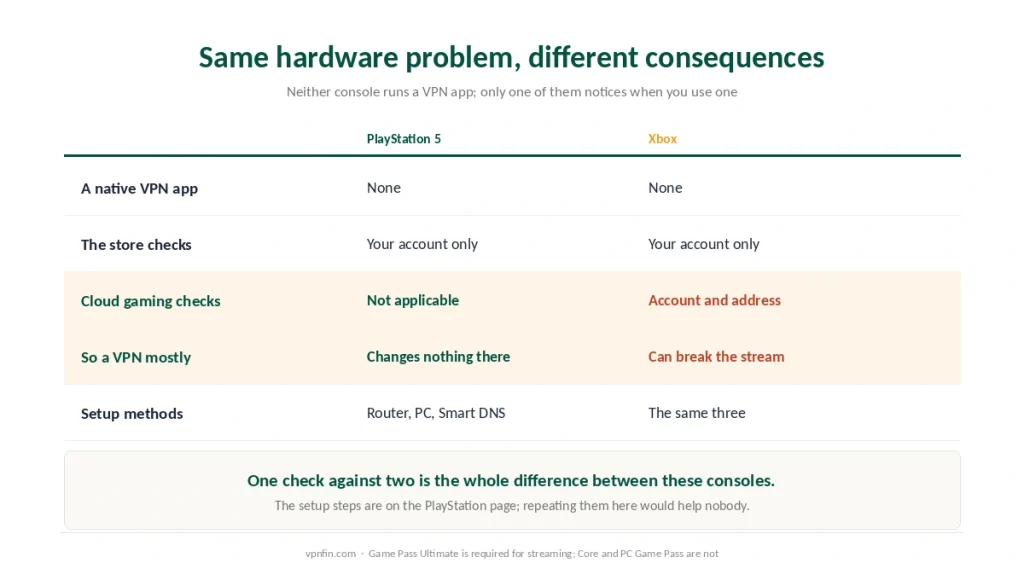
The Xbox runs no VPN app, exactly like a PlayStation, and the three workarounds are the same. What is not the same is what happens afterwards.
On a PS5 a VPN mostly changes nothing, because the store follows the account. On an Xbox it changes one thing decisively, and for most people the change is that cloud gaming stops working. Our page on TunnelBear on Xbox covers sharing a PC connection and the gaming trade-offs.
The Short Answer
No app exists, and there are three ways round it. A router, a shared connection from a PC, or Smart DNS — the mechanics are identical to a PlayStation, down to the menu paths.
Cloud gaming is where Xbox differs. Microsoft checks two things when a stream starts: the region on your account and the address you are connecting from. If those disagree, it refuses.
Which means a VPN that helped everywhere else will break xCloud, and the fix is configuration rather than switching it off.
The Three Methods, Briefly
No point repeating a page we have already written.
A router covers the console and everything else. It is the only method that keeps working when the computer is off — our router guide covers the three paths and which one risks your hardware.
A shared connection from a PC covers the console conditionally. Ethernet is steadier than a wireless hotspot.
Smart DNS covers nothing but changes what streaming apps show you. The Xbox accepts manual DNS entries in its network settings, just as a PlayStation does.
⚠️ The full step-by-step lives on the PlayStation page. The console menus differ in wording and not in substance, and duplicating them here would help nobody.
Cloud Gaming Checks Two Things
Here is the part that belongs only to Xbox.
Xbox Cloud Gaming is available in a limited list of countries, and it requires Game Pass Ultimate. Core and PC Game Pass do not include streaming at all, which surprises people who assumed a subscription was a subscription.
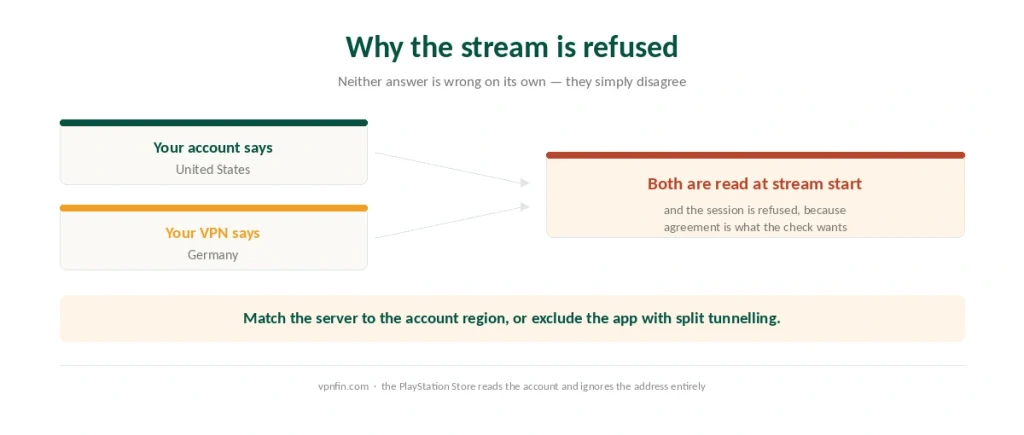
When a stream starts, Microsoft reads the region on your Microsoft account and the address you arrive from. Both are checked, and both have to make sense together.
⚠️ That is why a VPN breaks it more often than it helps. An account registered in the United States, connecting through a German server, produces a refusal — not because either is wrong, but because they disagree.
Compare that with the PlayStation Store, which reads the account and ignores the address entirely. One check versus two is the whole difference between these two consoles.
Why Yours Stopped Working, and What Fixes It
Four causes, in the order they occur.
A mismatch between account and server. Check the region at your Microsoft account profile, then pick a VPN server in that same country. Consistency is what the check wants.
Latency. Cloud gaming is real-time video in both directions. A distant server pushes ping past the point where the session either stutters or refuses to start — our speed page has the measurements, and a wired connection helps more than any setting.
The tunnel covering traffic that does not need it. Split tunneling excludes the Xbox app or your browser from the VPN while everything else stays protected. Most major providers offer it under Split Tunneling or App Exclusions.
DNS resolution. If pages load but games will not start, pointing the connection at a public resolver sometimes clears it. Our guide to Surfshark on Xbox covers router or Windows PC, party chat fixes and ping.
⚠️ None of that is a workaround for a restriction. It is making two of your own settings agree with each other, which is a different thing from pretending to be somewhere you are not.
What We Will Not Help With
The same line we drew on our gaming page, for the same reason.
Changing your Microsoft account region to buy Game Pass in a cheaper currency breaches platform terms. Published accounts also suggest the price gap has largely closed since 2026, so the risk now buys less than it used to. Nintendo permits the equivalent change officially, which is why advice does not transfer between consoles.
Reaching cloud gaming from a country where Microsoft does not offer it is the same category. It is a contractual matter rather than a criminal one, and the realistic consequence is a suspended account rather than anything worse. Your call, but know which rule you are bending. Our guide to CyberGhost on Xbox covers router, Smart DNS or a Windows hotspot.
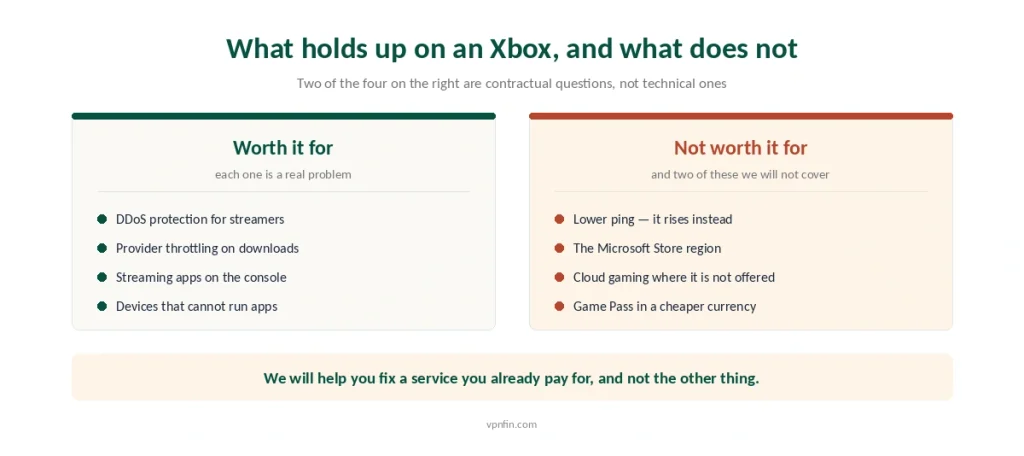
We will help you fix a service you already pay for, which is what the section above does.
The Reasons That Actually Hold Up
The list is short, and it matches the console rather than the marketing.
DDoS protection for streamers. In lobbies where opponents can see your address, hiding it is the point, and this is the strongest case on any console. Our guide to IPVanish on Xbox covers router or Windows sharing, and the trade-offs.
Provider throttling during large downloads. An encrypted tunnel removes the ability to identify game traffic and slow it. Our guide to Windscribe on Xbox covers PC sharing or a router, with no proxy option.
Streaming apps on the console. Netflix and the rest read the address rather than the account — our streaming guide covers which platforms notice.
⚠️ Lower ping is not on the list. A VPN adds a routing step and usually costs ten to twenty milliseconds, which matters twice as much when the game itself is being streamed to you.
Which Providers Suit an Xbox
NordVPN for speed, which cloud gaming needs most. Highest on our scale at 4.8 and the lowest measured speed loss of the providers we cover.
ExpressVPN for the router route. It sells hardware with the VPN already installed, which removes the step that breaks most attempts.
Surfshark for a household, where the console shares a network with everything else.
| Provider | Speed loss | Source |
|---|---|---|
| NordVPN | 2.9% | CNET |
| Surfshark | 21% | CNET |
| ExpressVPN | 18% | CNET |
| CyberGhost | 31–38% | independent labs |
| PureVPN | 12–67% | four labs, varies by server |
| Proton VPN | 16% | CNET |
Before You Start
Test the tunnel on a computer first. Run the leak checks before wiring it into a console that reports almost nothing.
Write down which method you used. A router rule and a DNS entry fail in completely different ways months later — and the router version has its own order of operations.
And keep the basic picture in view. A VPN moves who can see your traffic rather than making you invisible, on a console as much as anywhere.
How We Research
This guide draws on VPNCentral for the causes of Xbox Cloud Gaming failures under a VPN and the split tunnelling fix, on AvisVPN for the absence of a native app and the three configuration routes, on Marix and Cloud Loadout for the limited country availability of cloud gaming and the requirement for Game Pass Ultimate rather than Core, on DevRunners for the closing of the regional price gap since 2026, and on our own gaming and speed pages for the latency figures. Several of those sources sell subscriptions or regional codes, so we have used them for platform behaviour rather than for recommendations, and we have not reproduced the region-changing methods some of them describe. We do not run our own tests. Our method lives on the About Us page.
Xbox VPN FAQ
No. Neither the Series X, the Series S nor the One runs VPN applications, and the Microsoft Store carries none. The console is covered indirectly through a router, through a shared connection from a computer, or through Smart DNS, which changes what streaming apps show you without encrypting anything.
Because Microsoft checks two things when a stream begins: the country on your Microsoft account and the address you are connecting from. If your account says one country and your VPN server says another, the service refuses. Matching the server to the account region usually resolves it.
Only Game Pass Ultimate. Core and PC Game Pass do not include streaming, which catches out people who assumed any subscription would do. Cloud gaming is also limited to a set list of countries regardless of which plan you hold.
Usually the opposite, and it matters more here than on other consoles. A VPN adds a routing step worth roughly ten to twenty milliseconds, and cloud gaming streams video in both directions, so the penalty is felt twice. A nearby server on a wired connection limits the damage.
Match your VPN server to the region on your Microsoft account, or use split tunnelling to exclude the Xbox app while the rest of your traffic stays in the tunnel. Most major providers list that setting as Split Tunnelling or App Exclusions.
The Verdict
The Xbox takes no VPN app, and the three workarounds match a PlayStation exactly.
Cloud gaming is the difference. Microsoft checks both the account region and the address, so a VPN that solves problems elsewhere creates one here unless the two agree.
Fix the mismatch rather than switching the VPN off. Match the server to your account region, or exclude the Xbox app through split tunnelling, and the service behaves as it did before. Our page on NordVPN on Xbox covers sharing a Windows connection, routers and Smart DNS.