
Disclosure: VPNFin is reader-supported. If you buy a VPN through links on this page, we may earn a commission at no extra cost to you. This never affects our ratings — here’s our full disclosure.
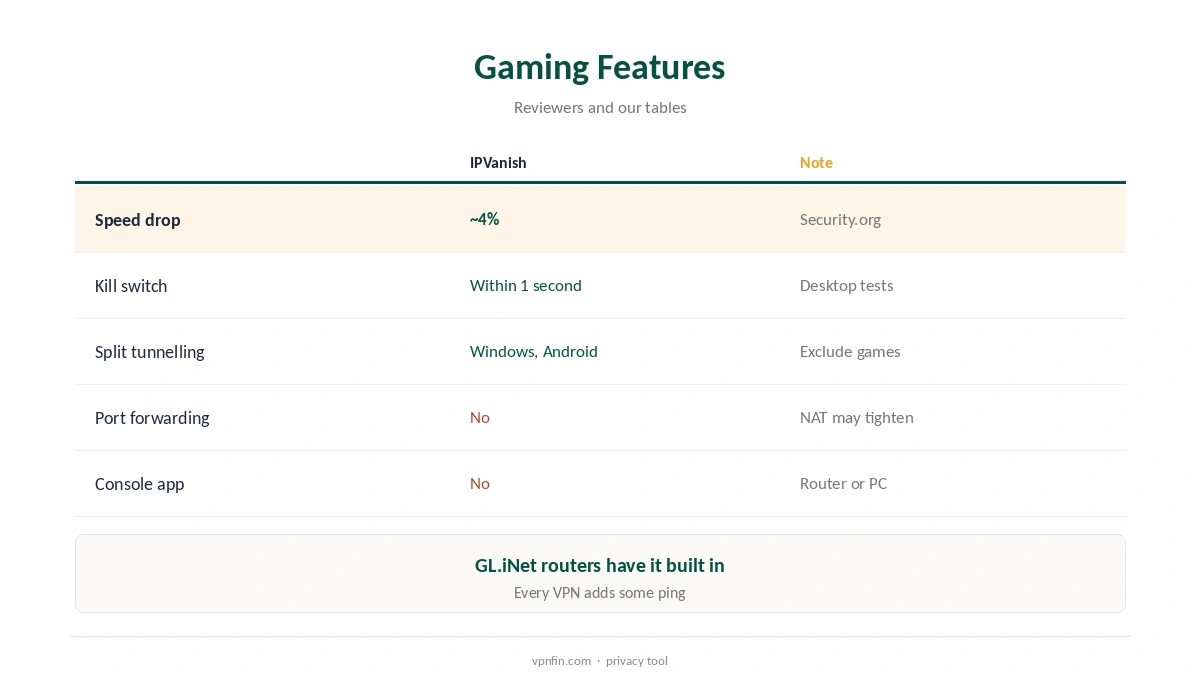
IPVanish for gaming is a reasonable choice for privacy and shared networks rather than a way to lower ping. Security.org measured only about a 4% speed drop, Cloudwards found nearby servers barely slowed connections, and WireGuard is its fastest protocol, VPNpro found. IPVanish has no port forwarding and no console app, so consoles need a router, and every VPN adds some latency.
This guide covers when it helps, settings, PC and console setup, NAT and the trade-offs.
When IPVanish for Gaming Helps
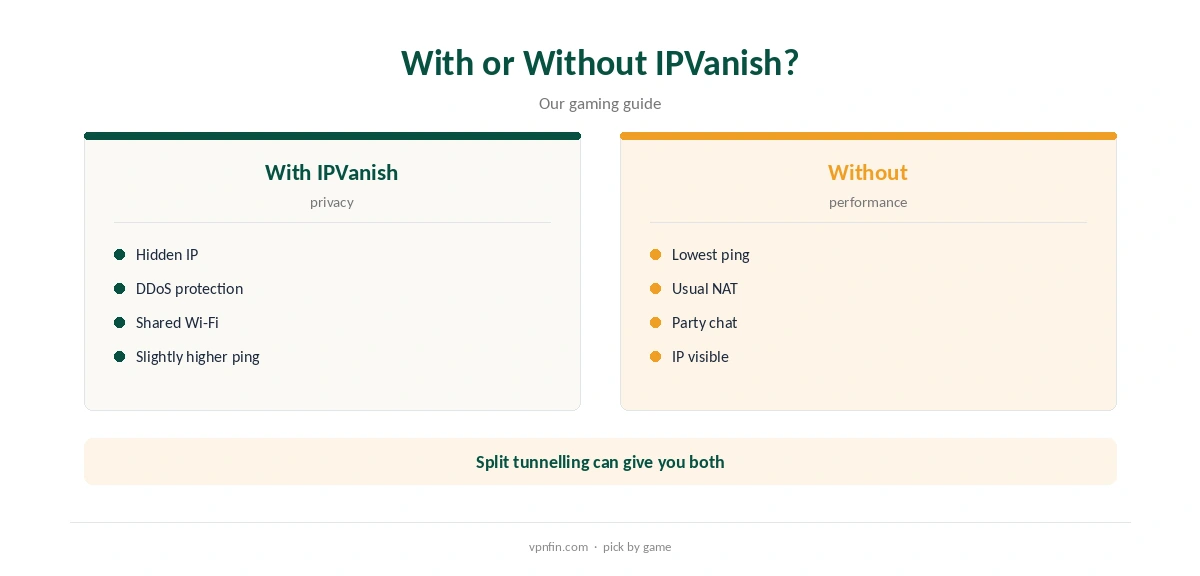
A VPN hides your home IP address from other players, which can help against DDoS attempts. It also encrypts traffic on shared networks such as student housing. It does not usually lower ping, since it adds a hop between you and the game server.
Our gaming VPN guide explains when a VPN helps and when it hurts.
IPVanish for Gaming Settings
Choose WireGuard, the nearest location to you or to the game’s servers, and a wired connection. Security.org’s roughly 4% speed drop and Cloudwards’ nearby results suggest bandwidth will rarely be the limit for online games.
Split tunnelling on Windows and Android lets you keep a game outside the tunnel while the browser and chat stay inside, Tom’s Guide notes.
On PC and Consoles
Install the IPVanish Windows app, choose WireGuard and connect before opening the game launcher or store. The kill switch cut traffic within a second in Security.org’s desktop tests, which keeps your IP hidden if the tunnel drops mid-match.
Our IPVanish Windows guide covers the app.
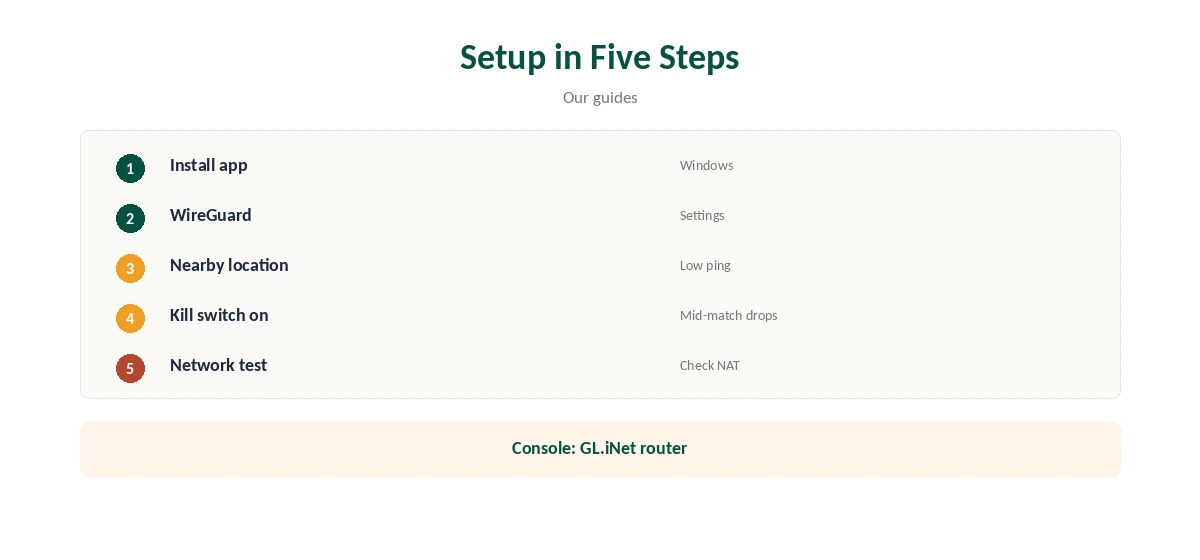
PlayStation and Xbox consoles cannot run VPN apps, and IPVanish has no Smart DNS. A GL.iNet router with built-in IPVanish WireGuard, or a PC sharing its connection, covers the console.
Our IPVanish PS5 guide and Xbox guide walk through both.
NAT and Port Forwarding
A VPN can make your NAT type stricter, which affects party chat and matchmaking, and IPVanish offers no port forwarding to open it again. Run your console’s or game’s network test after connecting, and again after switching servers or protocols.
If chat or matchmaking breaks, play direct for that session and use the VPN when privacy matters more than an open NAT.
Choosing a Server
Pick the IPVanish location nearest to you, or to the game’s servers if you know where they are, such as a regional data centre. Distant locations fell below 80% of unprotected speed in three of Cloudwards’ tests, and latency grows with distance too.
Try two nearby cities and keep the one with the lower ping in the game’s own network display, then save it as a favourite.
Game Downloads and Updates
Large game downloads through Steam or console stores pass through the tunnel whenever the VPN is on, so a nearby location keeps them quick. Split tunnelling can keep the launcher outside the VPN if you only want privacy in browsers and chat.
IPVanish sets no data caps, so downloads do not count against any allowance.
Cloud Gaming
Cloud gaming services such as GeForce Now and Xbox Cloud Gaming stream the game from a data centre, so every millisecond of extra latency shows. Exclude them with split tunnelling on Windows or Android, or simply disconnect while playing.
Use IPVanish for downloads, browsing and voice chat around cloud sessions instead, where latency matters less.
Checking Your Setup
Compare ping in the game’s network display with the VPN on and off, at the same time of day. If the difference is small, keep the VPN on for privacy; if it is large, try a closer city or play direct.
Run a leak test in the browser to confirm your real IP is hidden from sites and other players.
Dorms, Shared Networks and Lobby Tricks
On student housing or hotel Wi-Fi, the VPN keeps your game traffic and IP address away from others on the network. Some campus and workplace networks block VPN traffic; OpenVPN with Scramble can help there.
Check your network’s rules first, since some schools and institutions forbid VPN use.
Some players use VPNs to reach easier lobbies in other regions. Game publishers rarely state their rules clearly, players report bans in some games, and distant servers add ping.
Use IPVanish at a nearby location for privacy, and treat region-hopping as a real risk to your gaming account.
Privacy and Price
IPVanish’s no-logs policy has two audits in our table, by Leviathan in 2022 and Schellman in 2025, and it is based in the US under Ziff Davis. IPVanish costs $57.22 for the first 24 months and renews at $89.99 a year, VPNOverview lists, with no device limit. Yearly website plans carry a 30-day refund; monthly plans carry none. Our guide to IPVanish for Warzone covers ping, servers and the right settings.
Unlimited devices mean a gaming PC, console router, laptop and phone all fit on one plan.
How We Research
This page draws on All Things VPN’s, Security.org’s, Cloudwards’, VPNpro’s and Tom’s Guide’s IPVanish coverage, GL.iNet’s WireGuard client documentation and our IPVanish and gaming tables. We cross-checked these sources against each other, and where they conflict or something can’t be verified, we say so in the text rather than guessing. We checked time-sensitive figures, including prices in US dollars, on 8 October 2026. The main source we relied on is All Things VPN’s IPVanish review. Our full approach lives on the About Us page.
IPVanish for Gaming FAQ
For privacy and shared networks; it will not usually lower ping.
WireGuard, at a nearby location.
No.
Through a router or a shared PC connection.
Region-hopping adds ping and may risk your account.
The Verdict
IPVanish for gaming suits players who want privacy and DDoS protection at a nearby location. Expect a small ping cost and no port forwarding.