
Disclosure: VPNFin is reader-supported. If you buy a VPN through links on this page, we may earn a commission at no extra cost to you. This never affects our ratings — here’s our full disclosure.
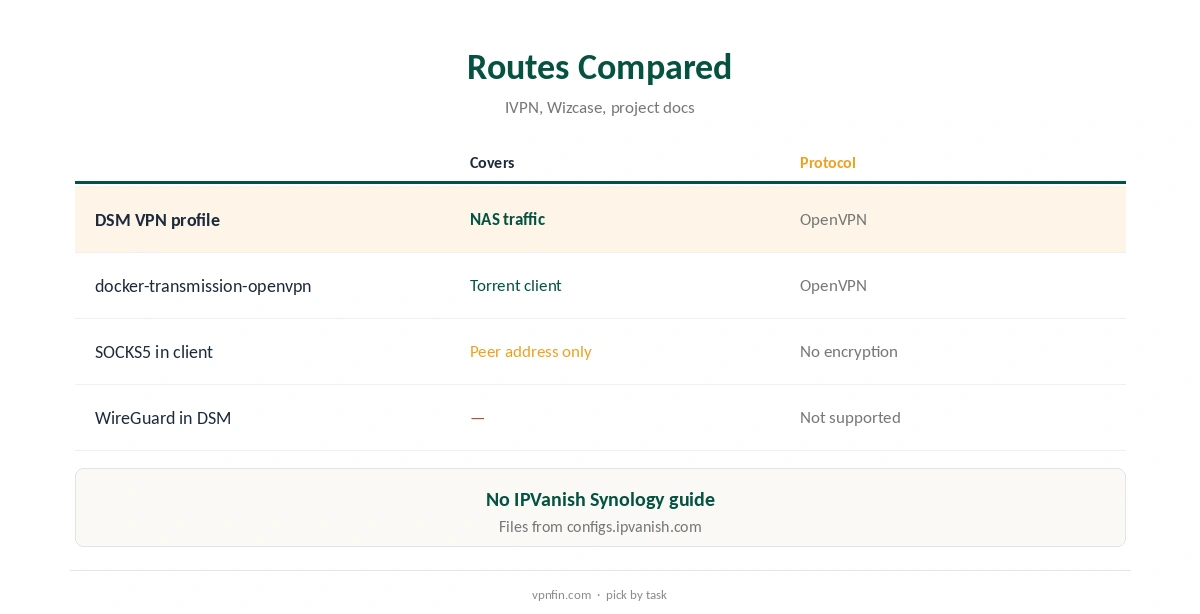
IPVanish on Synology works through DSM’s built-in OpenVPN profiles, using IPVanish’s configuration files. Wizcase found IPVanish publishes no Synology-specific guide, but the generic steps work. A second route suits download boxes: the docker-transmission-openvpn container lists IPVanish as a provider and runs on Synology through Container Manager. IPVanish’s unlimited devices mean the NAS costs nothing extra.
This guide covers both routes, DSM’s advanced options, remote access, leaks and when each route fits.
Two Routes
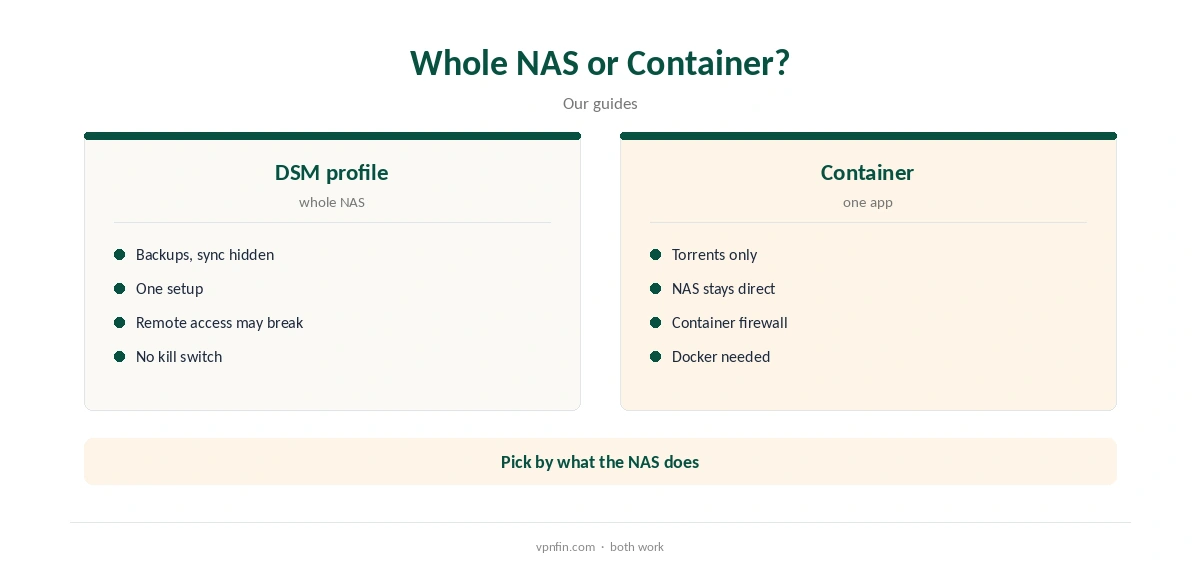
A DSM VPN profile sends the NAS’s own traffic, or all of it, through IPVanish. A container sends only the apps inside it, such as a torrent client, through the tunnel and leaves the rest of the NAS direct.
DSM’s VPN client handles OpenVPN but not WireGuard, a 2026 guide notes, so OpenVPN is the protocol for the built-in route. Our Synology VPN guide explains the trade-offs.
Getting IPVanish’s Files
Download IPVanish’s OpenVPN configuration archive from configs.ipvanish.com and unzip it on your computer, as VPNAlert’s Linux guide describes. Each file covers one server location, and the archive also holds the certificate file some setups ask for.
You sign in with your IPVanish username and password. Choose a nearby location for the best speed, since backups and sync move large amounts of data, often overnight.
IPVanish on Synology DSM Setup
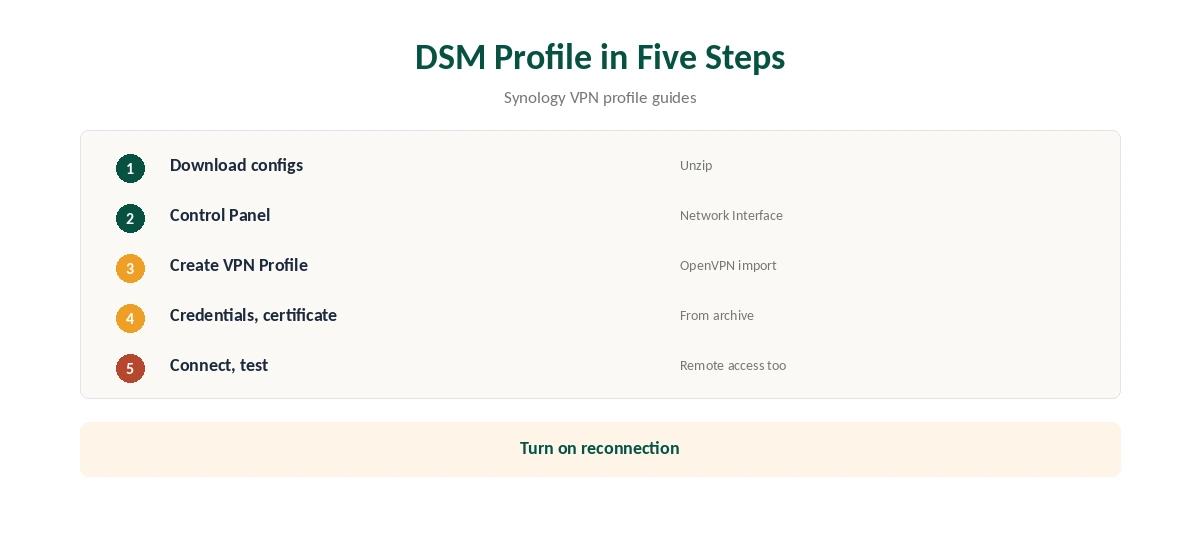
In DSM, open Control Panel, Network and Network Interface, choose Create and Create VPN Profile, and pick OpenVPN via importing a .ovpn file. Name the profile, enter your IPVanish credentials, import the file and, if asked, the certificate from the archive.
Save the profile, select it and connect; Network Interface then shows the VPN as connected. The steps match other providers’ Synology guides, such as IVPN’s.
The Advanced Options
Use default gateway on remote network sends all NAS traffic through IPVanish. Allow other network devices to connect through this Synology server’s Internet connection turns the NAS into a gateway, IVPN’s guide explains; most people do not need it.
Turn on reconnection when the VPN connection is lost so the NAS returns to the tunnel after network blips or a router restart.
Remote Access and Leaks
With all traffic through the VPN, reaching the NAS from outside your home may stop working, so test remote access after connecting. DSM’s profile has no IPVanish kill switch, so traffic can continue outside the tunnel if it drops.
Disable IPv6 if you do not need it and set DNS in the network settings. Our DNS leak guide explains the checks.
The Container Route
docker-transmission-openvpn, a widely used container, lists IPVanish as a provider, downloads its configuration bundle itself and picks a server, its project discussions show, including on Synology DSM 7. Only the torrent client then uses the VPN.
Some users needed extra network permissions for the container on Synology, the same discussions note, and Portainer is a common way to manage it. Our IPVanish Raspberry Pi guide covers the container on a Pi.
Price and Privacy
IPVanish costs $57.22 for the first 24 months and renews at $89.99 a year, VPNOverview lists, with no device limit. It has two audits in our table, by Leviathan and Schellman, owns its servers and is based in the US.
Yearly website plans carry a 30-day refund. Our ExpressVPN Synology guide covers a provider with its own Synology instructions.
SOCKS5 for Download Station
IPVanish’s SOCKS5 proxy, on more than 25 servers in 14 countries, VPNAlert reports, can be set in torrent clients that support proxies. It changes the address peers see but does not encrypt traffic, so your internet provider still sees the transfers.
Disable DHT, PEX and IPv6 in the client to prevent leaks, VPN.ac advises.
Download Station and the Tunnel
With the default gateway option on, Download Station’s transfers go through IPVanish like the rest of the NAS. Because DSM has no IPVanish kill switch, tasks keep running on your normal connection if the tunnel drops.
Pause downloads in Download Station whenever the VPN is off, or use the container route, whose firewall stops traffic outside the tunnel.
How IPVanish Compares on Synology
ExpressVPN and NordVPN publish their own Synology instructions, Wizcase and Comparitech note, while IPVanish relies on the generic DSM steps. IPVanish’s advantage is its unlimited device policy, so a NAS never competes with phones or TVs for a slot, and its SOCKS5 proxy adds another option for torrent clients.
Our NordVPN Synology guide covers a provider with its own instructions.
Checking It Works
After connecting, run a task that uses the internet, such as a package update, and check the NAS’s public address from DSM or a container. Then confirm remote access still works from a phone on mobile data.
Repeat the check after a NAS restart, since the profile must reconnect on its own without you logging in.
How We Research
This page draws on Wizcase’s Synology VPN guide, IVPN’s Synology guide, VPNAlert’s IPVanish Linux guide, the docker-transmission-openvpn project, nelson.cloud on DSM and WireGuard, and our IPVanish tables. We cross-checked these sources against each other, and where they conflict or something can’t be verified, we say so in the text rather than guessing. We checked time-sensitive figures, including prices in US dollars, on 8 October 2026. The main source we relied on is IVPN’s Synology guide. Our full approach lives on the About Us page.
IPVanish on Synology FAQ
No; use a DSM OpenVPN profile or a container.
Wizcase found none; the generic DSM steps work.
Not in DSM’s VPN client, which lacks WireGuard.
It can if all traffic uses it; test it.
Yes, with a container such as docker-transmission-openvpn.
The Verdict
IPVanish on Synology works through a DSM OpenVPN profile or a torrent container. Test remote access and leaks either way.