
Disclosure: VPNFin is reader-supported. If you buy a VPN through links on this page, we may earn a commission at no extra cost to you. This never affects our ratings — here’s our full disclosure.
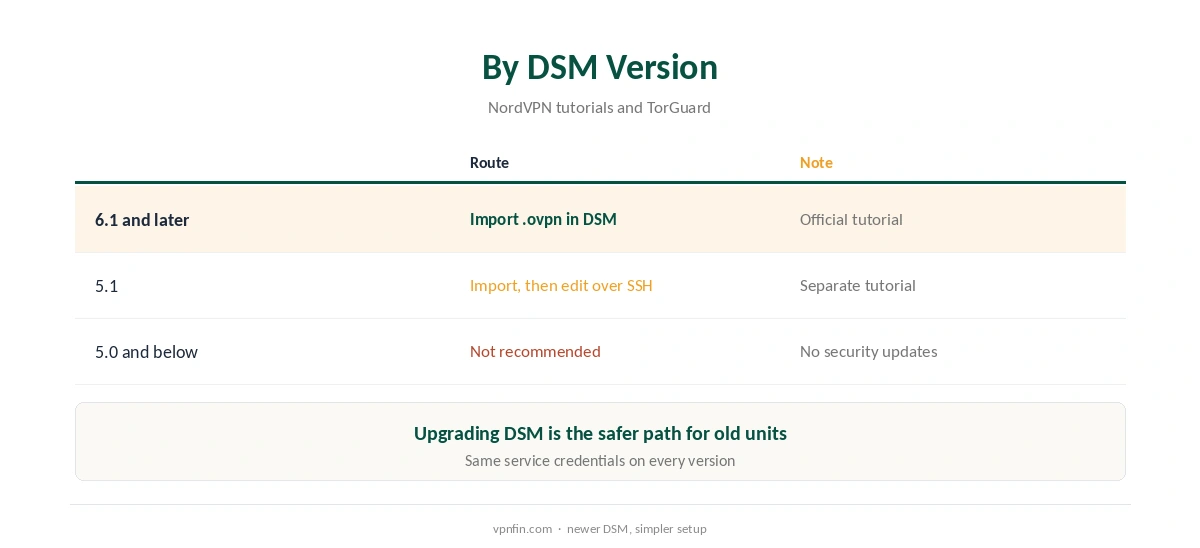
NordVPN on Synology works through DSM’s built-in VPN client, using OpenVPN. NordVPN’s own tutorial says DSM 6.1 and later support it, and the setup takes a downloaded .ovpn file plus your service credentials. Older DSM versions need manual edits over SSH, and DSM 5 no longer gets security updates from Synology. Our page on Surfshark on Synology covers OpenVPN in DSM with service credentials.
What You Need First
You need two things from the Nord Account. First, the service credentials: open NordVPN, then Set up NordVPN manually, and copy the username and password from the Service credentials tab. Second, an OpenVPN configuration file for the server you want, from the OpenVPN configuration files tab.
Service credentials are not your account email and password. Our NordVPN OpenVPN guide explains where to find both.
How to Set Up NordVPN on Synology
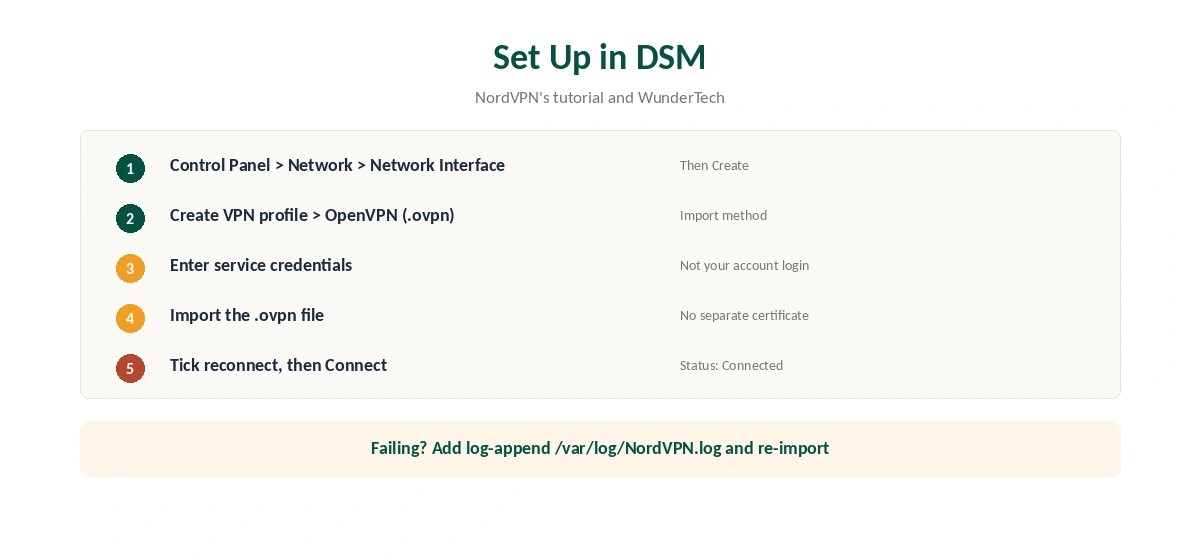
In DSM, open Control Panel, then Network, then Network Interface. Click Create, then Create VPN profile, and pick OpenVPN (via importing a .ovpn file). Enter a profile name, the service username and password, and import the .ovpn file. A user on the NAS-Forum notes that no separate certificate is needed with this import method.
On the last screen, WunderTech suggests ticking Reconnect when the VPN connection is lost, and Use default gateway on remote network if all NAS traffic should use the VPN. Then select the profile and click Connect; the status changes to Connected.
If the Connection Fails
NordVPN’s tutorial suggests adding the line log-append /var/log/NordVPN.log to the .ovpn file, importing it again, and checking the log. Also confirm that you used the service credentials and a current server file.
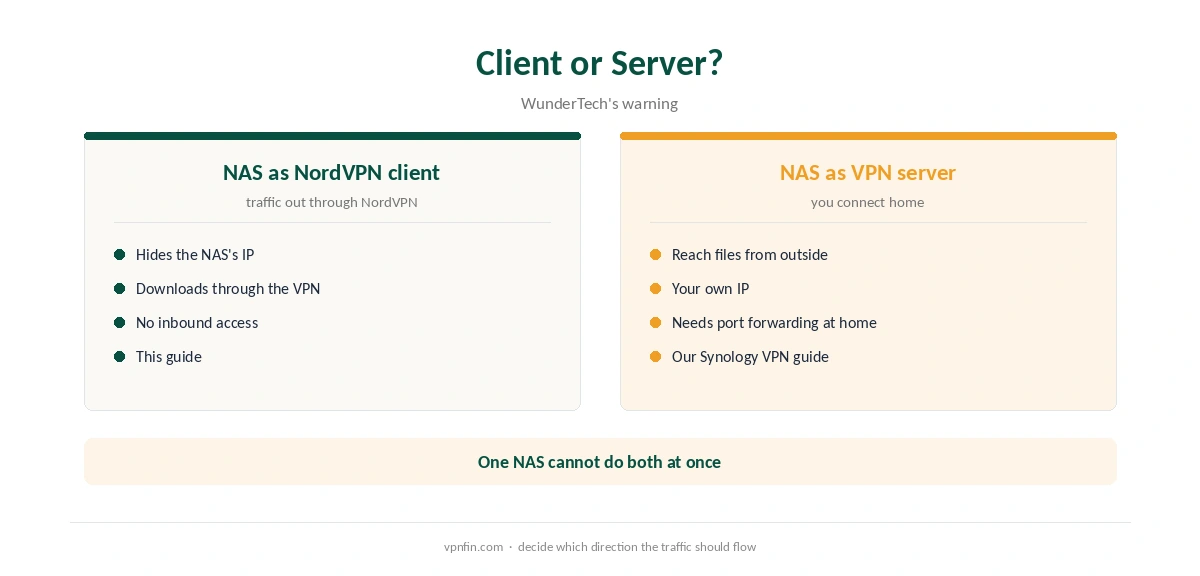
WunderTech warns about one conflict: you cannot run your own OpenVPN server on the NAS and a NordVPN interface at the same time. Our Synology VPN guide covers hosting your own server instead.
NordVPN on Synology Versions
DSM 6.1 and later follow the steps above. For DSM 5.1, NordVPN publishes a separate tutorial that edits the OpenVPN configuration over SSH. TorGuard’s guide notes that DSM 5 and below no longer receive security updates from Synology, so upgrading is the safer path.
A NAS behind NordVPN loses inbound access from the internet, and NordVPN has no port forwarding, as our port forwarding guide explains.
Related Setups
For a whole-home VPN instead, our NordVPN router guide covers routers. For torrenting on the NAS, our torrenting guide covers P2P servers. Our kill switch guide explains why DSM’s VPN client lacks one. NordVPN belongs to Nord Security, which also owns Surfshark.
Testing NordVPN on Synology
Once NordVPN on Synology shows Connected, check the NAS’s public IP from a package or a browser on the NAS. Our VPN test page explains what to look for, and our DNS leak guide covers the resolver.
If the profile keeps dropping, our disconnection guide lists server and protocol checks. NordVPN on Synology uses OpenVPN only, so compare protocols in our WireGuard vs OpenVPN page. Our refund guide explains the 30-day window.
For a single app rather than the whole NAS, our SOCKS5 guide covers a lighter option. It encrypts nothing, so the NAS client remains the safer route. Both use the same service credentials.
IPv6 on the NAS
DSM does not support IPv6 over a VPN, PureVPN’s own Synology guide notes, and the same applies whatever provider you use. Turn IPv6 off in DSM’s network settings to stop traffic leaking around the tunnel. Our IPv6 leak guide explains the risk.
Downloads Through the VPN
With Use default gateway on remote network ticked, Download Station and other packages send traffic through NordVPN. That is the usual reason to run NordVPN on a NAS. Without it, only traffic that specifically uses the VPN interface is covered.
Reaching the NAS From Outside
NordVPN has no port forwarding, so remote access through the VPN address is not possible. Meshnet offers an alternative: route through a home computer that can see the NAS, as our NordVPN Meshnet guide explains.
Testing the Setup
Check the NAS’s public IP from a package or browser on the NAS. It should show a NordVPN address. Repeat after DSM updates, since network settings can change.
Reconnecting Automatically
WunderTech suggests ticking Reconnect when the VPN connection is lost on the profile’s last screen. A NAS often runs unattended for weeks, and a drop at night would otherwise leave downloads on your real address until you notice. Our guide to PureVPN on Synology covers OpenVPN in DSM, the Gateway trade-off and IPv6.
DSM’s VPN client has no kill switch of the kind the apps offer. Combine the reconnect option with a check of the NAS’s public IP after any network change. Our kill switch guide explains the gap. A quick IP check after each DSM update keeps that gap small.
How We Research
This page draws on NordVPN’s Synology tutorials for DSM 6.1 and 5.1, WunderTech’s setup guide, a NAS-Forum thread and TorGuard’s DSM notes. We cross-checked these sources against each other, and where they conflict or something can’t be verified, we say so in the text rather than guessing. We read every source on 5 October 2026. The main source we relied on is NordVPN’s Synology tutorial. Our full approach lives on the About Us page.
NordVPN on Synology FAQ
Yes. NordVPN’s tutorial says DSM 6.1 and later support it through the built-in OpenVPN client.
The NordVPN service credentials from the Nord Account, not your account email and password.
Not when importing a NordVPN .ovpn file, according to a NAS-Forum user.
No, according to WunderTech. Choose one role for the NAS.
Add log-append /var/log/NordVPN.log to the .ovpn file, import it again, and read the log.
The Verdict
NordVPN on Synology is a ten-minute OpenVPN import on DSM 6.1 and later. Use the service credentials, tick reconnect, and remember the NAS cannot host its own VPN server at the same time.