
Disclosure: VPNFin is reader-supported. If you buy a VPN through links on this page, we may earn a commission at no extra cost to you. This never affects our ratings — here’s our full disclosure.
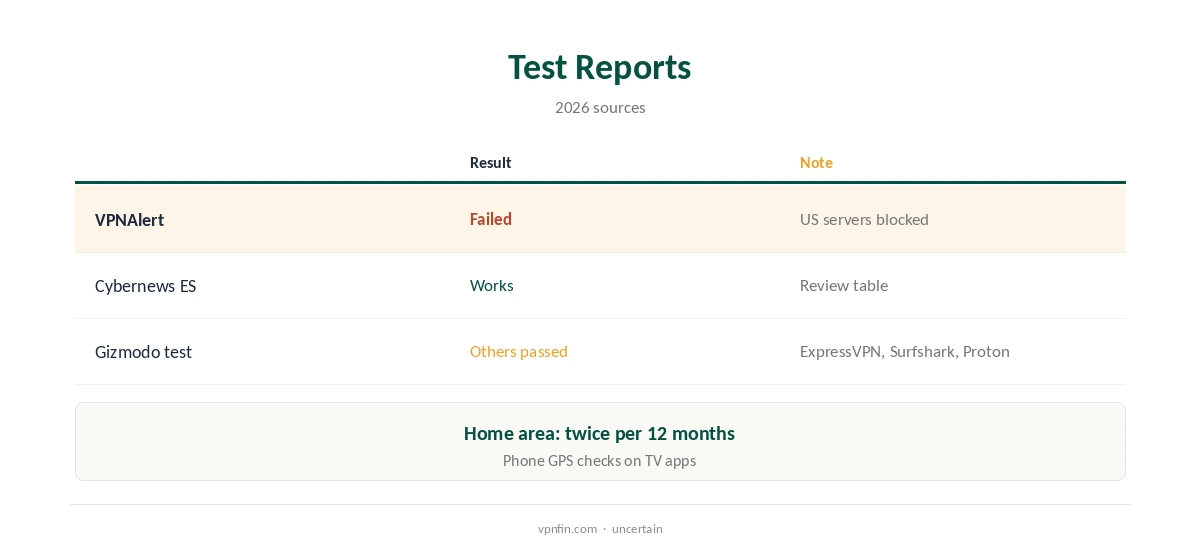
IPVanish YouTube TV tests disagree. VPNAlert found IPVanish constantly failed YouTube TV’s checks on US servers in 2026 and reports that IPVanish support blamed the service’s ZIP-code region locking, while a 2026 Cybernews review lists YouTube TV as working. On top of that, Google’s own rules tie local channels to a home area you can change only twice in 12 months, from inside the new area.
This guide covers the test reports, Google’s rules, what to try, and when another provider is the better pick.
What the Reports Say
VPNAlert’s 2026 guide says IPVanish failed YouTube TV’s VPN checks on its US servers and that IPVanish’s support confirmed YouTube TV does not work with the service. The Spanish edition of Cybernews’ 2026 IPVanish review marks YouTube TV as working.
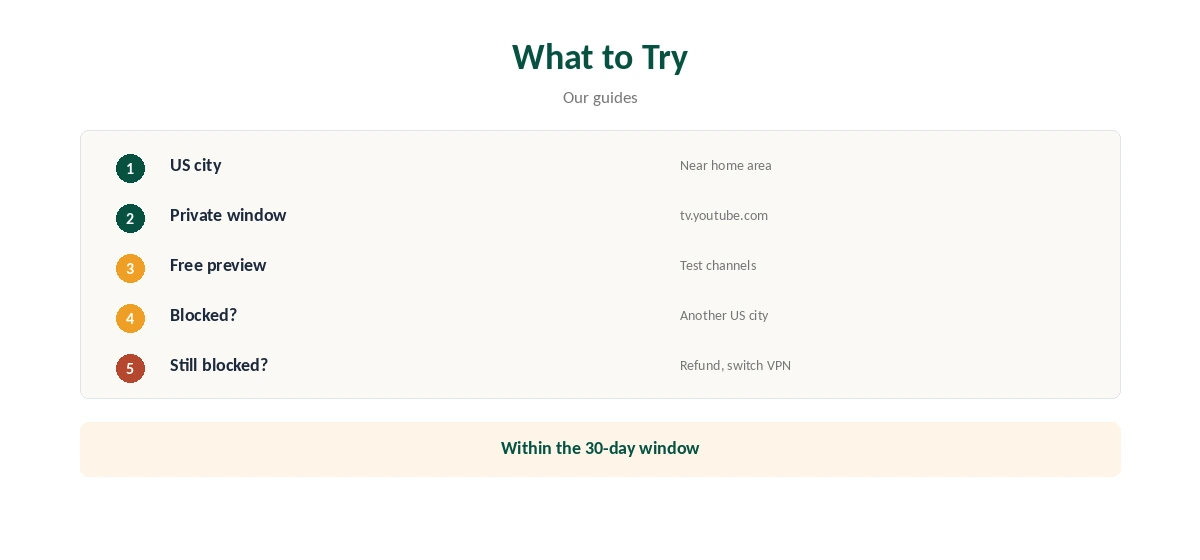
With reports split, test it yourself within the 30-day refund window before relying on it for live TV.
Google’s Home-Area Rules
Your home area decides your local channels and which recordings you can make. Google lets you change it only twice in 12 months, and only while you are in the new area, its help page says, and it asks you to use YouTube TV at home at least once every three months.
Google checks your current playback area with your device’s location, so a VPN alone cannot move it.
IPVanish YouTube TV: What to Try
Connect to the IPVanish US city nearest your YouTube TV home area, open tv.youtube.com in a private browser window and test the free preview or your account. If YouTube TV refuses, try another US city.
Comparitech’s general advice for blocks is the same: switch server, and try a desktop browser rather than a TV or phone app.
Local Channels and Phones on the Move
Local stations depend on the location your device or browser reports, not only your IP address. In Gizmodo’s 2026 tests with other VPNs, local channels played only after the browser reported a US location.
On TV apps, the phone check uses your phone’s GPS, which a VPN does not change, Security.org found in testing.
When to Choose Another VPN
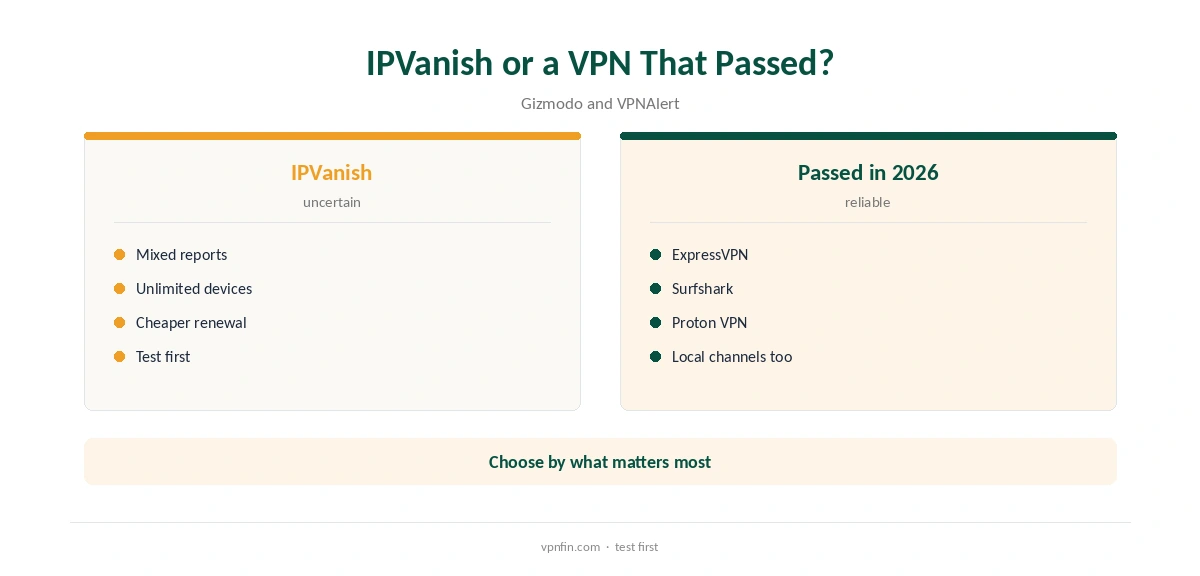
Gizmodo’s October 2026 test found ExpressVPN, Surfshark and Proton VPN unlocked YouTube TV’s cable channels and local stations from Europe. If live US TV is your main reason for a VPN, start with one of those three providers.
Our ExpressVPN YouTube TV guide covers one.
Using IPVanish at Home, Price and Privacy
Inside the US, the service needs no VPN at all. IPVanish still adds privacy on public Wi-Fi, and split tunnelling on Windows and Android can keep YouTube TV on your normal connection.
That avoids location checks entirely while the rest of your traffic stays protected.
IPVanish costs $57.22 for the first 24 months and renews at $89.99 a year, VPNOverview lists, with no device limit. Yearly website plans carry a 30-day refund; monthly plans carry none.
IPVanish’s no-logs policy has two audits in our table, by Leviathan in 2022 and Schellman in 2025.
Sports, Blackouts and Recordings
Regional sports networks follow your home area, and blackout rules may apply on top, Cybernews notes. A VPN does not override blackouts tied to your account’s home area.
What you can record also follows your home area, Google’s help page says. Away from it, you can watch networks local to where you are but not record or watch your home area’s local networks.
National cable channels record normally wherever you watch, at home or away.
The YouTube TV phone app checks your device location, so a VPN on the phone does not move you, Security.org found. Keep location permission on while in the US, or the app may refuse to play local channels.
Abroad, expect national channels at best, and plan around missing local news.
Testing on the Free Preview
Gizmodo tested VPNs on YouTube TV’s 20-minute free preview, which is the cheapest way to check whether an IPVanish server gets through before paying for either service.
Test both a national cable channel and a local station, since they behave differently under location checks.
Checking Your Playback Area and Clearing Cached Location
In a browser, YouTube TV’s area settings page shows your home area and current playback area. Check it after connecting so you know which region YouTube TV thinks you are watching from.
If the playback area still shows your real location, the browser is sharing it; review its location permission.
Google suggests clearing the browser’s cache and cookies when location problems persist, and checking that YouTube TV has permission to use your location. On TV apps, sign out and back in after changing networks. Our guide to IPVanish for Gaming covers ping, servers and the right settings.
Do this before concluding that YouTube TV has blocked an IPVanish server outright.
How We Research
This page draws on VPNAlert’s IPVanish YouTube TV guide, Cybernews’ 2026 IPVanish review, Comparitech’s YouTube TV fixes, Google’s YouTube TV help, Gizmodo’s and Security.org’s YouTube TV tests and our IPVanish tables. We cross-checked these sources against each other, and where they conflict or something can’t be verified, we say so in the text rather than guessing. We checked time-sensitive figures, including prices in US dollars, on 8 October 2026. The main source we relied on is VPNAlert’s IPVanish YouTube TV guide. Our full approach lives on the About Us page.
IPVanish YouTube TV FAQ
Testers disagree; VPNAlert found it failed, Cybernews lists it working.
No; Google requires you to be in the new area.
ExpressVPN, Surfshark and Proton VPN in Gizmodo’s 2026 test.
They check device or browser location as well as IP.
Exclude YouTube TV with split tunnelling instead.
The Verdict
IPVanish YouTube TV access is uncertain in 2026 testing. Test it within the refund window, or pick a provider that passed if YouTube TV matters most.