
Disclosure: VPNFin is reader-supported. If you buy a VPN through links on this page, we may earn a commission at no extra cost to you. This never affects our ratings — here’s our full disclosure.
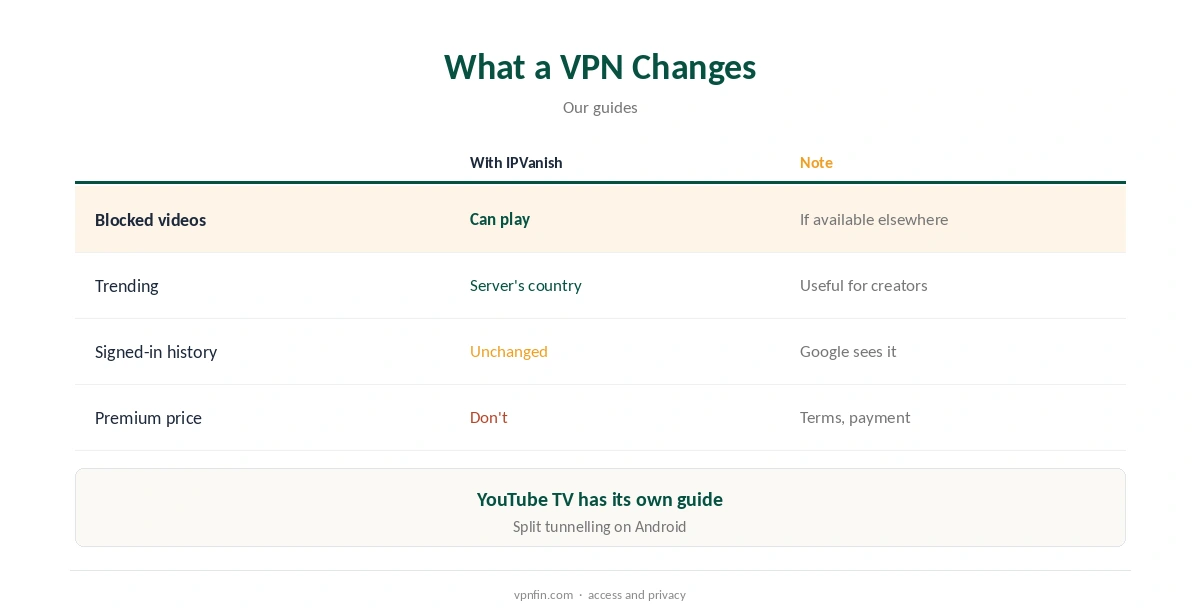
IPVanish YouTube use is mostly about region-blocked videos and privacy. Uploaders and rights holders block some videos in certain countries; connecting to a country where they play lets you watch them, and trends and recommendations shift to that country. A 2026 Cybernews review lists YouTube among the services IPVanish handles. YouTube TV, the US live TV service, behaves very differently and has its own guide.
This guide covers regional videos, recommendations, privacy, Premium pricing, speed and devices.
Region-Blocked Videos
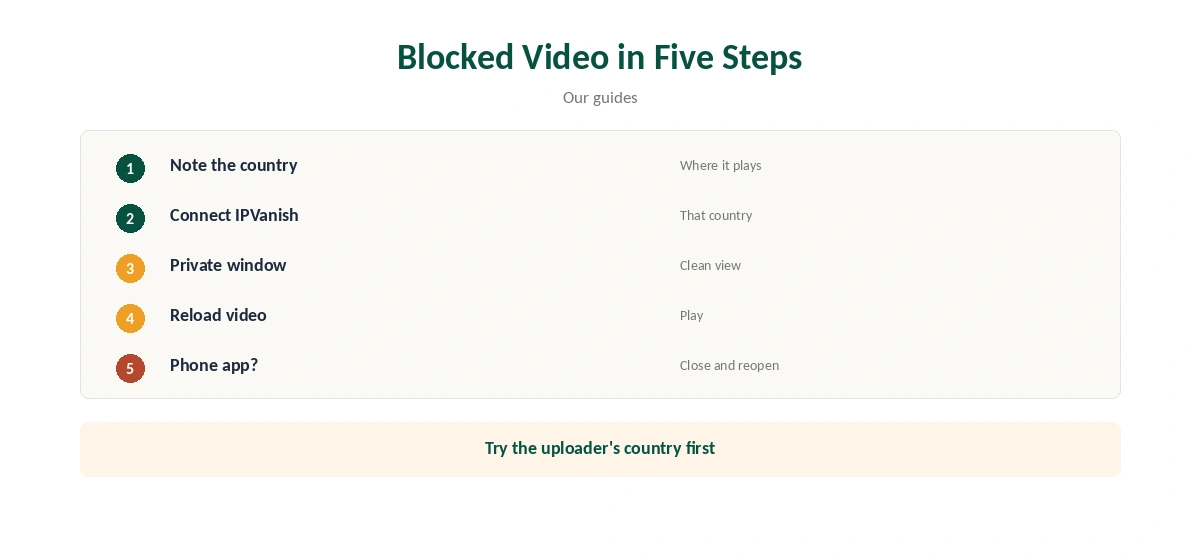
When a video shows that it is not available in your country, connect IPVanish to a country where it is, reload the page and play it again. Music videos, film trailers and sports highlights are the usual examples.
If you do not know where it is available, try the uploader’s home country first, then nearby countries. Our YouTube VPN guide explains the basics.
Trends, Search, Recommendations and Music
YouTube shapes trending lists, search results and some recommendations by the viewer’s country. Connected to another country, you see roughly what viewers there see, which helps creators and marketers check how a video appears abroad.
Signed-in accounts carry their own settings, so a private window gives the cleanest view of another country.
Privacy on YouTube
A VPN hides your IP address from YouTube and your viewing from your internet provider and from public Wi-Fi operators in cafés or hotels. Once you sign in to Google, YouTube still knows who you are.
Watching while signed out, or pausing watch history in your Google account, adds privacy the tunnel cannot.
YouTube Premium Pricing
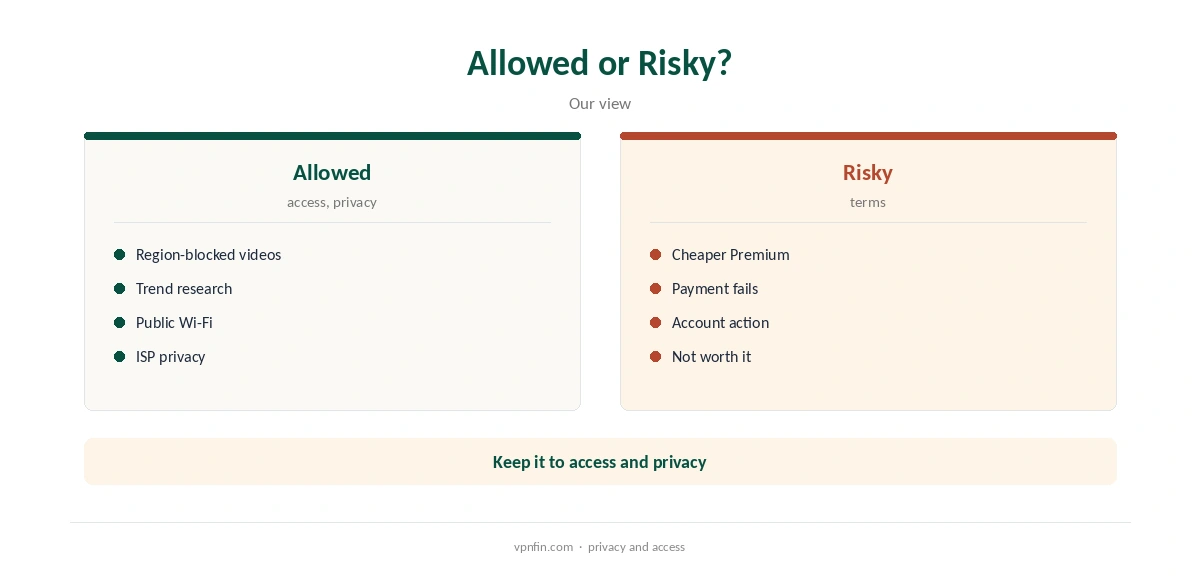
YouTube prices Premium by country, and some guides suggest buying it through a cheaper country with a VPN. That may conflict with YouTube’s terms and can fail at payment, since your card’s country often has to match the account’s country.
We do not recommend it at all; use the VPN for privacy and for content your account can already see legitimately.
IPVanish YouTube Setup on Computers and Phones
Install IPVanish, choose WireGuard for speed, connect to the country you need and open YouTube in a private browser window. On phones, close the YouTube app fully after switching servers, then reopen it.
IPVanish’s Android app can split tunnel by app or domain, so you can route only YouTube through the VPN or leave it out.
YouTube TV Is Different; Speed and Price
YouTube TV is a US live TV service with home-area rules and location checks, and testers report mixed results with IPVanish. Our IPVanish YouTube TV guide covers it in detail.
For regular video, none of those rules apply.
4K video needs roughly 20 Mbps or more, Google advises for YouTube, and Cloudwards found nearby IPVanish servers barely slowed connections in its tests. IPVanish costs $57.22 for the first 24 months and renews at $89.99 a year, VPNOverview lists, with no device limit. Yearly website plans carry a 30-day refund; monthly plans carry none.
IPVanish’s no-logs policy has two audits in our table, by Leviathan in 2022 and Schellman in 2025.
YouTube Music follows similar country rules: some tracks and albums are licensed only in certain regions. Connecting to another country can show or hide them.
For everyday listening at home, a nearby server or split tunnelling keeps your usual music catalogue intact.
TVs, Streaming Sticks and Creators
IPVanish has apps for Fire TV, Android TV and Apple TV, so the YouTube app there can use the VPN directly. LG and Samsung TVs need a router running IPVanish instead, since it offers no Smart DNS.
Our IPVanish smart TV guide covers each system.
Creators can restrict a video to certain countries in YouTube Studio’s settings. Connecting IPVanish to a country you blocked, or allowed, and opening the video in a private window shows what viewers there get.
The same trick checks how titles and thumbnails appear in search results abroad.
Ads, and Checking Which Country YouTube Sees
A VPN does not reliably remove YouTube ads, because they come from YouTube’s own servers alongside the video. IPVanish’s Threat Protection blocks malicious sites and some trackers, but it is not a YouTube ad blocker.
Ads may also change with the country you connect to, along with their language and products.
YouTube shows a country code next to its logo in many countries, and the location setting in the menu shows the region it is using. Check both after connecting so you know which version of YouTube you are seeing.
If they still show your home country, clear cookies or use a private window, then reload.
The YouTube app on phones may use your account’s settings and device location, so results can differ from a browser. Close the app fully after switching servers, and use the browser to test a blocked video.
IPVanish’s mobile apps use WireGuard by default, which keeps video smooth on mobile data.
How We Research
This page draws on Cybernews’ 2026 IPVanish review, Cloudwards’ speed tests and our IPVanish tables. We cross-checked these sources against each other, and where they conflict or something can’t be verified, we say so in the text rather than guessing. We checked time-sensitive figures, including prices in US dollars, on 8 October 2026. The main source we relied on is Cybernews’ IPVanish review. Our full approach lives on the About Us page.
IPVanish YouTube FAQ
Yes; it changes which country’s videos and trends you see.
If it is available in another country, connect there.
Not once you sign in to Google.
It may conflict with YouTube’s terms and often fails at payment.
Testers disagree; see our separate guide for details.
The Verdict
IPVanish YouTube use works for region-blocked videos and privacy. Leave Premium pricing alone, and treat YouTube TV as a separate question.