
Disclosure: VPNFin is reader-supported. If you buy a VPN through links on this page, we may earn a commission at no extra cost to you. This never affects our ratings — here’s our full disclosure.
The Proton VPN Chrome extension is free to use: Proton made its Chrome and Firefox extensions available on the free plan, after previously limiting them to paid plans, its blog says. The extension connects only the browser, while other apps on the device use your normal connection. On paid plans you can run it in several browsers, each on a different server, up to 10 connections. The Chrome Web Store listed version 1.3.5 in June 2026 with about 2 million users, itechguides notes.
This guide covers setup, what the extension protects and when to use the full app instead.
Proton VPN Chrome Setup
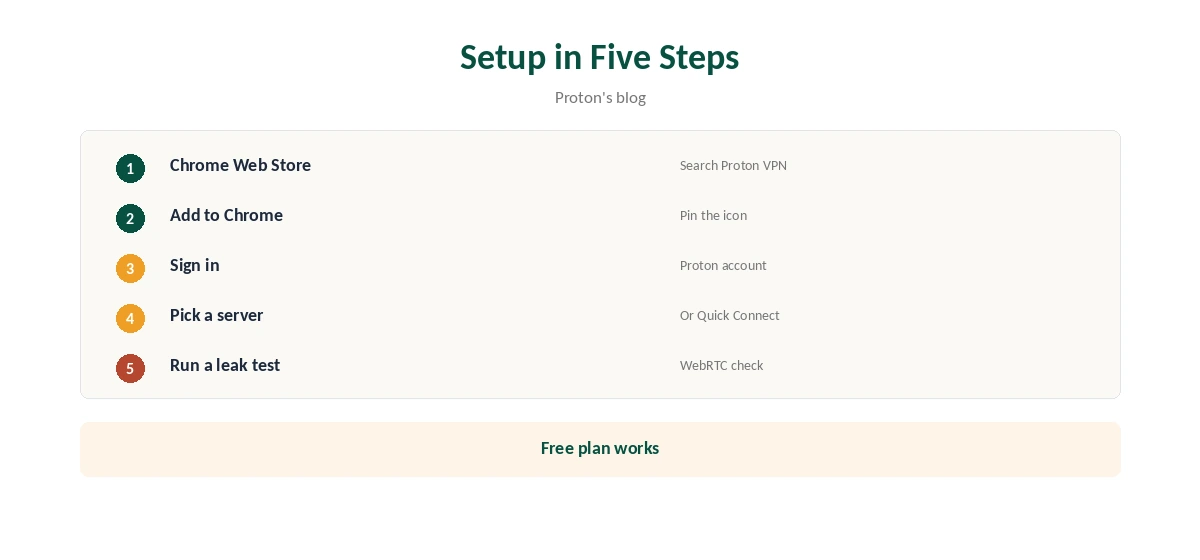
Open the Chrome Web Store, search for Proton VPN and add the extension. Sign in with your Proton account, then pick a server or use Quick Connect. It works in Chromium-based browsers too, Proton’s blog says, and there is a Firefox version.
What It Protects
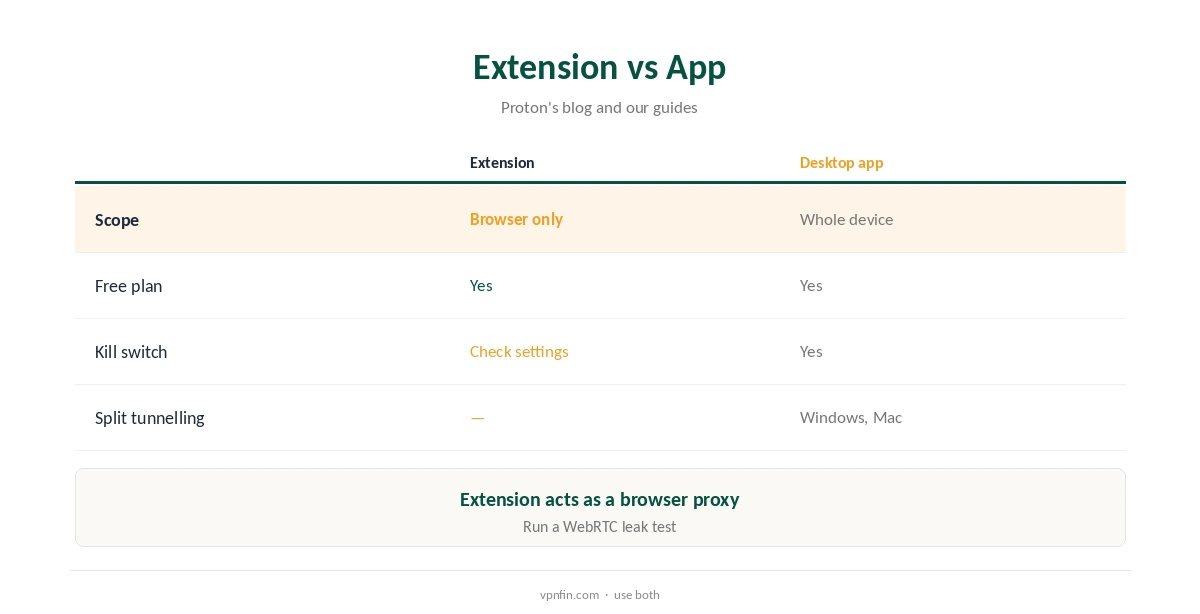
Only Chrome’s traffic. Email apps, games and anything outside the browser go out on your normal connection, Proton explains. That makes the extension a browser proxy in practice, as our VPN vs proxy guide explains.
Free and Paid
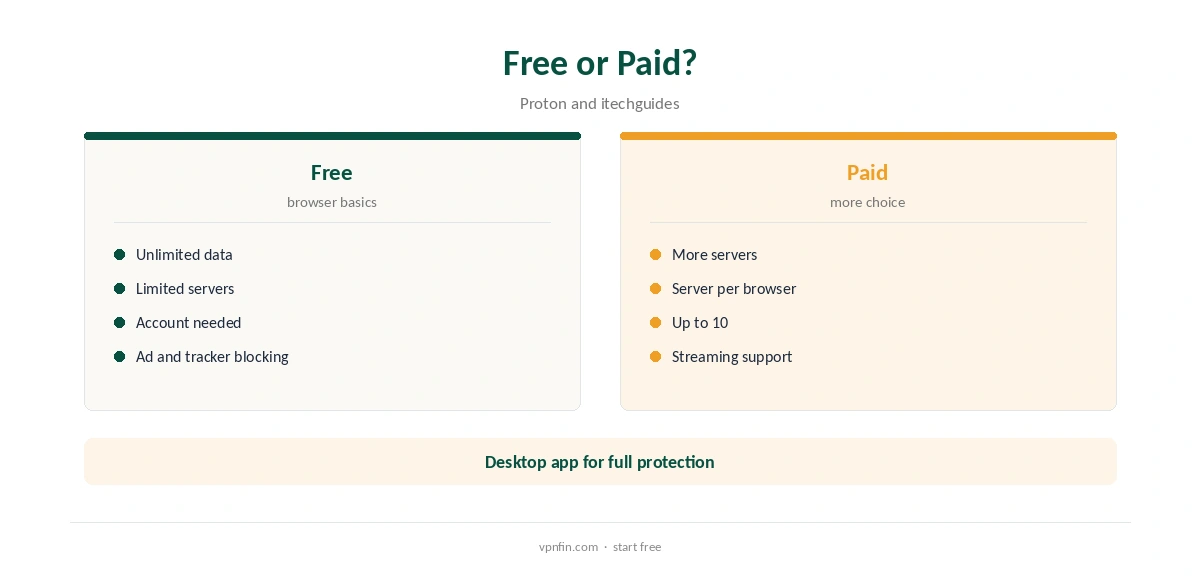
On the free plan, data has no cap but you get fewer servers to choose from, itechguides notes. Paid plans unlock more servers and let each browser connect to its own server. Our Proton VPN free guide covers the free plan.
Blocking
itechguides describes the extension as a browser proxy with ad- and tracker-blocking features, more capable than a basic IP switcher. Test it on the sites you use most.
Proton VPN Chrome on Chromebooks
On a Chromebook, the extension covers Chrome only, while Android apps keep the normal connection. For the whole device, use Proton’s Android app instead. Our Chromebook VPN guide explains the options.
Several Browsers
Paid users can run the extension in Chrome, Edge, Brave and Firefox at once, each on a different server, up to 10 connections, Proton’s blog says. That suits testing a site from several countries.
Proton VPN Chrome vs Opera’s Free VPN
Both cover only the browser. Opera’s is built in and needs no account, while Proton’s needs an account but offers more server choice on paid plans. Our Opera built-in VPN guide covers Opera’s.
Privacy
Proton has five Securitum audits in our table. The extension follows the same no-logs policy as the apps.
Who It Suits
Users who mainly need privacy in the browser, on a shared or work computer where installing apps is restricted, suit the extension well. Anyone needing whole-device protection should install the app.
Keeping It Updated
Chrome updates extensions automatically. If the extension misbehaves, remove it and add it again from the Web Store, then sign in.
Quick Check
With the extension connected, open our VPN test page in Chrome, then in another browser. Only Chrome should show the changed address.
Proton VPN Chrome for Streaming
Streaming support is for paid plans, Proton says, and browser streaming can leak location through WebRTC. For regular streaming, the desktop or TV app is the steadier choice.
Public Wi-Fi
The extension encrypts Chrome’s traffic on café and hotel networks, but email and chat apps stay exposed. Our public Wi-Fi guide explains why the full app is safer there.
Refunds
Paid plans carry a full refund within 30 days of the original purchase, once per user, our tables record.
Quick Rule
Browser privacy on a locked-down computer: extension. Everything else: the app. Both work on the free plan.
Kill Switch
Check the extension’s settings for what happens if it disconnects; Chrome may fall back to your normal connection. Use the desktop app’s kill switch where that matters, such as on public Wi-Fi.
Proton VPN Chrome Settings
Open the extension’s settings to review blocking options and the server you connect to by default. Pin the icon to the toolbar so you can see the connection state at a glance.
Support
Paid Proton users can reach support by live chat, its release notes say; free users can contact the support team.
Several Accounts
Chrome profiles each need the extension added and signed in separately. Paid users can connect each profile to a different server.
Is the Proton VPN Chrome Extension Enough?
For browsing on public Wi-Fi in Chrome, often yes. For the whole computer, no.
Leaks
Browser extensions can leak your real address through WebRTC unless the extension handles it. Run our WebRTC leak guide after connecting to check.
When to Use the Desktop App
Use the full app for public Wi-Fi, torrents, games or anything outside Chrome. On Windows, it also offers split tunnelling with the kill switch, as our Proton VPN Windows guide explains.
Turning It Off
Disconnect in the extension, or disable it in Chrome’s extensions page. Our guide to turning off a VPN in Chrome covers each route.
How We Research
This page draws on Proton’s blog on free browser extensions, itechguides’ 2026 Chrome extension roundup and our Proton tables. We cross-checked these sources against each other, and where they conflict or something can’t be verified, we say so in the text rather than guessing. We checked time-sensitive figures, including prices in US dollars, on 8 October 2026. The main source we relied on is Proton’s browser extension announcement. Our full approach lives on the About Us page.
Proton VPN Chrome FAQ
Yes; it works on the free plan with unlimited data.
No; it covers only Chrome’s traffic.
Yes, in Chromium-based browsers and in Firefox.
More servers and a different server per browser, up to 10.
itechguides lists ad- and tracker-blocking features.
The Verdict
The Proton VPN Chrome extension is a free, simple way to protect browsing. For anything outside the browser, install the full app.