
Disclosure: VPNFin is reader-supported. If you buy a VPN through links on this page, we may earn a commission at no extra cost to you. This never affects our ratings — here’s our full disclosure.
The Opera built-in VPN is free, unlimited and on Android, iOS and desktop, but it protects only what happens inside the Opera browser. HighTechSociety and TheBestVPN describe it as an encrypted proxy rather than a device-wide VPN, with three regions: the Americas, Europe and Asia. Deloitte audited the free browser VPN’s no-logs claims between June and August 2024. Opera VPN Pro, the paid tier, adds wider protection but lacks a kill switch and WireGuard, AllAboutCookies found.
This guide covers how to turn it on, what it protects, what Pro adds and when a full VPN is the better choice.
Does Opera Have a VPN on Android?
Yes. Opera has built a free VPN into its Android browser since 2019, TechCrunch reported, and into iOS since 2023, HighTechSociety notes. It needs no account and has no data cap.
Turning On the Opera Built-In VPN
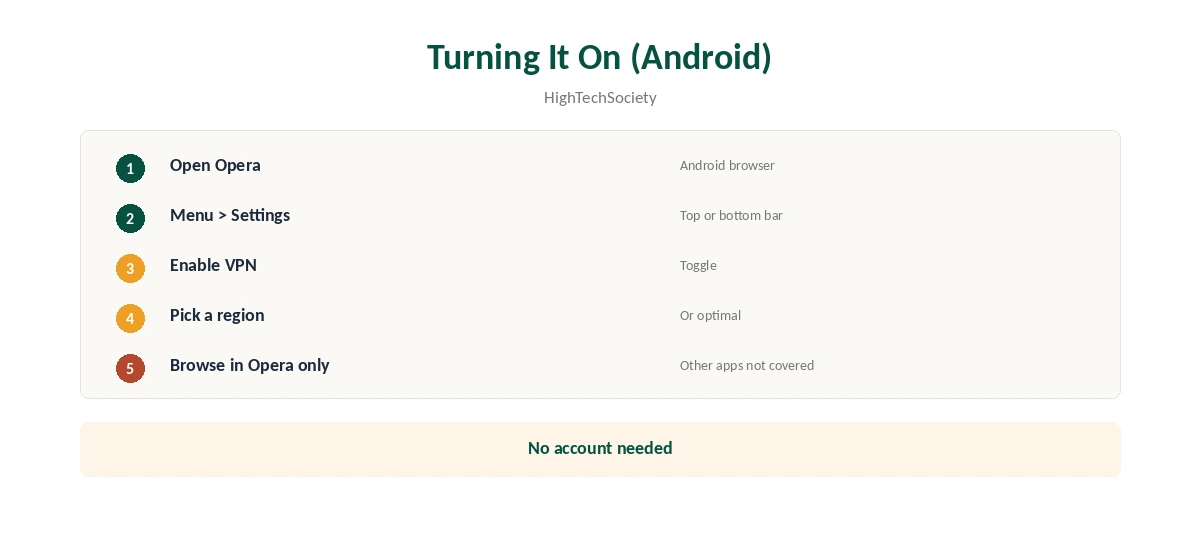
On Android, open the Opera menu, tap Settings and enable VPN, HighTechSociety explains. Choose a region or leave it on the optimal location. On desktop, enable it in settings and use the VPN badge in the address bar. Our guide to turning off Opera’s VPN covers switching it off.
What It Protects
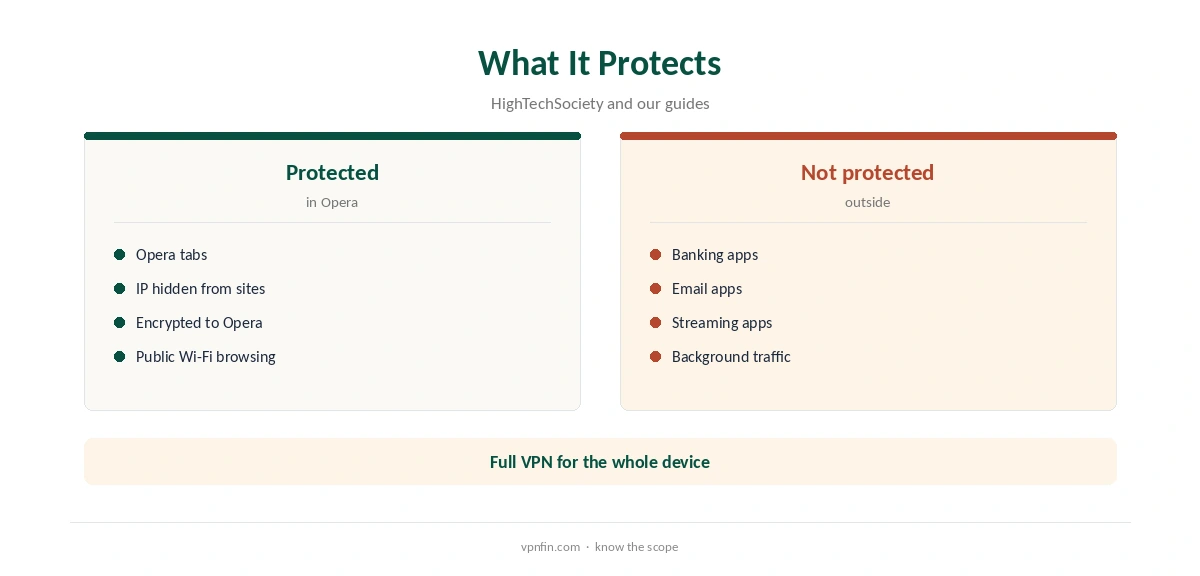
Only browser traffic. Your banking app, email app and anything else on the phone go out on your normal connection. That makes it a proxy in practice, as our VPN vs proxy guide explains. It hides your IP from websites you visit in Opera and encrypts that traffic on the way to Opera’s servers.
The Audit
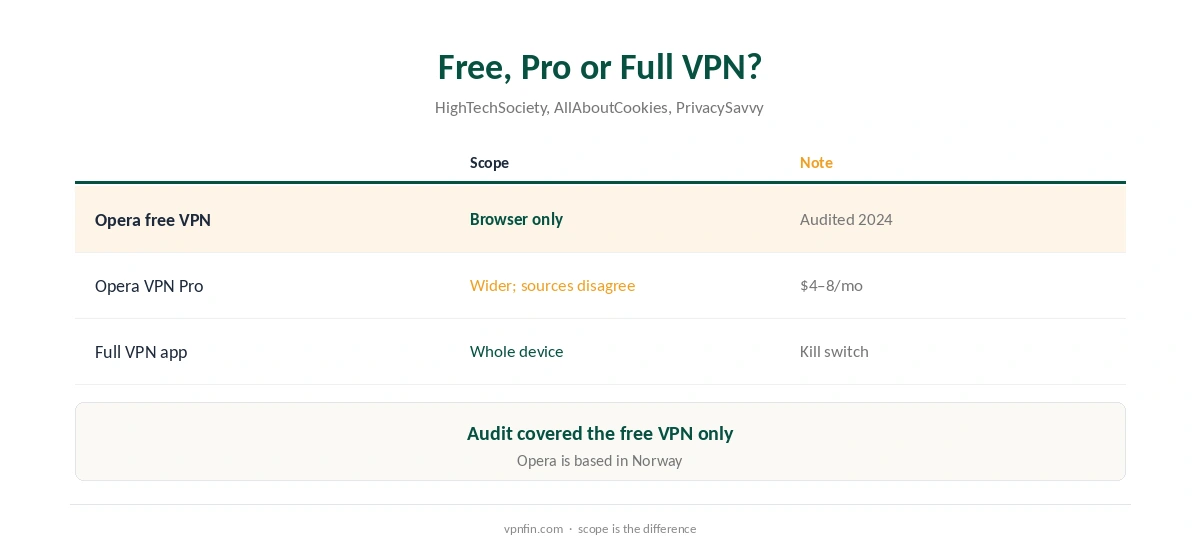
Deloitte audited the free browser VPN from 18 June to 10 August 2024 and found no logging of browsing activity or originating addresses, TheBestVPN reports. HighTechSociety and AllAboutCookies say the audit covered the free VPN only, not VPN Pro. Opera is based in Norway, a Nine Eyes member.
Opera VPN Pro
PrivacySavvy lists VPN Pro at $8 a month or $4 a month yearly, for up to six devices. Sources disagree on where it runs: AllAboutCookies says only through the Opera browser, while Newsoftwares describes coverage on Windows, Android and iOS. AllAboutCookies found no kill switch, split tunnelling or WireGuard.
Opera Built-In VPN Speed
TheBestVPN rates its speeds as average. Because the Opera built-in VPN routes only browser traffic through three regions, you cannot pick a specific country, which limits both speed tuning and access to region-locked sites.
Streaming With Opera
The free browser VPN is not built for streaming. AllAboutCookies, testing VPN Pro, reported playback errors in the Opera browser across regions. If streaming is the goal, a full VPN with streaming servers is the better tool.
Opera Built-In VPN on iPhone
Opera’s iOS browser has included the free VPN since 2023, HighTechSociety notes. As on Android, it covers only Opera’s tabs, not Safari or other apps.
Privacy Considerations
The audit covered browsing logs on the free VPN. Opera still operates the browser itself, so its wider privacy policy applies. PrivacySavvy notes the audit’s scope was limited to the VPN’s internal logging.
Is the Opera Built-In VPN Enough on Public Wi-Fi?
For browsing in Opera, it encrypts traffic between your phone and Opera’s servers. Other apps on the same Wi-Fi stay exposed, so a full VPN is safer in cafés and hotels. Our public Wi-Fi guide explains the risks.
Opera Built-In VPN vs a VPN Extension
Browser extensions from VPN providers, such as NordVPN’s, also cover only the browser. The difference is that the Opera built-in VPN needs no account and no install. Our NordVPN Chrome guide shows how an extension compares.
Turning It Off
Toggle VPN off in Opera’s settings on Android, or in the browser settings on desktop. Browsing then returns to your normal connection, so websites see your real address again.
Who It Suits
The Opera built-in VPN suits occasional private browsing, checking a region-locked page, or hiding your IP from websites in Opera. It does not suit anyone who needs the whole phone protected.
Quick Check
With the VPN on, open our VPN test page in Opera, then in another browser. Only Opera should show the changed address.
Opera Built-In VPN vs Proton VPN Free
Both cost nothing and have audited no-logs claims. Opera covers only its browser across three regions, while Proton’s free plan protects the whole device across 10 auto-assigned countries. For anything beyond browsing, Proton’s free plan is the stronger choice.
Regions Explained
The three regions, the Americas, Europe and Asia, change your apparent continent rather than a specific country. An optimal setting picks the fastest one automatically, TechCrunch reported when Android support launched.
When to Use a Full VPN Instead
Use a full VPN for public Wi-Fi, apps outside the browser, streaming or torrents. Proton VPN’s free plan protects the whole device with no data cap. Our Opera VPN alternatives guide compares options.
How We Research
This page draws on HighTechSociety’s, TheBestVPN’s, AllAboutCookies’, PrivacySavvy’s and Newsoftwares’ 2026 Opera VPN coverage and TechCrunch’s 2019 report. We cross-checked these sources against each other, and where they conflict or something can’t be verified, we say so in the text rather than guessing. We checked time-sensitive figures, including prices in US dollars, on 7 October 2026. The main source we relied on is TheBestVPN’s Opera VPN review. Our full approach lives on the About Us page.
Opera Built-In VPN FAQ
Yes, a free browser VPN on desktop, Android and iOS.
No; it covers only traffic inside the Opera browser.
Yes, with no data cap and no account needed.
Deloitte audited the free browser VPN in 2024.
$8 a month or $4 a month yearly, per PrivacySavvy.
The Verdict
The Opera built-in VPN is a handy, audited free proxy for Opera browsing. For apps, public Wi-Fi or streaming, use a full VPN instead.