
Disclosure: VPNFin is reader-supported. If you buy a VPN through links on this page, we may earn a commission at no extra cost to you. This never affects our ratings — here’s our full disclosure.
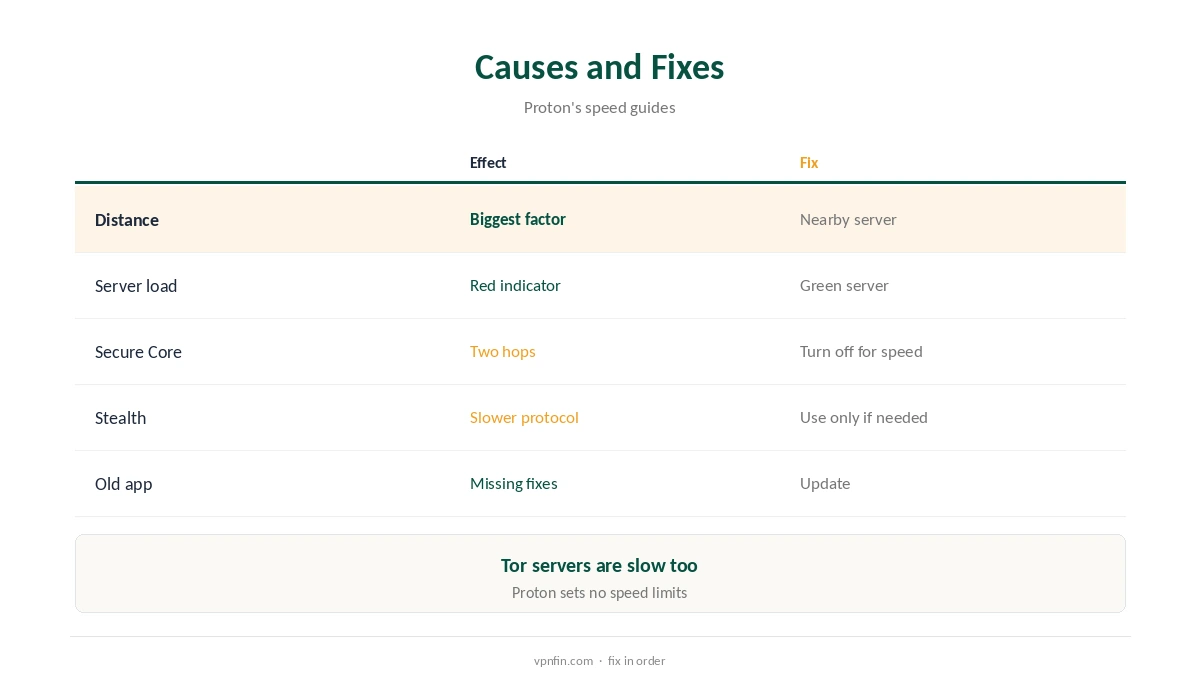
When Proton VPN is slow, Proton’s own guides point to a short list of causes. Distance to the server matters most, then how busy the server is; the app shows load as a green, yellow or red circle. Free servers tend to be slower because more people use them, though Proton sets no artificial speed limits. Secure Core and Tor servers add latency, Stealth is slower than other protocols, and switching protocol often helps.
This guide works through the causes and fixes in order.
Why Proton VPN Is Slow
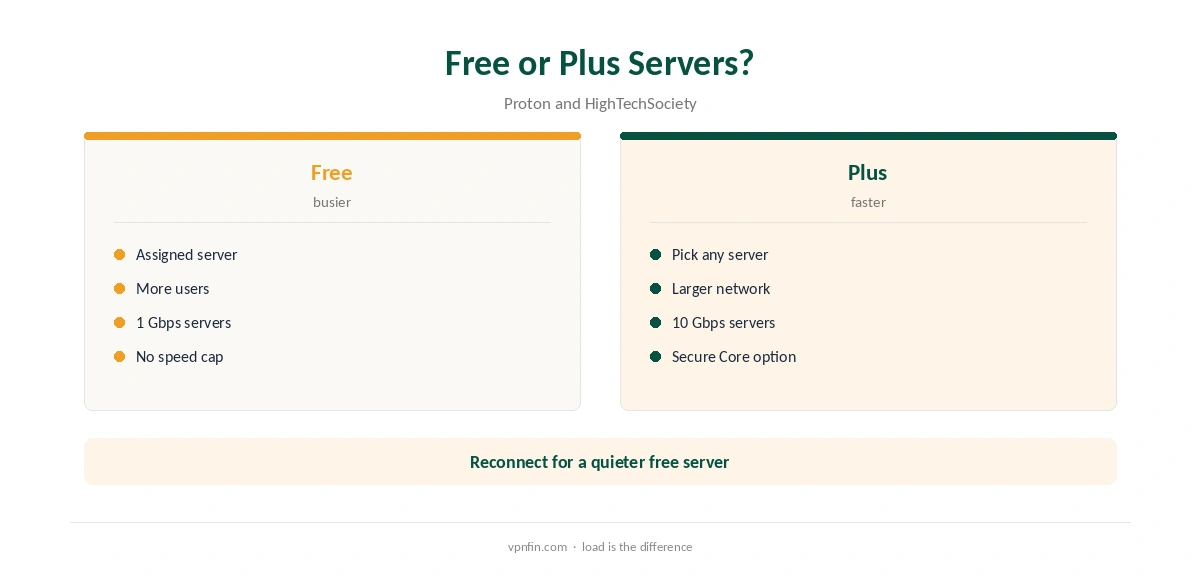
Proton’s blog lists distance as the biggest factor, then server load. Free servers carry more users, so load rises; Proton says its Plus network is much larger, with lower load. HighTechSociety measured about 15% average speed loss on free servers and notes they run at 1 Gbps against 10 Gbps for paid users.
Proton VPN Slow Fixes in Order
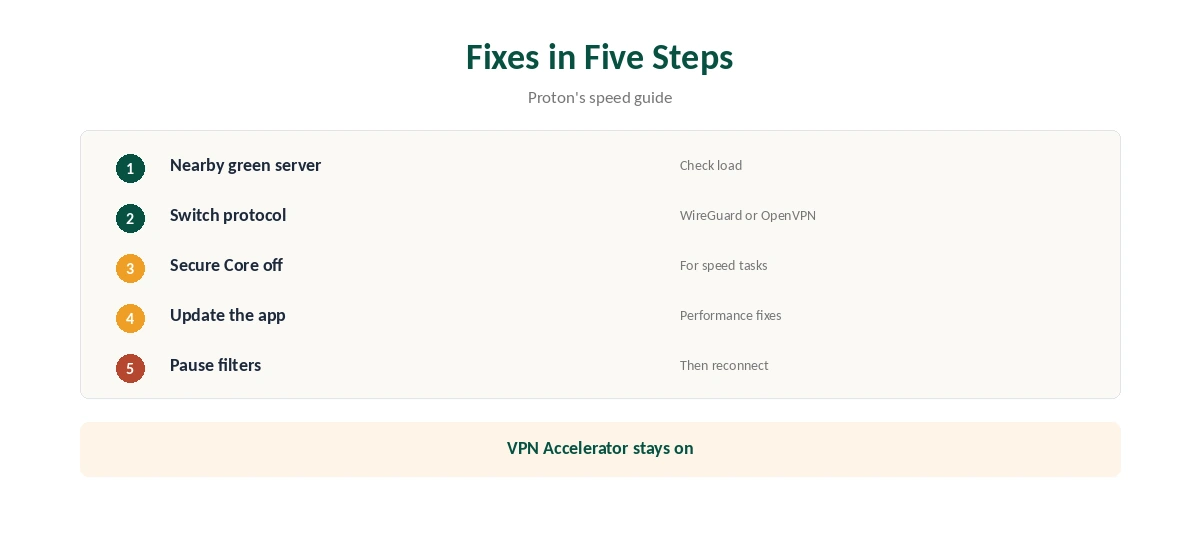
First, pick a nearby server with a green load indicator. Second, try another protocol: Proton suggests testing WireGuard and OpenVPN and keeping the faster. Third, turn off Secure Core and Tor servers for speed-heavy tasks. Fourth, update the app, since new versions carry performance fixes.
Secure Core
Secure Core routes traffic through two servers, the first in Switzerland, Iceland or Sweden, and there are only three Secure Core locations, Proton explains. That adds distance and latency. Proton itself suggests turning it off for streaming.
Stealth and Protocols
Stealth is built for censored networks and is slower than Proton’s other protocols, its blog says. Use it only where you need it. Smart Protocol picks automatically; switching manually can help when it settles on a slow option.
VPN Accelerator
Proton’s VPN Accelerator combines techniques such as the BBR congestion algorithm and multi-threaded OpenVPN, and can raise speed by up to 400% in some conditions, Proton says. Keep it on.
Proton VPN Slow on Wi-Fi
Weak Wi-Fi can limit speed as much as the VPN does. Move closer to the router or use a cable, then compare speed with the VPN on and off to see how much the VPN itself costs.
Measuring Properly
Run a speed test without the VPN, then on a nearby green server, at the same time of day. HighTechSociety measured about 15% loss on Proton’s free servers; a much larger drop points to load, distance or protocol.
Streaming
For streaming, turn off Secure Core, as Proton suggests, and pick a server in the library’s country with low load. Our Netflix VPN guide covers streaming blocks, which differ from slow speeds.
Mobile Data
On mobile networks, speed varies by signal. Try another protocol, since some mobile networks handle one better than another.
Is Proton VPN Slow on Purpose?
No. Proton says it enforces no artificial speed limits, even on free servers; free servers are slower only because more people share them.
When to Contact Support
If speed stays low on several nearby green servers and protocols, contact Proton’s support with your test results. Paid users can use live chat, Proton’s release notes say.
Proton VPN Slow on Routers
A router with a weak processor can slow WireGuard. Our Proton VPN router guide covers supported firmware and the trade-offs.
Several Devices
Many devices on one home line share its bandwidth, so speed per device drops when everyone streams at once. VPN Plus covers 10 devices.
Quick Check
After each change, run the same speed test again, so you know which fix helped.
Proton VPN Slow After an Update
If speed dropped after an app update, check that the protocol and VPN Accelerator settings stayed the same, then reconnect to a nearby server. Early Access builds can behave differently from stable releases.
Quick Rule
Nearby green server first, protocol second, Secure Core off third, update fourth. Test after each change before moving on, so you know which step helped.
Proton VPN Slow and Streaming Quality
Streaming apps lower video quality when speed drops. If quality falls on one server, switch to another nearby green server before changing anything else.
Refunds
If paid speeds still disappoint, Proton allows a full refund within 30 days of the original purchase, once per user.
Free or Paid?
Free servers share capacity among more users, Proton says. If you rely on the VPN daily for video or large downloads, Plus servers and VPN Accelerator are the main upgrade.
Other Software
Proton suggests temporarily disabling software that filters traffic, such as some antivirus tools, then reconnecting to see if speed improves. Our Proton VPN connection guide covers related problems.
Free Plan Limits
Free users cannot choose a server; the app assigns one of 10 countries. If the assigned server is busy, reconnect for another. Our Proton VPN free guide covers the limits.
How We Research
This page draws on Proton’s speed support article and blog on VPN speeds, HighTechSociety’s 2026 free VPN testing and our Proton tables. We cross-checked these sources against each other, and where they conflict or something can’t be verified, we say so in the text rather than guessing. We checked time-sensitive figures, including prices in US dollars, on 8 October 2026. The main source we relied on is Proton’s speed guide. Our full approach lives on the About Us page.
Proton VPN Slow FAQ
Usually distance, server load, Secure Core or the protocol.
Yes; more people use them, though Proton sets no speed limit.
Yes; it routes through two servers.
Test WireGuard and OpenVPN; Stealth is slower.
Proton’s speed technology, up to 400% faster in some conditions.
The Verdict
When Proton VPN is slow, pick a nearby green server, switch protocol and turn off Secure Core. On the free plan, reconnect for a quieter server or upgrade for Plus servers.