
Disclosure: VPNFin is reader-supported. If you buy a VPN through links on this page, we may earn a commission at no extra cost to you. This never affects our ratings — here’s our full disclosure.
TorGuard not working usually comes down to one of a few causes: a blocked protocol or port, a glitch after an app update, security software interfering, or a service blocking TorGuard’s addresses. Tom’s Guide notes TorGuard does not update its apps regularly, which can cause glitches, and Cloudwards calls the apps buggy. TorGuard’s flexibility helps here: you can switch protocol, port and Stealth mode until one connects.
This guide works through the fixes in order, by symptom.
Common Symptoms
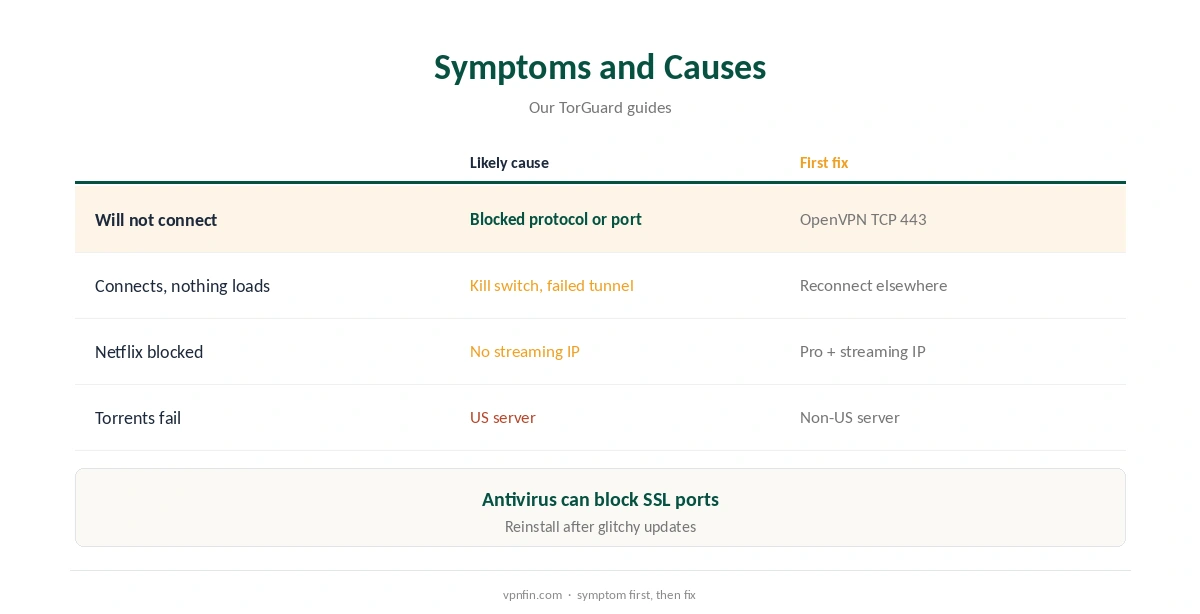
The app will not connect, it connects but nothing loads, a website or streaming service blocks you, or a torrent will not start. Each has a different likely cause, so match the symptom before changing settings.
TorGuard Not Working? Switch Protocol and Port
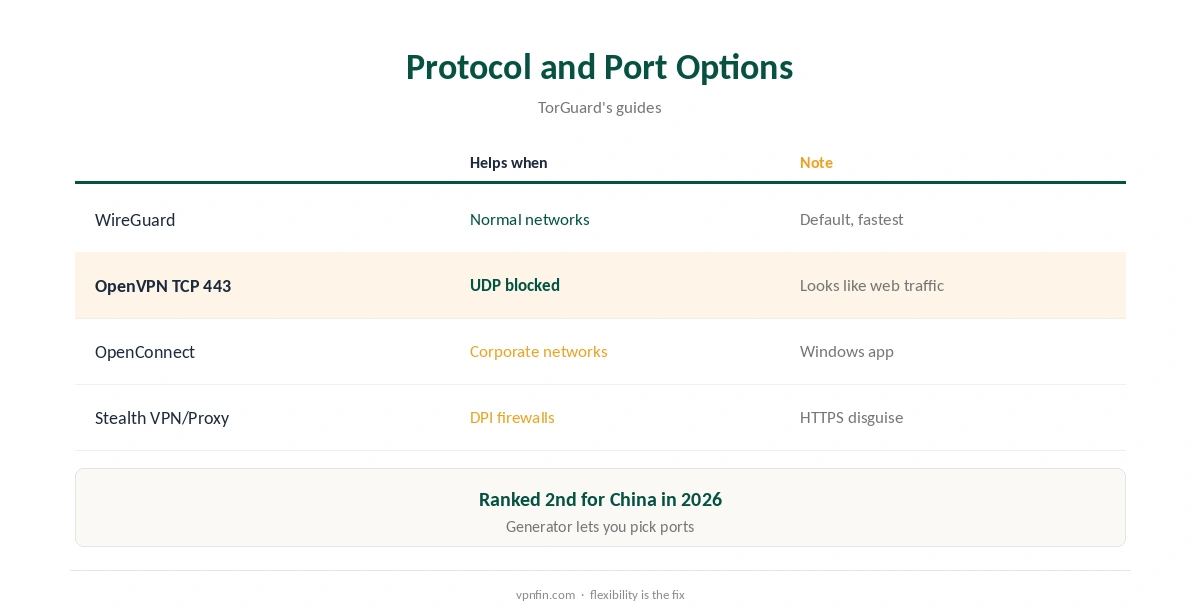
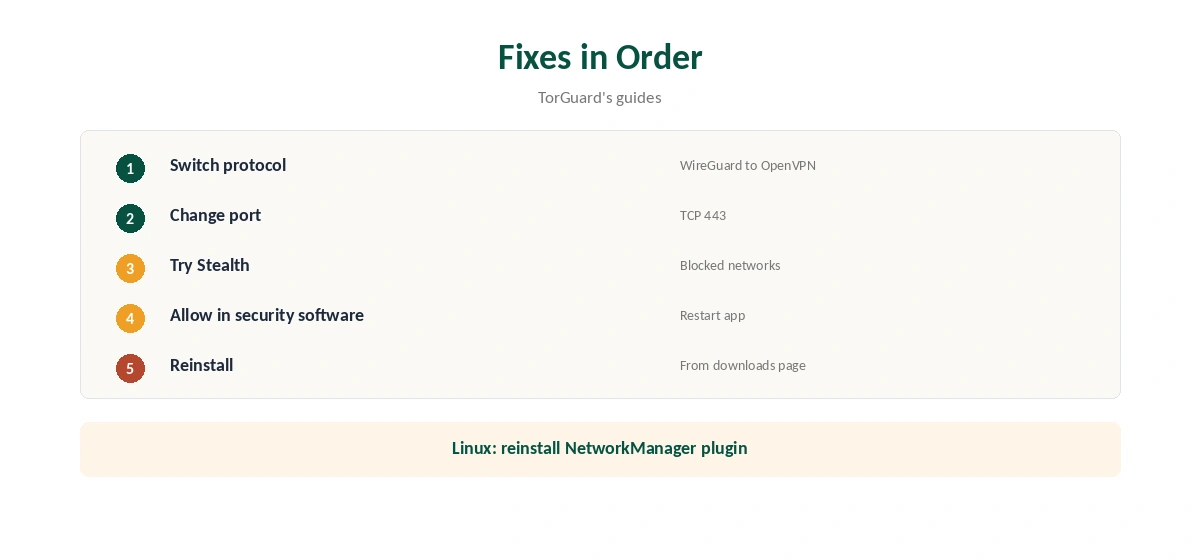
WireGuard is the Windows default. If it fails, try OpenVPN over TCP on port 443, which blends with web traffic, or OpenConnect. TorGuard’s config generator lets you pick ports for manual setups. Our TorGuard OpenVPN guide covers the options.
Fix Two: Use Stealth on Blocked Networks
School, office, hotel and national firewalls can block VPN traffic. TorGuard’s Stealth VPN and Stealth Proxy disguise it as HTTPS. GreatFirewallGuide ranked TorGuard second for China in 2026. Our obfuscation guide explains how disguise works.
Fix Three: Check Security Software
TorGuard’s Chrome guide notes Avast Mail Shield can block some SSL ports, and other antivirus or firewall tools can block the VPN adapter. Allow TorGuard in the security software, then restart the app.
Fix Four: Reinstall After Updates
Given reports of glitches, a clean reinstall from TorGuard’s downloads page often helps. On a Mac, allow the app past Gatekeeper again by right-clicking and choosing Open. On Linux NetworkManager setups, TorGuard’s guide suggests reinstalling the plugin, checking journalctl and restarting NetworkManager.
Connects, but Nothing Loads
If the kill switch is on and the tunnel failed silently, traffic stops by design. Disconnect, reconnect on another server, and run our DNS leak guide. TorGuard’s guides recommend its own DNS servers.
Streaming or Torrent Problems
Netflix works only with a streaming IP on Pro or Premium, as our TorGuard Netflix guide explains. Torrents fail on US servers, where TorGuard blocks BitTorrent after its 2022 settlement; use a non-US server. For SOCKS5, try ports 1085 or 1090 if your provider blocks 1080.
TorGuard Not Working on a Router
On OpenWrt, check the TorGuard app’s status and restart WireGuard. On Tomato or DD-WRT with OpenVPN, regenerate the config, since server addresses change. Our TorGuard router guide covers each firmware.
TorGuard Not Working in Chrome
The Chrome extensions are proxies. Login failures usually mean wrong credentials, but other proxy extensions can interfere, TorGuard’s guide notes. Disable other proxy extensions and clear Chrome’s proxy settings. Our TorGuard Chrome guide explains the two extensions.
Slow Speeds
Pick a nearer server, use WireGuard, and turn Stealth off on normal networks, since disguise adds overhead. Tom’s Guide found Brazil and Mexico servers hosted in Miami, so distance may differ from the label.
When to Contact Support
TorGuard lists 24/7 support in its guides. Send the exact error, platform and protocol; it saves back-and-forth.
Is TorGuard Not Working Everywhere, or Just for You?
If TorGuard not working shows up on one network only, the network is likely blocking VPNs; Stealth or TCP 443 should help. If it fails everywhere, reinstall and check your account status in the client area.
Checking After a Fix
When the connection returns, confirm the address with our VPN test page and turn the kill switch on, since it starts switched off on desktop.
Linux and Raspberry Pi
On terminal setups, read the OpenVPN or WireGuard log for the exact error before changing files. Regenerate configs from TorGuard’s generator if server details changed. Our TorGuard Linux guide covers the routes.
TorGuard Not Working After a Plan Change
Upgrading to Pro or adding a dedicated IP can change which configs and servers you use. Sign out and back in, then regenerate configs, so the app picks up the new plan.
Several Devices
Standard allows up to eight devices, Fahimai notes. If a new device will not connect, check you have not reached the limit in the client area.
Kill Switch After Fixes
Once TorGuard connects again, turn the kill switch on before using sensitive apps, since it starts switched off on desktop. Our kill switch guide explains why.
Quick Check
After each fix, open a website, then run a speed test. If both work, move on to the specific service that failed, such as Netflix or your torrent client.
Account Problems
If no protocol connects anywhere, sign in to the client area and check the subscription is active and paid, then try again.
Platform Guides
Our TorGuard Windows guide and TorGuard Mac guide cover platform-specific settings.
How We Research
This page draws on Tom’s Guide’s and Cloudwards’ TorGuard reviews, TorGuard’s Chrome, Ubuntu, macOS and SOCKS5 guides, GreatFirewallGuide and our TorGuard tables. We cross-checked these sources against each other, and where they conflict or something can’t be verified, we say so in the text rather than guessing. We checked time-sensitive figures, including prices in US dollars, on 7 October 2026. The main source we relied on is Tom’s Guide’s TorGuard review. Our full approach lives on the About Us page.
TorGuard Not Working FAQ
Usually a blocked protocol or port; try OpenVPN over TCP 443 or Stealth.
The kill switch may be blocking a failed tunnel; reconnect on another server.
US servers block BitTorrent since 2022; use a non-US server.
Netflix needs a streaming IP on Pro or Premium.
Yes; TorGuard notes Avast Mail Shield can block some ports.
The Verdict
TorGuard not working is usually fixable: switch protocol or port, try Stealth, allow it in security software and reinstall after glitchy updates. For streaming and torrents, check the plan and server rules.