
Disclosure: VPNFin is reader-supported. If you buy a VPN through links on this page, we may earn a commission at no extra cost to you. This never affects our ratings — here’s our full disclosure.
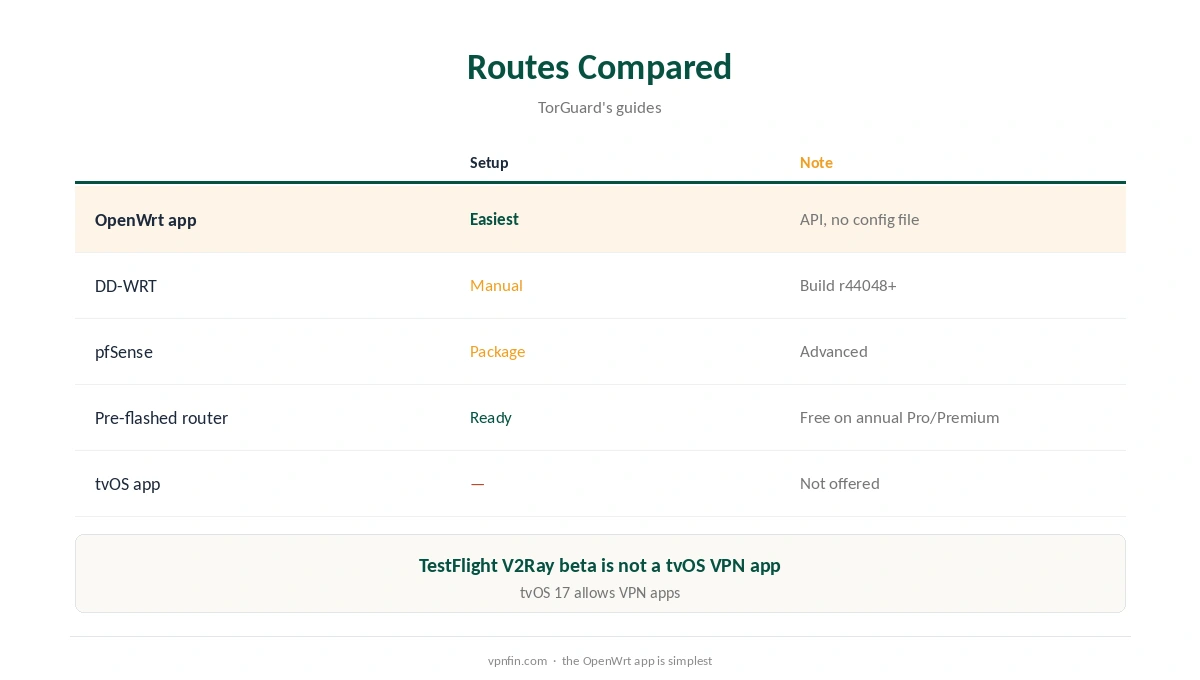
TorGuard Apple TV support runs through your router, not an app. TorGuard’s downloads page lists Chrome extensions and an iOS app, but no tvOS app. A beta TorGuard V2Ray proxy is on Apple’s TestFlight, yet the tvOS mention there is part of TestFlight’s general requirements, not a TorGuard Apple TV app. TorGuard’s router tools are strong, though: its own OpenWrt app, DD-WRT and pfSense guides, and pre-flashed routers.
This guide covers the router route, the setup and providers with native tvOS apps.
Why a Router
Apple TV has accepted VPN apps since tvOS 17, but TorGuard does not list one. A router running TorGuard covers the Apple TV and every other device on the network. Our TorGuard router guide covers the firmware options.
TorGuard Apple TV Setup Through OpenWrt
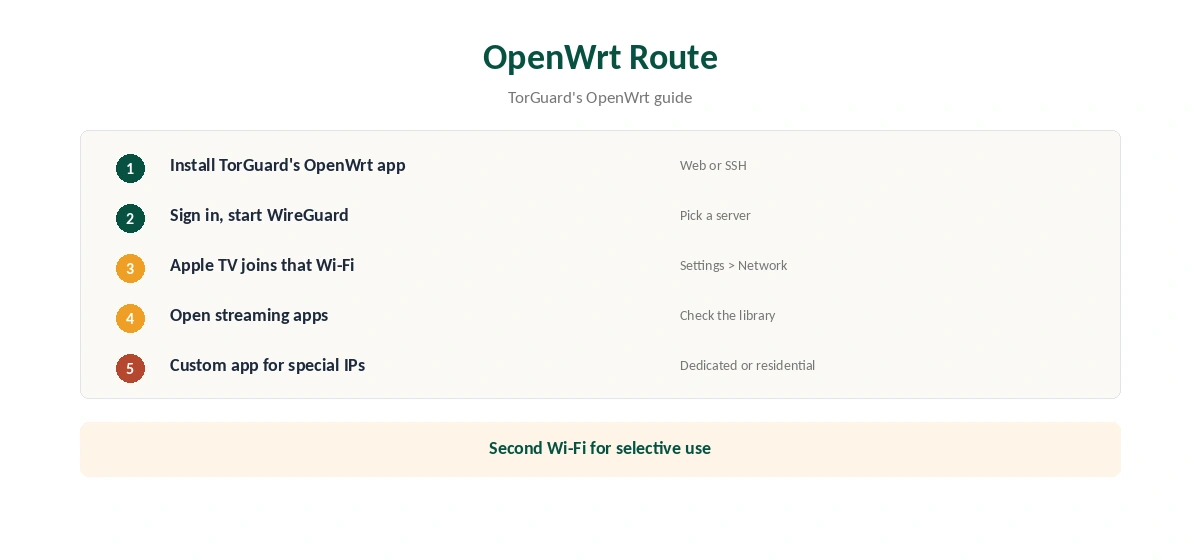
Install TorGuard’s WireGuard app on your OpenWrt router, sign in and start WireGuard, as TorGuard’s guide shows. Then join the Apple TV to that router’s Wi-Fi under Settings, Network. For a dedicated or residential IP, use the Custom app with a config from TorGuard’s generator.
Other Router Routes
TorGuard’s guides cover DD-WRT with WireGuard on builds r44048 or newer, pfSense with the WireGuard package, and Tomato with OpenVPN. TorGuard also sells pre-flashed routers, and Fahimai reports Pro and Premium annual plans include a free router. Our TorGuard WireGuard guide covers the configs.
A Second Network for Exceptions
OpenWrt can run two Wi-Fi networks from one router: one through TorGuard and one direct. Put the Apple TV on the VPN network and smart home devices on the other. Our router or device guide explains the trade-offs.
Using a Dedicated IP
Some streaming and banking services flag shared VPN addresses. TorGuard’s Custom OpenWrt app accepts configs with a dedicated or residential IP, which gives the Apple TV a stable address. Our dedicated IP guide explains when that helps.
Checking for Leaks
From a phone on the same Wi-Fi, run our DNS leak guide. TorGuard’s guides recommend its own DNS servers to avoid leaks, so set them on the router if requests still go to your provider.
A Quick Rule
Already run OpenWrt? Install TorGuard’s app and the Apple TV is covered. No suitable router? Consider a pre-flashed TorGuard router or a provider with a native tvOS app. Need one stable address? Use the Custom app with a dedicated IP.
Choosing a TorGuard Plan for Apple TV
Security.org found Standard lacked streaming options and moved to Pro for that reason. Pro adds a dedicated IP and 12 devices, Fahimai notes, and annual Pro and Premium plans include a free router. For a TorGuard Apple TV setup aimed at streaming, Pro on an annual term covers the router and the plan in one purchase.
Router Performance
TorGuard’s guides stress the router’s processor: weaker routers cap speeds, and WireGuard runs better than OpenVPN on modest hardware. For 4K streams on the Apple TV, pick a router with headroom and a server near the streaming service.
Pre-Flashed Router Option
If you would rather not flash firmware, TorGuard sells routers already set up, and PrivateRouter offers OpenWrt models with a TorGuard tool, TorGuard’s guides note. Plug one in, sign in, and connect the Apple TV to its Wi-Fi.
Quick Check
On the Apple TV, open a streaming app and confirm the library matches the server country. If not, restart the Apple TV so it picks up the router’s new connection.
Several Apple TVs
A router covers every Apple TV in the house at once, along with smart TVs and consoles, which saves configuring each box. TorGuard’s Standard plan allows up to eight devices, but a router usually counts as one.
Turning It Off
Stop WireGuard in TorGuard’s OpenWrt app, or move the Apple TV to your normal Wi-Fi. Our guide to turning off a router VPN covers other firmware.
Streaming on Apple TV
After connecting the router, open the streaming app and check the library. If it shows your home catalogue, close the app fully and reopen it. Security.org found TorGuard’s Standard plan lacked streaming options, so streamers may need Pro, as our TorGuard cost guide explains.
Providers With tvOS Apps
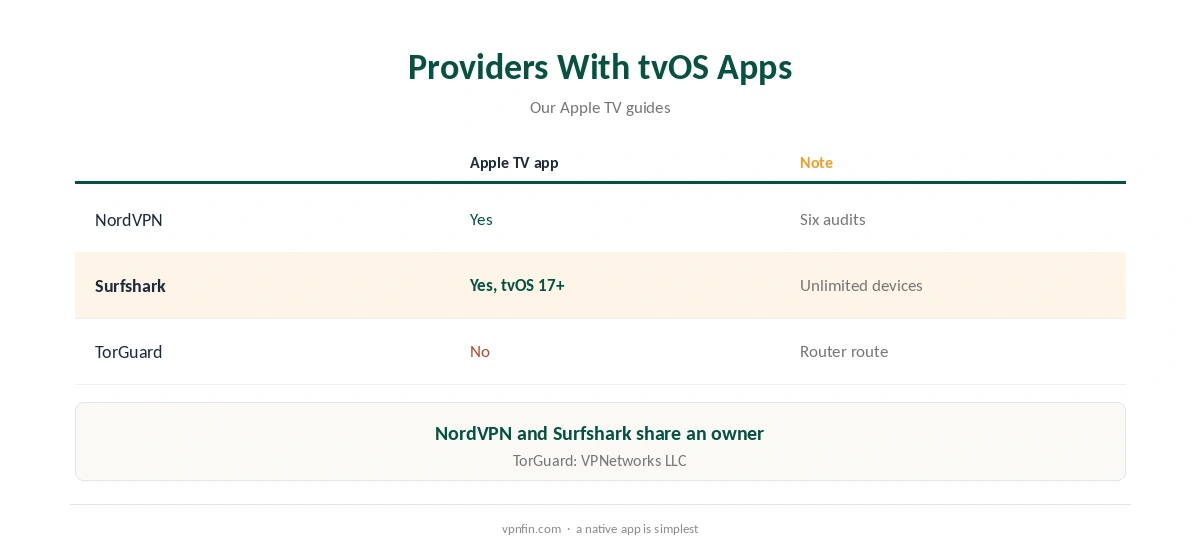
If router setup is too much, several providers offer Apple TV apps. Our NordVPN Apple TV guide and Surfshark Apple TV guide cover two; the pair share an owner, Nord Security.
TorGuard’s Record
Our audit table records no independent audit for TorGuard. It is run by VPNetworks LLC in Florida and settled a copyright lawsuit in 2022 by blocking BitTorrent on its US servers. Standard allows up to eight devices, and refunds are limited to seven days.
Related Guides
Our Apple TV VPN guide compares providers, and our guide to turning off a VPN on Apple TV covers removing profiles.
How We Research
This page draws on TorGuard’s downloads page and router guides, Apple’s TestFlight page for TorGuard’s V2Ray beta, Security.org’s and Fahimai’s TorGuard coverage and our TorGuard tables. We cross-checked these sources against each other, and where they conflict or something can’t be verified, we say so in the text rather than guessing. We checked time-sensitive figures, including prices in US dollars, on 7 October 2026. The main source we relied on is TorGuard’s downloads page. Our full approach lives on the About Us page.
TorGuard Apple TV FAQ
Not on its downloads page, which lists iOS and Chrome only for Apple-related platforms.
Run TorGuard on a router and connect the Apple TV to it.
Yes, a WireGuard app plus a Custom version for pasted configs.
TorGuard sells pre-flashed routers; Fahimai says annual Pro and Premium include one.
NordVPN and Surfshark, among others.
The Verdict
TorGuard Apple TV use runs through a router, where TorGuard’s OpenWrt app and pre-flashed options help. For a simpler setup, a provider with a native tvOS app saves effort.