
Disclosure: VPNFin is reader-supported. If you buy a VPN through links on this page, we may earn a commission at no extra cost to you. This never affects our ratings — here’s our full disclosure.
Torrenting is a file-transfer protocol, not a crime — Linux distributions, game patches and open-access research all move over BitTorrent every day. What it does do is broadcast your IP address to every peer in the swarm, which is why a VPN matters here more than for almost any other use. This guide compares P2P policies, port forwarding and real download speeds across the five providers we rank, and explains why the protocol you pick matters more than the provider you choose. Kodi sits in the same category — legal software, and the questions belong to what you do with it. Torrenting through a residential exit node carries extra risk, as our Mysterium VPN safety check explains.
A note on the law: we cover the technology and the privacy tools. Downloading copyrighted material without permission is illegal in most countries regardless of what VPN you use, and no provider here markets itself otherwise — our guide to VPN legality covers where the technology itself is restricted. The Netherlands is the case worth reading: enforcement there targets people who upload, and has done for twenty years. Canada runs the opposite arrangement, where providers must forward a rights holder’s notice to you by law.
The Short Answer
NordVPN for speed, which is what you notice on large files.
Surfshark if several machines torrent at once — unlimited connections and P2P allowed on every one of its servers.
PureVPN if you seed on private trackers, because it is the only one of the five ranked here offering port forwarding, as a $0.99 add-on. our port forwarding guide lists the providers that still offer it.
What Actually Matters for Torrenting
Four things, in this order.
A kill switch that works. BitTorrent exposes your IP to every peer. If the VPN drops mid-transfer and traffic falls back to your real connection, every peer in that swarm sees your address. This is not optional — and fourteen of thirty tested providers failed exactly that test.
Where P2P is allowed. Some providers permit it network-wide, others restrict it to designated servers. Neither is less safe — the difference is how much hunting you do before a download starts.
Speed, which matters here unlike streaming. Our streaming guide argued that VPN speed barely matters, because 4K needs 15 to 25 Mbps and every provider clears that many times over. Torrenting is the opposite case: a 50 GB file at 40 Mbps takes nearly three hours, at 80 Mbps it takes ninety minutes. The percentage difference you can ignore for Netflix is real time here.
Port forwarding, if you seed. It opens an inbound port so other peers can connect directly to you, which raises upload ratios on private trackers. If you only download, you will never notice its absence. If you maintain ratios, nothing else on this page matters as much. Our page on NordVPN port forwarding covers why it is missing and which providers offer it.
The Five Compared
1. NordVPN — Fastest
NordVPN routes P2P through specialty servers rather than the whole network, which means one extra click before you start. It also offers SOCKS5 proxy support across most of its servers — lighter than full VPN encryption, and some torrent clients handle it natively. Our page on NordVPN SOCKS5 covers the proxy setup in qBittorrent and its limits.
The speed case is the strongest here: CNET measured a 2.9% average download loss, the best result in their lineup, and independent torrent testing puts it level with or ahead of the field.
No port forwarding. NordVPN treats it as a security risk and points to Meshnet — its private network for up to 60 of your own devices — as the alternative. That is not a substitute for seeding ratios. Full detail in our NordVPN review.
2. Surfshark — Best for Multiple Machines
Every one of Surfshark’s roughly 4,500 servers supports P2P. No hunting, no dedicated list, no redirects. Combined with unlimited simultaneous connections, that makes it the only pick here that covers a desktop, a laptop and a seedbox under one subscription without counting slots.
Independent testing puts its torrent speeds close to NordVPN’s on the same files. Bypasser, its split-tunneling tool, keeps your banking app outside the tunnel while the download client stays inside.
No port forwarding. Full detail in our Surfshark review.
3. PureVPN — Port Forwarding, for an Extra Dollar
This is why PureVPN is on the list. Among the five providers we rank, it is the only one offering true port forwarding — the feature that lets peers connect to you directly and keeps seeding ratios healthy on private trackers. How it stacks up against the category leader overall is in our NordVPN vs PureVPN comparison. We also weigh it against Surfshark, which allows unlimited devices but no port forwarding.
P2P runs on designated servers, and renewal at $47.95 a year is the cheapest here. The trade-off is consistency: independent labs measured speed retention anywhere from 12% to 67% depending on which server they hit, which means testing several before judging.
There is also a 2017 logging incident on the record, which we cover honestly in our PureVPN review. If ratios matter to you, the port forwarding may outweigh it. If they don’t, it probably doesn’t.
4. ExpressVPN — P2P Everywhere, at a Price
Every ExpressVPN server supports P2P with no configuration, and its Lightway protocol is the right choice for transfers — testers report stable connections where older protocols struggled. Our page on VyprVPN for torrenting covers P2P on every server and the kill switch caveats.
Speed is mid-field rather than leading: one test recorded 78 Mbps average on a 100 Mbps line, another measured 51 Mbps peak. Solid, not exceptional, at the steepest renewal in the category — $99.95 a year. No port forwarding. Full detail in our ExpressVPN review.
5. CyberGhost — Cheapest, With One Annoyance
CyberGhost runs dedicated P2P servers and is the cheapest option here at $56.94 a year on renewal, with a 45-day refund window.
The annoyance: of its 100+ locations, 87 support P2P — but the app does not label which ones. You check the server list on CyberGhost’s website before connecting. Every other provider here either allows P2P everywhere or marks the servers in the app.
Speed is the weakest of the five, and one test showed exactly how much protocol choice matters: the same 5.31 GB file took 1 minute 27 seconds on WireGuard and over 33 minutes on OpenVPN. Full detail in our CyberGhost review.
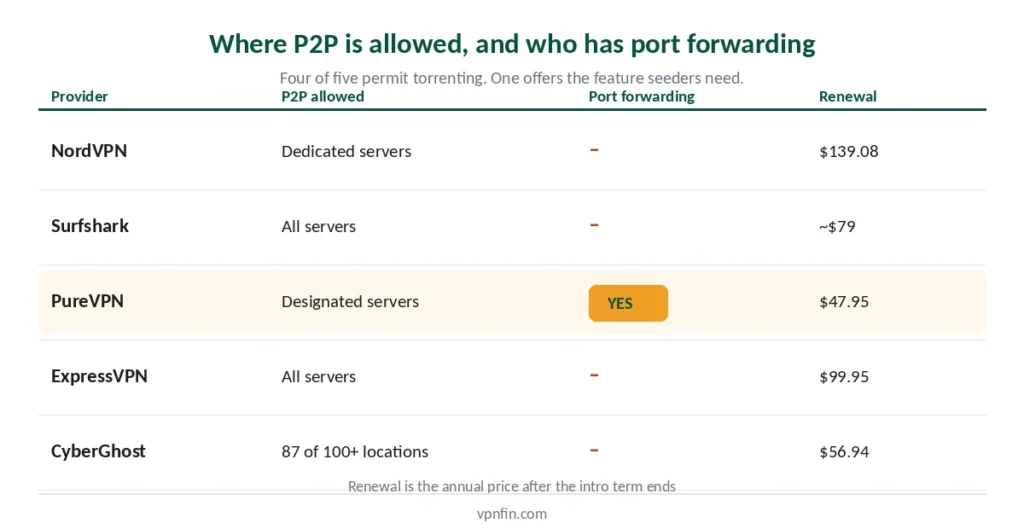
Head to Head
| P2P allowed | Port forwarding | Renewal/yr | Devices | |
|---|---|---|---|---|
| NordVPN | Dedicated servers | No | $139.08 | 10 |
| Surfshark | All servers | No | ~$79 | Unlimited |
| PureVPN | Designated servers | Yes ($0.99/mo) | $47.95 | 10 (50 paid) |
| ExpressVPN | All servers | No | $99.95 | 10–14 |
| CyberGhost | 87 of 100+ locations | No | $56.94 | 7 |
The Setting That Matters More Than Your Provider
Use WireGuard — or the provider’s own version of it: NordLynx on NordVPN, Lightway on ExpressVPN.
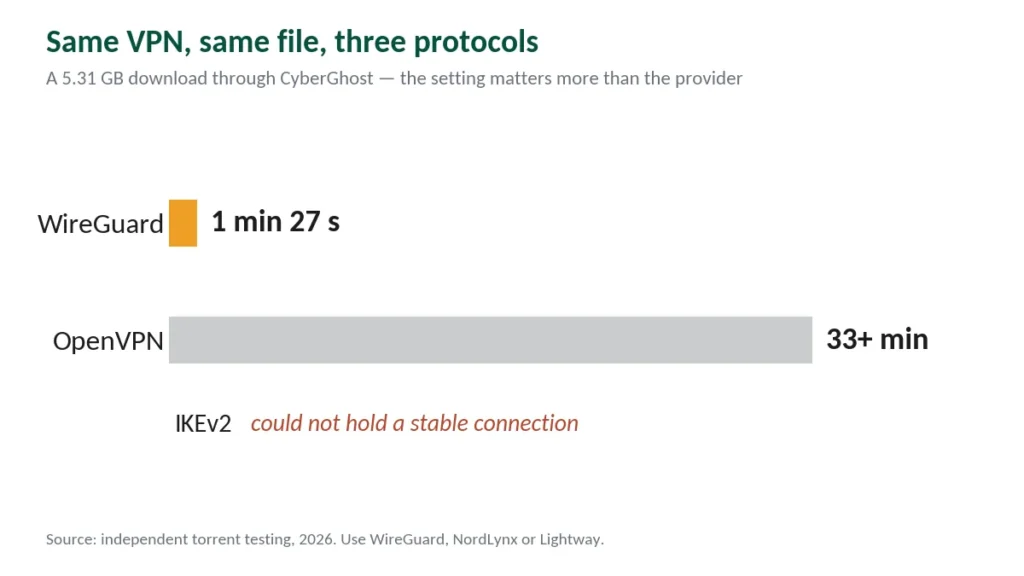
One tester downloaded the same 5.31 GB file through CyberGhost on three protocols. WireGuard finished in 1 minute 27 seconds. OpenVPN took over 33 minutes. IKEv2 could not hold a stable connection at all.
That is a thirty-fold difference from a setting most people never touch, on the same provider and the same file. Whichever VPN you buy, check the protocol before blaming the service. Our setup guide covers where to find it and the four tests that confirm your connection is actually protected.
Do You Actually Need Port Forwarding?
Probably not, and the honest answer saves you money.
You need it if you maintain ratios on private trackers, or you seed heavily and want peers connecting to you directly rather than waiting for outbound connections. We put the two side by side in our PIA vs FastestVPN comparison.
You don’t need it if you download and stop, use public trackers, or torrent occasionally. Downloads work fine without it — the difference is upload throughput and connection count. Our guide to IPVanish for Torrenting covers fast P2P and SOCKS5, but no port forwarding.
If you fall into the second group, ignore this section entirely and pick on speed or price. If you fall into the first, PureVPN is your only option among the five ranked here — though PIA also offers port forwarding, at roughly $2 a month with unlimited devices — and it usually wants a dedicated IP address alongside it, which is a separate add-on with a separate trade-off. We compare those two directly, and Surfshark does not offer port forwarding at all.
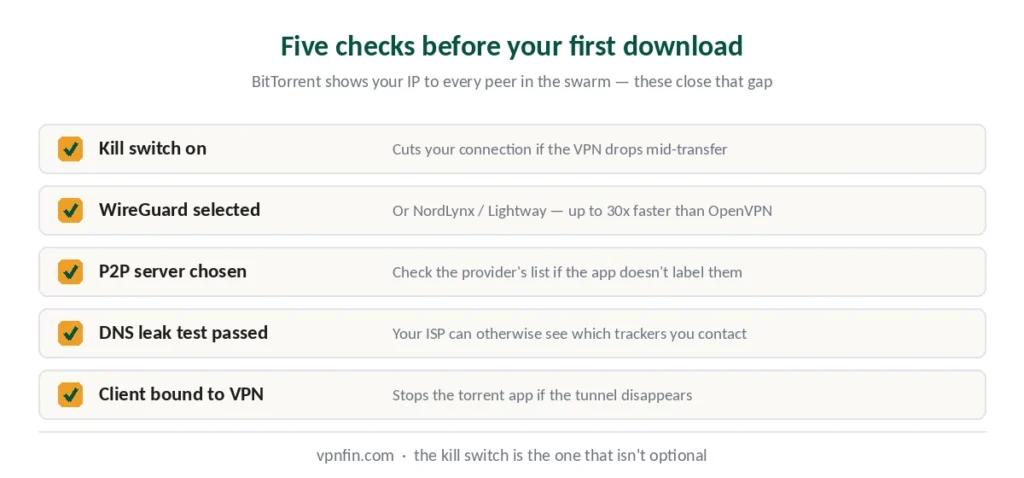
Safety Checklist Before Your First Download
The DNS leak test matters here specifically: your ISP can see which trackers you contact even when the transfer itself is encrypted. Our setup guide walks through all four verification tests. Our Hotspot Shield vs PrivateVPN comparison sets the two side by side.
Kill switch enabled — check it fires by disconnecting Wi-Fi mid-test
Protocol set to WireGuard, NordLynx or Lightway
Connected to a server that permits P2P
DNS leak test passed with the VPN running
Torrent client bound to the VPN interface where the client supports it Our guide to ExpressVPN for Torrenting covers P2P on every server, and port forwarding on routers only.
How We Research
This guide draws on our full reviews of all five providers, their published P2P and port-forwarding policies, and torrent-specific speed testing from named independent sources including Security.org, Cybernews and Cloudwards — cross-checked and verified at publication. We do not run our own transfers; where we cite download times, they come from named testers and are attributed. Our full approach lives on the About Us page.
Torrenting VPN FAQ
The protocol is legal — Linux distributions, game patches and open-access research all use BitTorrent. Downloading copyrighted material without permission is not, in most countries, regardless of whether you use a VPN. A VPN protects your privacy from peers and your ISP; it does not change what is legal.
Several of the providers we cover: PureVPN, Private Internet Access, Windscribe, AirVPN, Proton VPN and TorGuard, whose port forwarding survived the settlement that removed its US torrent support. PureVPN is the only one of the five ranked here, and it charges $0.99 a month for the add-on rather than including it. NordVPN declines to offer port forwarding at all, treating it as a security risk and pointing to Meshnet instead, and Surfshark, ExpressVPN and CyberGhost do not offer it either. PIA includes it in the base price at roughly $2 a month. Mullvad removed the feature in 2023, citing security risk.
Only if you seed. Downloads work perfectly without it — the difference shows in upload throughput and how many peers can connect to you directly. Casual users and anyone on public trackers will never notice its absence. Private tracker users maintaining ratios will notice immediately.
WireGuard, or a provider’s implementation of it — NordLynx on NordVPN, Lightway on ExpressVPN. One tester downloaded the same 5.31 GB file through CyberGhost in 1 minute 27 seconds on WireGuard and over 33 minutes on OpenVPN. That thirty-fold gap comes from a setting, not a subscription.
Depends on the provider. Surfshark and ExpressVPN allow P2P across their entire networks. NordVPN and PureVPN route it through designated servers. CyberGhost supports it on 87 of its 100+ locations but does not label them in the app — you check the server list on its website first.
Without a kill switch, your torrent client keeps running on your real connection and every peer in the swarm sees your actual IP address. With one enabled, your internet cuts until the VPN reconnects. This is the single most important setting for torrenting, and it is off by default on some providers.
The Verdict
NordVPN if speed is the priority — on a 50 GB file the difference is measured in hours, not percentages.
Surfshark if more than one machine torrents, or you want P2P allowed everywhere without checking a server list.
PureVPN if you seed on private trackers. It is the only one of the five with port forwarding — a dollar a month on top — and that settles it regardless of anything else on this page. Our page on Hotspot Shield and port forwarding covers why it is missing and the alternatives.
And whichever you choose: set the protocol to WireGuard, test the kill switch, and confirm there is no DNS leak. Those three steps matter more than the logo on the app. Our page on TunnelBear for torrenting covers split reviewer results and the missing extras.