
Disclosure: VPNFin is reader-supported. If you buy a VPN through links on this page, we may earn a commission at no extra cost to you. This never affects our ratings — here’s our full disclosure.
Surfshark on Chrome is less a VPN than a privacy toolkit with a proxy attached. Gizmodo’s September 2026 test of five VPN extensions found Surfshark’s did the most without the desktop app: ad and tracker blocking, cookie pop-up blocking, malicious site warnings, data breach alerts and a Gmail scam checker. Its ad blocking stopped 107 of 135 test domains, 79%, matching Surfshark’s desktop CleanWeb exactly.
It is still a proxy that covers Chrome alone, with no kill switch. And it is heavy: Gizmodo measured it at 96.9 MB, roughly nine times the size of NordVPN’s or ExpressVPN’s extensions. This guide covers what it does, how to set it up, and what breaks.
Surfshark on Chrome: The Short Answer
Install the extension from the Chrome Web Store, sign in, and turn on WebRTC protection, under Settings, VPN Settings, as Surfshark’s download page describes.
It protects Chrome only. For the whole computer, use the app; our Surfshark on Windows guide and our Surfshark on Mac guide cover those.
CleanWeb works even without the VPN connected, Surfshark says, so the extension doubles as an ad blocker. Our VPN and proxy comparison explains what a browser proxy can and cannot do.
What the Extension Does
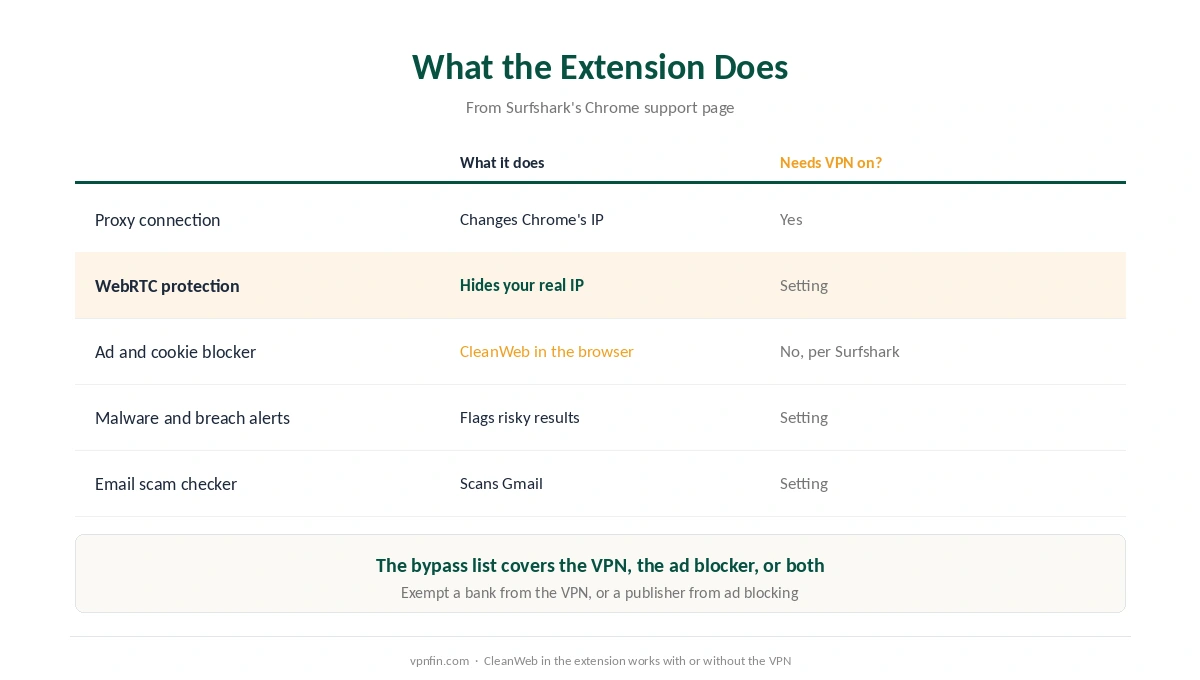
| Feature | What it does | Needs VPN on? |
|---|---|---|
| Proxy connection | Changes Chrome’s IP address | Yes |
| WebRTC protection | Stops sites finding your real IP | Setting |
| Ad and cookie pop-up blocker | CleanWeb in the browser | No, per Surfshark |
| Malware and breach alerts | Flags risky search results and sites | Setting |
| Email scam checker | Scans Gmail for phishing | Setting |
| Bypass list | Sites skip the VPN or the ad blocker | — |
The bypass list does two jobs. Surfshark’s support page says you can exempt a site from the VPN, from ad blocking, or both, useful for a banking site or a publisher you want to support. Our split tunnelling guide explains the idea.
Setting Up Surfshark on Chrome
| Step | What to do | Note |
|---|---|---|
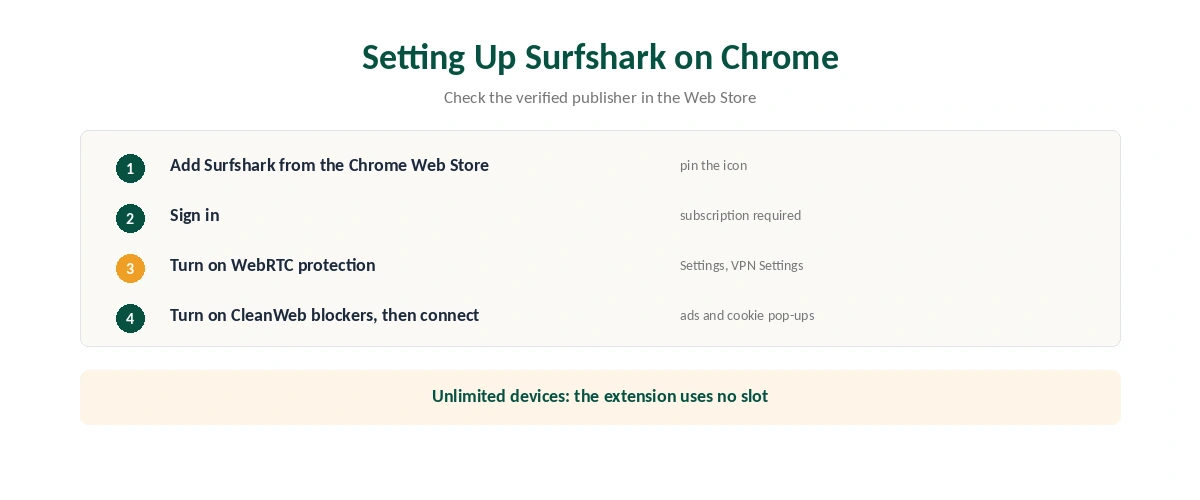
| 1 | Open the Chrome Web Store, search Surfshark | Check the verified publisher |
| 2 | Add to Chrome and pin the icon | About 96.9 MB, per Gizmodo |
| 3 | Sign in | A subscription is required |
| 4 | Turn on WebRTC protection | Settings, VPN Settings |
| 5 | Turn on Ad blocker and Cookie pop-up blocker | CleanWeb settings |
| 6 | Connect to a location | Quick-connect or a country |
Set it to connect when Chrome opens if you use it for everyday privacy. Unlimited devices mean the extension costs you no slot, as our multi-device guide explains.
What Breaks, and How to Fix It
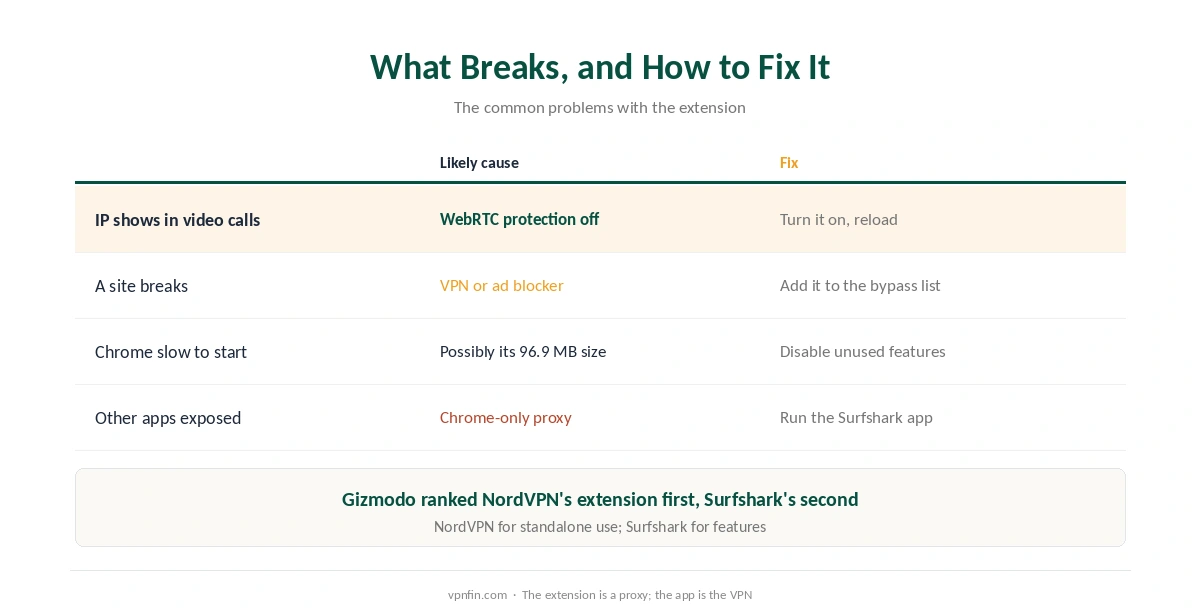
Your IP shows in a video call. WebRTC protection is off. Turn it on under Settings, VPN Settings, and reload the page.
A site breaks or blocks you. Add it to the bypass list, either for the VPN, the ad blocker, or both.
Chrome feels slow to start. The extension is large, at 96.9 MB in Gizmodo’s measurement, which may play a part; try disabling features you do not use.
Other apps are not protected. The extension covers Chrome only and has no kill switch. Run the Surfshark app for the whole device, as our kill switch guide explains.
When the Extension Is Enough
Surfshark on Chrome suits quick browser-only sessions, such as checking email on café Wi-Fi when nothing else is running, as our public Wi-Fi guide explains.
It is not enough when other apps are online. Your provider still sees everything outside Chrome, as our guide to what a VPN hides sets out. After connecting, our guide to checking a VPN shows how to confirm which address sites see.
Surfshark or NordVPN on Chrome?
Gizmodo ranked NordVPN’s extension first, for standalone use, site exclusion and clean WebRTC results, and Surfshark’s second, for doing the most without the app. NordVPN’s ad blocking was weaker. Our NordVPN on Chrome guide covers it; the two share a parent, Nord Security.
Gizmodo’s advice fits both: the extension is a proxy for Chrome, and the app is the VPN, so install both. Our guide to turning off a VPN in Chrome covers disconnecting, and our Surfshark review the service.
How We Research
The features and settings come from Surfshark’s Chrome support page, download page, CleanWeb page and feature list. The blocking figure, extension size and store rating come from Gizmodo’s September 2026 Chrome extension test. We name each source where used; all were read on 26 September 2026. We did not test the extension ourselves. Our full approach lives on the About Us page.
Surfshark on Chrome FAQ
No. It is a proxy that protects Chrome’s traffic only, with no kill switch. Use the Surfshark app to protect the whole device.
Yes, in the browser extension. Surfshark says CleanWeb there works with or without an active VPN connection.
Open the extension, go to Settings, then VPN Settings, and turn on WebRTC protection.
Gizmodo found it blocked 107 of 135 test domains, 79%, the same as Surfshark’s desktop CleanWeb.
It bundles many features. Gizmodo measured it at 96.9 MB, roughly nine times the size of NordVPN’s or ExpressVPN’s extensions.
The Verdict
Surfshark on Chrome is the most feature-packed extension in Gizmodo’s test, with ad blocking that matches the desktop app.
It is still a Chrome-only proxy with no kill switch, and a large download. Keep it for browser privacy and ad blocking, and run the app for everything else.