
Disclosure: VPNFin is reader-supported. If you buy a VPN through links on this page, we may earn a commission at no extra cost to you. This never affects our ratings — here’s our full disclosure.
TunnelBear Windows support is its most complete. Tom’s Guide notes that among TunnelBear’s Windows, Mac, iOS and Android apps, only Windows splits tunnelling by both apps and websites, and GhostBear, TunnelBear’s obfuscation, works there over OpenVPN. The app supports WireGuard, OpenVPN and IKEv2, and TunnelBear’s download page lists Vigilant Mode and Trusted Networks for PCs. Cure53 has audited TunnelBear every year since 2017. Our guide to TunnelBear OpenVPN covers where OpenVPN runs in the apps, GhostBear and Linux.
This guide covers the setup, the features, the settings worth turning on and how it compares.
TunnelBear Windows Setup
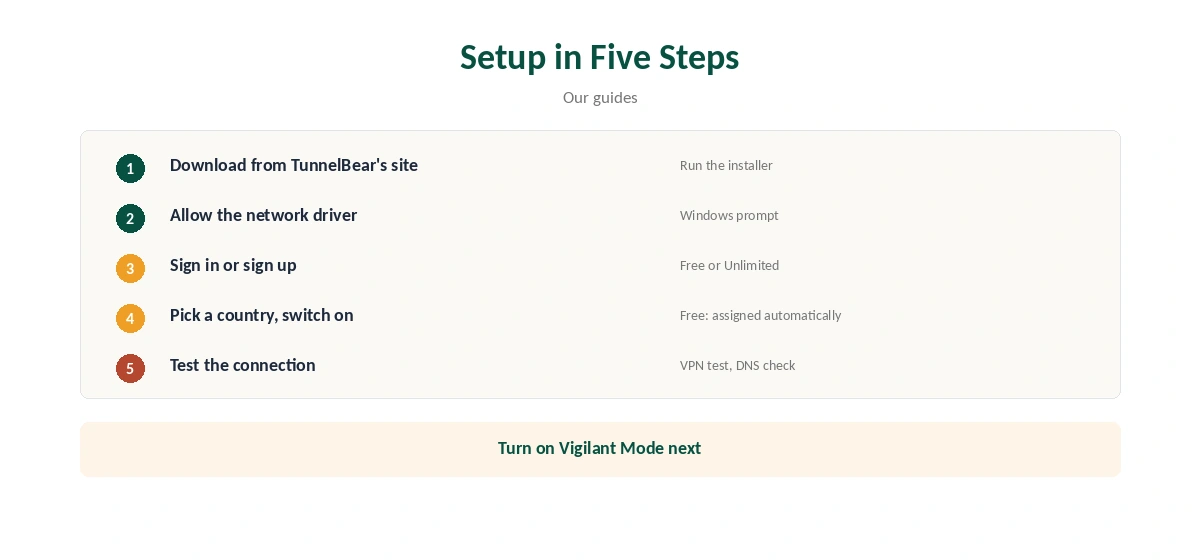
Download the installer from TunnelBear’s website, run it and follow the prompts. Allow the network driver when Windows asks. Sign in or create an account, pick a country and switch on.
Confirm the new address with our VPN test page and run a DNS check with our DNS leak guide.
Features on Windows
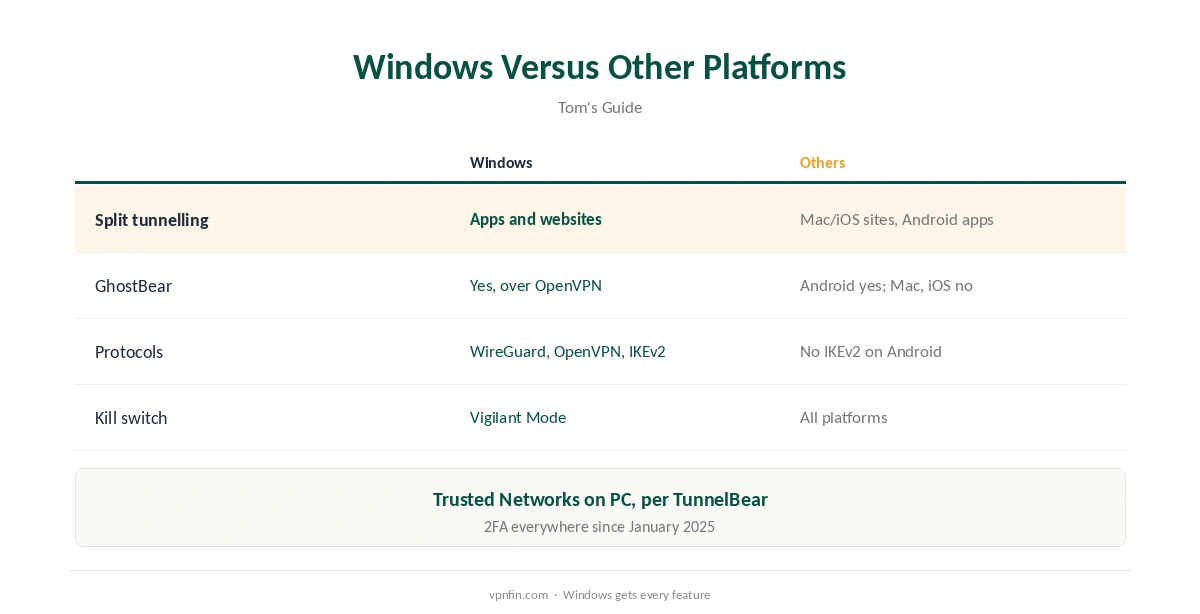
Tom’s Guide lists WireGuard, OpenVPN and IKEv2 on Windows. Split tunnelling covers apps and websites, the only platform where it does both; Mac and iOS split by website, Android by app. Two-factor authentication arrived in January 2025.
TunnelBear’s download page lists Vigilant Mode, its kill switch, and Trusted Networks, which lets you mark home networks where the VPN need not connect automatically.
GhostBear on Windows
GhostBear disguises VPN traffic on networks that block VPNs. Tom’s Guide notes it works on Windows and Android, only with OpenVPN. Switch to OpenVPN first, then turn on GhostBear. Our obfuscation guide explains how disguised traffic works.
Settings Worth Turning On
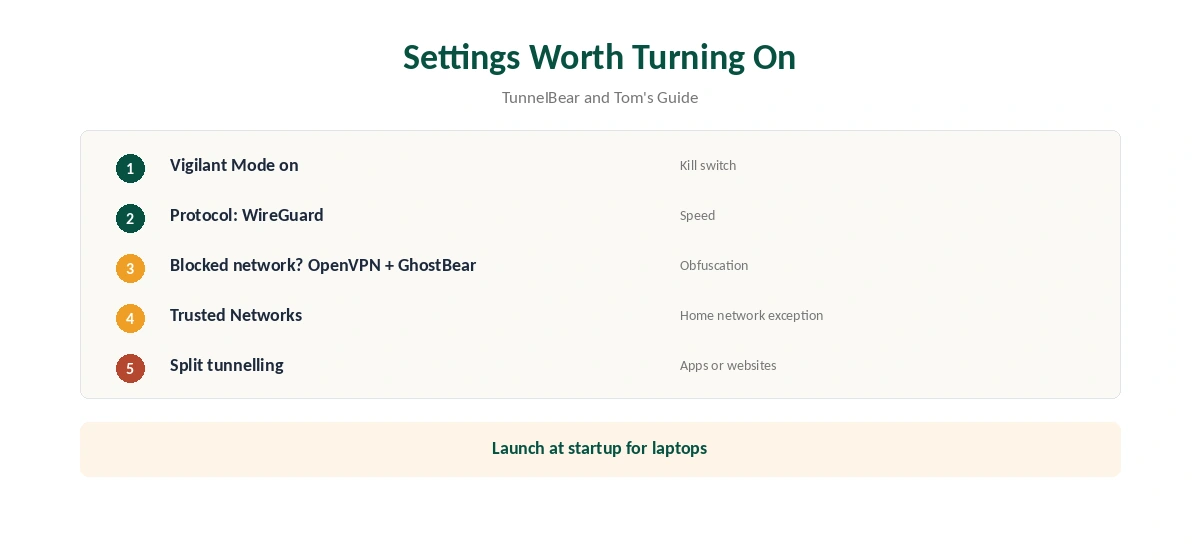
Turn on Vigilant Mode so traffic stops if the connection drops, as our kill switch guide explains. Choose WireGuard for speed. Add your home network to Trusted Networks if you only want the VPN elsewhere, and enable launch at startup for laptops.
Use split tunnelling to keep a game launcher or banking site outside the VPN, as our split tunnelling guide explains.
The Free Plan on Windows
The free plan gives 2 GB a month, and since early 2026 assigns your server automatically, TheBestVPN reports. TheBestVPN also notes split tunnelling became paid-only. Our TunnelBear free guide covers the limits.
TunnelBear Windows Use on Public Wi-Fi
On laptops that move between cafés, airports and offices, the TunnelBear Windows app protects every program, not just the browser. Trusted Networks keeps it quiet at home and on by default elsewhere. Our public Wi-Fi guide explains the risks.
Troubleshooting
If TunnelBear will not connect on Windows, switch protocol, then country. Security software can block the network driver; allow TunnelBear in it and restart. Reinstalling from TunnelBear’s website can fix remaining problems.
Gaming PCs
A VPN adds a step between you and game servers, so expect slightly higher ping rather than lower. Use split tunnelling to keep a game launcher outside TunnelBear, or pick the nearest country while playing. Our gaming VPN guide explains what a VPN can and cannot do for games.
Several PCs on One Plan
TunnelBear Unlimited sets no device limit, according to our device table, so one plan covers every Windows PC, laptop and phone in a household. That makes the TunnelBear Windows app a cheap way to protect a family’s computers.
Windows Updates
After a major Windows update, the network driver may need reinstalling. If TunnelBear stops connecting after an update, reinstall it from TunnelBear’s website and sign in again. Keep the app itself updated, since new versions add features such as two-factor authentication and fix connection problems. Our page on TunnelBear on Xbox covers sharing a PC connection and the gaming trade-offs.
A Quick Rule
Everyday privacy on a PC? TunnelBear on Windows covers it with every feature. Seeding or hosting? Look elsewhere for port forwarding, which TunnelBear does not offer on any plan.
Quick Check
After connecting, run the VPN test and a DNS check, then open the apps you use most to confirm they still work as expected.
Browser Extensions on a PC
TunnelBear also offers Chrome, Firefox and Edge extensions, Tom’s Guide notes. Each protects only its browser; the Windows app protects everything. Use one or the other, not both at once. Our TunnelBear Chrome guide covers the extension.
What Is Missing
TunnelBear offers no port forwarding and no dedicated IPs, our review found, and no apps for smart TVs or consoles, Holafly adds. For gaming PCs, that rarely matters; for seeders, it does.
What TunnelBear Costs
Tom’s Guide lists TunnelBear Unlimited at $9.99 a month, about $4.17 a month on one year and $3.33 a month on three years, with no device limit; other reviewers quote $3.33 for one year, so check the checkout. Our TunnelBear price guide covers the plans, and our TunnelBear refund guide explains the limited 30-day guarantee.
Related Guides
Our Windows VPN guide compares providers. TunnelBear has belonged to McAfee since March 2018.
For rivals, see our NordVPN Windows guide and Surfshark Windows guide; NordVPN and Surfshark share an owner, Nord Security.
Before You Pay
Try the free plan first.
How We Research
This page draws on Tom’s Guide’s TunnelBear review, TunnelBear’s download page, Holafly, TheBestVPN, TunnelBear’s terms of service and pricing sources including TechRepublic and Security.org. We cross-checked these sources against each other, and where they conflict or something can’t be verified, we say so in the text rather than guessing. We checked time-sensitive figures, including prices in US dollars, on 6 October 2026. Sources disagree on the one-year price; check TunnelBear’s checkout. The main source we relied on is Tom’s Guide’s TunnelBear review. Our full approach lives on the About Us page.
TunnelBear Windows FAQ
Yes. The Windows app is its most complete, per Tom’s Guide.
It does, for both apps and websites.
Yes, over OpenVPN.
It has Vigilant Mode.
Yes, with 2 GB a month and an automatically assigned server.
The Verdict
TunnelBear Windows support is its best: full split tunnelling, GhostBear and Vigilant Mode. It suits simple, audited privacy on a PC, though seeders will miss port forwarding. Our page on TunnelBear on Roku covers the two workarounds and the providers that make it easier.