
Disclosure: VPNFin is reader-supported. If you buy a VPN through links on this page, we may earn a commission at no extra cost to you. This never affects our ratings — here’s our full disclosure.
Turbo VPN free is the reason the app has passed 100 million downloads on Google Play, VPN.com reports. It costs nothing, needs no setup and connects with one tap.
However, free here means paying in other ways: ads, and a privacy policy that reviewers find concerning. This guide explains what the free plan gives and what it costs. Our Turbo VPN review covers the service in full.
What Turbo VPN Free Gives You
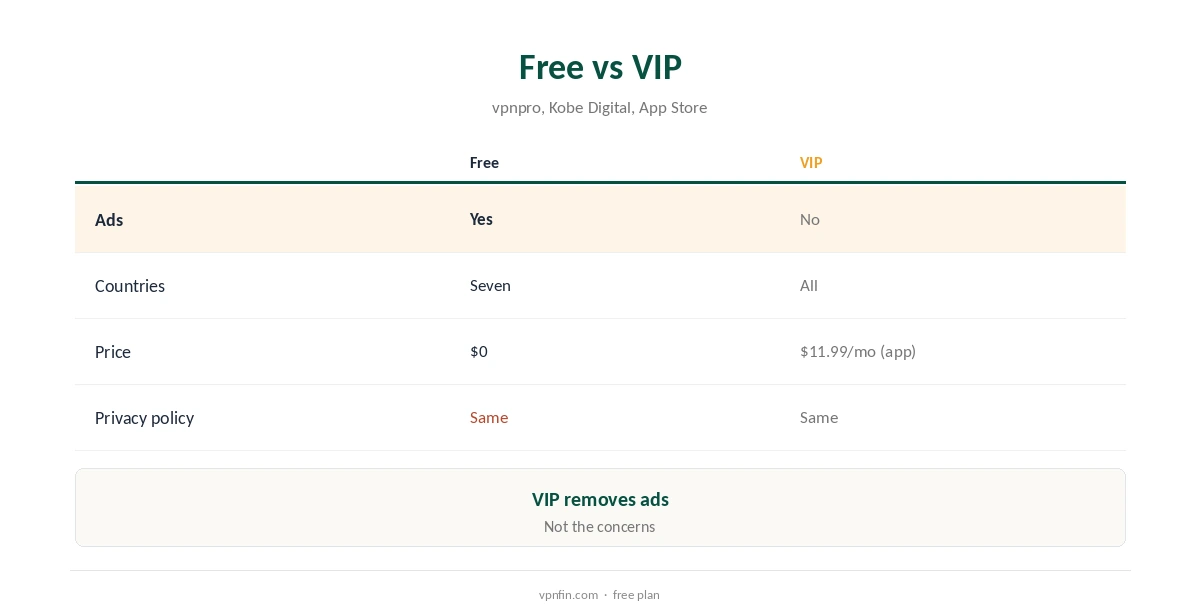
The free plan offers a choice of seven countries, vpnpro reports, with servers that free users share. VPN.com describes it as a free plan with unlimited bandwidth, which is unusual among free VPNs.
The app is simple, with one-tap connection, and needs no account to start.
The Ads
The free version is supported by advertising, ProPrivacy notes, and PrivacySavvy describes the free app as full of adware. Ads bring third-party tracking, which works against the point of a VPN.
App Store reviewers also complain about ads they cannot close, which the developer answers by asking them to report the ad network.
Privacy on the Free Plan
ProPrivacy found the privacy policy permits sending collected data to servers in China. Top10VPN quotes it as allowing disclosure when served with a valid court order.
The company says it deletes usage logs at the end of each session, but no independent audit has checked that, Top10VPN notes.
Free vs VIP
VIP removes ads and unlocks all locations and faster servers, Kobe Digital reports. It costs $11.99 a month in the US App Store, as our Turbo VPN price guide explains, and less on the site’s long plans.
Paying, however, does not change the ownership or the privacy policy.
Who Runs Turbo VPN
Innovative Connecting Pte, a Singapore company, runs Turbo VPN. Top10VPN found its director heads LinkSure, the company behind WiFi Master Key, in mainland China.
Compared With Audited Free Plans
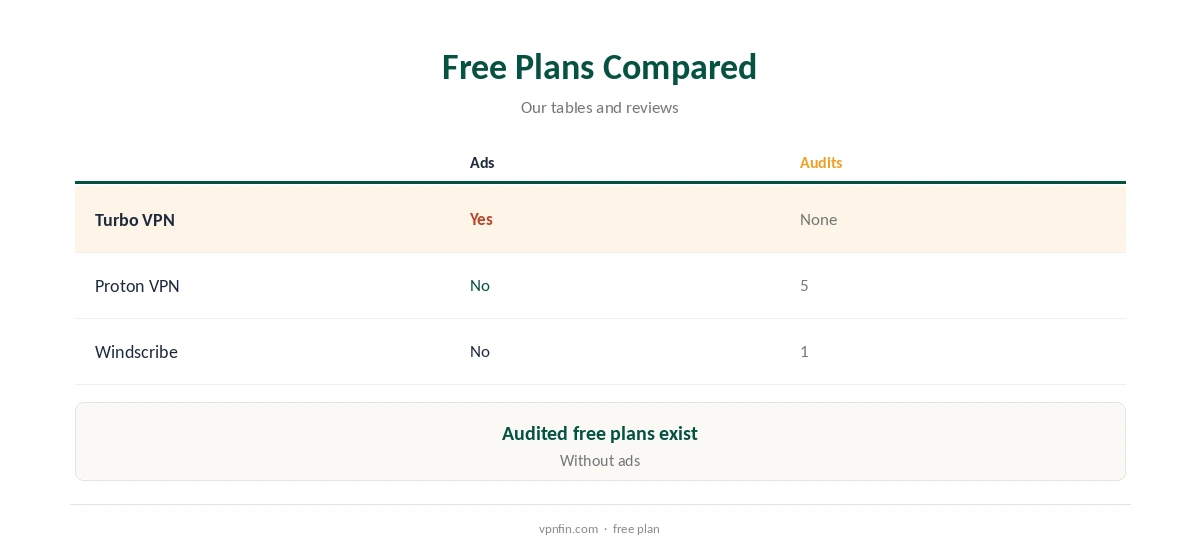
Proton VPN’s free plan has no data cap, no ads and 5 audits in our table. Windscribe’s free tier offers up to 15 GB, our refund table notes.
Both offer fewer free locations than Turbo VPN, but neither raises the same ownership or policy concerns. Our guide to free VPN risks explains why that matters.
If You Use It Anyway
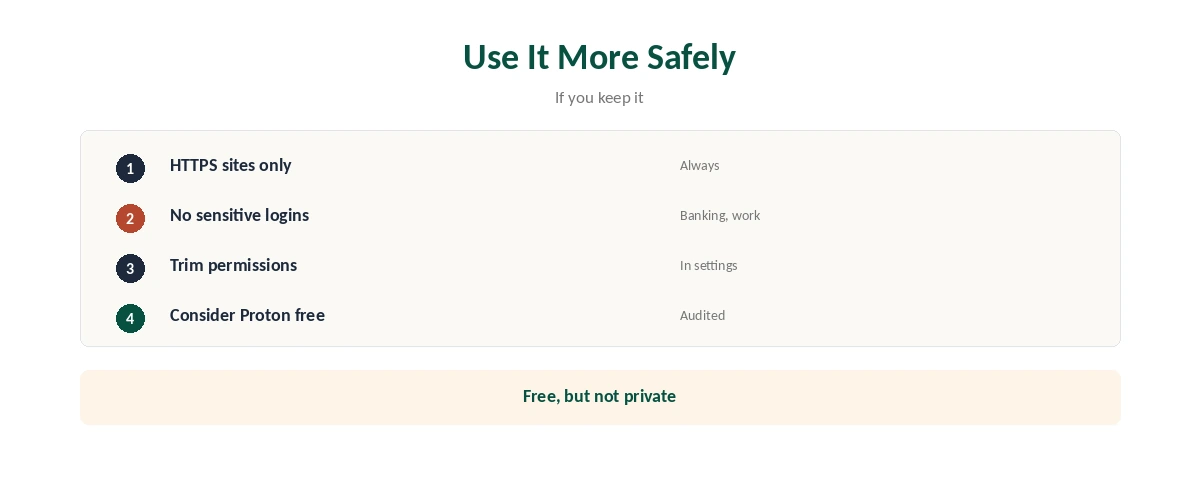
Keep to HTTPS websites and avoid logging into banking, work or email accounts. Review the app’s permissions and turn off any it does not need.
The Premium Trial
The App Store offers a 3-day premium trial that renews into a paid subscription unless cancelled, the listing says. Comparitech found a 7-day trial that required a card. Cancel in time if you do not plan to pay.
Free Plan Speed
Free servers are shared by many users, so speeds drop at busy times. Reviews disagree on overall speed: Comparitech found it slow, while PrivacySavvy was impressed.
If speed matters, test a few free locations at different times of day before relying on one.
Streaming on the Free Plan
Results conflict here too. Top10VPN found Turbo VPN poor for streaming, and ProPrivacy says it does not unblock Netflix or BBC iPlayer, while Comparitech unblocked most services even on the free plan.
Treat any free streaming success as a bonus rather than a feature you can rely on.
Torrenting and the Free Plan
Top10VPN found Turbo VPN unsuitable for torrenting. Given the privacy policy, we would not torrent through the free plan either.
Platforms
Apps cover phones and computers, and the free app sits in both major app stores. Install only from the official listing by Innovative Connecting, since look-alike free VPNs are common.
Children and Free VPN Apps
Ad-supported VPN apps are a poor choice for children’s devices, since ads bring tracking and sometimes unsuitable content. An ad-free, audited VPN is a safer default for family phones.
Data and Permissions
Free apps often request more permissions than they need. Therefore, check the permissions screen after installing and remove anything unrelated to the VPN, such as contacts or location.
In addition, review the privacy settings inside the app, if any, and turn off personalised ads where possible.
A Better Free Setup
For free protection without ads, install an audited free VPN on your phone and laptop. In addition, keep your browser and operating system updated, since a VPN does not fix outdated software.
The Bottom Line on Cost
Free does not mean costless. You pay with exposure to ads and a broad data policy, which matters more than the price tag for most readers.
Switching Away
Install the replacement VPN first, then uninstall Turbo VPN and cancel any trial or subscription in your store account. Deleting the app does not cancel payments.
Related pages on Turbo VPN cover Turbo VPN refund terms, CyberGhost vs Turbo VPN, ExpressVPN vs Turbo VPN and PureVPN vs Turbo VPN.
How We Research
We took free-plan details from vpnpro, VPN.com and ProPrivacy, privacy findings from ProPrivacy and Top10VPN, and trial terms from the App Store and Comparitech, read on 21 October 2026. The main source is ProPrivacy’s TurboVPN review. We do not run our own tests. Our full approach lives on the About Us page.
Turbo VPN Free FAQ
Yes, with ads and a choice of seven countries.
We do not recommend it for private use, given its policy, ownership and ads.
VPN.com describes unlimited bandwidth on the free plan.
Proton VPN, with no data cap, no ads and an audit.
The Verdict
Turbo VPN free is easy and generous on data, but it costs you in ads and privacy. For anything personal, an audited free plan such as Proton VPN’s is the better free choice.