
Disclosure: VPNFin is reader-supported. If you buy a VPN through links on this page, we may earn a commission at no extra cost to you. This never affects our ratings — here’s our full disclosure.
Windscribe Android follows the design of its Windows app, with a large connect button and your new IP and protocol on screen, TechRadar notes. It offers WireGuard, OpenVPN, IKEv2 and Stealth, split tunnelling, the R.O.B.E.R.T. blocker and GPS spoofing, Windscribe says, plus Custom Config support for other VPN servers. The free plan gives 10 GB a month with a confirmed email, and Windscribe also has an Android TV app.
This guide covers setup, Android’s always-on settings, each feature, the free plan, Android TV and leak testing.
Windscribe Android Setup
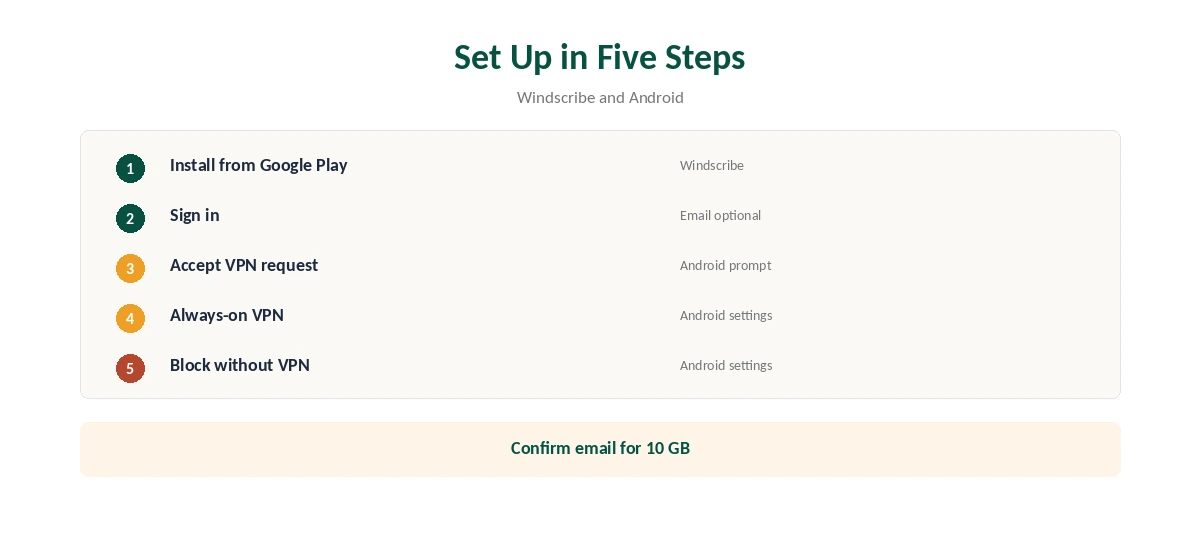
Install Windscribe from Google Play, open it and sign in or create an account; an email is optional, but confirming one raises free data from 2 GB to 10 GB. Accept Android’s VPN connection request, pick a location and connect.
Next, open Android’s VPN settings, usually under Network or Connections, tap the gear next to Windscribe and turn on Always-on VPN and Block connections without VPN. That keeps the phone connected after restarts and blocks traffic if the tunnel drops. Our kill switch guide explains why.
Protocols on Android
TechRadar lists WireGuard, OpenVPN over UDP and TCP, IKEv2 and Stealth among the protocol choices. WireGuard is the fast, battery-friendly default; Stealth wraps traffic for networks that block VPNs. IKEv2 reconnects quickly when the phone moves between Wi-Fi and mobile data, which helps on a commute.
You can also choose the port, which helps on restrictive hotel or office Wi-Fi. Our VPN battery guide explains why WireGuard costs less battery than OpenVPN.
Split Tunnelling and GPS Spoofing
Split tunnelling lets chosen Android apps bypass the VPN, Windscribe’s guide notes, in either inclusive or exclusive mode, useful for a banking app that rejects VPN addresses or a local streaming app. The rest of the phone stays protected.
GPS spoofing aligns the phone’s reported location with the VPN server, which some location-aware apps check alongside the IP address. Turn it off when you need your real location, for maps or deliveries, and use it only where an app’s terms allow, as our VPN legality guide notes for local rules.
R.O.B.E.R.T. and Custom Configs
R.O.B.E.R.T. blocks adverts, trackers and malware domains at the DNS level across apps on the phone, not just in a browser. You can choose which categories to block, and the same settings apply across your Windscribe devices.
Custom Config support, which TechRadar notes, lets the app load configurations for other VPN servers while keeping Windscribe’s interface and features. Most users will never need it, but it helps if you also run your own VPN server.
Free Plan on a Phone
The free plan gives 10 GB a month after confirming an email, 2 GB without, servers in 10 countries and no device limit. That is enough for messaging, browsing and maps on public Wi-Fi, but not daily video. The app shows remaining data on its main screen, and the allowance resets each month.
Use split tunnelling to send only sensitive apps through the VPN, which stretches the allowance. Pro, at $9 a month or $69 a year, removes the cap. Our Windscribe Free guide covers the limits.
Android TV
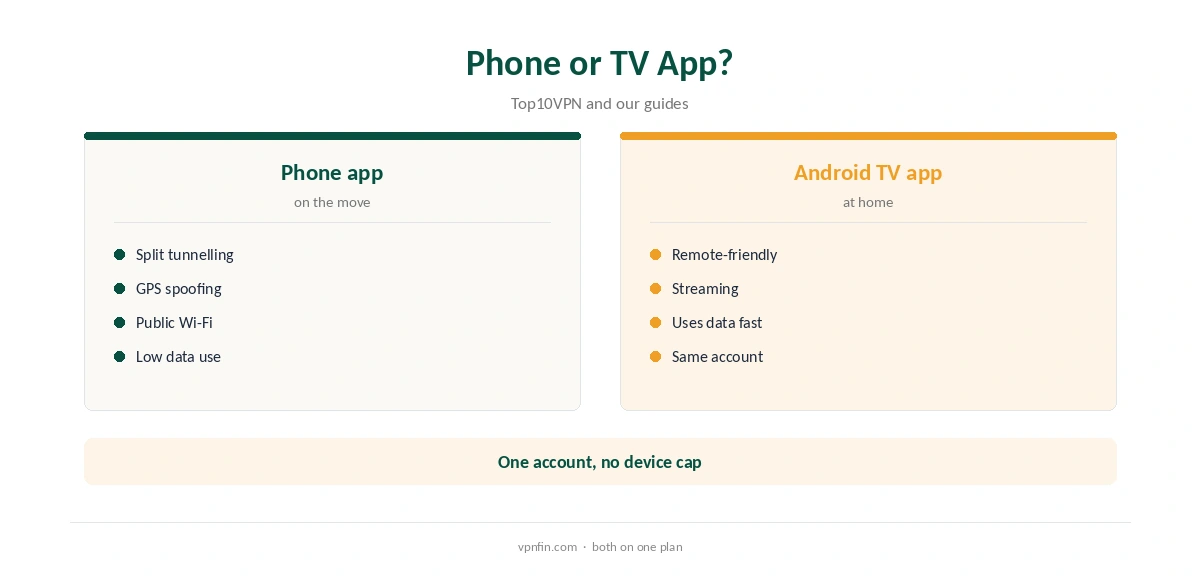
Windscribe is among the few free VPNs with an Android TV app, Top10VPN lists, so the same account can cover a phone and a TV.
Streaming on a TV uses data quickly on the free plan. Our Windscribe Firestick guide covers TV setup in detail.
Windscribe’s Privacy Record
Windscribe’s no-logs claim held when an Athens court dismissed charges against its CEO in April 2025, because the company had no user data to give, TechRadar and Tom’s Guide reported. In 2021, two seized Ukrainian servers held no user data but exposed an encryption key, which Windscribe disclosed and fixed.
The audit picture is mixed: Windscribe cites a 2024 PacketLabs infrastructure audit, while Security.org found no audit of the no-logs policy. Our Windscribe safety guide covers the full record.
Streaming on a Phone
Streaming results on Windscribe are mixed: Security.org reported problems with Netflix. Pro users get more locations to try, while free users have 10 countries and a 10 GB cap that video uses quickly. On mobile data, streaming through the VPN also counts against your phone plan.
If a streaming app shows your home library, close it fully, switch server and reopen it. Our Netflix VPN guide explains why services block some servers.
Battery Savers and Leak Testing
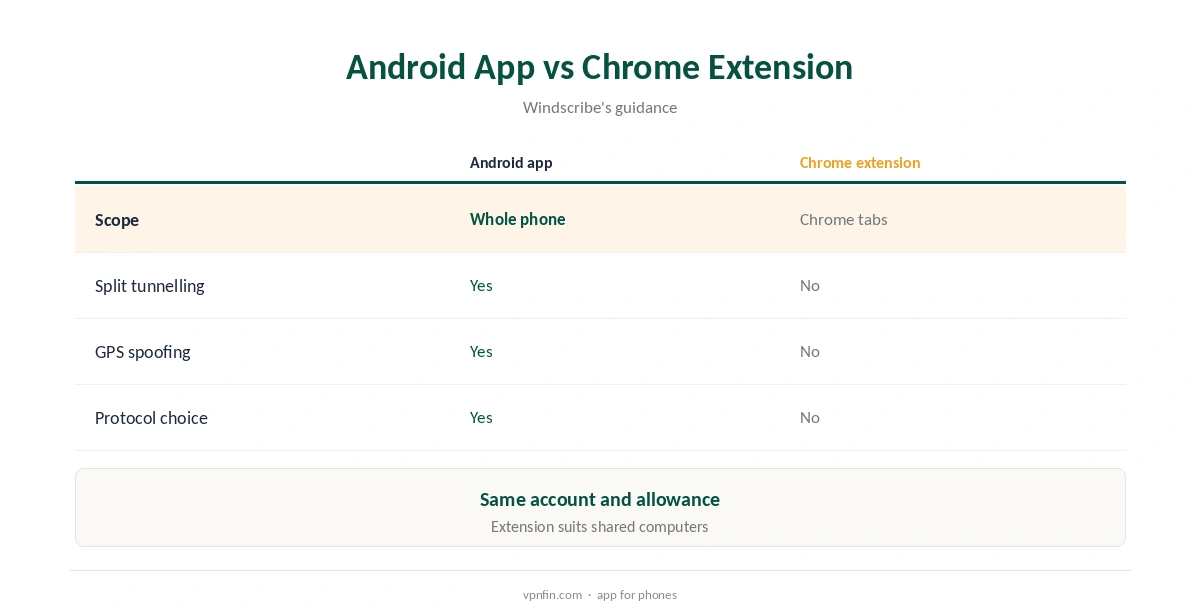
Some Android battery savers close VPN apps in the background, which looks like a disconnection. Set Windscribe’s battery use to unrestricted in Android’s app settings if the connection drops with the screen off. Our guide to Windscribe on Chromebook covers the Android app or the Chrome extension.
After setup, run our DNS leak guide on mobile data and Wi-Fi. Our guide to turning off a VPN on Android covers removing it cleanly later.
How We Research
This page draws on TechRadar’s 2026 Windscribe review, Windscribe’s Chromebook and Android guidance, Top10VPN’s 2026 Android TV list and our Windscribe price and free-plan tables. We cross-checked these sources against each other, and where they conflict or something can’t be verified, we say so in the text rather than guessing. We checked time-sensitive figures, including prices in US dollars, on 8 October 2026. The main source we relied on is TechRadar’s Windscribe review. Our full approach lives on the About Us page.
Windscribe Android FAQ
It is, with 10 GB a month after confirming an email.
Use Android’s Always-on VPN and Block connections without VPN.
Chosen apps can bypass the VPN.
It aligns the phone’s reported location with the VPN server.
Windscribe is on Top10VPN’s list of free VPNs with one.
The Verdict
Windscribe Android is a capable free phone VPN with split tunnelling, GPS spoofing and Stealth. Turn on Android’s always-on settings and use split tunnelling to make 10 GB last.