
Disclosure: VPNFin is reader-supported. If you buy a VPN through links on this page, we may earn a commission at no extra cost to you. This never affects our ratings — here’s our full disclosure.
IPVanish Apple TV support is native: IPVanish has a tvOS app, TheBestVPN’s 2026 guide confirms, among the few providers that do. Since an update TechRadar reported in August 2026, it offers WireGuard and OpenVPN with Scramble alongside IKEv2. tvOS 17 opened the Apple TV to VPN apps, so older models and versions need a router instead.
This guide covers installation, protocols, streaming, what the app lacks and when a router makes more sense.
IPVanish Apple TV Requirements
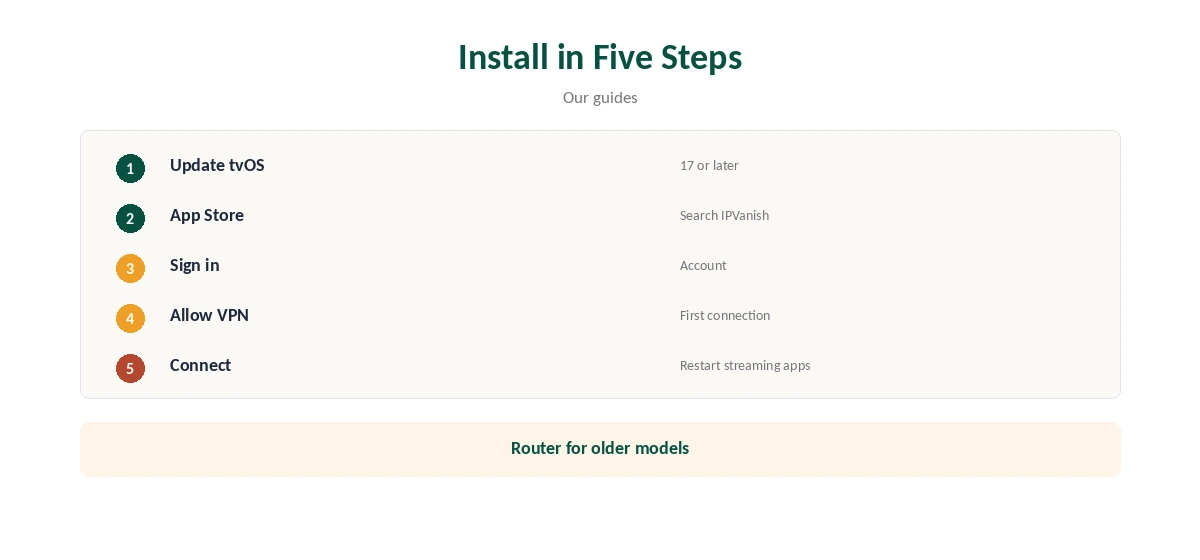
VPN apps run on Apple TV only from tvOS 17, Top10VPN notes, so update the box first in Settings, System, Software Updates. Older models that cannot reach tvOS 17 need the router route instead. Apple TV HD and 4K models that run tvOS 17 or later can install the app.
Our Apple TV VPN guide lists which providers offer tvOS apps.
Installing the App
Open the App Store on the Apple TV, search for IPVanish, install it and sign in with the remote or on-screen keyboard. Allow the VPN configuration when tvOS asks on first connection, then choose a location and connect.
IPVanish sets no device limit, so the Apple TV joins your other devices on one plan. Sign-in uses your normal IPVanish account email and password.
Protocols on Apple TV
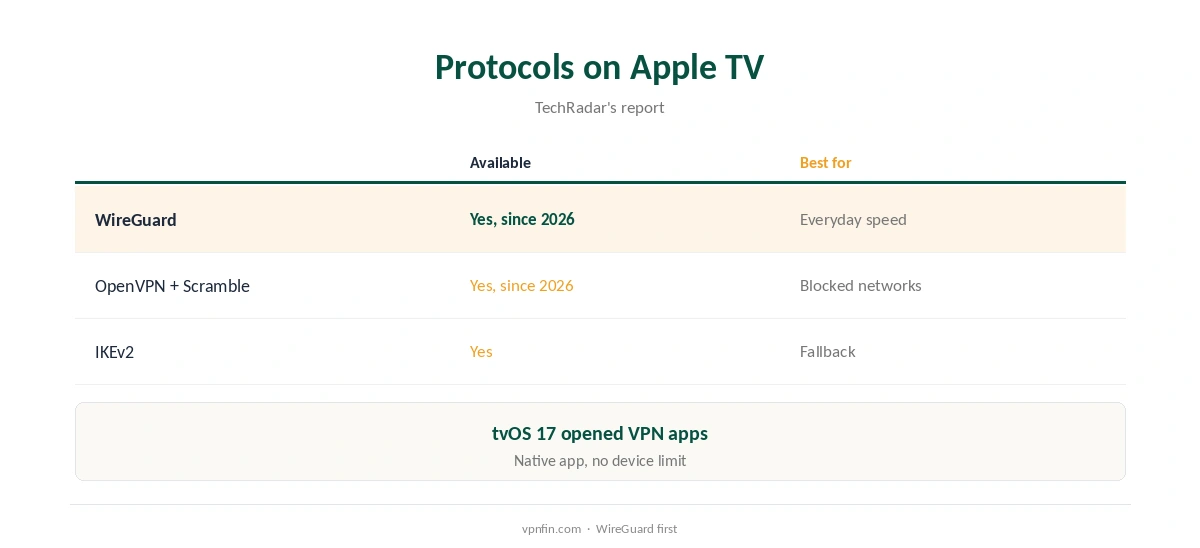
The app gained WireGuard and OpenVPN with Scramble in its summer 2026 update, TechRadar reported, joining IKEv2. WireGuard is the fast everyday choice for streaming, and Scramble helps on networks that block VPN traffic, such as some hotel or dorm Wi-Fi. IKEv2 remains as a fallback.
Our IPVanish WireGuard guide explains the protocols.
Streaming
VPNOverview reached Netflix, Hulu, Prime Video, Max, Disney+ and BBC iPlayer with IPVanish in 2026, while VPNpro found its streaming inconsistent. Test the apps you use within the refund window, on the Apple TV itself rather than a phone.
Restart a streaming app after connecting so it checks your region again, and switch servers in the same country if one fails.
Location and Privacy
Pick the nearest IPVanish location for everyday privacy and smooth playback, or a location in the country whose streaming catalogue you pay for when travelling. IPVanish owns its servers rather than renting them, Top10VPN notes.
Nearby servers barely slowed IPVanish in Cloudwards’ tests, which matters for 4K video and live sport.
A VPN on the Apple TV hides its traffic from your internet provider and from others on shared networks, such as a hotel. IPVanish’s no-logs policy has two audits in our table, by Leviathan and Schellman.
Our ExpressVPN Apple TV guide compares another provider’s tvOS app.
What the tvOS App Lacks
Our tables do not record split tunnelling for the Apple TV app; on Fire TV, IPVanish offers it only on Fire OS. Check the app’s settings after updates, since new features arrive over time. Expect a simpler app than on desktop, where IPVanish keeps extras such as Double Hop.
If you need features the tvOS app lacks, a router covers the Apple TV with whatever the router supports. For most viewers, the app’s protocols and locations are enough.
Router or App, and Price
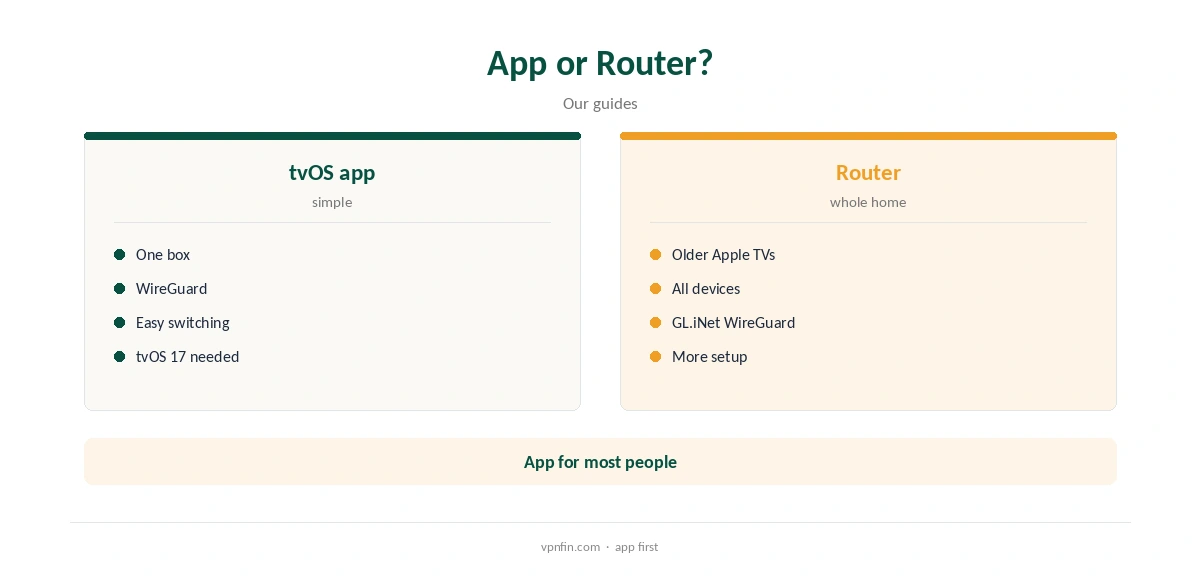
The app is the simpler choice for one Apple TV on tvOS 17 or later. A router running IPVanish, such as a GL.iNet model with built-in WireGuard, covers older Apple TVs and every other device on the network, at the cost of a more involved setup.
Our IPVanish router guide covers that route.
IPVanish costs $57.22 for the first 24 months and renews at $89.99 a year, VPNOverview lists. Yearly website plans carry a 30-day refund; purchases through Apple follow Apple’s refund rules instead.
Our IPVanish price guide compares the plans.
Troubleshooting and Travel
If the app will not connect, update tvOS and the IPVanish app, then try another protocol: WireGuard first, OpenVPN with Scramble on restrictive networks, IKEv2 as a fallback. Reinstalling the app resets its VPN configuration, and tvOS will ask for permission again on the next connection.
Our IPVanish troubleshooting guide lists fixes in order.
On hotel Wi-Fi, sign in to the network’s login page before connecting the VPN, since the VPN cannot pass the portal. Then connect IPVanish and, if the hotel network blocks VPNs, switch to OpenVPN with Scramble in the app’s settings.
A small travel router running IPVanish can cover the Apple TV and your other devices together, and it handles the hotel login once.
Apple TV Compared With Other Boxes
IPVanish also has apps for Fire TV and Android TV boxes. On Fire OS sticks, its app adds split tunnelling, which our tables do not record for the Apple TV app.
If you already own an Apple TV on tvOS 17 or later, its app covers the essentials. Our IPVanish Firestick guide covers the Fire TV version.
How We Research
This page draws on TheBestVPN’s and Top10VPN’s Apple TV VPN guides, TechRadar on IPVanish’s tvOS update, VPNOverview’s and VPNpro’s IPVanish reviews and our IPVanish tables. We cross-checked these sources against each other, and where they conflict or something can’t be verified, we say so in the text rather than guessing. We checked time-sensitive figures, including prices in US dollars, on 8 October 2026. The main source we relied on is Top10VPN’s Apple TV VPN guide. Our full approach lives on the About Us page.
IPVanish Apple TV FAQ
Yes, a native tvOS app.
tvOS 17 or later, when Apple TV opened to VPN apps.
Yes, since a 2026 update, alongside OpenVPN and IKEv2.
Results vary by reviewer; test your services.
Use a router running IPVanish.
The Verdict
IPVanish Apple TV use is simple with the native app on tvOS 17 or later, now with WireGuard. Older boxes need a router.