
Disclosure: VPNFin is reader-supported. If you buy a VPN through links on this page, we may earn a commission at no extra cost to you. This never affects our ratings — here’s our full disclosure.
Windows is unusually generous when a VPN fails. It gives you a number.
Then almost every guide ignores it and offers the same twelve steps: restart, reinstall, disable the firewall, flush DNS, update the driver, try another server. Work through all of them and something eventually helps, though you never learn which.
The number narrows it to one thing. And its presence tells you something else useful before you read it at all: which piece of software is actually failing.
Why Is My VPN Not Connecting on Windows?
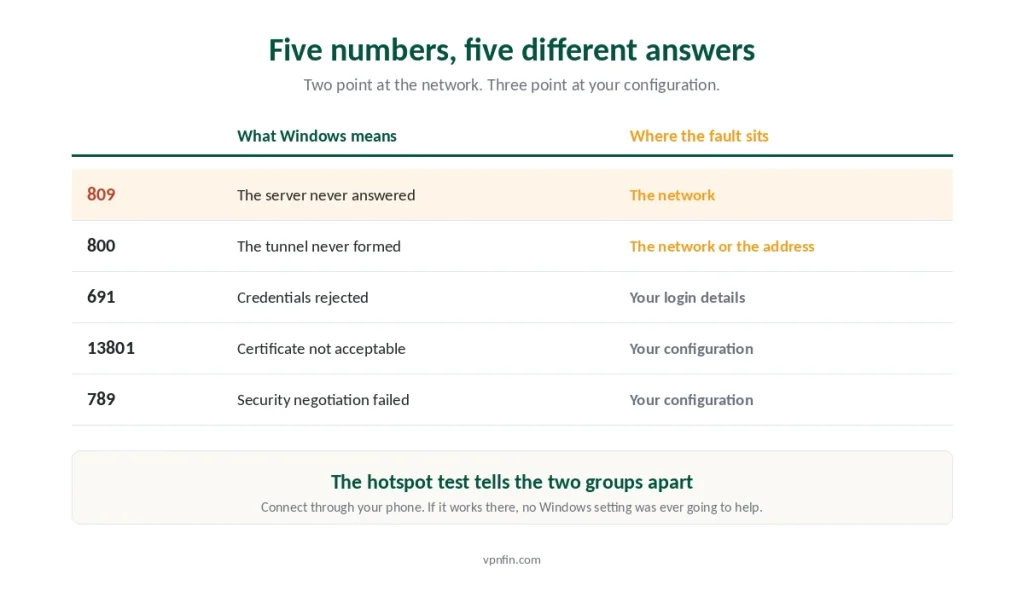
Read the error code first. 809 means something is blocking the ports the tunnel needs. 691 means credentials were rejected. 13801 means a certificate problem. 789 means IPsec negotiation failed. Each points at one cause. If no number appears, you are using a provider’s app rather than Windows’ own client, and the causes are different.
A Numbered Error Means You Are Not Using the App
Establish this before anything else, because it decides which half of this page applies to you.
These codes come from Windows’ built-in VPN client. It lives under Settings, then Network & Internet, then VPN, and you configure it by hand with a server address and credentials.
Provider apps do not use it. NordVPN, Surfshark, Proton VPN and the rest ship their own client with their own protocol implementation. When they fail, they say so in plain language rather than in numbers.
So a numbered error means you built the connection manually. That is a perfectly reasonable thing to have done, and for most people it is also the harder path.
⚠️ The two-minute answer is often to stop fixing it. Install the provider’s app, sign in, connect. The app handles NAT traversal, protocol selection and port fallback on its own — the three things these codes are usually complaining about. Manual setup earns its keep on routers and on Linux, not on a laptop where an app exists. Our setup guide covers both routes.
What Each Number Is Telling You
The common ones, and what they actually mean.
809 — the server did not answer. IKEv2 and L2TP need UDP ports 500 and 4500; older PPTP needs TCP 1723. Something between you and the server is discarding them. Microsoft’s own guidance for this failure is to check that client firewalls, server firewalls and any hardware firewall allow UDP 500 and 4500.
800 — the tunnel could not be established at all. Close cousin of 809, usually the server address, the protocol, or a network refusing that protocol outright.
691 — your credentials were rejected. VPN credentials are frequently different from the ones you use on the provider’s website, which catches people constantly.
13801 — the certificate was not acceptable. Either it is missing, expired, or the wrong type for the authentication method configured.
789 — the security layer failed during negotiation. An L2TP or IPsec mismatch between what your machine offers and what the server expects.
⚠️ Two of these are network problems and three are configuration problems, which is why the next test matters more than any single fix.
The Thirty-Second Test That Splits It in Two
Before changing a single setting, find out whether the fault is on your machine or on the network you are sitting on.
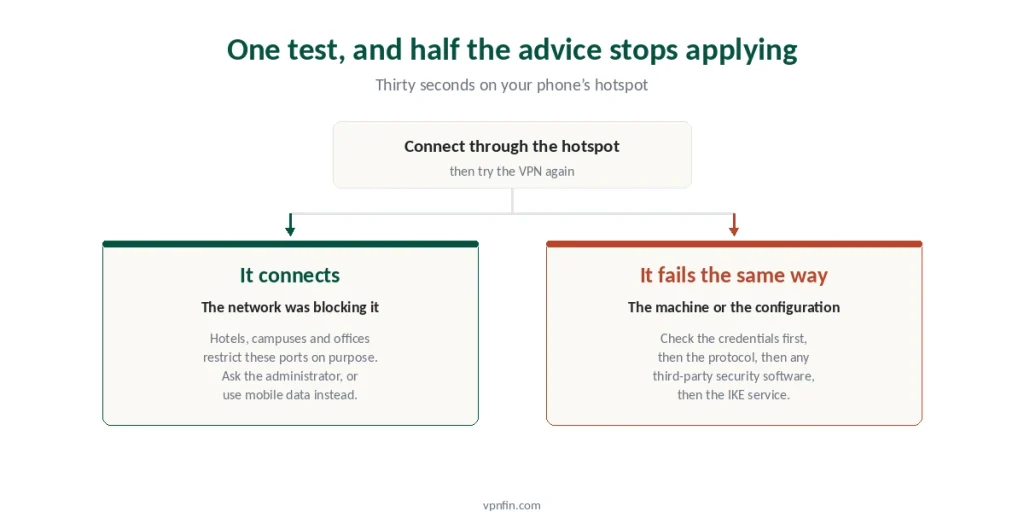
Turn on your phone’s hotspot. Connect the laptop to it, then try the VPN again.
If it connects, the network was blocking it. Nothing in Windows will change that, and no amount of reinstalling will either.
If it fails identically, the machine or the configuration is at fault, and everything in the second half of this page applies.
⚠️ This test is worth thirty seconds because it eliminates half the internet’s advice. Most guides describe machine-side fixes for a network-side problem, which is why people follow ten steps and end up where they started.
If the Network Is Blocking It
Hotels, campuses, offices and some carriers restrict the ports VPN protocols use. This is common and usually deliberate.
On a network you control, open UDP 500 and 4500 in the router’s firewall, and enable IPsec passthrough if the setting exists. That is the documented remedy.
On a network you do not control, ask rather than work around it. A workplace or a school blocking VPN traffic is enforcing a policy, and defeating it can breach an acceptable-use agreement you signed. Your IT team can either permit it or explain why not.
Mobile data is the honest alternative when you simply need a tunnel for an hour. It costs a little bandwidth and creates no policy problem.
⚠️ Public networks are the usual home of this failure, which is worth remembering before blaming your provider — what these networks can actually see, and what they can interfere with is a separate question from whether they let you connect.
If the Machine Is the Problem
The hotspot test failed too, so the fault travelled with the laptop. Work through these in order.
Check the credentials. For 691, confirm you are using the VPN username and password rather than your account login. Providers usually show them separately in the dashboard.
Check the protocol. IKEv2 fails on networks that block UDP. Protocols that run over TCP port 443 look like ordinary web traffic and get through far more often, which is the practical difference between the protocol families.
Disable third-party security software temporarily. Antivirus suites with their own firewall intercept IPsec in ways Windows Defender does not. Turn it off, test, turn it back on immediately.
Check the IKE service is running. Open Services, find IKE and AuthIP IPsec Keying Modules, and confirm it is started. When it is stopped, IKEv2 fails with no useful explanation.
Then try a different server. One misconfigured endpoint produces convincing symptoms, and switching costs nothing.
⚠️ A documented registry change exists for NAT traversal, and it is genuinely the right fix for some manual IKEv2 setups behind a router. It is also a registry edit, and the same result comes from installing the provider’s app, which handles NAT traversal without asking you to touch anything. Choose accordingly.
Why Reinstalling Rarely Helps
Worth explaining, because it is the most common advice and the least effective.
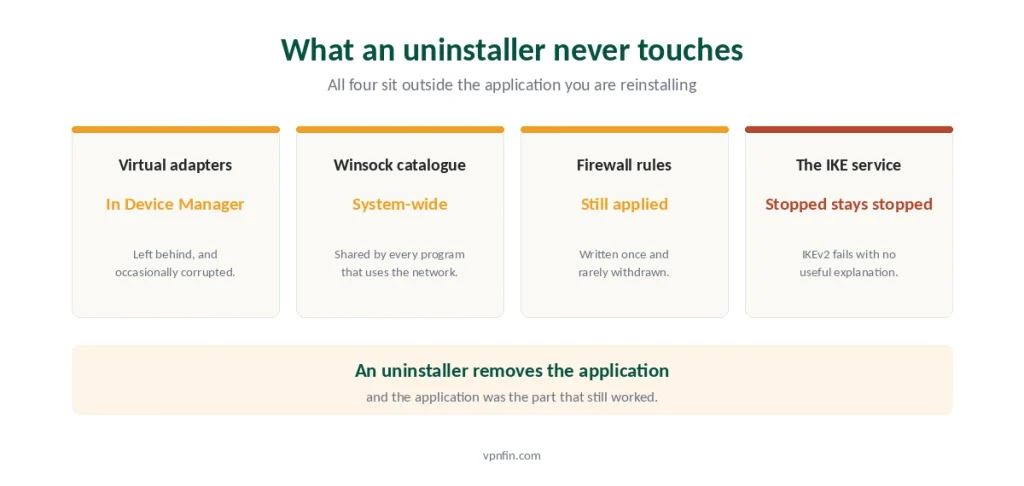
Windows keeps its networking pieces separately from your VPN. Virtual adapters, the Winsock catalogue, firewall rules and the IKE service all sit outside the application.
An uninstaller does not touch most of them. So the thing that broke survives the reinstall, and the reinstall restores the one part that was working. Our page on TorGuard troubleshooting covers protocol, port and Stealth fixes in order.
The exception is a corrupted adapter, and that lives in Device Manager rather than in the app. Our guide to removing a VPN properly on Windows covers what actually gets left behind.
⚠️ If nothing has ever connected on this machine, treat it as a fresh setup rather than a repair. The Windows guide covers what the operating system does differently, including the DNS behaviour that surprises people later.
When It Connects and Then Fails
Different symptom, different page, and worth naming so you do not troubleshoot the wrong thing.
Connects but nothing loads. The handshake succeeded and something after it failed — three pings identify which.
Connects and then drops repeatedly. Sleep, wake and security software are the usual causes on a laptop, and the timing of the drops names the cause.
Connects and everything crawls. That is a speed question rather than a fault, and the honest numbers are smaller than the complaints suggest.
⚠️ Free services fail at connection time more often than paid ones, because capacity and server maintenance both cost money. Only three free tiers are worth trusting at all.
How We Research
This guide follows Microsoft’s published troubleshooting guidance for VPN connection failures, including its instruction to verify that UDP ports 500 and 4500 are open across client, server and hardware firewalls, alongside provider documentation decoding the error codes raised by Windows’ built-in client. Where a documented remedy involves editing the registry, we describe that it exists rather than walking you through it, because the same outcome comes from software that does it for you. We don’t run our own speed tests, and we do not publish methods for defeating network policies on equipment you do not own. Our broader troubleshooting guide covers the other symptoms, and confirming a working tunnel takes about ten minutes. Our full approach lives on the About Us page.
Windows VPN Connection FAQ
That the server never answered. IKEv2 and L2TP need UDP ports 500 and 4500 open, and something between you and the server is discarding them. Microsoft’s guidance is to check the client firewall, the server firewall and any hardware firewall in the path allow that traffic.
Because the Wi-Fi network is blocking the ports the tunnel needs. Hotels, campuses and offices commonly restrict VPN protocols on purpose. No Windows setting overrides a network you do not control, so ask whoever administers it or use mobile data instead.
Rarely. The components that break — virtual adapters, firewall rules, the IKE service, the Winsock catalogue — sit outside the application, and an uninstaller does not touch most of them. Reinstalling restores the one part that was already working.
Because you are using Windows’ built-in VPN client rather than your provider’s app. The built-in client is configured manually under Settings, Network and Internet, VPN. Provider apps use their own implementation and report failures in plain language.
Rejected credentials. The most common cause is using your provider account login rather than the separate VPN username and password, which most services list in the dashboard as distinct values. Check there before changing anything else.
The Short Version
Read the number before doing anything. 809 is blocked ports, 800 is a tunnel that never formed, 691 is credentials, 13801 is a certificate, 789 is an IPsec mismatch.
A number at all means you are using Windows’ own client, not your provider’s app. Installing the app resolves most of these by handling ports and NAT traversal itself.
Then run the hotspot test. Connects on mobile data means the network was blocking it, and no Windows setting will change that.
If it fails everywhere, check credentials, switch protocol to one that runs over port 443, pause third-party security software, and confirm the IKE service is running.
And skip the reinstall. The parts that break sit outside the application, which is why putting the application back rarely changes anything. Our page on CyberGhost on Windows covers the Windows app’s protocols, settings and repair steps.