
Disclosure: VPNFin is reader-supported. If you buy a VPN through links on this page, we may earn a commission at no extra cost to you. This never affects our ratings — here’s our full disclosure.
Most guides to this subject tell you to connect to an American server to reach the eShop. Nintendo’s own support pages say the store follows your account country, and a great many of those guides are published by VPN companies.
For the thing people actually want here, a VPN does nothing. The setting they are trying to defeat changes on a web page, for free, in about a minute.
The Short Answer
The Switch runs no VPN app, on either generation. Coverage comes from a router, a shared connection from a computer, a phone hotspot, or Smart DNS.
The eShop reads your Nintendo Account country, not your address. Changing servers changes nothing about which store you see.
And that country is officially changeable. No fake address, no workaround — a setting on the Nintendo Account website, with one condition attached.
⚠️ Which leaves a narrow list of reasons to run one at all, and we cover those at the end rather than pretending they are the whole page.
Three Consoles, Three Different Rules
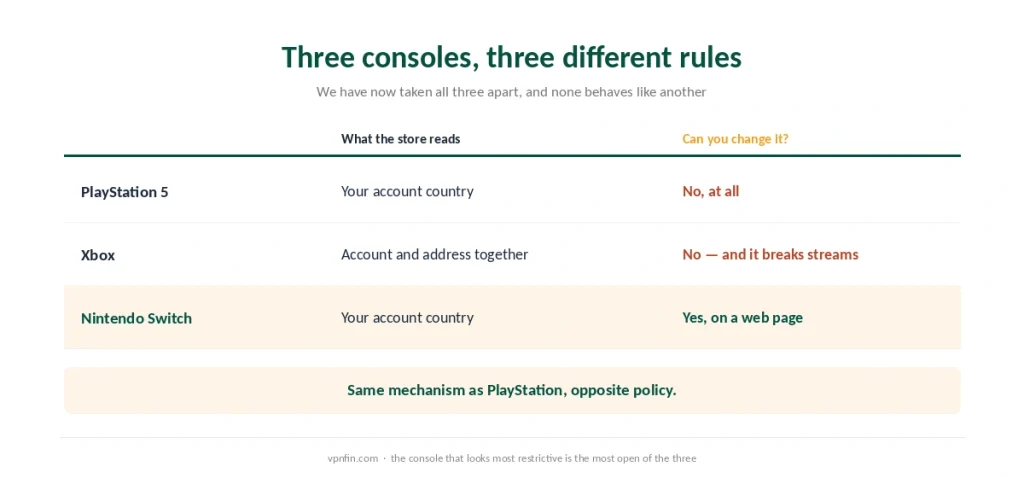
Worth setting side by side, because we have now examined all of them.
The PlayStation Store follows your account and will not move. Regional pricing and release timing stay where the account was registered, and no tunnel touches them.
Xbox checks the account and the address together. Cloud gaming refuses when the two disagree, which is why a VPN breaks it more often than it helps.
Nintendo follows the account and lets you change it. Same mechanism as PlayStation, opposite policy.
⚠️ So the console that looks most restrictive is the most open of the three. The Switch is also famously import-friendly for cartridges, which reinforces the point. A Steam Deck is more open still — it runs a VPN application natively — and yet sits behind the strictest store of the four.
Changing the Region Properly
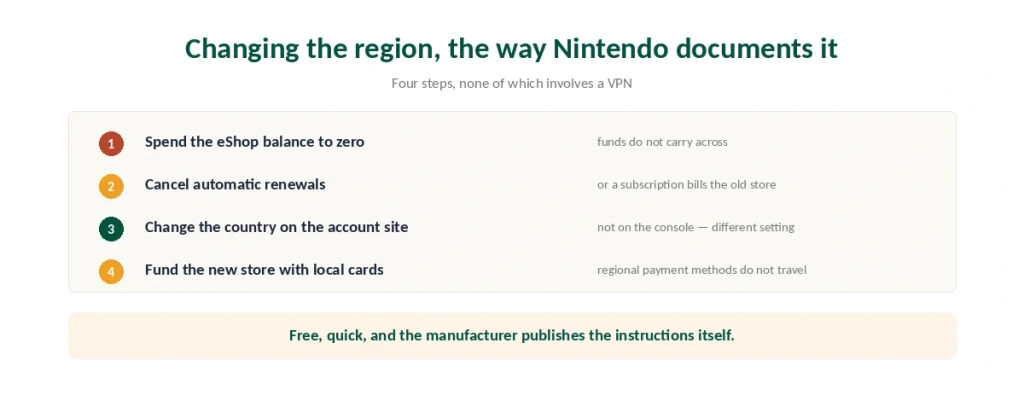
Nintendo documents this itself, which is the strongest source we could ask for.
The setting lives on the Nintendo Account website, not on the console. Console region and account country are separate settings and do different things.
Your eShop balance must be exactly zero. Nintendo will refuse the change while funds remain, and the balance does not carry across. Spend it on games, downloadable content or membership time first.
Cancel automatic renewals before switching, or a subscription can bill against a store you no longer belong to.
Payment methods are regional. A card issued in one country will not work in another region’s eShop, which is the practical limit on this whole exercise.
⚠️ That last point is the one that catches people. Changing the region is free and instant; funding the new one requires gift cards issued for that market.
Which Region to Pick
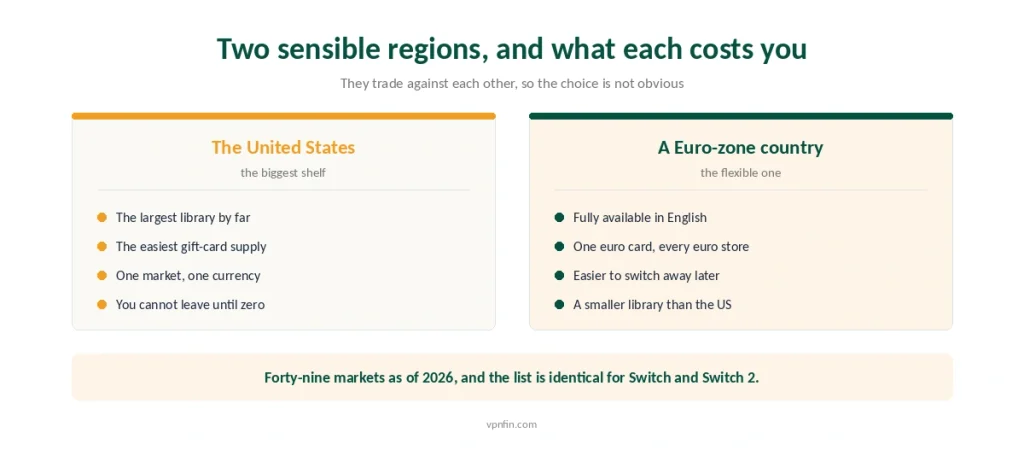
Two sensible defaults, and they trade against each other.
The United States has the largest library and the easiest supply of gift cards. The cost is that you cannot change region again until the balance reads exactly zero.
A Euro-zone country is the flexible option. Germany, Ireland and the Netherlands are fully available in English, one euro card works across every Euro-zone store, and moving away later is less painful.
The store exists in 49 markets as of 2026 — thirty-two across Europe, the Middle East and South Africa, eight in the Americas, nine across Asia and Oceania. The list is identical for Switch and Switch 2.
⚠️ Some markets still have no store at all. Singapore, Malaysia and Thailand joined in November 2025 and Taiwan in September 2025, while the United Arab Emirates and Saudi Arabia were announced and had not launched as of 2026.
What a VPN Is Actually For Here
Three cases, and none of them is the eShop.
Public and shared networks. Hotel wifi, a friend’s connection, a holiday rental — the situation where a VPN earns its cost on any device.
Streaming apps on the console, where the platform reads your address rather than your Nintendo account. That is the ordinary geo-restriction and our streaming guide covers which services notice.
Provider throttling during large downloads, which an encrypted tunnel makes harder to identify.
⚠️ It will not lower your ping. A VPN adds a routing step and usually costs ten to twenty milliseconds — our gaming guide has the measurements, and the honest answer is the same on every console.
How to Cover the Console
Since there is no app, all four methods are indirect.
A router covers the Switch and everything else, and it is the only method that keeps working when the computer is off — our router guide walks through the three paths.
A shared connection from a computer works over Ethernet or as a virtual hotspot, and stops when the computer does.
A phone hotspot is the quickest for a trip and the most expensive in mobile data.
Smart DNS changes what streaming apps show you and encrypts nothing — the same setting that later looks like a broken connection when a provider retires it.
⚠️ Every method adds latency, and the router version adds the least. Encryption costs throughput whichever route you take.
What We Will Not Tell You to Do
We are not going to recommend a VPN for the eShop, because Nintendo publishes the correct method and it costs nothing.
Guides that do are mostly published by VPN companies. That is not an accusation of dishonesty — it is a description of who benefits from the advice.
⚠️ Creating a second account for another region is legitimate, and Nintendo’s design allows it. Funding it still requires gift cards for that market, so the VPN adds nothing there either.
If You Do Want One
NordVPN has the strongest router documentation and the lowest measured speed loss of the providers we cover, which is what matters when the connection is shared.
Surfshark covers unlimited devices, so the console and everything else in the house count once.
⚠️ Buy it for the public-network case, not for the store. A VPN moves who can see your traffic — it does not move an account setting.
Playing Fortnite? Our Fortnite guide explains why you pick servers in the game rather than with a VPN.
How We Research
This guide draws on Nintendo’s own support documentation for the account country rules, the zero-balance requirement and the regional payment restriction, on DevRunners for the count of 49 eShop markets, the 2025 additions and the observation that Nintendo checks the account rather than the IP address, on published setup guides for the four indirect connection methods, and on our own PlayStation and Xbox pages for the comparison. Several sources recommending a VPN for eShop access are published by VPN providers, and Nintendo’s documentation contradicts them — where that conflict exists we have followed the manufacturer. We do not run our own tests. Our method lives on the About Us page.
Nintendo Switch VPN FAQ
No. Neither the Switch nor the Switch 2 supports VPN applications. The console can only be covered indirectly, through a router, a shared connection from a computer, a phone hotspot, or Smart DNS, which changes what streaming apps show without encrypting anything.
No. Nintendo reads the country set on your Nintendo Account rather than your IP address, so connecting to a server elsewhere changes nothing about which store you see. Guides recommending it are solving a problem the platform does not have.
On the Nintendo Account website, not on the console. Your eShop balance must be exactly zero first, because funds do not carry across, and you should cancel automatic renewals before switching. Payment methods are regional, so you will need gift cards issued for the new market.
The United States has the largest library and the easiest gift-card supply, but you cannot change away again until the balance reads zero. A Euro-zone country such as Germany, Ireland or the Netherlands is fully available in English, and one euro card works across every Euro-zone store.
Usually the opposite. A VPN adds a routing step worth roughly ten to twenty milliseconds and can cause NAT problems on a poorly configured setup. It genuinely helps with public networks and with provider throttling during large downloads.
The Verdict
The Switch runs no VPN app, and for the most common reason people want one it needs no VPN at all. The eShop follows your Nintendo Account country, which you can change yourself on a web page.
The condition is a zero balance and a regional payment method. Spend the wallet, cancel renewals, then switch — and fund the new store with cards issued for it.
Buy a VPN for the console if you use public networks or want streaming apps to show a different library. For the store, the manufacturer already gave you the answer for free. Our page on NordVPN on Nintendo Switch covers router, shared PC and Smart DNS routes, plus travel.