
Disclosure: VPNFin is reader-supported. If you buy a VPN through links on this page, we may earn a commission at no extra cost to you. This never affects our ratings — here’s our full disclosure.
Building a VPN server on a Raspberry Pi is genuinely straightforward. WireGuard ships in the standard Raspberry Pi OS repositories, and PiVPN reduces the whole thing to a single installer. our Raspberry Pi VPN guide covers the current tools, including PiVPN’s status.
What almost no tutorial says is what you end up with. Your traffic leaves the internet through your own home connection, from your own address, past your own provider — so the thing most people buy a VPN for is exactly the thing this does not do.
What You Actually Get
Your home network, from anywhere. Files, printers, cameras, a media server — reachable from a hotel as though you were sitting in the living room. For a NAS, see our Synology NAS guide.
Encryption on hostile networks. Café and airport wifi cannot read your traffic, because it is tunnelled home before it goes anywhere.
Control over DNS. PiVPN detects Pi-hole if you run it and offers it as the resolver for connected devices, so ad-blocking follows you off the network.
⚠️ What you do not get is privacy from your provider, or a different country, or an address that is not obviously yours. A commercial VPN moves who can see your traffic; this moves where your traffic enters the internet, and the answer is still your house.
The Thing to Check Before You Buy Anything
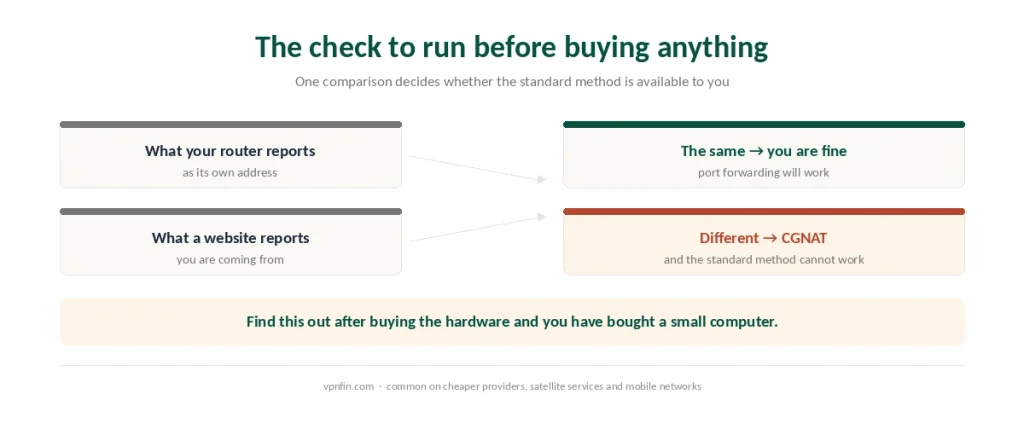
Carrier-Grade NAT will stop the standard method dead. If your provider puts you behind it, you have no directly routable public address, your router cannot expose a port that is not routable, and port forwarding simply cannot work.
It is common. Cheaper providers use it, satellite services use it, and mobile networks use it almost universally.
How to check: compare the address your router reports as its own with the address a website says you are coming from. If they differ, you are behind CGNAT.
⚠️ Discover this after buying the hardware and you have bought a small computer, not a VPN. Three routes remain — a genuine IPv6 address if your provider issues one, a mesh service like Tailscale, or a rented server acting as a middle hop — and each changes the project.
The Two Ways to Build It
WireGuard directly, or through PiVPN. The protocol is in the standard repositories, so installation is an ordinary package install. PiVPN wraps the same thing in an installer that asks questions instead of expecting configuration files.
Both need the same two supporting pieces. UDP port 51820 forwarded from the router to the Pi, and a dynamic DNS service so the address your phone dials still points at your house tomorrow.
A Pi 5 handles dozens of simultaneous connections without strain, so hardware is not the limit.
⚠️ Skip dynamic DNS only if your provider gives you a static address, which most do not.
Tailscale, and What It Costs You
The alternative when the standard method is blocked, and it deserves its own section because the trade is real.
It removes both requirements. No port forwarding, no dynamic DNS — it handles the traversal itself, using WireGuard underneath.
It works behind CGNAT, which is the reason most people end up there.
The cost is throughput when it cannot connect directly. In that case traffic goes through public relay servers, and speed drops accordingly.
And it introduces a third party. A commercial service now coordinates your private network, which is a different trust arrangement from a Pi you own outright.
The Speed Ceiling Nobody Mentions
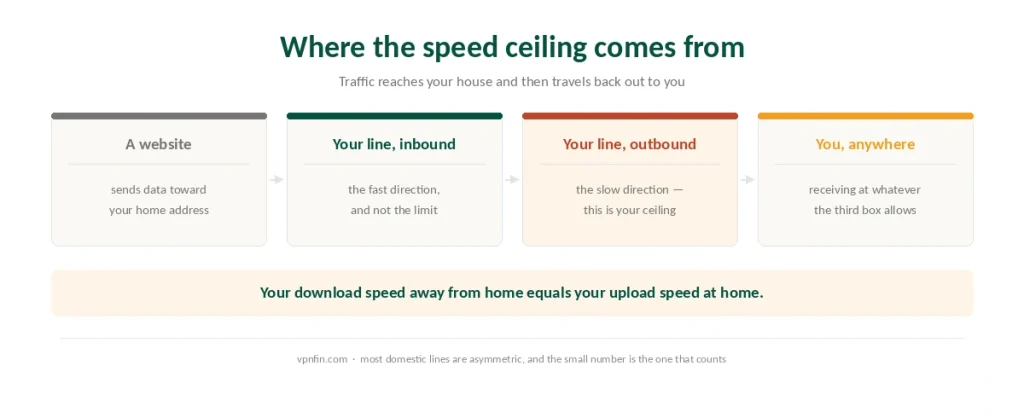
Your VPN’s download speed is your home connection’s upload speed. Traffic comes into your house and then back out to you, so the outbound leg is what limits everything.
Most domestic connections are asymmetric. A line advertised at several hundred megabits down may offer a tenth of that up, and that tenth is your ceiling wherever you are in the world.
⚠️ This is the point at which many people stop. A commercial provider’s speed loss is measured in single-digit percentages; a self-hosted tunnel is capped by whatever your provider gave you upstream.
Which Problem Are You Solving
The honest way to choose, and it is not a close call in either direction.
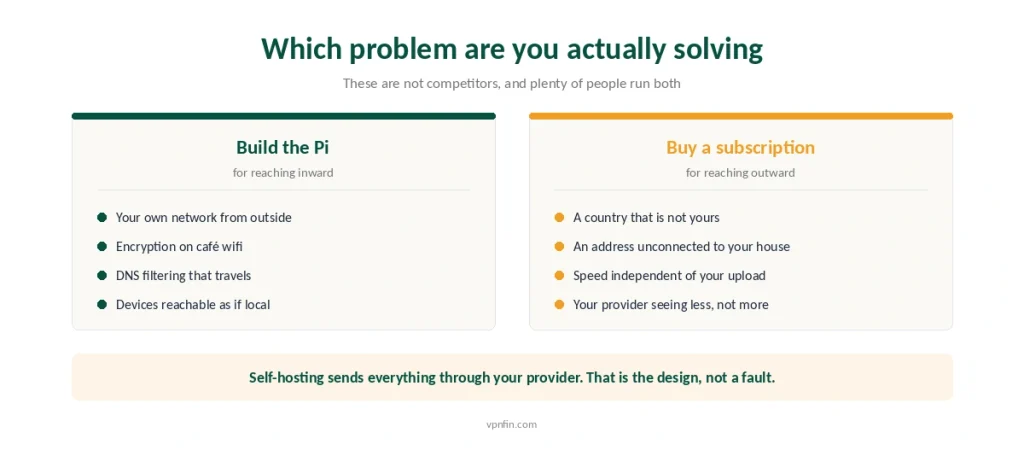
Build the Pi if you want your own network from outside it. Remote access to files and devices at home is what this technology is for, and no subscription replicates it.
Build the Pi if you want DNS filtering that travels, with Pi-hole answering for every connected device.
Buy a subscription if you want a different country, or an address that is not traceable to your house, or speed that does not depend on your upload. Our guide to Surfshark on Raspberry Pi covers WireGuard from the terminal, OpenVPN as fallback.
Buy a subscription if the point is your provider seeing less. Self-hosting sends everything through them by design.
⚠️ The two are not competitors. Plenty of people run both, for the two different jobs — and there are free measures that cover some of this ground without either.
What It Costs
A Pi 4 or 5, a card, a power supply, a case. Call it the price of a year of most subscriptions, once.
Electricity, continuously. Small, and not nothing over years.
Your time when it breaks. Updates, expiring certificates, a provider changing your address at three in the morning. A subscription has support; a Pi has you. For WireGuard from the command line, see our page on PureVPN on Raspberry Pi.
⚠️ And a router you control. Port forwarding needs administrative access to the router, which rules out shared accommodation and most rented equipment — the same constraint our router guide describes.
Verifying It Works
Check the address it hands you. Connect from mobile data and look up your apparent address: it should be your home one. If it is not, traffic is not going where you think. Our guide to ExpressVPN on Raspberry Pi covers 64-bit only, setup and Network Lock.
Check DNS separately. A tunnel that carries traffic while lookups escape to your provider is the most common failure and the least visible — a leak test settles it.
Test from outside, not from home. On your own network everything works whether or not the tunnel does.
If You Want Both
Proton VPN and Mullvad both publish WireGuard configurations you can import directly, which suits anyone already comfortable at a terminal — our Linux guide covers the client side. Our page on FastestVPN on Linux covers OpenVPN in the terminal and WireGuard setups.
NordVPN provides ARM builds that run on Raspberry Pi OS, if you want the Pi itself behind a commercial tunnel rather than acting as one.
⚠️ Running the Pi as a client and as a server are different projects. The first sends your home traffic out through somebody else; the second lets you in.
How We Research
This guide draws on Raspberry Pi community documentation and the raspberry.tips setup guide for the WireGuard installation path, the port and dynamic DNS requirements and the peer capacity of a Pi 5, on the PiVPN project documentation for the installer behaviour and the Pi-hole DNS integration, on Raspberry Pi forum discussions and published write-ups for the CGNAT problem and the IPv6 and relay workarounds, and on Tailscale user documentation for the throughput cost when direct connections are impossible. Several sources are enthusiast write-ups rather than vendor documentation, and we have used them for mechanics rather than for performance claims. We do not run our own tests. Our method lives on the About Us page.
Raspberry Pi VPN FAQ
No. Traffic tunnels to your home and then leaves through your own connection, so websites see your home address and your provider sees everything as before. It encrypts the network you are physically sitting on, which is a different benefit.
Carrier-Grade NAT means your provider shares one public address among many customers, so you have no directly routable address of your own. A router cannot forward a port on an address it does not hold, which makes the standard setup impossible. Compare your router’s reported address with what a website sees: if they differ, you are behind it.
It is easier and works behind CGNAT, because it handles traversal without port forwarding or dynamic DNS. The costs are reduced throughput when it cannot establish a direct connection and a commercial service coordinating your private network.
No faster than your home connection’s upload speed, because traffic reaches your house and then travels back out to you. Domestic lines are usually asymmetric, so a connection advertised at several hundred megabits down may cap your VPN at a fraction of that.
Build one for remote access to your own network and for DNS filtering that follows you. Buy a subscription for a different country, an address unconnected to your home, or speed independent of your upload. They solve different problems and many people run both.
The Verdict
A Raspberry Pi VPN server is a remote-access tool, not a privacy tool. It puts your home network in your pocket and encrypts the wifi you are sitting on. Our page on TorGuard on Raspberry Pi covers OpenVPN setup, auto-connect and gateway use.
It cannot hide you from your provider, because everything you do still enters the internet through their line, from your address. Our page on CyberGhost on Raspberry Pi covers manual OpenVPN, the credentials file and starting at boot.
And it may not work at all. Check for Carrier-Grade NAT before buying anything, because that single answer decides whether the standard method is available to you. Our page on NordVPN on Raspberry Pi covers installing the Linux app without losing SSH.