
Disclosure: VPNFin is reader-supported. If you buy a VPN through links on this page, we may earn a commission at no extra cost to you. This never affects our ratings — here’s our full disclosure.
An ExpressVPN uninstall is simple on every platform, with one Windows trap. If Network Lock was on, the internet can stay dead after the VPN goes away. ExpressVPN’s own support article covers the fix, and this guide includes it.
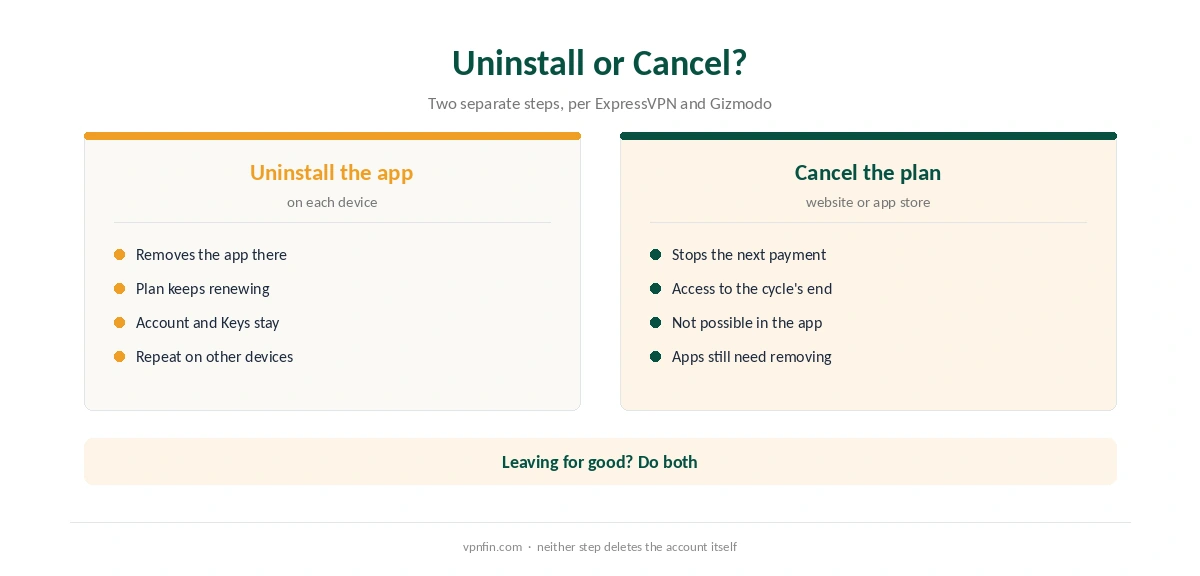
Removing the app also leaves your subscription untouched. Gizmodo notes there is no automatic uninstall when you cancel, and no automatic cancel when you uninstall. So decide first whether you are leaving or only switching the VPN off.
Turn Off, Uninstall or Cancel?
Turning ExpressVPN off means disconnecting on one device. Uninstalling removes the app from that device. Cancelling stops the next payment, and ExpressVPN says you cannot do that inside the app; you need its website or the app store you paid through. Our guide to cancelling ExpressVPN covers that step.
How to Turn ExpressVPN Off Without Removing It
Before any ExpressVPN uninstall, open the app and press the connect button again to disconnect. If the app reconnects at startup or on new networks, check its settings for auto-connect options and switch them off. Our guides for Windows and Mac show the system side.
Network Lock deserves a check before you go further. It cuts the internet whenever the VPN drops unexpectedly, which is useful while connected and confusing once you stop using the app. Our kill switch guide explains the behaviour.
ExpressVPN Uninstall Steps on Each Device
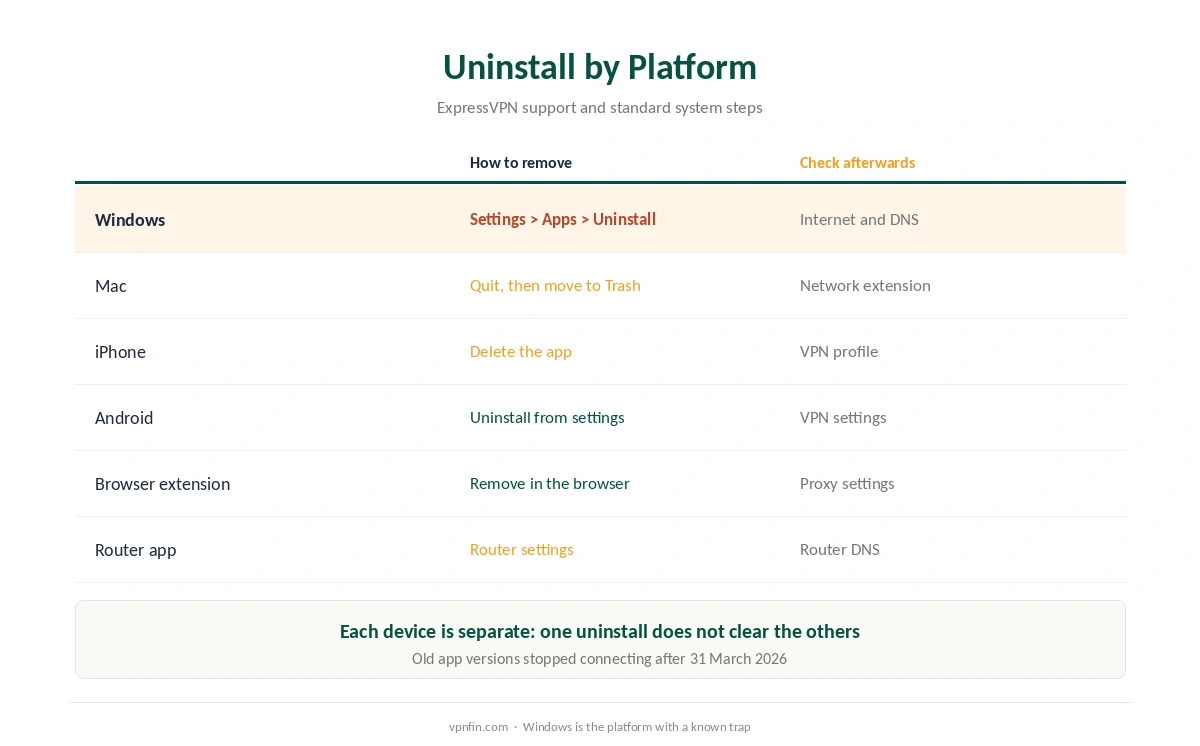
An ExpressVPN uninstall on Windows starts in Settings, Apps, Installed apps, where you choose ExpressVPN and Uninstall. On a Mac, quit the app from the menu bar, then move it from Applications to the Trash, and check System Settings for a leftover network extension or VPN entry. Our ExpressVPN Windows guide and ExpressVPN Mac guide show where those settings sit.
For an ExpressVPN uninstall on a phone, delete the app, then check that no VPN profile remains. On an iPhone, that list sits under General, VPN and Device Management. Browser extensions and router apps are separate, so remove them where they live. Our Chrome guide and router guide cover those.
No Internet After the ExpressVPN Uninstall on Windows
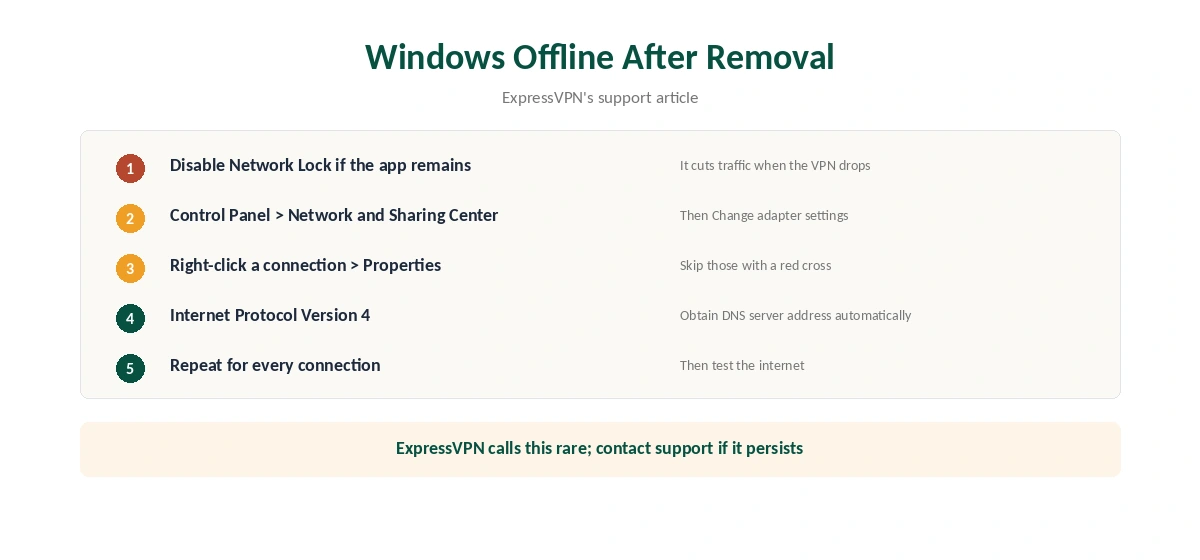
ExpressVPN’s support article on this problem starts with Network Lock: if it was on, it may still block traffic. If the app is still installed, disable Network Lock there. Otherwise, open Control Panel, Network and Internet, Network and Sharing Center, then Change adapter settings.
Right-click each connection, open Properties, then Internet Protocol Version 4. Tick Obtain DNS server address automatically and confirm. Repeat for every connection except those marked with a red cross. ExpressVPN notes that this problem is rare, so contact support if the steps do not help.
Reinstalling Instead of Leaving
A reinstall is part of ExpressVPN’s own troubleshooting, and 2026 adds a reason to do it. After the certificate change on 31 March, old app versions stopped connecting, according to Tom’s Guide. If your app suddenly fails, a fresh install of the current version may be all you need.
Before uninstalling for a fault, try the fixes in our ExpressVPN disconnection guide, speed guide or not connecting guide.
What Stays After Removal
Your ExpressVPN account stays, and so does any data in ExpressVPN Keys, its password manager. ExpressVPN’s cancellation article says you can still reach the logins stored in Keys after a subscription ends. Export them before you delete the account. ExpressVPN belongs to Kape Technologies, which also owns CyberGhost and Private Internet Access. Our ExpressVPN review covers its audits.
Removing ExpressVPN From Phones
On iPhone and Android, deleting the app removes ExpressVPN and its VPN profile. Check the VPN section of the phone’s settings afterwards. If a profile remains, delete it there.
Removing the app does not cancel the subscription. Cancelling happens only on ExpressVPN’s website or in the app store you bought from, as our ExpressVPN cancellation guide explains.
Routers
If ExpressVPN runs on a router, removing the computer app does not affect it. Turn the VPN off in the router’s settings, or restore the router’s normal firmware settings. Cybernews reports that ExpressVPN’s router app is no longer supported except on Aircove, so many routers use manual setups that you remove in the router’s VPN menu.
Checking Your Connection Afterwards
After removal, open a few websites. If nothing loads, Network Lock or a leftover DNS setting is the usual cause. ExpressVPN’s support gives the steps to set DNS back to automatic in Windows network settings.
How We Research
This page draws on ExpressVPN’s articles on restoring the Windows connection and cancelling a subscription, Gizmodo’s cancellation guide and Tom’s Guide’s report on the certificate change. We cross-checked these sources against each other, and where they conflict or something can’t be verified, we say so in the text rather than guessing. We read every source on 5 October 2026. The main source we relied on is ExpressVPN’s Windows connection article. Our full approach lives on the About Us page.
How to Turn Off ExpressVPN FAQ
No. Turn off automatic renewal on ExpressVPN’s website, or in the app store you paid through. ExpressVPN says you cannot cancel inside the app.
Network Lock may still be blocking traffic. ExpressVPN’s support suggests disabling it, or setting each network adapter to obtain DNS automatically.
Quit the app from the menu bar, move it from Applications to the Trash, then check System Settings for a leftover VPN entry or network extension.
Not when the subscription ends. ExpressVPN says stored logins stay accessible. Export them before deleting the account.
If the app stopped connecting in 2026, an old version may be the cause. Install the current version before giving up on it.
The Verdict
A clean ExpressVPN exit means cancelling on the website or in the store, uninstalling on each device and, on Windows, checking that Network Lock has not left the internet blocked. Export any Keys passwords before deleting the account.