
Disclosure: VPNFin is reader-supported. If you buy a VPN through links on this page, we may earn a commission at no extra cost to you. This never affects our ratings — here’s our full disclosure.
When ExpressVPN keeps disconnecting, its support pages point to three things before anything else: the protocol, the server location and your phone’s habit of jumping between networks. ExpressVPN publishes a separate VPN keeps disconnecting article for Android, iOS, Mac, Windows and Linux, and they share that core.
This guide puts those steps in order. If the app never connects at all, our ExpressVPN not connecting guide covers that separate fault.
Step 1: Update the App
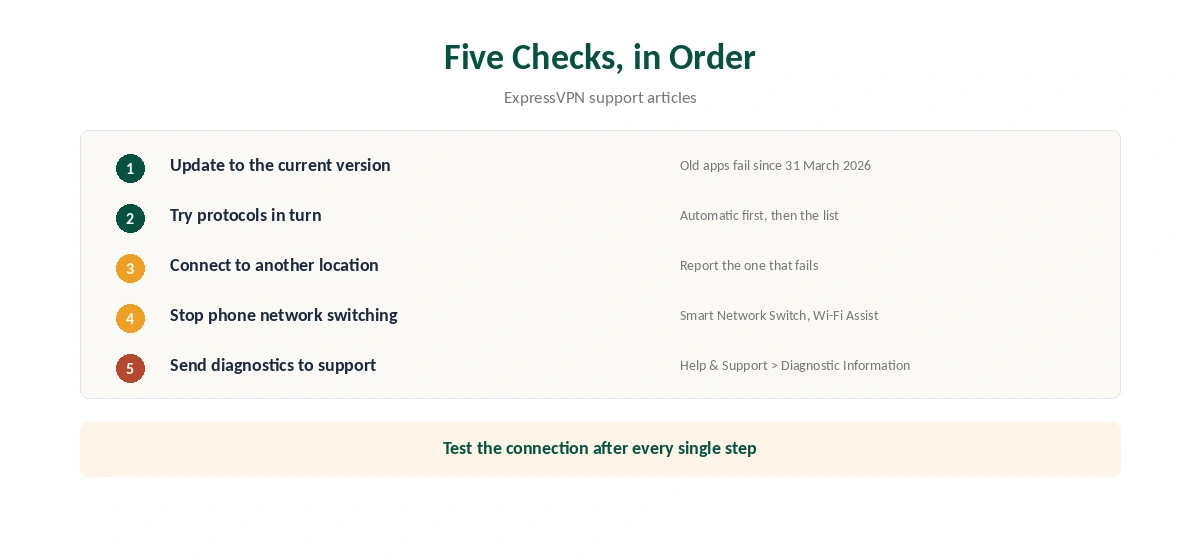
Start with the version. On 31 March 2026, ExpressVPN retired old security certificates, and Tom’s Guide reported that older apps stopped connecting. The minimums include Windows 12.103.0.22, Mac 11.70.90675, iOS 11.193.0 and Android 12.13.0. You can check yours under Help and Support, then About.
Step 2: Change the Protocol
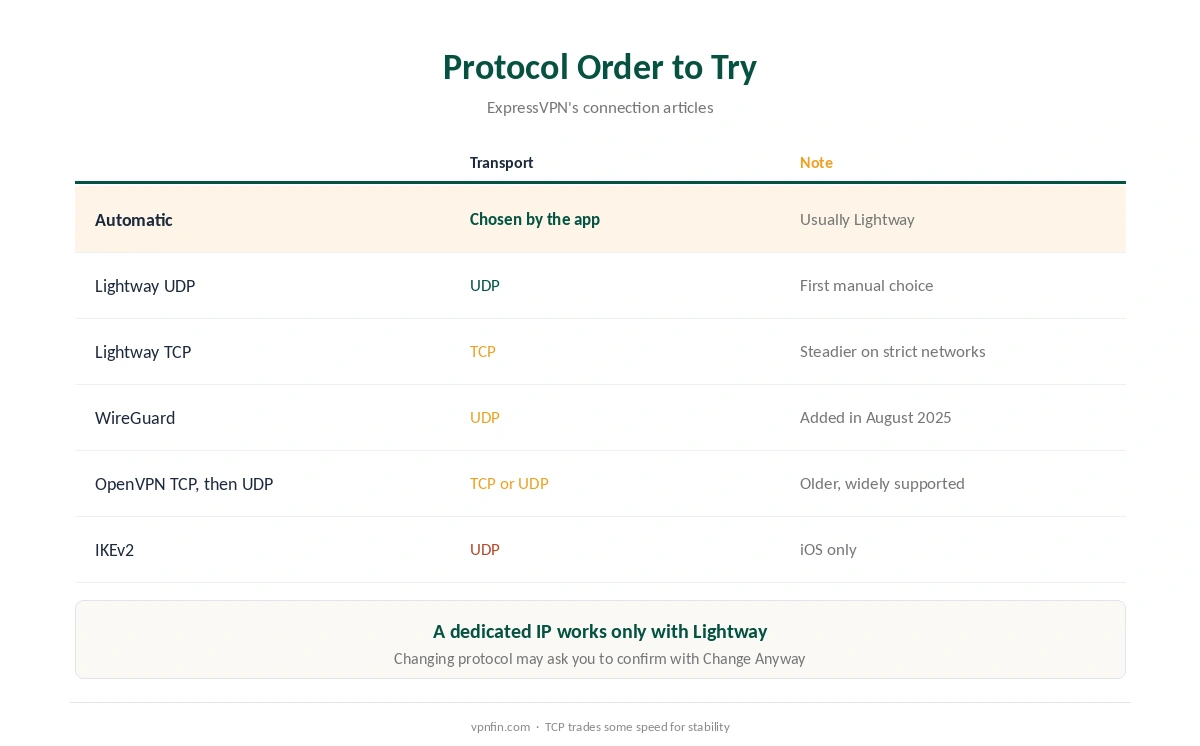
ExpressVPN recommends Automatic, which usually picks Lightway, its own protocol. If ExpressVPN keeps disconnecting on Automatic, its support pages suggest trying the others in turn: Lightway UDP, Lightway TCP, WireGuard, then OpenVPN TCP and UDP. IKEv2 remains on iOS only.
TCP versions tend to hold better on strict networks, at some cost in speed. Our WireGuard vs OpenVPN page explains the difference. One exception: a dedicated IP works only with Lightway, according to ExpressVPN.
Step 3: If ExpressVPN Keeps Disconnecting, Pick Another Location
ExpressVPN’s articles suggest connecting to a different location and telling support about the one that fails. A server can be under maintenance, which looks like a random drop from your side. Choose a nearby location from the Recommended list. If ExpressVPN keeps disconnecting on every location, the cause is probably on your side. Our ExpressVPN Android TV guide covers TV boxes, and our general VPN drop guide covers router causes.
Step 4: Why ExpressVPN Keeps Disconnecting on Phones
Phones switch between Wi-Fi and mobile data on their own, and each switch can break the tunnel. ExpressVPN’s Android article tells you to disable network switching settings, naming Samsung’s Smart Network Switch. On iPhone, Wi-Fi Assist does a similar job, so test with it off.
Battery saving can also pause the app in the background. Our Android VPN troubleshooting page and iPhone VPN troubleshooting page list the system settings. When ExpressVPN keeps disconnecting on an iPhone, ExpressVPN on iPhone covers that app’s options.
Network Lock: Useful During a Drop, Confusing After
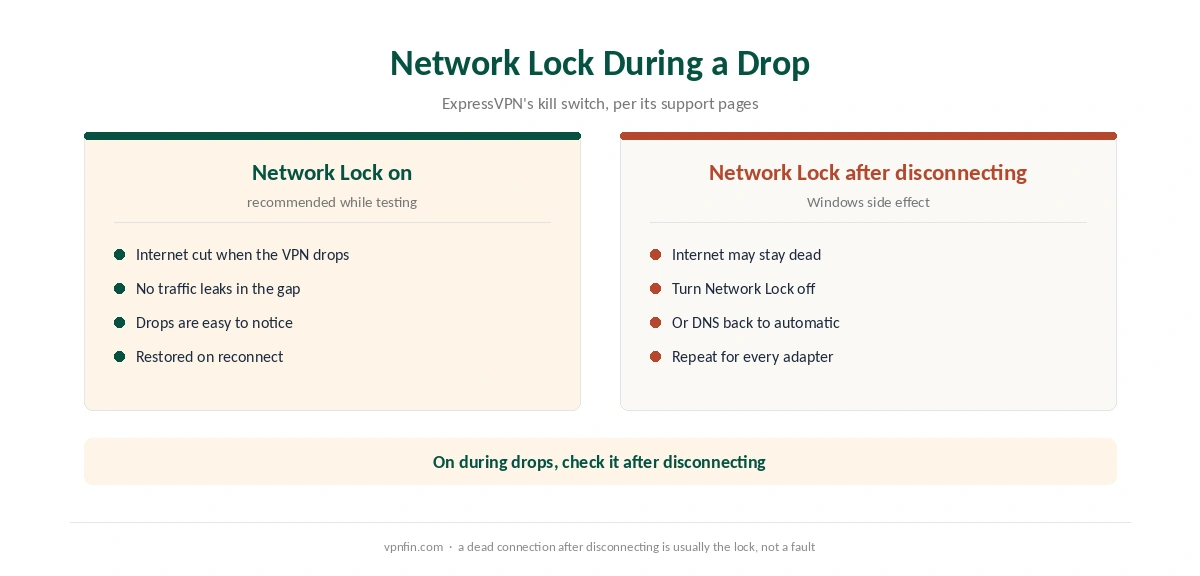
Network Lock is ExpressVPN’s kill switch. It cuts the internet if the VPN drops suddenly, so nothing leaks in the gap. That is exactly what you want while the connection is unstable. Our kill switch guide explains how it works.
It has a side effect on Windows. ExpressVPN’s support notes that if the internet stays dead after you disconnect, Network Lock may be the cause. Turn it off, or set each network adapter to obtain DNS automatically, as the support article describes. Our ExpressVPN Windows guide shows the app’s settings.
When to Send Diagnostics
If nothing helps, ExpressVPN asks for diagnostic information. In the app, open Help and Support, then Diagnostic Information, and send it to support. That data lets the team see which server and protocol failed. Hotel and campus networks are a common special case, covered in our hotel Wi-Fi guide.
If the drops make the service unusable within 30 days, the money-back guarantee applies to new users, as our ExpressVPN refund guide explains. For slow speeds rather than drops, see our ExpressVPN speed guide. ExpressVPN belongs to Kape Technologies, which also owns CyberGhost and Private Internet Access.
Sending Diagnostics to Support
ExpressVPN’s support asks for diagnostic information when disconnections continue. In the app, open Help and Support, then Diagnostic Information, and choose Contact Support. Sending it gives support the connection logs they need to see what failed.
Add a short note with the times of the drops, the protocol in use and the network type. That narrows the cause quickly.
Routers and ExpressVPN
Cybernews reports that ExpressVPN’s router app stopped being supported on 31 March 2026, except on Aircove routers. Aircove itself was discontinued on 16 September 2026, according to our device research. Manual router setups remain possible.
If your router connection keeps dropping, check whether it still runs the old router app. A manual configuration, or running ExpressVPN on each device, avoids an unsupported app. Our ExpressVPN router guide covers the options.
Mobile Networks
On Android, ExpressVPN’s support suggests turning off automatic network switching if drops happen as the phone moves between Wi-Fi and mobile data. Battery saving can also pause the app. Our Android VPN troubleshooting page shows where those settings sit.
How We Research
This page draws on ExpressVPN’s articles on disconnections, connection failures and lost internet after disconnecting, plus Tom’s Guide’s report on the certificate change. We cross-checked these sources against each other, and where they conflict or something can’t be verified, we say so in the text rather than guessing. We read every source on 5 October 2026. The main source we relied on is ExpressVPN’s connection troubleshooting index. Our full approach lives on the About Us page.
ExpressVPN Keeps Disconnecting FAQ
ExpressVPN’s support names the protocol, the server location and phone network switching. An outdated app can also fail after the March 2026 certificate change.
Start with Automatic, which usually picks Lightway. If drops continue, try Lightway TCP, then WireGuard and OpenVPN TCP.
ExpressVPN’s kill switch. It cuts the internet if the VPN drops, so nothing leaks. Keep it on while you troubleshoot.
Network Lock may still be active. Turn it off, or set your network adapters to obtain DNS automatically, as ExpressVPN’s support describes.
Smart Network Switch can move the phone between Wi-Fi and mobile data. ExpressVPN’s Android article suggests turning it off.
The Verdict
Most ExpressVPN drops come down to an old app, the protocol, the server or a phone switching networks. Update first, try the protocols in ExpressVPN’s order, and keep Network Lock on while you test.