
Disclosure: VPNFin is reader-supported. If you buy a VPN through links on this page, we may earn a commission at no extra cost to you. This never affects our ratings — here’s our full disclosure.
ExpressVPN not connecting? Check the app version first. On 31 March 2026 ExpressVPN retired older security certificates, and apps older than the versions it listed can no longer connect at all, Tom’s Guide reported. After that, ExpressVPN’s own troubleshooting page, updated on 23 September 2026, gives a fixed order: update the app, try another location, change the protocol in a set sequence, and add ExpressVPN as an antivirus exception.
This page follows that order, then covers each device and the cases the checklist doesn’t.
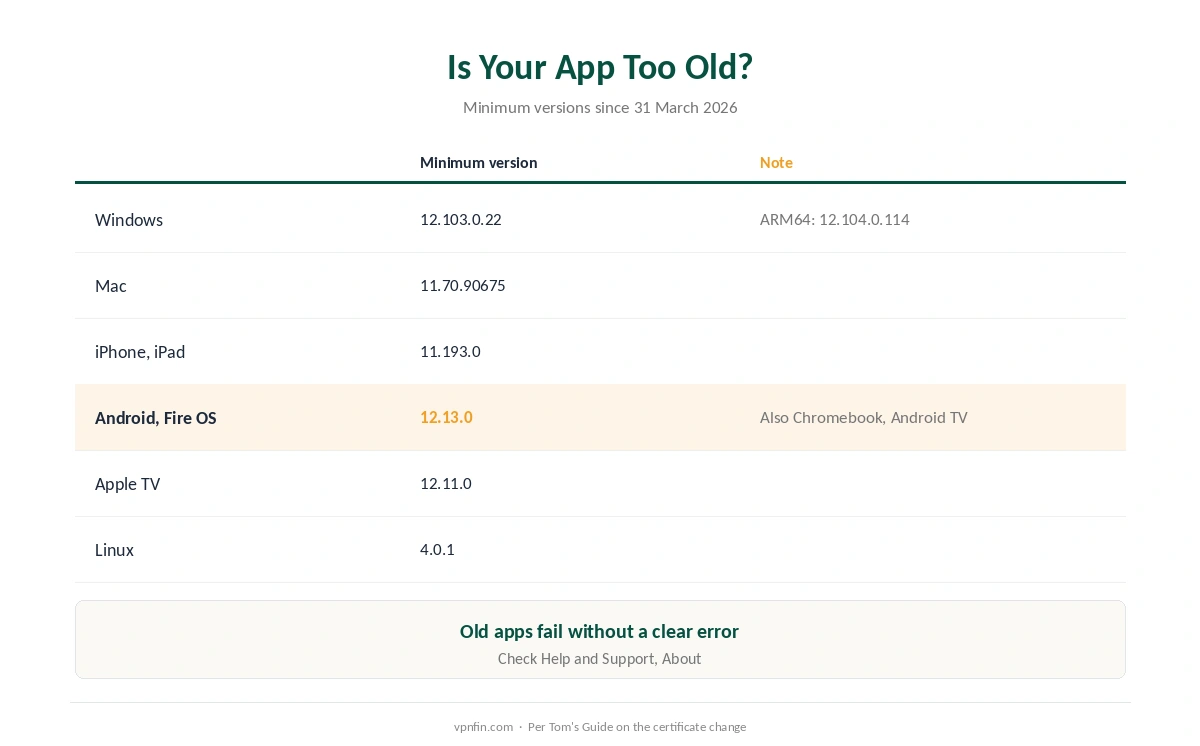
Is Your App Too Old to Connect?
| Platform | Minimum version since 31 March 2026 |
|---|---|
| Windows | 12.103.0.22 |
| Windows ARM64 | 12.104.0.114 |
| Mac | 11.70.90675 |
| iPhone, iPad | 11.193.0 |
| Android, Fire OS, Chromebook, Android TV | 12.13.0 |
| Apple TV | 12.11.0 |
| Linux | 4.0.1 |
If ExpressVPN is not connecting, find your version under Help and Support, then About, in most apps, Tom’s Guide explains. Older apps show no special error; they simply fail to connect, and your connection runs unprotected.
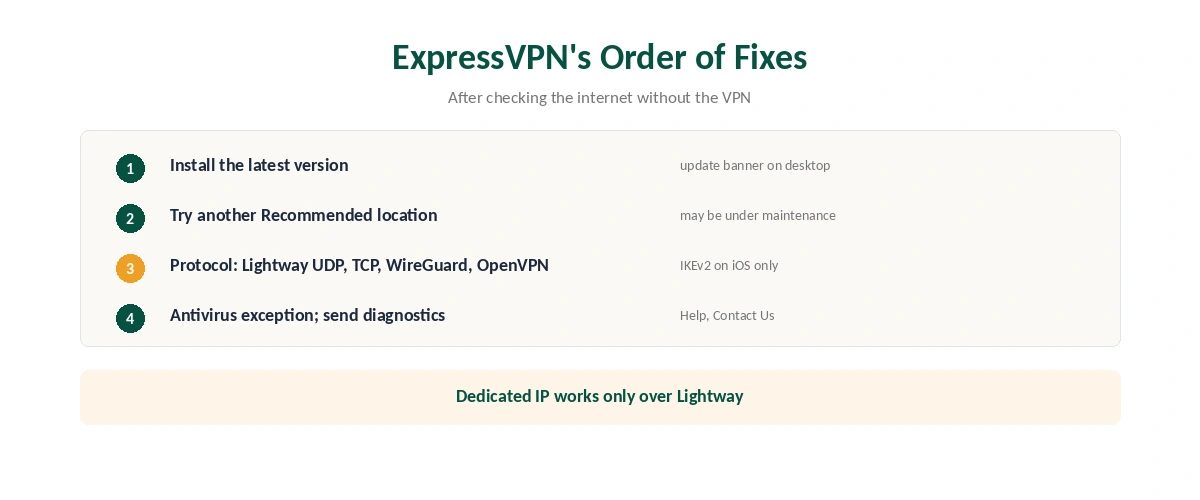
ExpressVPN’s Official Order of Fixes
| Step | What to do | Note |
|---|---|---|
| 0 | Check the internet with ExpressVPN disconnected | If it fails, it isn’t the VPN |
| 1 | Install the latest version | Desktop apps show an update banner |
| 2 | Connect to another Recommended location | The first may be under maintenance |
| 3 | Change the protocol, in ExpressVPN’s order | See the list below |
| 4 | Add ExpressVPN as an antivirus exception | Or allow UDP ports 1194 to 1204 |
| 5 | Send diagnostics from the app | Help, Contact Us, Connection Issues |
The protocol order matters. Leave it on Automatic, which ExpressVPN says usually picks Lightway. If that fails, ExpressVPN’s page says to try Lightway UDP, Lightway TCP, WireGuard, OpenVPN TCP, OpenVPN UDP, and IKEv2 on iOS only.
Using a dedicated IP? It works only over Lightway, ExpressVPN notes, so switching to WireGuard or OpenVPN will break it. Our dedicated IP guide explains the trade-offs.
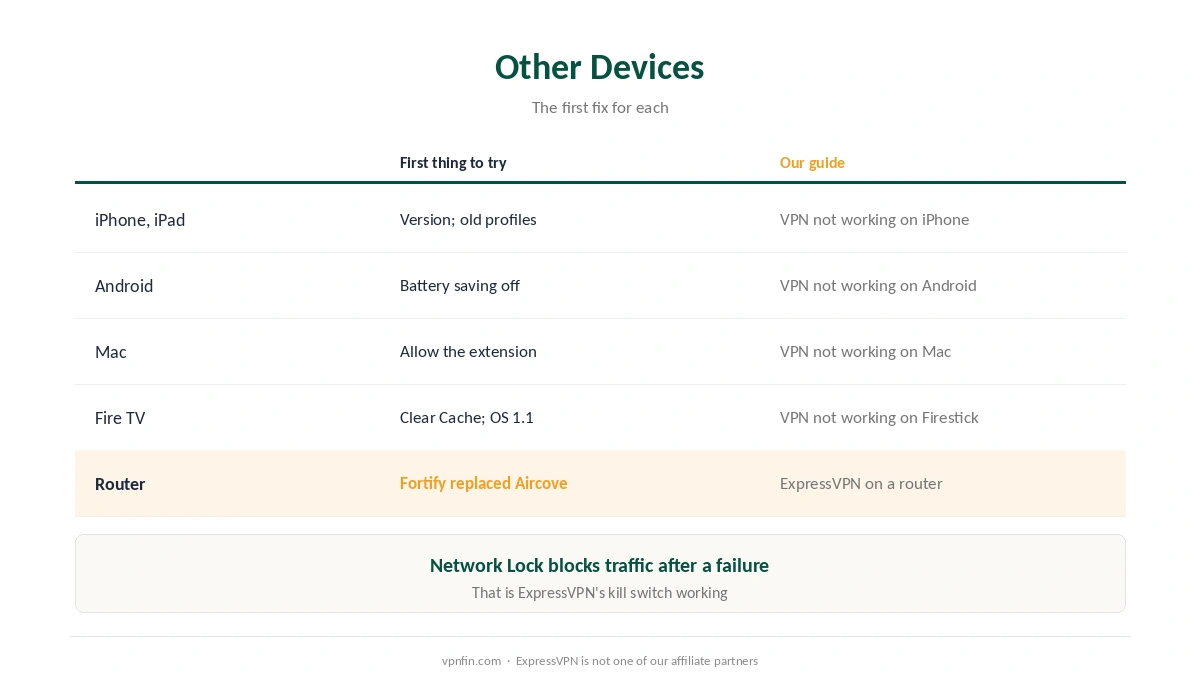
ExpressVPN Not Connecting on Other Devices
| Device | First thing to try | Our guide |
|---|---|---|
| iPhone, iPad | Check the version; delete old profiles | VPN not working on iPhone |
| Android | Battery saving off; Private DNS Automatic | VPN not working on Android |
| Mac | Allow the network extension | VPN not working on Mac |
| Fire TV | Clear Cache; Vega sticks need OS 1.1 | VPN not working on Firestick |
| Router | Fortify replaced Aircove in September 2026 | ExpressVPN on a router |
Phones: ExpressVPN’s support notes that battery-saving modes and Wi-Fi settings can interfere on mobile, as our iPhone fix guide and our Android fix guide explain.
Mac and TV: our Mac fix guide covers the network extension, and our Firestick fix guide the Vega OS app ExpressVPN added in September 2026.
Routers: Aircove owners keep support, and our ExpressVPN router guide covers Fortify, its replacement.
If It Stops After Sleep or Keeps Dropping
Waking from sleep can break the tunnel. ExpressVPN keeps a separate support article for apps that won’t reconnect after sleep mode; disconnecting, quitting and reopening the app is the first step there too. Our disconnection guide covers the wider causes.
A kill switch can make a failed connection look like no internet. ExpressVPN calls its version Network Lock, and it blocks traffic until the tunnel is back, as our kill switch guide explains. That is intended behaviour when ExpressVPN is not connecting.
When the Network Is the Problem
Hotel Wi-Fi needs its login page completed first, as our hotel Wi-Fi guide explains, and school or work networks may block VPNs deliberately, as our school and work guide explains.
Manual configurations? ExpressVPN recommends switching to its app for better performance. Our ExpressVPN review covers the service, and our NordVPN fix guide covers a rival’s steps.
How We Research
The causes, order of fixes, protocol sequence, antivirus ports and dedicated IP rule come from ExpressVPN’s support page on connection failures, updated on 23 September 2026. The certificate change and minimum versions come from Tom’s Guide; mobile interference from ExpressVPN’s page on disconnections. We read all sources on 28 September 2026. ExpressVPN is not one of our affiliate partners. Our full approach lives on the About Us page.
ExpressVPN Not Connecting FAQ
Common causes are an outdated app, a server location under maintenance, antivirus software, or a dedicated IP used without Lightway. Update the app first.
No. Since 31 March 2026, apps older than ExpressVPN’s minimum versions can’t connect, because the old security certificates were retired.
Automatic first. Then, in ExpressVPN’s order: Lightway UDP, Lightway TCP, WireGuard, OpenVPN TCP, OpenVPN UDP, and IKEv2 on iOS.
ExpressVPN suggests granting an exception to UDP ports 1194 to 1204, or trusting the ExpressVPN app.
ExpressVPN’s dedicated IP works only over the Lightway protocol. Switch back to Lightway.
The Verdict
ExpressVPN not connecting often starts with an old app: since March 2026, outdated versions can’t connect at all.
Then follow ExpressVPN’s own order: another location, the protocol sequence, and an antivirus exception, before sending diagnostics.