
Disclosure: VPNFin is reader-supported. If you buy a VPN through links on this page, we may earn a commission at no extra cost to you. This never affects our ratings — here’s our full disclosure.
NordVPN Fortnite use starts with one fact many guides skip: Fortnite lets you pick your matchmaking region in its own settings, so you do not need a VPN for that. A VPN helps with DDoS protection, privacy and provider throttling. Fortnite runs Easy Anti-Cheat and BattlEye, NAT Checker notes, and Epic shows a warning against playing over VPNs.
Change Region in Fortnite First
ExpressVPN’s own Fortnite page points to the Matchmaking Region option in the game’s settings. Choose the region there before reaching for a VPN. Only FNCS tournaments stay region-locked, the same page notes.
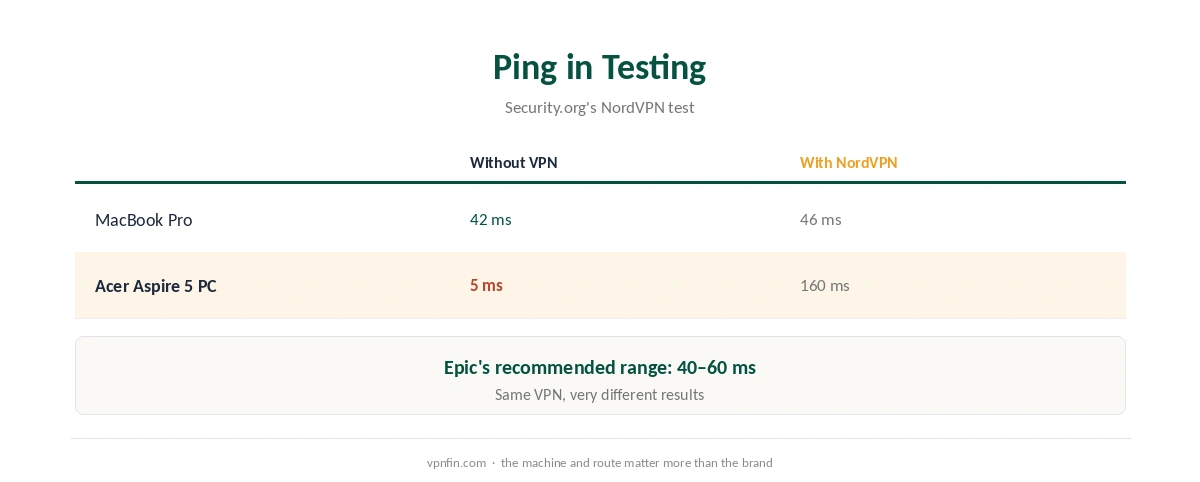
Epic recommends a ping of 40 to 60 ms, Security.org reports. A VPN adds a hop, so it rarely improves ping unless your provider routes or throttles gaming traffic badly.
NordVPN Fortnite Ping in Testing
Security.org’s test shows how much the result depends on the setup. On a MacBook, ping rose only from 42 to 46 ms with NordVPN. On a PC, it jumped from 5 to 160 ms. Test your own machine before relying on the VPN in matches. If ping climbs, our NordVPN speed guide explains server choice.
What Epic Allows
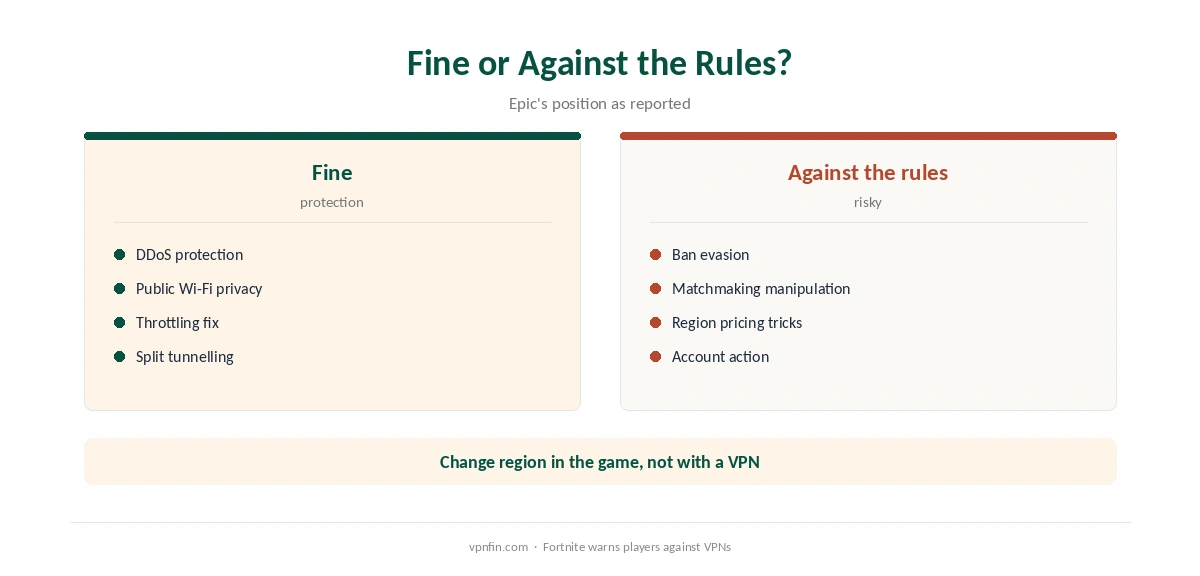
Sources disagree on Epic’s terms. ExpressVPN says VPNs are not mentioned in them; TechNadu says the licence terms ban tunnelling that affects game outcomes, including matchmaking manipulation and ban evasion. VPNAlert quotes Fortnite’s own message recommending against VPN or proxy use.
Using a VPN to evade a ban breaks Epic’s rules, as even VPN provider Windscribe acknowledges. We do not support it.
Setting Up NordVPN for Fortnite
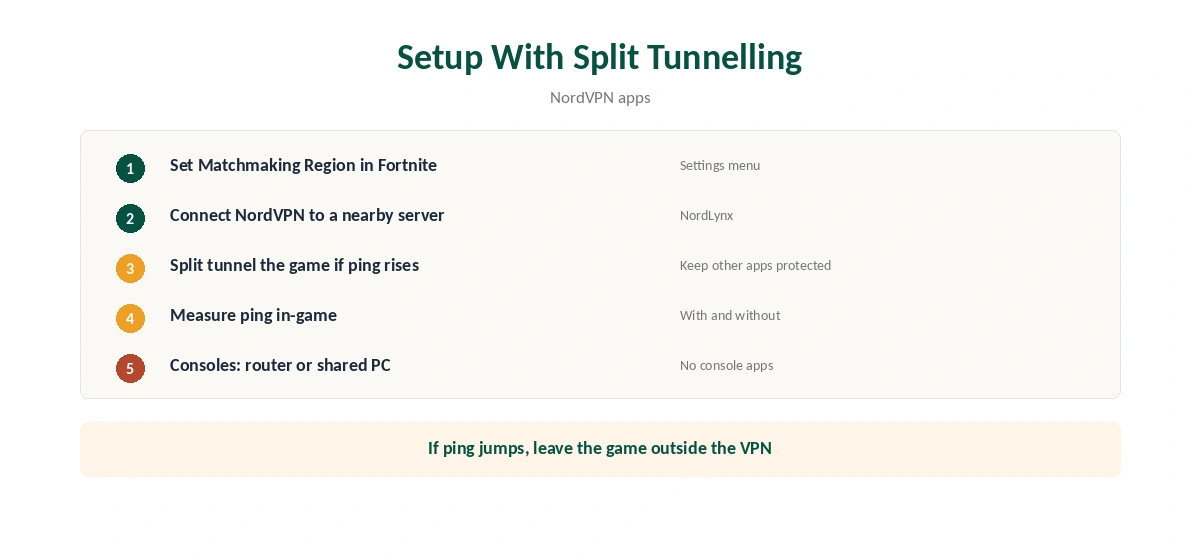
For NordVPN Fortnite setups, connect to the nearest server with NordLynx. To keep game traffic direct while protecting other apps, use split tunnelling, as our NordVPN split tunnelling guide explains. On consoles, use a router or shared connection, covered in our PS5 guide and Xbox guide.
Related Guides
Our NordVPN gaming guide covers ping and Meshnet, and our Warzone guide covers another shooter with anti-cheat. For NordVPN Fortnite comparisons, our gaming VPN guide lists providers. Each one tests ping the same way.
Leak tests matter for gamers too; our DNS leak guide shows one. Our kill switch guide explains protection on drops, and our Meshnet guide covers LAN-style play. Turn the kill switch off if it disrupts matches.
Switch players can follow our Switch guide. Our refund guide explains the 30-day window. NordVPN belongs to Nord Security, which also owns Surfshark.
Where Epic Does Not Operate
ExpressVPN’s Fortnite page lists regions where Epic Games cannot do business, including Crimea, Cuba, Iran, North Korea and Syria. Those limits come from sanctions, not from matchmaking. Using a VPN to play from them would mean evading those restrictions, which we do not support.
The same page notes that FNCS tournaments remain region-locked to limit lag. Competitive players should compete in their real region.
Throttling and Poor Routing
A VPN can lower ping in one situation: when your provider routes or throttles gaming traffic badly. Windscribe’s guide makes that point, and it also warns that a distant server raises ping. The only way to know is to measure.
Play a few matches with the VPN off and note the ping. Then connect to the nearest NordVPN server and repeat. If the VPN wins, keep it. If not, use split tunnelling and leave Fortnite outside the tunnel.
Consoles and Switch
Fortnite runs on PlayStation, Xbox and Nintendo Switch, none of which run VPN apps. A VPN router or a shared PC connection is the route, as our NordVPN Switch guide explains. Smart DNS does nothing for game traffic, since it only changes DNS lookups.
Streamers and DDoS
Players who stream on Twitch or YouTube expose more than casual players. A VPN hides the home IP from opponents who might try to flood the connection. That protection matters more than any ping change. Keep the kill switch on, so a dropped tunnel does not reveal the address mid-stream.
Our Fortnite VPN guide compares other providers for players who want more options.
Setting Up Split Tunnelling for Fortnite
On Windows, split tunnelling lets you choose which apps skip the VPN. Add the Epic Games Launcher and Fortnite to the excluded list if the VPN raises your ping. Your browser, Discord and other apps stay protected.
Remember that the Internet Kill Switch overrides this, according to NordVPN’s support. If the VPN drops, excluded apps are blocked too, which can end a match. Players who rely on split tunnelling may prefer the App Kill Switch, which closes only chosen apps. Our NordVPN kill switch guide explains the difference between the two.
Our NordVPN gaming guide covers ping tests in more detail. The same checks apply to every online game, not only Fortnite. Our guide to NordVPN for Valorant covers region lock, Vanguard and what a VPN can and cannot do.
How We Research
This page draws on Fortnite VPN guides from Security.org, NAT Checker, TechNadu, VPNAlert, Windscribe and ExpressVPN, treating provider pages with caution. We cross-checked these sources against each other, and where they conflict or something can’t be verified, we say so in the text rather than guessing. We read every source on 5 October 2026. The main source we relied on is Security.org’s Fortnite VPN tests. Our full approach lives on the About Us page.
NordVPN for Fortnite FAQ
No. Fortnite has a Matchmaking Region setting in the game.
Rarely. Security.org saw 42 to 46 ms on a Mac but 5 to 160 ms on a PC.
Sources disagree on Epic’s terms. Using a VPN to evade a ban breaks the rules.
Between 40 and 60 ms, according to Security.org.
Easy Anti-Cheat and BattlEye, according to NAT Checker.
The Verdict
NordVPN Fortnite use makes sense for protection and privacy, not region changes or ban evasion. Change region in the game, test your ping, and use split tunnelling.