
Disclosure: VPNFin is reader-supported. If you buy a VPN through links on this page, we may earn a commission at no extra cost to you. This never affects our ratings — here’s our full disclosure.
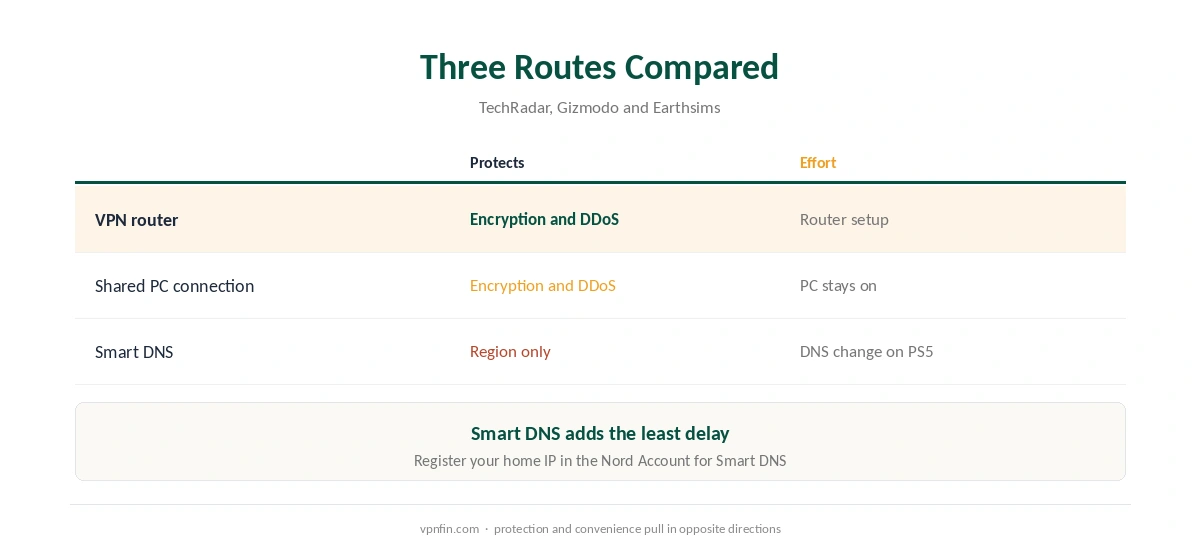
NordVPN for PS5 needs a workaround, because PlayStation consoles cannot install VPN apps, as TechRadar notes. There are three routes: a VPN router, a PC sharing its VPN connection, or NordVPN’s Smart DNS. Only the first two encrypt traffic and hide your IP from DDoS attacks.
Three Ways to Use NordVPN for PS5
A VPN router covers the PS5 and every other device at home; our NordVPN router guide explains it. Sharing a PC’s VPN connection, which Gizmodo calls a virtual router, needs a laptop or desktop running NordVPN with its connection shared over Wi-Fi or Ethernet.
Smart DNS is the easiest. TechRadar notes it unlocks region-locked apps without a full VPN. However, Earthsims points out it gives no encryption and no DDoS protection. Our Smart DNS vs VPN page explains the difference.
Setting Up NordVPN Smart DNS on PS5
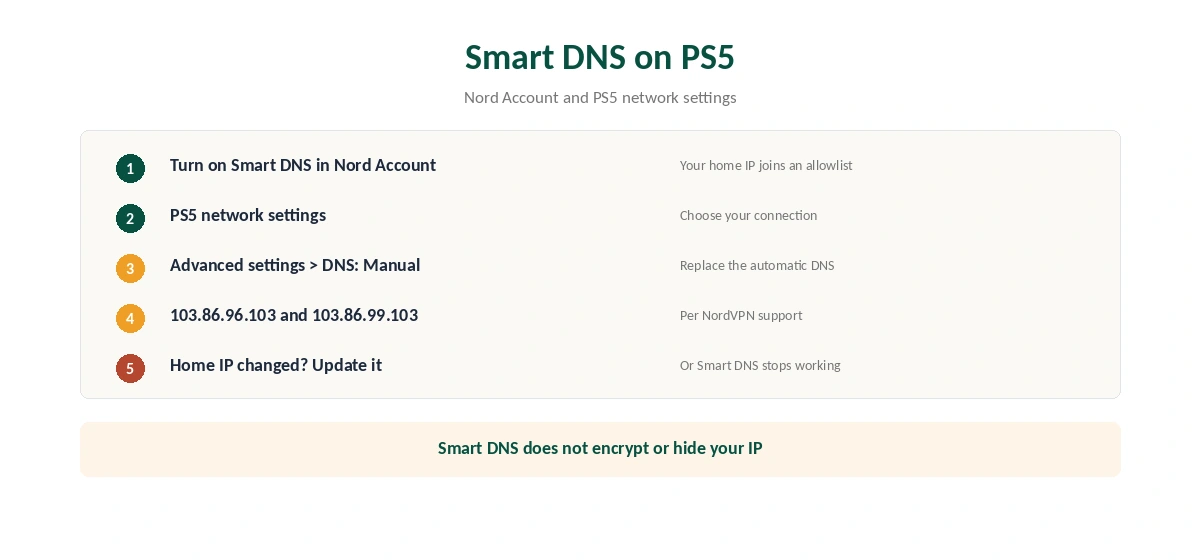
First, turn on Smart DNS in your Nord Account; NordVPN’s support explains that this adds your home IP to an allowlist. Then open the PS5’s network settings, choose your connection and its advanced settings, and set DNS to manual. NordVPN’s support lists the addresses 103.86.96.103 and 103.86.99.103.
If your home IP changes, update it in the Nord Account, or Smart DNS stops working. For full protection, use the router route instead.
Ping and Lag on PS5
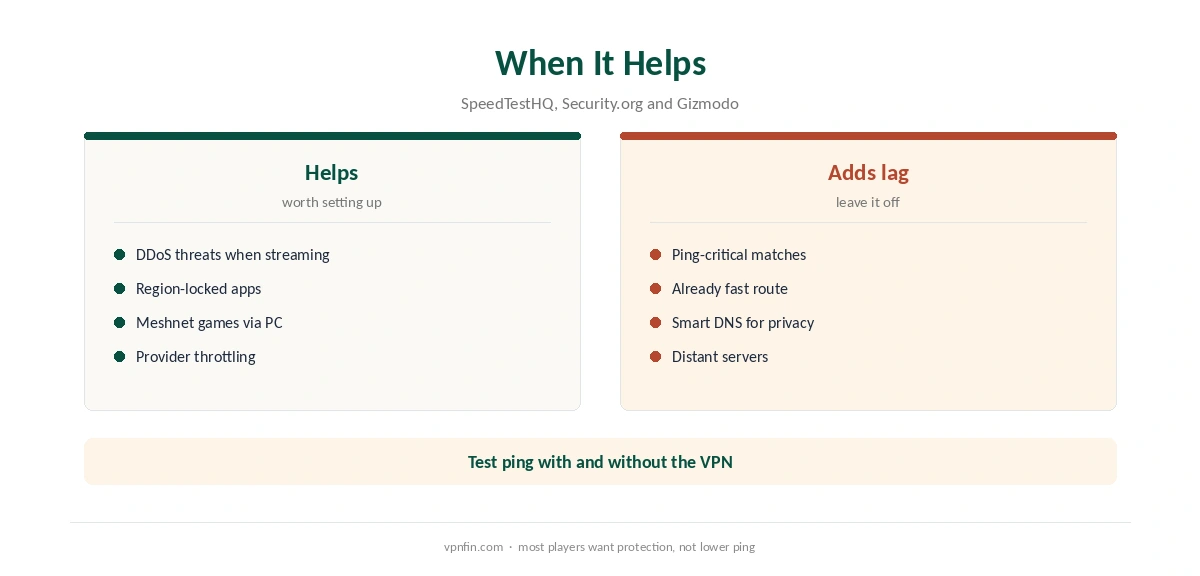
A VPN adds latency rather than removing it, SpeedTestHQ notes, typically 5 to 20 ms. Security.org measured 43 ms on a console in its tests. Connect to the nearest server, and keep NordLynx, the WireGuard-based protocol, if your router supports it. Our NordVPN gaming guide covers ping in depth.
Smart DNS adds little delay because it changes only DNS. That makes it the lighter option when DDoS is not a concern. Our kill switch guide explains what happens on a router if the tunnel drops.
Meshnet for PlayStation Players
TechRadar and Gizmodo both highlight Meshnet, NordVPN’s free private network, for linking devices and friends over long distances. On PS5, it works through a PC or router running NordVPN rather than on the console itself.
Our PS5 VPN guide compares other providers. Our gaming VPN guide covers the wider topic. For routers, our IKEv2 vs WireGuard page explains protocol choice.
Other Devices
The same Smart DNS method works on smart TVs, as our NordVPN smart TV guide shows, and on Apple TV, covered in our Apple TV guide. NordVPN belongs to Nord Security, which also owns Surfshark.
To test it, our NordVPN refund guide explains the 30-day window, and our trial guide lists the trial terms. Our streaming hub covers PS5 streaming apps. Thirty days is enough to test all three routes.
Ping on PlayStation
Security.org measured 43 ms on a console in its NordVPN test. Earthsims saw smaller increases on nearby servers. Either way, a VPN adds delay rather than removing it. For PS5 players, the nearest server matters more than any other setting.
Measure ping in the game with and without the VPN. If the increase hurts competitive play, put the PS5 on a network outside the VPN and use NordVPN on other devices.
Guest Networks and Routers
Many routers support a second network, such as guest Wi-Fi. Run NordVPN on one network and leave the other direct. The PS5 can then switch between them in its network settings. Our router setup guide explains router options.
Smart DNS Limits on PS5
Smart DNS helps region-locked apps but encrypts nothing and offers no DDoS protection, Earthsims notes. It also works only from IP addresses registered in the Nord Account. If your home IP changes, update it there.
For streaming apps on the PS5, Smart DNS is a reasonable shortcut. For online play and protection, the router route is the one that works.
PS4 Owners
The PS4 has the same limits as the PS5: no VPN apps, and the same three routes. A router covers both consoles at once. The PS4 also lets you set DNS manually in its network settings. Our page on PureVPN on PS4 covers the router and Windows PC routes, NAT and ping.
Streaming Apps on PS5
The PS5 runs Netflix, YouTube and other streaming apps. Through a router running NordVPN, those apps see the server’s country. With Smart DNS, they see the region set for each service, while your IP stays visible. If an app shows the wrong catalogue, close it fully and reopen it after the connection changes. Our NordVPN streaming hub covers each service’s rules. Our guide to NordVPN on Xbox covers share it from Windows, use a router or Smart DNS.
Whichever route you pick, test it once before an online session. A two-minute check saves a lost match or a stream that will not start. Our guide to NordVPN on Nintendo Switch covers router, shared PC or Smart DNS.
How We Research
This page draws on PS5 and gaming guides from TechRadar, Gizmodo, Earthsims, SpeedTestHQ and Security.org. We cross-checked these sources against each other, and where they conflict or something can’t be verified, we say so in the text rather than guessing. We read every source on 5 October 2026. The main source we relied on is TechRadar’s PS5 VPN guide. Our full approach lives on the About Us page.
NordVPN on PS5 FAQ
No. PlayStation consoles do not support VPN apps. Use a VPN router, a shared PC connection or Smart DNS.
No. It changes your region but gives no encryption or DDoS protection, as Earthsims notes.
In most tests, no. A VPN typically adds 5 to 20 ms. Smart DNS adds less but does not protect you.
A VPN router, which covers the console fully and every other device at home.
Not on the console itself; run it on a PC or router that the PS5 connects through.
The Verdict
NordVPN for PS5 works best through a VPN router. Smart DNS is quicker to set up and fine for region apps, but it does not protect you. Pick the route that matches why you want the VPN.