
Disclosure: VPNFin is reader-supported. If you buy a VPN through links on this page, we may earn a commission at no extra cost to you. This never affects our ratings — here’s our full disclosure.
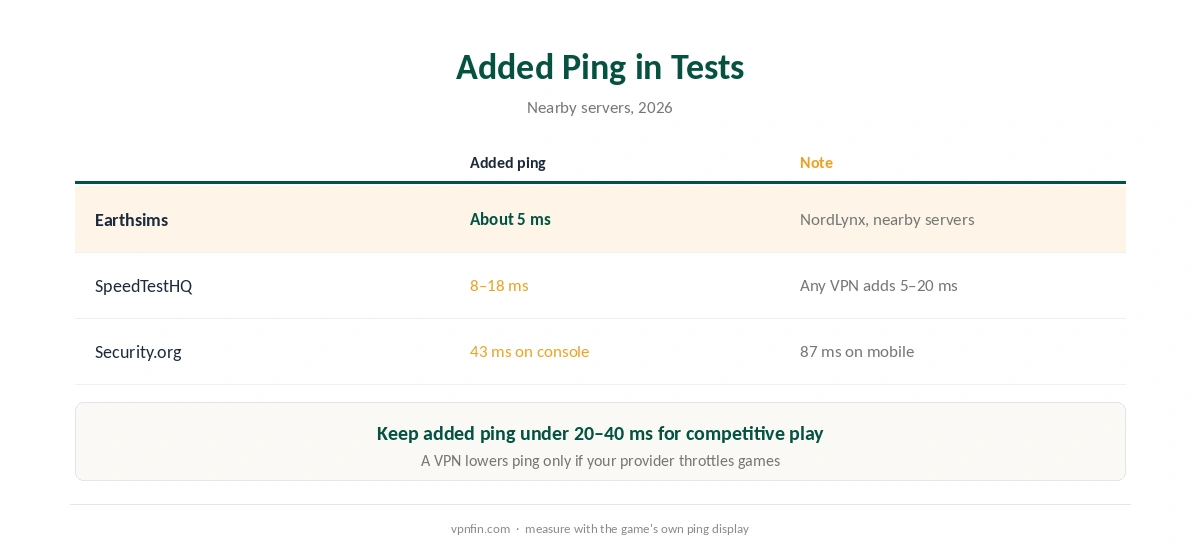
In the tests we read, NordVPN for gaming does not lower ping; it adds a few milliseconds. Earthsims measured about 5 ms on nearby servers, and SpeedTestHQ 8 to 18 ms. What NordVPN adds instead is DDoS protection through a hidden IP, and Meshnet, a free virtual LAN for playing with friends over the internet. Our guide to NordVPN Meshnet covers free Private network, file sharing and NAS access.
NordVPN for Gaming: What Ping to Expect
SpeedTestHQ is blunt: a VPN almost always adds 5 to 20 ms and rarely reduces ping, unless your provider throttles gaming traffic. Security.org recommends keeping the added ping under 20 to 40 ms for competitive play.
NordLynx, NordVPN’s WireGuard-based protocol, keeps the overhead low. Pick the server nearest to you or to the game server. Our gaming VPN guide explains how routing affects ping.
Meshnet: A LAN Party Over the Internet
Meshnet links your devices and your friends’ devices in a private network, so LAN games see each other as local, as Gizmodo and TechRadar describe. CyberInsider notes that Nord Security made Meshnet free for everyone, and NordVPN’s Linux release notes confirm it is staying.
Setting it up takes some learning, SpeedTestHQ warns. Our NordVPN Windows guide shows where it sits in the app, and our Linux guide lists the Meshnet commands.
NordVPN for Gaming on Consoles
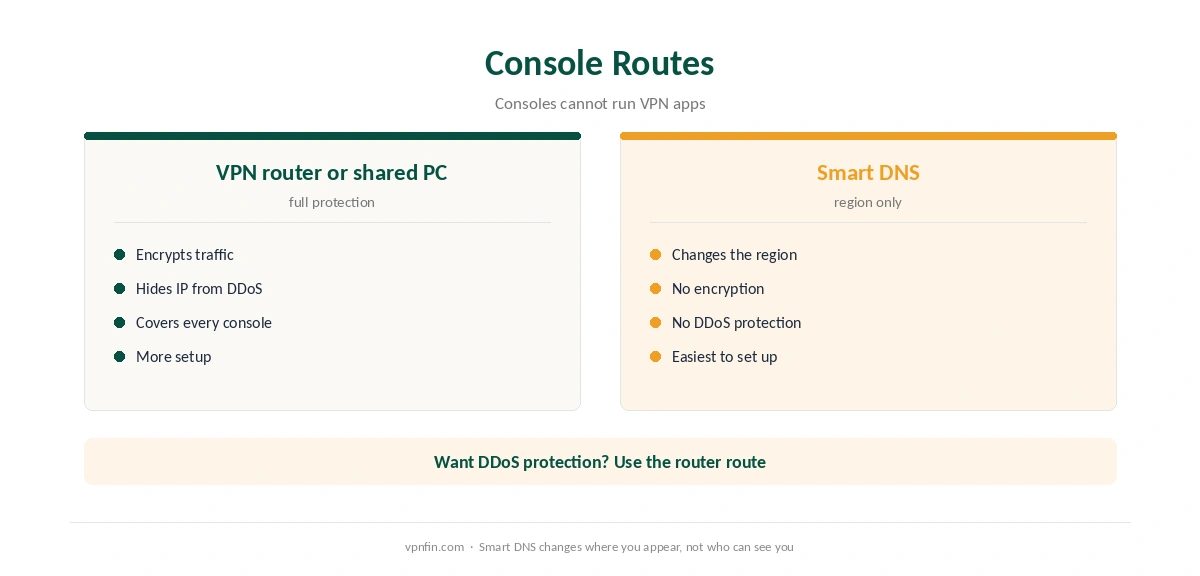
PlayStation, Xbox and Switch cannot install VPN apps, TechRadar and SpeedTestHQ note. There are three routes: a VPN on the router, a PC sharing its VPN connection over Ethernet, or Smart DNS. Smart DNS changes the region but does not encrypt traffic or hide your IP from DDoS, Earthsims points out.
Our NordVPN router guide covers the most complete option, and our Smart DNS vs VPN page explains the trade-off.
When NordVPN Helps Gamers
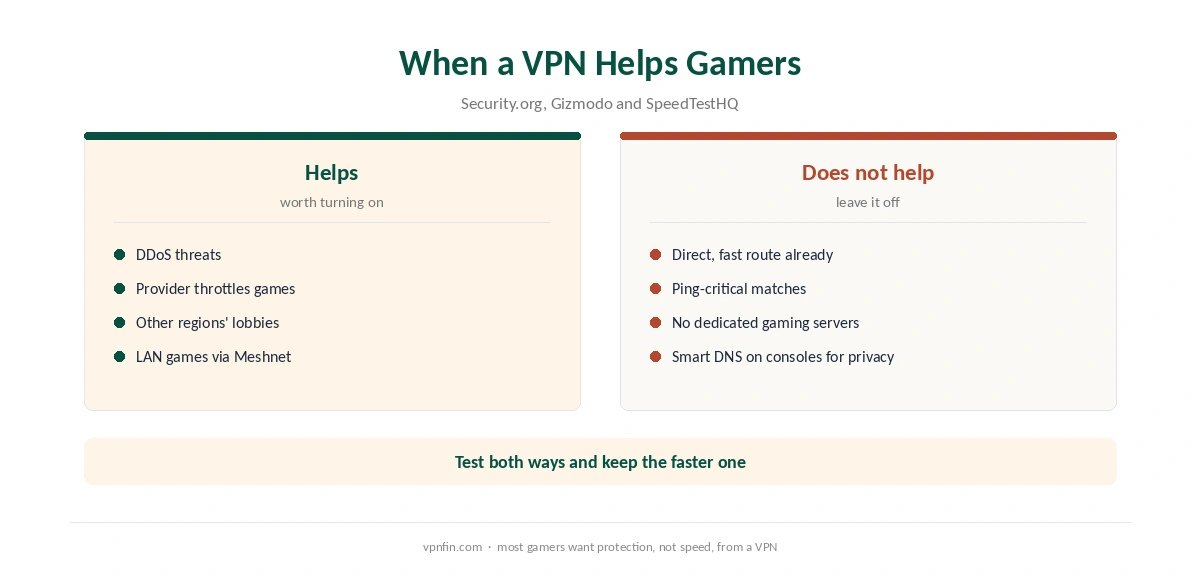
A VPN helps against DDoS attacks, which target a player’s IP address, according to Security.org and Gizmodo. It also helps if your provider throttles gaming traffic, and when you want a different region’s servers.
It does not help when you already have a direct, unthrottled route. NordVPN also has no dedicated gaming servers, Cybernews notes. Our NordVPN speed guide helps if latency climbs, and our kill switch guide explains what happens if the tunnel drops mid-match.
Other Options
Surfshark covers unlimited devices, which suits households with several consoles; NordVPN belongs to Nord Security, which also owns Surfshark. Our NordVPN vs Surfshark page compares them, and our IKEv2 vs WireGuard page explains why WireGuard suits gaming.
Test your own ping inside the refund window, as our NordVPN refund guide explains. Our trial guide lists the trial terms, and our disconnection guide helps if matches drop. Thirty days is enough to try several game servers.
What the Ping Tests Show
Three sources measured NordVPN’s added ping, and they agree on the direction. Earthsims saw 3 to 8 ms on nearby servers with NordLynx, about 5 ms on average. SpeedTestHQ measured 8 to 18 ms and notes that a VPN almost always adds some delay.
Security.org suggests keeping the increase under 20 to 40 ms for competitive games. In its test, a console reached 43 ms and a phone 87 ms. A VPN rarely lowers ping, so treat any setup that keeps the cost small as a success.
No Special Gaming Servers
Cybernews notes that NordVPN has no dedicated gaming servers. Any standard server near you works. The closest city usually wins, but busy servers slow down at peak hours, so keep two nearby favourites.
Smart DNS Is Not a Gaming Tool
Smart DNS changes only how domain names resolve. Earthsims points out that it adds no encryption and no DDoS protection. Game traffic and your IP stay exactly as they were, so Smart DNS does nothing for online play.
For consoles, the full VPN route through a router or a shared PC is the one that protects you. Our NordVPN Xbox guide and Switch guide cover those routes.
Game-by-Game Guides
Each competitive game has its own anti-cheat and region rules. Our Fortnite guide covers Epic’s in-game region setting. Our Valorant guide explains Riot’s region lock, and our Warzone guide covers Activision’s anti-cheat.
One rule runs through all three: use NordVPN for protection, not to bend matchmaking. The account risk falls on you.
Handhelds and PCs
On a Windows gaming PC, the NordVPN app works directly, with split tunnelling to keep a game outside the tunnel if needed. On a Steam Deck, a manual OpenVPN profile carries into Gaming Mode, as our Steam Deck guide explains.
Whatever the platform, keep the kill switch on for streams and tournaments, so a dropped tunnel never reveals your address mid-match. Our guide to NordVPN on PS5 covers the three routes around the missing app, and what each protects.
How We Research
This page draws on gaming tests and guides from Earthsims, SpeedTestHQ, Security.org, Gizmodo, TechRadar, Cybernews and CyberInsider. We cross-checked these sources against each other, and where they conflict or something can’t be verified, we say so in the text rather than guessing. We read every source on 5 October 2026. The main source we relied on is Security.org’s gaming VPN tests. Our full approach lives on the About Us page.
NordVPN for Gaming FAQ
Rarely. Tests show it adds about 5 to 18 ms on nearby servers. It can help only if your provider throttles gaming traffic.
A free private network that lets friends play LAN games together over the internet.
Not with an app. Use a VPN router, share a PC’s connection, or use Smart DNS without encryption.
Hiding your IP address makes DDoS attacks against you harder, according to Security.org and Gizmodo.
No. Cybernews notes it has no dedicated gaming servers; choose the nearest regular server.
The Verdict
NordVPN for gaming is about protection and Meshnet, not lower ping. Keep the added latency small with NordLynx and a nearby server, and use the router route for consoles.